Azuredatastudio: Add filtering to OE Tree View
- Azure Data Studio Version: 1.12.2
- VS Code: 1.37.0
Steps to Reproduce:
- List Servers
- List Tables
Feature Requests:
- Add new feature to filter on databases
- Add new feature to filter on tables, view, stored procedures, etc.
 mxj1009
All 7 comments
Being able to filter for server objects for Tables/Views/Stored Procedures is the only thing preventing me from using Azure Data Studio. I've tried to live without it, but I can't, so I end back up in SSMS.
Be nice to also see a table/view/stored procedures dependencies.
Advance search features would be nice, like finding columns and data within all the objects.
 ninken
on 8 Jan 2020
ninken
on 8 Jan 2020
We do currently have the ability to search in the Server/Database Dashboard :
Server (searching databases)
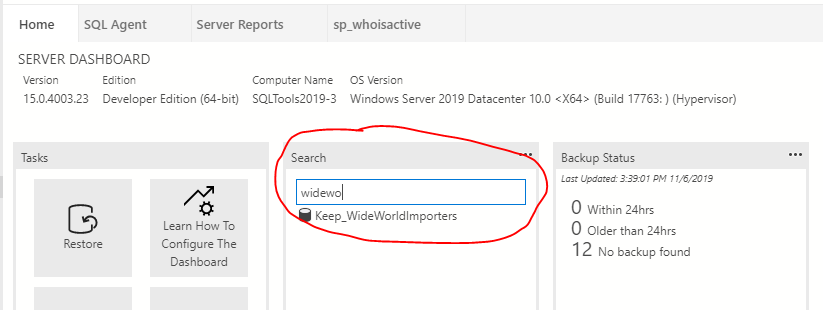
Database (searching views/tables/stored procedures/etc)

There's a lot more we can do here (such as OE integration) but hopefully this helps at least a little bit!
 Charles-Gagnon
on 8 Jan 2020
Charles-Gagnon
on 8 Jan 2020
Thanks that helps allot. Just allot of us SSMS people are used to searching and filtering not from a dashboard screen. Just used to filtering from the Connection/Server tree view area. I guess it's a habit to break.
ninken
on 10 Jan 2020
One thing different from SSMS that I would thoroughly enjoy is to (optionally?) persist at least the database-level filter rule(s) and reapply them on new connections. The filter rules could be stored at the connection level in the settings.json file.
In SSMS, I repeatedly apply a "Does not contain" search expression to our production database list every time I connect to it, which takes time but ultimately saves me from scrolling hell (we have about 100 databases).
Perhaps it's worth having both a find-as-you-type searching filter and a persistent filter rule, to cater to everyone.
 consultcory
on 4 May 2020
consultcory
on 4 May 2020
When you have a 100 databases then you need redgate search. Just sayin. I left this tool, it has some likes when it comes to other databases and cloud, but clearly it's UI focus. Some simple and basic task are not a right click away, or searching within the database you are currently dealing with. Sorry but SSMS is king when it comes to MSSQL. Maybe I'll use this on other projects, but its not my cup of tea.
ninken
on 12 May 2020
Filtering on the server tree has been added with https://github.com/microsoft/azuredatastudio/pull/11838 - this should be in tomorrow's insiders build. Please try it out and let me know if you run into any issues with it!
To enable this filtering :
- Click the tree or otherwise focus on it
- Start typing text
- In the little filter bubble that appears click the "Enable Filter on Type" button to enable the tree filtering out any items that don't match the filter
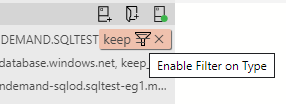
This applies to all expanded objects in the tree and is by the name of the node.
NOTE Given that this was a large refactor and a preview feature a special preview flag has been added for this. To enable the new tree view you must have these two settings enabled :
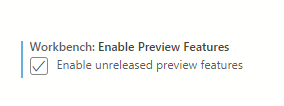

If you encounter any issues or wish to revert back to the old tree you can disable either one of those settings and it will go back to using the old tree.
Charles-Gagnon
on 19 Aug 2020
There's an issue with this approach: it filters by searching for each individual character on the object names, instead of the full word. Say I have a table with the text "TEMP" in its name, and another with the text "TMP". If I filter by writing "tmp", both tables will match, when only the second one would match in SSMS.
 johnny32
on 15 Dec 2020
johnny32
on 15 Dec 2020
Related issues
 Ungerfall
·
3Comments
Ungerfall
·
3Comments
 kfrajtak
·
3Comments
Ungerfall
·
3Comments
kfrajtak
·
3Comments
Ungerfall
·
3Comments
 jsmith8858
·
3Comments
jsmith8858
·
3Comments
 kburtram
·
3Comments
kburtram
·
3Comments
Most helpful comment
We do currently have the ability to search in the Server/Database Dashboard :
Server (searching databases)
Database (searching views/tables/stored procedures/etc)
There's a lot more we can do here (such as OE integration) but hopefully this helps at least a little bit!