Azuredatastudio: Show fetched row count in status bar or results pane
- SQL Operations Studio Version: 0,25,4
It is a really interesting tool!
But, where is a count of fetched rows after select operator performed like in SSMS?
It is a useful sometimes as for me
I see only total execution time...
 tsag
tsag
All 5 comments
It should be available in the 'Messages' window, below the results grid. (You may have to scroll the 'Messages' window to see it.)
 dsmeltz
on 25 Jan 2018
dsmeltz
on 25 Jan 2018
@tsag we show the number of rows in the Message pane after the query completes. Where did you expect to see the result set row count?
 kburtram
on 30 Jan 2018
kburtram
on 30 Jan 2018
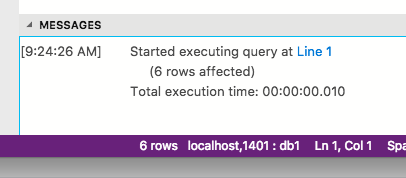
The Messages pane takes up precious space from the query and the results panes, so I keep it collapsed. If the Messages pane could be moved to the right side of the app or if a simple count could be included somewhere in the Results pane or status bar, that would be a huge help.
 mrlife
on 31 Jan 2018
mrlife
on 31 Jan 2018
@mrlife thanks for the clarification. I've updated the issue title to match your description. We'll consider this for a future release.
kburtram
on 6 Feb 2018
This should be fixed in the July release.
kburtram
on 19 Jul 2018
Related issues
 mrdenny
·
27Comments
mrdenny
·
27Comments
 ben-moore
·
31Comments
ben-moore
·
31Comments
 joelvega
·
26Comments
joelvega
·
26Comments
 SvenAelterman
·
52Comments
SvenAelterman
·
52Comments
 borgdylan
·
30Comments
borgdylan
·
30Comments
Most helpful comment
@mrlife thanks for the clarification. I've updated the issue title to match your description. We'll consider this for a future release.