Azure-webjobs-sdk: [Custom Handlers - Go] More clarity around exceptions
I don't know if this is necessarily related to Custom Handlers, but I've encountered this plenty of times and it makes development difficult.
Errors that are surfaced in Application Insights aren't helpful in troubleshooting issues. For example, I have a timer triggered function that is running every two minutes and I cannot seem to go a day without some sort of issues. All of the exceptions I have been encountering are:
Exception type: System.Net.Sockets.SocketException
Message: The operation was canceled. Unable to read data from the transport connection: The I/O operation has been aborted because of either a thread exit or an application request.. The I/O operation has been aborted because of either a thread exit or an application request
Failed method: System.Net.Http.HttpConnection+<SendAsyncCore>d__53.MoveNext
I get a stack trace that isn't of any value to me and it doesn't help troubleshoot my issue. Is there a way we could make these messages more useful, especially for custom handlers? Yesterday I had a situation where I got this same exception but I think I was able to track it down to my function running over the allotted execution time because I forgot to implement a timeout for my http client. I don't know if this was actually the issue but this is my best guess because I noticed this execution was 4+ minutes when normally they are around a minute. In this case, it would be super helpful to just surface some sort of message that indicates that it failed with a socket exception because the output binding was suppose to be written but the function was killed because it went over the 5 minute execution limit.
This morning I faced this issue again but I'm having a hard time troubleshooting this one, so in this case, more straightforward error messages would be helpful. The issue from this morning was the same exact exception that I posted above. This time I made sure my http client had timeouts. I noticed for this execution, all my http requests were failing with:
context deadline exceeded (Client.Timeout exceeded while awaiting headers)
but my logs still indicated that my execution wrote its output successfully (my code indicates this had no error). Looking through the logs for this execution in Application Insights, it almost seems this SocketException occurred after my code finished and the runtime was writing the output bindings?
My issue probably comes from a lack of experience of working with Azure Functions in general, but it would be beneficial to me personally to have more descriptive error messages rather that trying to understand the host exception messages/stack traces.
Investigative information
This is for the invocation from this morning:
- Timestamp: 2020-08-26 14:21:40.3575892
- Function App version: 3.0.14287.0
- Function App name:
- Function name(s) (as appropriate):
- Invocation ID: 76e5f44d-7d67-4752-87ef-7b704639fbb5
- Region: Central US
 ZachTB123
All 7 comments
@pragnagopa @anthonychu
ZachTB123
on 26 Aug 2020
cc @yojagad
Thanks for opening the issue. I need to investigate more
- To confirm if function execution timeout exceptions are surfaced properly
- If there is anything we can do to capture full exception stack trace for the
System.Net.Sockets.SocketException
 pragnagopa
on 26 Aug 2020
pragnagopa
on 26 Aug 2020
@pragnagopa
Also seeing:
write tcp 127.0.0.1:52209->127.0.0.1:52399: wsasend: An established connection was aborted by the software in your host machine.
tonight when trying to write output. Seems to be correlated to my connections timing out.
Invocation ID: 0090d4f6-5b42-4fc8-a3b4-4bc76b6a8778
Timestamp: 2020-08-27 01:21:49.8549732
Don't seem to be reaching any thresholds based on the "Diagnose and solve problems" blade in the portal:
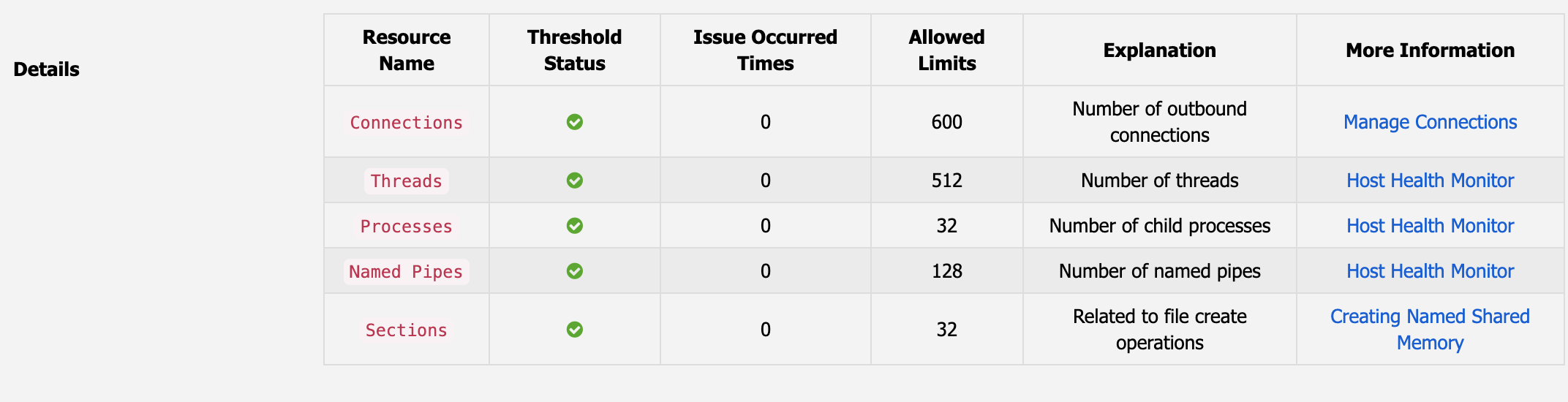
ZachTB123
on 27 Aug 2020
Took a deeper look at this. The exception in question
Exception type: System.Net.Sockets.SocketException
Message: The operation was canceled. Unable to read data from the transport connection: The I/O operation has been aborted because of either a thread exit or an application request.. The I/O operation has been aborted because of either a thread exit or an application request
comes from HttpClient having a default timeout of 100 seconds irrespective of what the function timeout value is. This has been fixed in https://github.com/Azure/azure-functions-host/commit/d7322274ad81540dd985febbf708f4f0cca8135d and will be part of the next release payload.
Meanwhile we're looking into how to improve logs and stack trace surfacing from webjobs-sdk that would enable us to debug these issues faster. Thanks for your patience and feedback.
 yojagad
on 14 Sep 2020
yojagad
on 14 Sep 2020
Closing this issue as addressed.
Exception Message : The operation was canceled. and the stack were accurate. We determined root cause to be HttpClient closing the connection as the timeout was not set properly. This issue is now fixed.
We have updated the functions host also to reflect full exception stack in the system logs to help us diagnose issues like these faster in future.
pragnagopa
on 25 Sep 2020
Is there any sort of timeline of when this will be released?
ZachTB123
on 6 Oct 2020
@ZachTB123 - changes made for this issue should not affect exceptions surfaces to Application insights. Exception that you have shared above is the complete stack. We made improvement in the system logs, to show complete stack for the team to be able to diagnose issues.
pragnagopa
on 15 Oct 2020
Related issues
 fwd079
·
5Comments
fwd079
·
5Comments
 TheeJamesLee
·
3Comments
TheeJamesLee
·
3Comments
 mathewc
·
5Comments
mathewc
·
5Comments
 kamranayub
·
4Comments
kamranayub
·
4Comments
 techniq
·
3Comments
techniq
·
3Comments
Most helpful comment
Took a deeper look at this. The exception in question
Exception type: System.Net.Sockets.SocketException
Message: The operation was canceled. Unable to read data from the transport connection: The I/O operation has been aborted because of either a thread exit or an application request.. The I/O operation has been aborted because of either a thread exit or an application request
comes from HttpClient having a default timeout of 100 seconds irrespective of what the function timeout value is. This has been fixed in https://github.com/Azure/azure-functions-host/commit/d7322274ad81540dd985febbf708f4f0cca8135d and will be part of the next release payload.
Meanwhile we're looking into how to improve logs and stack trace surfacing from webjobs-sdk that would enable us to debug these issues faster. Thanks for your patience and feedback.