Azure-webjobs-sdk: Azure Functions host - Lease lock http 409
Is your question related to a specific version? If so, please specify: Functions runtime V2
What language does your question apply to? (e.g. C#, JavaScript, Java, All) C#, .net core 2.2
Question
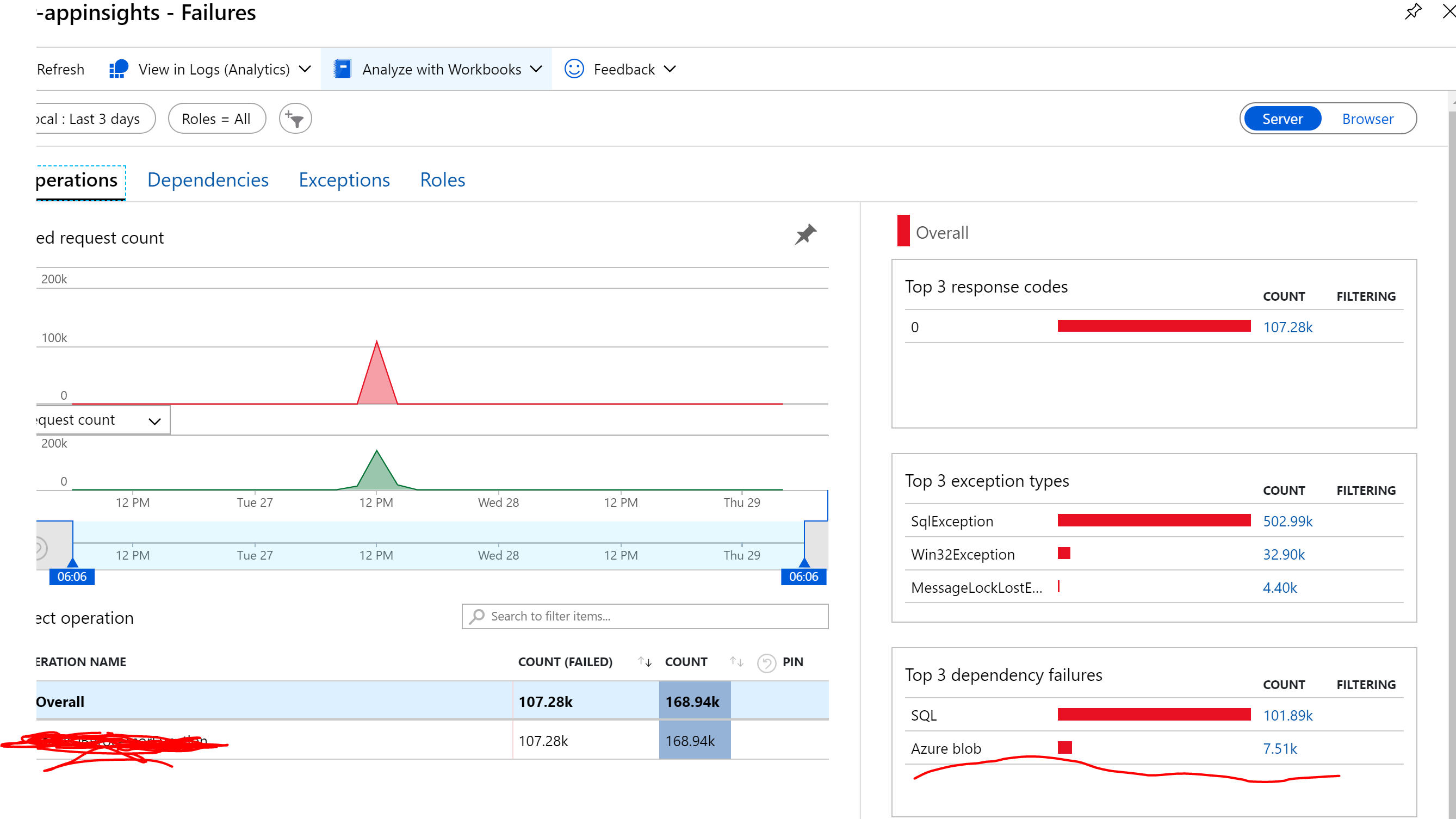
I have a Azure function triggered by Azure Service Bus topic. Occasionally I see a lot of http 409 errors in Application Insights when the functions host tries to acquire a lock i believe and persist that lock in Azure blob storage.
url - https://
Maxconcurrentcalls is set at 16
What is causing this and is there a documentation on how this locking works? There are the other suggestions to control the web app scaling by setting its limit to 1. Not clear as to how this works. Any documentation to the locking would be helpful.
 hsubramaniam
All 8 comments
Are you seeing these in the Dependencies in app insights?
The 409s for lease ownership are expected and not actually errors. When a host starts, it attempts to acquire a lock -- if another host has it, it gets a 409 back. App Insights treats anything as 400+ as an error, so it flags these. If you can share exactly where you're seeing it, we can see if there's any way we can minimize it.
 brettsam
on 28 Aug 2019
brettsam
on 28 Aug 2019
Are you seeing these in the Dependencies in app insights?
The 409s for lease ownership are expected and not actually errors. When a host starts, it attempts to acquire a lock -- if another host has it, it gets a 409 back. App Insights treats anything as 400+ as an error, so it flags these. If you can share exactly where you're seeing it, we can see if there's any way we can minimize it.
@brettsam Yes, I am seeing it on Dependencies in app insights. Its good to know these are not errors that affect function execution. However, too many such exceptions thrown, especially in a high volume use cases, could quite possibly decrease the overall throughput. And decrease in throughput could mean more time needed to drain the queues and a fraction of increase in costs. Would be great if this is kept this to a minimum
hsubramaniam
on 29 Aug 2019
I do get a lot of questions about this. We currently just use the Storage SDK to check for locks, which results in these 409s behind the scenes. But we could:
- Check if the lease is available.
- If so, try to acquire it. (it may be a race and you still get a 409)
This would result in more HTTP requests at startup, but it would reduce a lot of steady-state 409s.
brettsam
on 3 Sep 2019
Any news on this? Annoying to see thousands of dependency errors in App Insights
 OskarNet
on 18 Feb 2020
OskarNet
on 18 Feb 2020
@brettsam, is it normal to see about 10K AcquireBlobLease per minute in one app service plan with 7-8 apps? Is it one lease per .. what? Per function?
 zmarty
on 20 Oct 2020
zmarty
on 20 Oct 2020
i'm also trying to drive down the associated costs of high blob lease tranctions associated with function apps - unfortunately this suggests 1 app per storage account https://docs.microsoft.com/en-us/azure/azure-functions/storage-considerations
i think this is less than ideal and i'm looking for a more efficient solution because of this graph
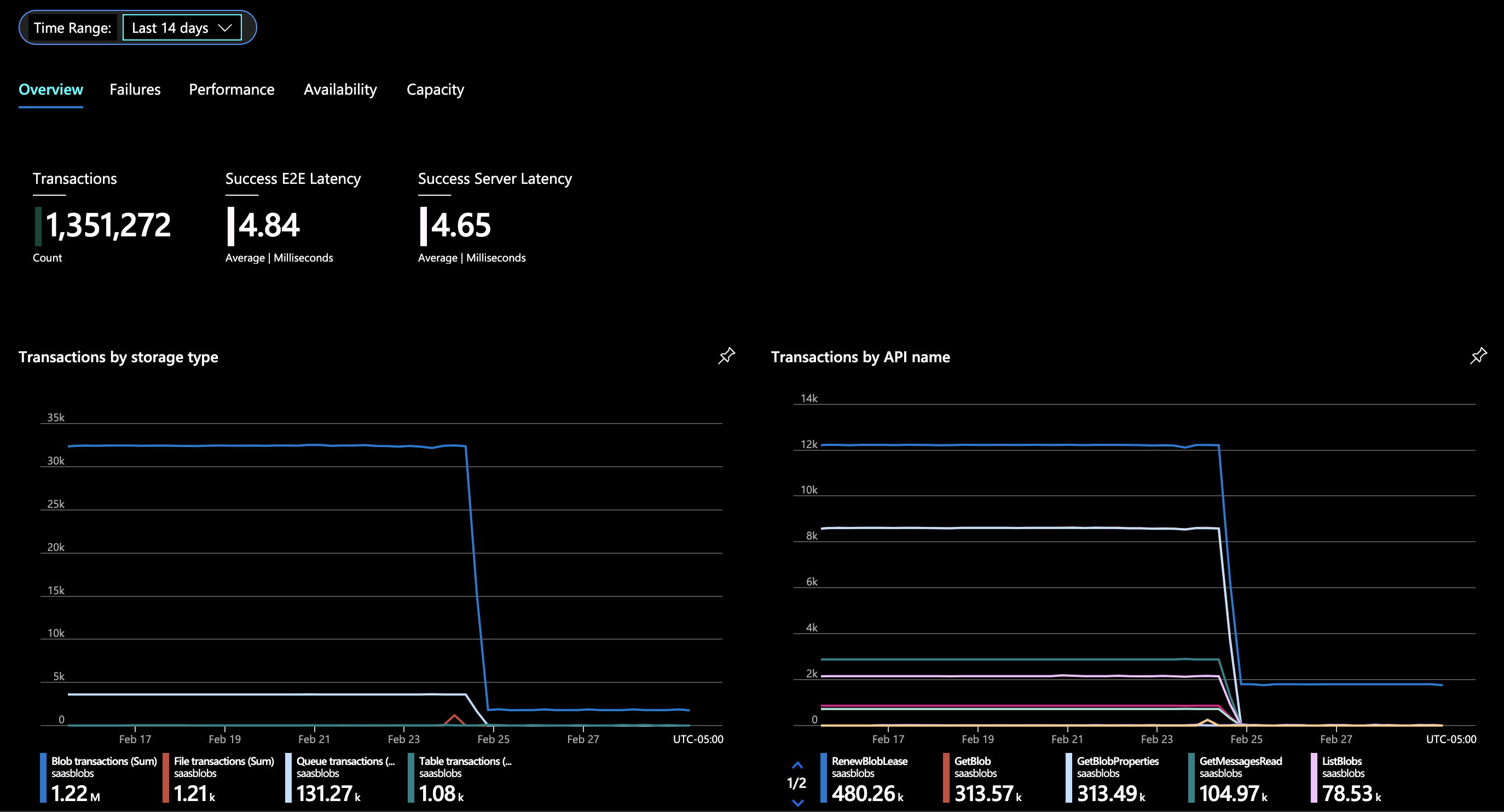
the sharp drop in traffic (every 10 minutes HTTP GET /) occurred when i changed AZUREWEBJOBSSTORAGE to point to a different storage account

with this kind of blob lease traffic the functions hub is essentially functioning as a denial of service attack against the associated storage account. can this be 'better'?
 vigouredelaruse
on 1 Mar 2021
vigouredelaruse
on 1 Mar 2021
Hi
In our case we are running the function as container in AKS, already with one storage per job.
The lock seems to arise from 2 instances of the function container trying to lock a file whose name is identical, due to truncation of the pod instance.
https://storageacctame.blob.core.windows.net:443/azure-webjobs-hosts/locks/verylongcontainernameuntil123456/host?comp=lease
In this case, "verylongcontainernameuntil" seems to be derived from the original "very-long-container-name-until" deployment name, where the 2 pods are:
- very-long-container-name-until123456000111
- very-long-container-name-until123456000222
By truncating this to 32 chars the code is causing a collision that would not be needed otherwise.
https://github.com/Azure/azure-webjobs-sdk/blob/master/src/Microsoft.Azure.WebJobs.Host/Executors/HostIdValidator.cs
With container names in helm-based deployments being driven both by release and deployment name, and the IDs having 15 chars, it's quite easy to get conflicting names.
Immediate workarounds could be to increase the ID length (which has risks as noted in comments in HostIdValidator.cs) or create some hash of the full process name that could prevent unnecessary duplicates.
Alternatively, if the API could allow customizable HostID generators, each dev could choose whatever was more convenient for their environment
Thanks
 joaocc
on 12 Mar 2021
joaocc
on 12 Mar 2021
@brettsam Has something changed recently that explains that I don't see 409 anymore? I was just testing last week and they were there, now I don't see a single one...it seems to have happen after Thursday DNS issues on Azure
Edit:
We can see the 409 on production but not on dev at the moment...
 jjcv2304
on 7 Apr 2021
jjcv2304
on 7 Apr 2021
Related issues
 drchilds
·
4Comments
drchilds
·
4Comments
 TheeJamesLee
·
3Comments
TheeJamesLee
·
3Comments
 mathewc
·
4Comments
mathewc
·
4Comments
 lopezbertoni
·
4Comments
lopezbertoni
·
4Comments
 mslugx
·
3Comments
mslugx
·
3Comments
Most helpful comment
Any news on this? Annoying to see thousands of dependency errors in App Insights