Azure-storage-azcopy: cannot use azcopy on linux env which is using proxy (not Kerberos, set https proxy)
Which version of the AzCopy was used?
linux azcopy 10.3.4
Note: The version is visible when running AzCopy without any argument
Which platform are you using? (ex: Windows, Mac, Linux)
linux
What command did you run?
azcopy.exe copy "file-on-local-machine" "URL on azure+SAS"
Note: Please remove the SAS to avoid exposing your credentials. If you cannot remember the exact command, please retrieve it from the beginning of the log file.
What problem was encountered?
always hit error like:
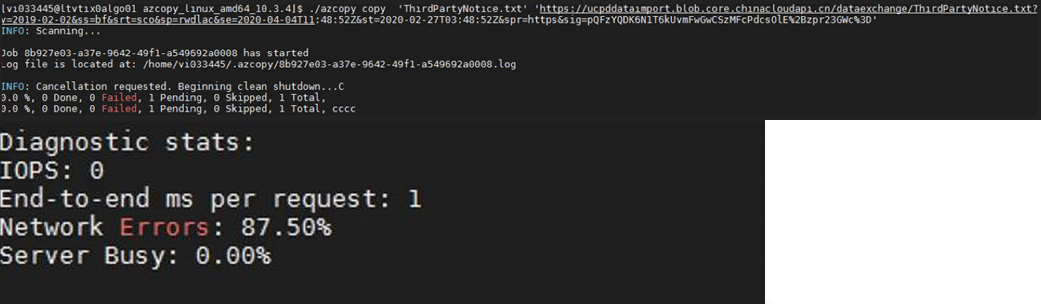
How can we reproduce the problem in the simplest way?
on this server, we can always hit this issue.
Configure:
1.this server use proxy but not Kerberos authentication way.
- we have set persist https configure in configure file. besides: we even set :
export https_proxy=:
no help. - on this server we can use wget to outside internet. example: we can download azcopy and run it.
Have you found a mitigation/solution?
NA, still blocked here.
Could you give some help on this?
 Icybiubiubiu
All 4 comments
Icybiubiubiu
on 5 Mar 2020
@Icybiubiubiu I emailed you a suggested solution. If it works, can you please add a comment here so that anyone else with the same problem can see the solution.
 JohnRusk
on 10 Mar 2020
JohnRusk
on 10 Mar 2020
Hi @JohnRusk
Thanks for your comments. yes, we used the following methods to solve this isseu:
export http_proxy=http://proxy-ip:port
export https_proxy=http://proxy-ip:port
Icybiubiubiu
on 11 Mar 2020
For anyone else reading this, the trick is that many proxies only support HTTP for their CONNECT command, even when proxying HTTPS traffic. What happens is that the client uses one command over HTTP (a CONNECT) command, to cause the proxy to open a TCP connection, then the client sets up a secure-end-to-end HTTPS session running over that connection (and all the proxy does is move the encrypted bytes, without ever understanding any of them).
It appears that only a small number of proxies support receiving the CONNECT over HTTPS, which is what @Icybiubiubiu 's original config was doing, when it had https_proxy=https://.... That only works with a proxy that accepts CONNECT over HTTPS. For all other proxies, i.e. most proxies, you need to set https_proxy=http://
(Or, I think, just set HTTP_PROXY and leave HTTPS_PROXY unset. Or, I think, just use proxy-ip:port, with no http or https)
JohnRusk
on 11 Mar 2020
Related issues
 Mmdixon
·
3Comments
Mmdixon
·
3Comments
 jiteshkumargouthamchand
·
6Comments
jiteshkumargouthamchand
·
6Comments
 DavidLafond
·
5Comments
DavidLafond
·
5Comments
 brettrowberry
·
4Comments
brettrowberry
·
4Comments
 colemickens
·
5Comments
colemickens
·
5Comments