Azure-storage-azcopy: Cannot resume azcopy job, possibly due to running out of memory
Which version of the AzCopy was used?
10.3.1
Which platform are you using? (ex: Windows, Mac, Linux)
Linux (inside docker ubuntu:latest)
What command did you run?
First I ran
azcopy copy "/data/*" "https://somewhere.blob.core.windows.net/azcopytest/XXXXX" --output-type text --put-md5 --no-guess-mime-type --content-type application/octet-stream --overwrite true --follow-symlinks --from-to LocalBlob --log-level ERROR --exclude-path ".snapshot/;azcopy/" --recursive=true
INFO: Scanning...

Job 86e3f350-2675-0b44-6775-8fc793e1ad7c has started
Log file is located at: /data/azcopy/86e3f350-2675-0b44-6775-8fc793e1ad7c.log

2.1 %, 831 Done, 0 Failed, 39169 Pending, 0 Skipped, 40000 Total (scanning...), 2-sec Throughput (Mb/s): 181.2666fatal error: runtime: out of memory

runtime stack:
runtime.throw(0xb734ec, 0x16)
    /opt/hostedtoolcache/go/1.12.0/x64/src/runtime/panic.go:617 +0x72
runtime.sysMap(0xc088000000, 0x4000000, 0x11e4af8)
    /opt/hostedtoolcache/go/1.12.0/x64/src/runtime/mem_linux.go:170 +0xc7
...
....


md5-ed79ccefdae26320280c548e971a86fa


azcopy jobs resume 86e3f350-2675-0b44-6775-8fc793e1ad7c --destination-sas "xxxx"


md5-512275c790bbbf814921ce8ead8cce16


cannot resume job with JobId 86e3f350-2675-0b44-6775-8fc793e1ad7c . It hasn't been ordered completely
How can we reproduce the problem in the simplest way?
Probably try running out of memory, since that seems to corrupt execution plan
Have you found a mitigation/solution?
No
 landro
All 29 comments
Hi @landro, thanks for reaching out!
To clarify, the job is not resumable because the source was not enumerated completely, i.e. the tool didn't finish scanning, and it's not possible to pick up where it left off.
As for the out of memory error, do you know how much memory is available in the Docker environment?
 zezha-msft
on 24 Oct 2019
zezha-msft
on 24 Oct 2019
I see. Maybe you could/should improve the error message?
So I'm running the docker container on a host where:
$ free -h
              total        used        free      shared  buff/cache   available
Mem:          3.9Gi       1.2Gi       488Mi       200Mi       2.2Gi       2.5Gi
Swap:            0B          0B          0B
I hadn't limited memory given to the container. After a while azcopy was killed by the host oomkiller.
After posting this issue, I reran azcopy with docker --env AZCOPY_CONCURRENCY_VALUE=16 --env AZCOPY_BUFFER_GB=1. That worked, and azcopy transfered something like 500.000 1MB files from NFS to blob storage using . Transfer performance was good too. I noticed however that the container is using more than 1.6GB of RAM. How come azcopy is using that much memory on top of the 1GB buffer?
landro
on 25 Oct 2019
Hi @landro, glad to hear that you've figured it out!
The AZCOPY_BUFFER_GB specifies only the memory used for buffering data, there's also fixed overhead (in terms of memory) for the operation of AzCopy.
zezha-msft
on 26 Oct 2019
Hi @zezha-msft,
I believe you should reopen this issue.
After my last post, I doubled the number of files to transfer (total of 1M), and reduced the average file-size in my performance test by 50% (0.5 MB).
I kept AZCOPY_BUFFER_GB=1 . Azcopy again got shot down by the OOM killer. In your previous post, you said _there's also fixed overhead (in terms of memory) for the operation of AzCopy._ . Given these test results, I doubt that is true.
Here is the memory profile of the process (from cadvisor via prometheus/grafana):

I also tried to set AZCOPY_BUFFER_GB=0.25. That didn't help much either. Scanning didn't finish as expected.
Do you have custom azcopy builds that you use for profiling memory etc? Or do you have build instructions for building such an image so that I could share diagnostics with you? Is there anything we can do to help figure out what is going on?
Right now this issue is completely blocking our ongoing migration to Azure.
landro
on 28 Oct 2019
Hi @landro, to clarify, by "fixed" I meant memory usage that's not optional, it's not necessarily a constant amount, since if the tool is transferring more files, then it's mandatory to keep track of more information (about the files).
Could you please clarify what happened when you tried AZCOPY_BUFFER_GB=0.25?
Memory profiling is built in, you could enabled it with export AZCOPY_PROFILE_MEM="mem.prof which specifies a path for the output.
zezha-msft
on 28 Oct 2019
Hi @zezha-msft , thanks for getting back to me. Today I reran azcopy twice with _AZCOPY_BUFFER_GB=0.5_ . Both times the the process was terminated by the host OOM-killer since it is runing low on resources. The memory profile is real similar in both cases. Here is the memory graph:

I also tried running with _AZCOPY_BUFFER_GB=0.25_. Here is that graph:

So, it seemed pretty evident _AZCOPY_BUFFER_GB_ is having no impact on the behavior we're seeing right now.
We had a look at the memory usage at the host level, and quickly realized we're running into an all to familiar NFS issue-related issue we've seen before: the data we're transferring is sourced from a NFS share, and since we're using kernel space NFS (I believe most people do that) and NFS-tuning capabilities on linux are very limited, the buffers/caches are filling up when azcopy traverses the entire directory tree during scanning, and buffer/cache memory is not released even if running low on resources. Basically what I'm saying is that _availiable_ returned by _free -h_ is a lie.
Converting NFS to object storage is probably a common use case with azcopy when moving to public cloud, and I recommend other people running into this kind of issue, to have a look at a tool called _slabtop_. _slabtop_ will show output like the following, and can be used in order to confirm the issue.
  OBJS ACTIVE  USE OBJ SIZE  SLABS OBJ/SLAB CACHE SIZE NAME
2264913 1382450  61%    0.19K 107853       21    431412K dentry
583200 265789  45%    1.05K  29880   30    956160K nfs_inode_cache
...
So basically the kernel is caching a whole lot of info about directories and inodes in the remote NFS server while azcopy is doing its initial scanning of the directory structure to copy. To overcome this issue, we're planning to investigate user space nfs clients.
Regardless of the NFS issues we're seeing, I still can't understand why azcopy should require so much memory during the initial scanning. Is there anything you can do to reduce its footprint? We have plans to transfer a NFS share holding close to 100M files in near future, and if the memory footprint of azcopy is driven by the number files to transfer, it might not be a viable solution for us. What do you reckon?
landro
on 29 Oct 2019
By the way, I'll try to generate a memory dump using the AZCOPY_PROFILE_MEM env var you suggested.
landro
on 29 Oct 2019
When exactly will the dump be created? At the end of a successful execution? How about using the https://golang.org/pkg/net/http/pprof/ package instead? That way dumps can be retrieved whenever you want.
landro
on 29 Oct 2019
The dump is created when the app is exiting (due due error or normal exit). The environment variable specifies the filename where the pprof data should be written.
 JohnRusk
on 29 Oct 2019
JohnRusk
on 29 Oct 2019
@landro
Can you clarify this:
Regardless of the NFS issues we're seeing, I still can't understand why azcopy should require so much memory during the initial scanning.
I thought you were saying that the NFS issues _were_ the problem. Are you saying that there are actually two problems, the NFS issues _and_ excessive memory usage in AzCopy at scanning time?
JohnRusk
on 29 Oct 2019
@zezha-msft I wonder if the memory is actually used, or just "looks" used as a result of churn in garbage collection. The Go runtime can be a bit slow in releasing unused memory back to the OS. Let's look into that once we hear answers from @landro above.
JohnRusk
on 29 Oct 2019
@JohnRusk
So the way I see things we're experiencing two independent issues, both related to memory consumption:
- NFS kernel module not releasing back its buffer/cache. We'll try to overcome that by using a user space nfsclient. I don't expect you to help us out with that, just wanted to share some context with you and the community.
- azcopy using excessive amounts of memory during initial scanning of the directory tree** to copy (because we run out of memory, the transfer of files doesn't even start it seems - I see no outbound data transfer from the container in cadvisor - I believe it crashes during the scanning due to OOM). I don't see why the memory consumption of azcopy should be related to the number of files to copy. We're planning to copy millions of files, and if memory consumption is driven by the number of files, we will probably have to look for a different data transfer solution.
I wonder if issue https://github.com/Azure/azure-storage-azcopy/issues/498 could be related to what we're seeing?
** We're doing azcopy copy "/data/*" "https://xxx.blob.core.windows.net/....." --recursive=true
landro
on 29 Oct 2019
Thanks @landro. I'll need to do some tests to figure out whether
(a) there is some kind of linear growth with the number of files. (I tested last week with 100 million files and didn't see linear growth, but need to repeat those tests and check a few more things, since at the time I was focussed on another issue rather than memory usage). OR
(b) maybe the overhead that Ze mentioned is just a bit bigger than what your Docker containers can accomodate, and with only a little more RAM everything would be fine.
JohnRusk
on 29 Oct 2019
Hi @landro, btw are all the files directly user /data/? Or are they mostly in sub-directories?
zezha-msft
on 1 Nov 2019
Hi @JohnRusk and @zezha-msft , I've got some new info.
I increased the memory on the server running the container by 2GB, and since then I haven't been running out of memory (the container is running without any cgroup limitations). Below is the container cpu/mem/net profile from cadvisor/grafana from one execution:
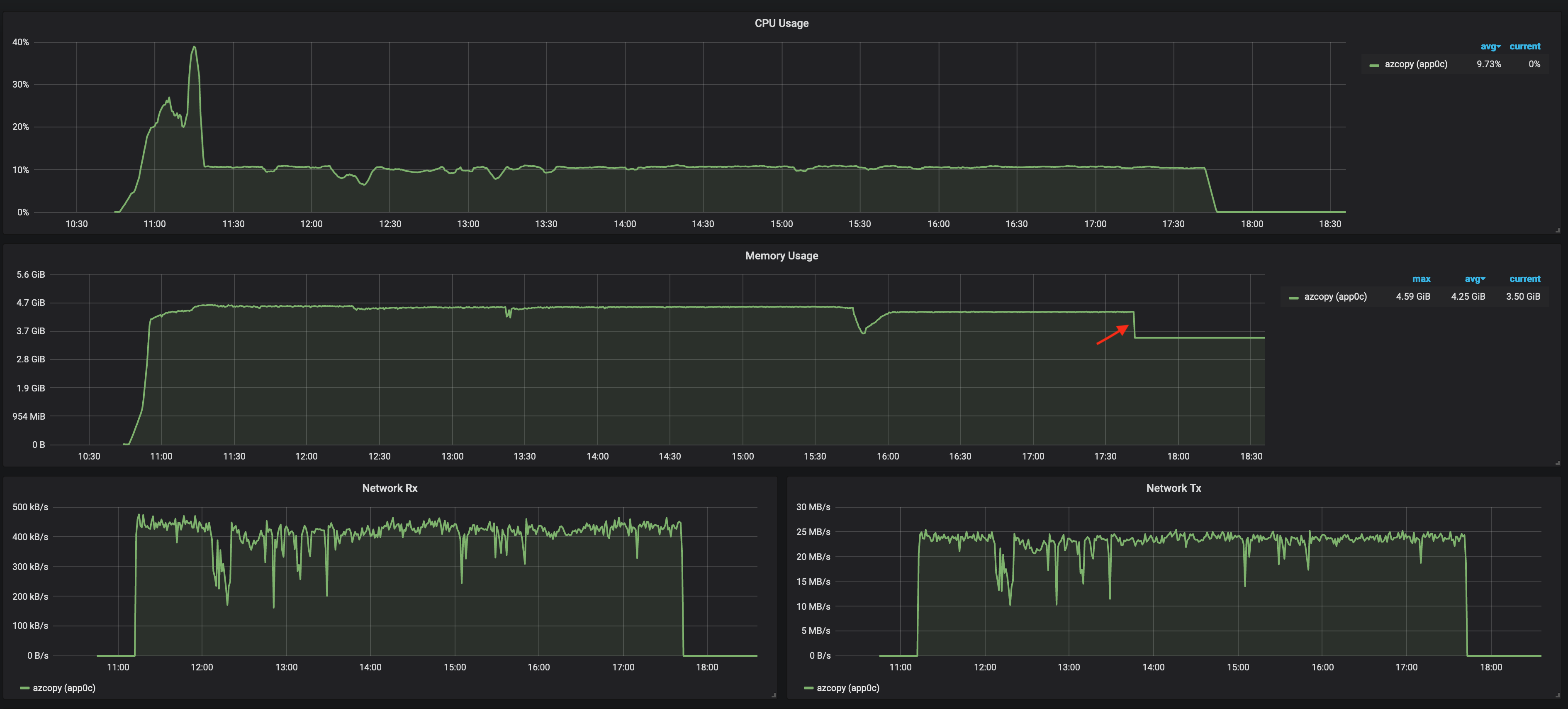
Around 1M files totaling ~0.5TB files were transferred successfully. After starting azcopy interactively within the the container, the container quickly consumes all available memory on the box. At first I was surprised by this, but it turns out that the memory consumed by a container (and possibly limited by cgroups) according to the cgroups docs contains more than just userland memory:
```Currently, the following types of memory usages are tracked.
- Userland memory - page cache and anonymous memory.
- Kernel data structures such as dentries and inodes.
- TCP socket buffers.
Where the red arrow is, azcopy finishes transferring files, and releases its userland memory which looking at the graph seems close to 1GB. Considering that I used *AZCOPY_BUFFER_GB=0.5*, around 0.5GB was used by the application itself. I will try transferring more files within the next few days, to check if memory grows linearly with number of files or not.

@zezha-msft, the directory-structure looks like this (based on filename prefix):
/data/00/00/000008af-2e78-4b21-9a0e-a44ee77d4606
/data/00/00/00001a60-05e0-46b0-b896-3435e43a9b74
.....
/data/00/01/00011b85-3053-4491-be24-272483fcb93f
.....
/data/ff/ff/ffffdc0d-37e1-4e23-8ffb-219e666341e9
```
I this example /data/00/00/000008af-2e78-4b21-9a0e-a44ee77d4606 is the full path to the file named 000008af-2e78-4b21-9a0e-a44ee77d4606. The first level of dirs (/data/00 .. /data/ff) contain no files at all, only 256 dirs each (totalling 256*256 dirs), whereas the second level (e.g. /data/00/00) typically contain around 5-15 files.
landro
on 4 Nov 2019
Thanks for the update @landro. At the point where the red arrow appears, does the azCopy process exit. I.e. no more azCopy process after that point?
Is your main concern, "What is using the RAM after that point", or is your main concern the peak RAM used when AzCopy is running (which is solved by the extra RAM that you've given to the containre).
JohnRusk
on 4 Nov 2019
Thanks @landro for the info! I was wondering if the pattern search/data/* was returning too many entries, but it's clearly not the case since there's only 256 directories.
To confirm, you are suggesting that AzCopy used a total of 1GB wile the buffer limit was 0.5GB, correct?
zezha-msft
on 5 Nov 2019
Since there's 1M files, the job tracking files might be substantial in size, and we map them into memory to keep track of each transfer and update their status.
If a memory dump is generated, we can perhaps verify the hypothesis. @JohnRusk thoughts?
zezha-msft
on 5 Nov 2019
I'm doubting that the memory mapping would be an issue with 'only' 1M files. It becomes noticeable with 10's of millions, but based on my testing I wouldn't expect it to be too bad with 1 million. But.... I wonder if we are failing to explicitly un-map it at the end of the process. But I would think end-of-process would be enough to tell the OS that we don't want it any more. Maybe should look this up tomorrow. First let's see what Landro says in answer to our questions above.
JohnRusk
on 5 Nov 2019
@landro We released version 10.3.2 yesterday. It returns unused memory to the OS more promptly. I don't know for sure if that will help in your situation, but it might.
Do you think we need to do anything more on this issue? If so, can you please answer the questions that Ze and I left, above. Otherwise, we'll close this issue soon.
JohnRusk
on 15 Nov 2019
I’ll give the new version a test drive on a bigger dataset tomorrow and let you guys know how it behaves.
- nov. 2019 kl. 03:21 skrev John Rusk [MSFT] notifications@github.com:
@landro We released version 10.3.2 yesterday. It returns unused memory to the OS more promptly. I don't know for sure if that will help in your situation, but it might.Do you think we need to do anything more on this issue? If so, can you please answer the questions that Ze and I left, above. Otherwise, we'll close this issue soon.
—
You are receiving this because you were mentioned.
Reply to this email directly, view it on GitHub, or unsubscribe.
landro
on 18 Nov 2019
Here is the performance profile from using azcopy 10.3.2 with AZCOPY_CONCURRENCY_VALUE=16 and AZCOPY_BUFFER_GB=0.5 to copy 1.2 M files (that is 300K more than the last test https://github.com/Azure/azure-storage-azcopy/issues/715#issuecomment-549273031):

When the azcopy job finishes (when TX drops to 0), the OS releases 800MB of ram. 500 of these 800 MB are (probably) used by the buffer, so basically azcopy itself used around 300 MB. During the last test https://github.com/Azure/azure-storage-azcopy/issues/715#issuecomment-549273031, azcopy 10.3.1 itself used around 500 MB while transferring 1.0M files, so it seems like things have improved, even if more files are being transferred! There is also reason to believe that the memory footprint of azcopy is not impacted by the number of files to copy, which was my main concern. I will therefor close this issue now.
Key takeaways for other folks that migrate from NFS to Azure blob storage:
- Make sure you have enough free memory on you NFS client to handle dentry and nfs_inode_cache caches since the linux kernel releases this cache relatively slowly and there are few options for tuning this cache behaviour
- Make sure to verify the transfer works as expected using tools like hashdeep and az-blob-hashdeep
landro
on 20 Nov 2019
Thank you @landro for the detailed results and suggestions for other users migrating from NFS to blob!
JohnRusk
on 20 Nov 2019
@landro Thanks for the tip about az-blob-hashdeep. I had not seen that before. One important point about it: it just reads the MD5 hash that is stored against the blob. It's important to understand that the hash is supplied by the tool that uploads the blob (AzCopy in this case) and nothing in the blob storage service actually checks that the blob content matches the hash. The only time the check takes place is if you download the blob with a hash-aware tool (such as AzCopy).
So using az-blob-hashdeep allows you to check that every blob has a hash and that those hashes match the hashes computed by hashdeep from your local (original) copy of the same files. But it does not prove that the blob content actually matches those hashes.
Below is a long extract of a draft description I wrote recently. We haven't published it anywhere, but I'll share it here on the understanding that it's a first draft. It contains a more detailed description, and a tip on how to check the blob content.
File Content Integrity
_"Were any bytes in a file changed, added or omitted?"_
Checking this works by having the client side tool (in this case, AzCopy) do two things:
(a) At upload time, compute the MD5 hash of the original source file, as it reads it from disk. This hash gets stored as the ContentMD5 property of the blob. You can think of this as the "Hash of the original file, as read".
(b) At download time, compute the MD5 hash of the file, as it saves it to disk. You can think of this as the "hash of the downloaded file, as saved". If the two hashes match, that proves that everything is fine. The hash of the original file, as read, matches the hash of the downloaded file, as saved, so that proves the integrity of the whole end-to-end process. If they don't match then (by default) AzCopy will report an error.
See the AzCopy parameters --put-md5 and --check-md5 for details. Note that for the strictest checking, your download can use --check-md5 FailIfDifferentOrMissing.
The key point here is that that the check is done at download time. So how do you use that check? There are two options:
Get all your download tooling to do the check. E.g. if you upload with AzCopy but download with your own SDK based tooling, then you need to make sure that your download code is doing the check. In this approach, you don't detect any errors immediately. You detect them later, when the data is used. OR
You can download everything straight away just to check it. That sounds awful... but there's a trick to make it much easier. The trick is this: Make a large VM in the same region as your Storage Account (e.g. 16 cores or more). Run AzCopy on that VM and download all your data, but specify NUL as the destination. (NUL on Windows, /dev/null on Linux). This tells AzCopy "download all the data, but don't save it anywhere". That way, you can check the hashes really quickly. If there's any case where the hash doesn't match, AzCopy will tell you. In many cases, you can check at least 4TB of date per hour this way (but it's slower if the files are very small).
If you want to use these download-time checks, its important that --put-md5 is on the AzCopy command line at the time of upload. That is the default in Storage Explorer 1.10.1.
Data Transmission Integrity
_"Did the network corrupt our data?"_
This is covered simply by using HTTPS. Because HTTPS protects you against malicious tampering, it must also therefore protect you against accidental tampering (i.e. network corrupting your data).
Note that this means you don't need to check MD5 hashes to protect against _network_ errors. Checking MD5s (as described above under File Content Integrity) proves that AzCopy and the Storage service didn't mess anything up. But it doesn't prove anything about the network ... because if you're using HTTPS you _already_ have proof that the network didn't mess anything up.
File Selection Integrity
_"Did we move the right files?"_
This is not about the content of the files, but its about which files were processed. E.g. did the tool leave any out? Obviously you can check the file counts that are reported by AzCopy.
We don't currently have anything else built in to the tool to check this. With other tools, and a maybe little scripting, it is possible to get listings of the source and destination and compare them. [This is where I see az-blob-hashdeep being particularly useful]
(See also small followup comment below)
JohnRusk
on 20 Nov 2019
If you run az-blob-hashdeep, you can check that all the stored hashes matches locally-computed ones. Then if you do the AzCopy-download-to-null trick, that checks that the blob content actually matches those hashes.
Note that not everyone will want to do the download to null trick. For most users, it's enough to know that Data Transmission Integrity and File Selection Integrity are covered.
JohnRusk
on 20 Nov 2019
and nothing in the blob storage service actually checks that the blob content matches the hash
According to https://blogs.msdn.microsoft.com/windowsazurestorage/2011/02/17/windows-azure-blob-md5-overview/ , the server validates the MD5 hash when then file is uploaded, @JohnRusk
Also, according to https://www.ietf.org/rfc/rfc1864.txt and https://www.w3.org/Protocols/rfc2616/rfc2616-sec14.html, the Content-MD5 header should/could be used for validation purposes.
landro
on 21 Nov 2019
For blobs with more than one block, there are two different usages of hashing:
- there is validation of the content of each block, as it is uploaded. That works, as you (and the RFCs) describe.
- But for a blob that consists of multiple blocks, none of those individual block hashes is the hash of the blob as a whole. The hash of the blob as a whole is computed by the client app, and provided to the service at the time of committing the block list in the header
x-ms-blob-content-md5. The service will then return that, as the value of the blob'sContent-MD5. (Note how this value is written with one name, and then returned in future with the other. I presume it can't be written using Content-MD5 because that name is reserved for the hash of the message content, and here we need hash of the file, not hash of the PutBlockList message).
The service cannot, and does not, hash the whole blob to check the accuracy of x-ms-blob-content-md5 (which is then returned as the blobs Content-MD5 in GET and HEAD calls). So for multi-block blobs, the Content-MD5 that you receive in GET and HEAD calls has not been verified by the service.
If you read the page you mentioned, https://blogs.msdn.microsoft.com/windowsazurestorage/2011/02/17/windows-azure-blob-md5-overview/ , very carefully, it does indeed describe these two different usages of hashing, and it does say that the "whole of blob" hash is not verified by the service for multi-block blobs. Although I admit the page could have been worded more clearly.
JohnRusk
on 21 Nov 2019
@JohnRusk I see from https://docs.microsoft.com/en-us/azure/storage/common/storage-ref-azcopy-copy#options that
--block-size-mb float Use this block size (specified in MiB) when uploading to Azure Storage, and downloading from Azure Storage. The default value is automatically calculated based on file size. Decimal fractions are allowed (For example: 0.25).
We'll only be transferring small files only (max 3MB, but lots of them), and I was wondering if they will fit into one block. Where can I find the algorithm that is used for calculating the block size?
landro
on 22 Nov 2019
Yes, they will be done with putBlob (a single call for the whole blob). Not putblock and putblock list.
The size is computed here
https://github.com/Azure/azure-storage-azcopy/blob/34f9af7da3dbc0e8f49e50b20a72b44f4ff5bc08/ste/mgr-JobPartTransferMgr.go#L233
Based on constants defined here https://github.com/Azure/azure-storage-azcopy/blob/5b1d5ad4e97fafb0885726a6868e98e50b4e759a/common/fe-ste-models.go#L844
The decision between putBlob and putblock is made here https://github.com/Azure/azure-storage-azcopy/blob/34f9af7da3dbc0e8f49e50b20a72b44f4ff5bc08/ste/sender-blockBlobFromLocal.go#L52 (note that, for block blobs, "chunk" means "block" in the AzCopy code)
Important. These are links to the current implementation. There may be changes in future. Those changes, if they happen, are likely to affect the block size in blocks that are too big for a single block.
JohnRusk
on 22 Nov 2019
Related issues
 TiloWiklund
·
5Comments
TiloWiklund
·
5Comments
 IGx89
·
4Comments
IGx89
·
4Comments
 ayeltsov
·
3Comments
ayeltsov
·
3Comments
 wilsonge
·
4Comments
wilsonge
·
4Comments
 Mmdixon
·
3Comments
Mmdixon
·
3Comments