Azure-storage-azcopy: 'azcopy list ...' returns RESPONSE Status: 403 This request is not authorized to perform this operation using this permission.
Which version of the AzCopy was used?
10.2.1
Note: The version is visible when running AzCopy without any argument
Which platform are you using? (ex: Windows, Mac, Linux)
Mac OS X 10.14.5
What command did you run?
$ azcopy list "https://storage_account_name.blob.core.windows.net/container_name"
Note: Please remove the SAS to avoid exposing your credentials. If you cannot remember the exact command, please retrieve it from the beginning of the log file.
What problem was encountered?
RESPONSE Status: 403 This request is not authorized to perform this operation using this permission.
How can we reproduce the problem in the simplest way?
Not entirely sure how my environment is unique. Open to suggestions.
Have you found a mitigation/solution?
No
Verbose output recorded below (note: replaced storage account with "storage_account_name" and Container with "container_name").
$ azcopy list "https://storage_account_name.blob.core.windows.net/container_name"
INFO: List is using OAuth token for authentication.

cannot list blobs for download. Failed with error -> github.com/Azure/azure-storage-blob-go/azblob.newStorageError, /Users/vsts/go/pkg/mod/github.com/!azure/[email protected]/azblob/zc_storage_error.go:42
===== RESPONSE ERROR (ServiceCode=AuthorizationPermissionMismatch) =====
Description=This request is not authorized to perform this operation using this permission.
RequestId:4545810a-c01e-008e-554b-3b46e8000000
Time:2019-07-15T20:27:09.5586803Z, Details:
   Code: AuthorizationPermissionMismatch
   GET https://storage_account_name.blob.core.windows.net/container_name?comp=list&restype=container&timeout=901
   Authorization: REDACTED
   User-Agent: [AzCopy/10.2.1 Azure-Storage/0.7 (go1.12; darwin)]
   X-Ms-Client-Request-Id: [696a9b26-986b-4b84-4d7b-41184ed4f9a2]
   X-Ms-Version: [2018-03-28]
   --------------------------------------------------------------------------------
   RESPONSE Status: 403 This request is not authorized to perform this operation using this permission.
   Content-Length: [279]
   Content-Type: [application/xml]
   Date: [Mon, 15 Jul 2019 20:27:09 GMT]
   Server: [Windows-Azure-Blob/1.0 Microsoft-HTTPAPI/2.0]
   X-Ms-Error-Code: [AuthorizationPermissionMismatch]
   X-Ms-Request-Id: [4545810a-c01e-008e-554b-3b46e8000000]
   X-Ms-Version: [2018-03-28]
this is after running:
az login and then
azcopy login --tenant-id=<tenant-id>
I've attempted to troubleshoot this as much as possible. I also am in a Group that has been given the 'Storage Blob Data Contributor" Role for that storage account (very recently, I found https://github.com/Azure/azure-storage-azcopy/issues/120), so I don't think that is the impediment.
Thanks
 goa5t
goa5t
All 7 comments
very recently
It can take 5 minutes for role changes to take full effect. So if you tried immediately after the change, it may be just that you tried to soon. If you may have done all your testing within 5 or 10 mins of the permission change, could you retest one more time please?
Oh, and if using --tenant-id, remember that it must be the tenant id that owns the storage account (i.e. what you want to authenticate _to_). (The difference is important in cases where the account's home tenant is not the one where the storage account lives).
 JohnRusk
on 15 Jul 2019
JohnRusk
on 15 Jul 2019
Tried it again after a few hours, and it did indeed work as expected. Thanks for the advice.
Out of curiosity (forgive me if perhaps this isn't the forum for this kind of question), why is this role required? Is this an intentional choice? It seems odd that one would have access to issue commands in the Azure portal, the Azure CLI, and but not using azcopy.
goa5t
on 16 Jul 2019
There are various different authentication types - variants even within the wider umbrella of AAD. I suspect that the "device" auth flow that we use with AzCopy (where you pop into the browser to finish the auth) is restricted only to the explicit permissions granted to the roles. I don't know details of Portal auth.
JohnRusk
on 16 Jul 2019
@goa5t I've got the same issue, and was able to list the content of the container with a SAS token I've previously generated:
azcopy copy "https://
 svengau
on 4 Sep 2019
svengau
on 4 Sep 2019
In case someone will get to this thread with similar issue:
I got a similar error with azcopy copy command with the use case of downloading data from Azure Data Lake container to local machine.
This is what worked for me:
azcopy login --tenant-id=<tenant-id>
azcopy copy 'https://<storage-account-name>.<blob or dfs>.core.windows.net/<container-name><sas-token>' '<local-directory-path>' --recursive --s2s-preserve-access-tier=false
 adipola
on 2 Jun 2020
adipola
on 2 Jun 2020
I'm running into a similar problem. If this is a matter of waiting, I've waited for 30 minutes. This would be a remarkably long time to wait for an authorization change. @goa5t mentions hours. Is it possible it can take that long??
@adipola My understanding is that the AD auth (azcopy login) is the alternative for SAS tokens. Did you find that you needed to use both methods?
 gar1t
on 15 Dec 2020
gar1t
on 15 Dec 2020
@gar1t , if you use the SAS token, the you do not need to login with azcopy. Of course, it implies that the SAS token has been properly set for what you need to do (eg., write permissions in case you want to upload data).
If instead you want to use your Azure user, then you do the login with azcopy login first (and do not use the SAS token part in the storage url after). azcopy will now act as the user you did the login with, meaning that the user must have the proper role/permissions to access the storage.
I had to give my user the "Storage Blob Data Owner" role to the container I wanted to access, and then azcopy worked as expected. Of course tailor the role assignment to the use case you have, you might be able to use azcopy, eg., "Storage Blob Data Reader" if you want to simply read data in the storage.
Another tip to check if the user has the right to access the storage, is to go in the Azure portal, navigate to a container in the selected storage, and try to switch the "Authentication method" to Azure AD to list the contents of the container. If you get an error like the one I got, it means you do not have reading rights.
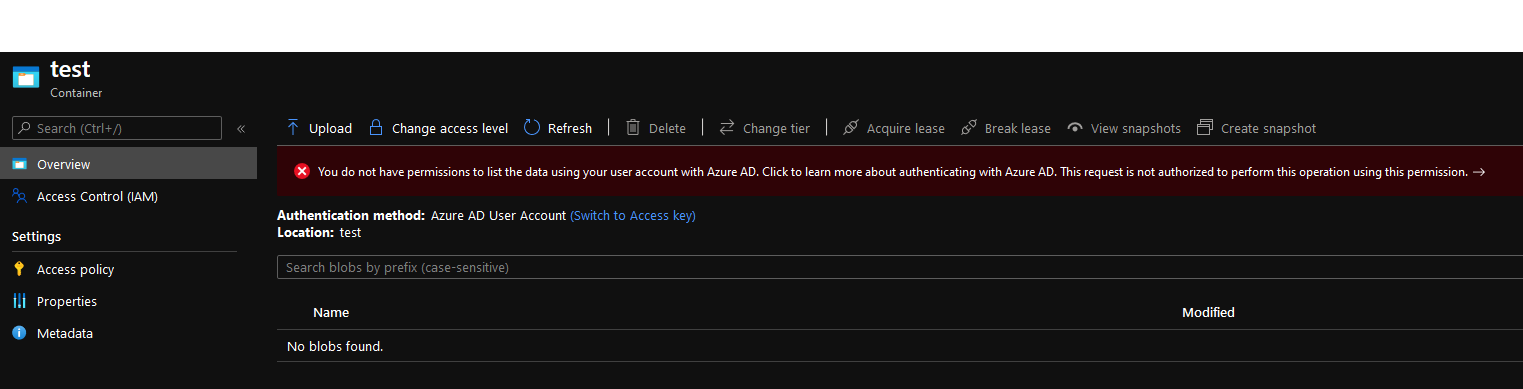
 stawo
on 13 Jan 2021
stawo
on 13 Jan 2021
Related issues
 Ilanak
·
4Comments
Ilanak
·
4Comments
 wahalulu
·
3Comments
wahalulu
·
3Comments
 alvipeo
·
4Comments
alvipeo
·
4Comments
 ayeltsov
·
3Comments
ayeltsov
·
3Comments
 IGx89
·
4Comments
IGx89
·
4Comments
Most helpful comment
It can take 5 minutes for role changes to take full effect. So if you tried immediately after the change, it may be just that you tried to soon. If you may have done all your testing within 5 or 10 mins of the permission change, could you retest one more time please?
Oh, and if using --tenant-id, remember that it must be the tenant id that owns the storage account (i.e. what you want to authenticate _to_). (The difference is important in cases where the account's home tenant is not the one where the storage account lives).