Azure-storage-azcopy: I am trying to resume a broken job on AzCopy v10
Which version of the AzCopy was used? v10
Note: The version is visible when running AzCopy without any argument
Which platform are you using? Windows
What command did you run? .\azcopy jobs resume 1a890bcc-5a40-f548-50cd-ad53f7a467c9 ?xxxxxxxxxxxxxxxxxxxxxxxxxxxxxxxxxxxxxxxxxxxxxxxxxxxxxxxxxxxxxxxxxx"
.\azcopy jobs resume
Note: Please remove the SAS to avoid exposing your credentials. If you cannot remember the exact command, please retrieve it from the beginning of the log file.
What problem was encountered?
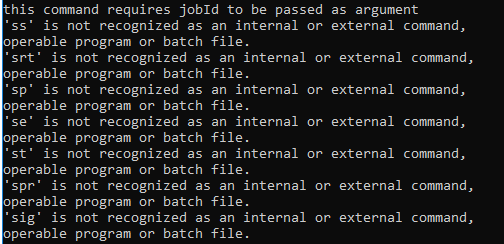
this command requires jobId to be passed as argument
'ss' is not recognized as an internal or external command,
operable program or batch file.
'srt' is not recognized as an internal or external command,
operable program or batch file.
'sp' is not recognized as an internal or external command,
operable program or batch file.
'se' is not recognized as an internal or external command,
operable program or batch file.
'st' is not recognized as an internal or external command,
operable program or batch file.
'spr' is not recognized as an internal or external command,
operable program or batch file.
'sig' is not recognized as an internal or external command,
operable program or batch file.
How can we reproduce the problem in the simplest way?
Initiate a Copy from C: drive of PC to Azure storage account and try to resume the Job using Job ID afterwards.
Have you found a mitigation/solution?
No. Not yet
 yallos
All 9 comments
Your SAS token needs to be put in quotes. The $ signs in the token breaks your command (escapes out of the command)
 seguler
on 5 Apr 2019
seguler
on 5 Apr 2019
Thanks for the Assistance @seguler
I may have found the fix!!!!
Document is misguiding and it took me a while to figure it out
https://docs.microsoft.com/en-us/azure/storage/common/storage-use-azcopy-v10#view-and-resume-jobs
The Document didn't specify the commands correctly or even show an example
Documentation says: .\azcopy jobs resume
Real Life: .\azcopy jobs resume "27ea1553-5357-144d-428e-XXXXXXXX" --source-sas "C:\Users\VIRUS\Documents\My Received Files" --destination-sas "?sv=2018-03-28&ss=XXXXXXXX=sco&XXXXXXXXXXXX&st=2019-04-05T17:48:07Z&spr=https&sig=FlO6PZNhJEqvWhzN47aaYBLvEkalxkUERPynbL3J0Oo%3D"
Since i was transferring from my Local PC, the PC Path becomes the source token ID
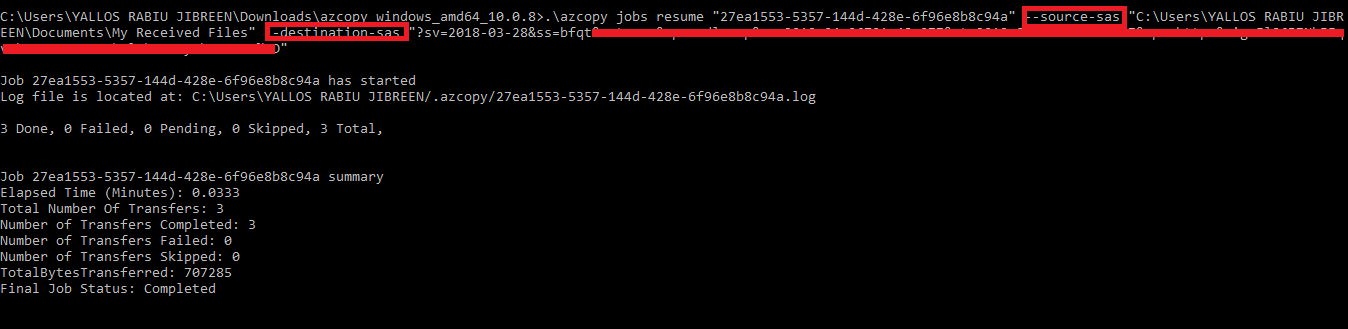
I hope it helps somebody :) Its IT and these things happen sometimes. But we shouldn't assume that everybody can easily figure it out. Thanks a Billion
yallos
on 5 Apr 2019
Hi @yallos, you don't need a source-sas since the source is local.
 zezha-msft
on 5 Apr 2019
zezha-msft
on 5 Apr 2019
Hi @yallos, you don't need a source-sas since the source is local.
Thanks @zezha-msft already figured it out and resolved the issue.
yallos
on 5 Apr 2019
Yes - I just realized the document is not clear enough. Will fix it.
seguler
on 5 Apr 2019
Fixed
seguler
on 6 Apr 2019
Fixed
Thanks @seguler but i see the command is broken here in the documentation:

The working code should be:
.\azcopy jobs resume "
Thanks!!!
yallos
on 6 Apr 2019
The document is still not updated @JohnRusk . It shows as per below:
azcopy jobs resume
azcopy jobs resume
Where it should be
.\azcopy jobs resume "" --source-sas "Path of job Source" --destination-sas "SAS key of Storage Account"
 qudiransari
on 16 Dec 2019
qudiransari
on 16 Dec 2019
I'm puzzled by the corrected syntax that's proposed. Can you explain why there there should be a _path_ in the source _SAS_?
 JohnRusk
on 24 Dec 2019
JohnRusk
on 24 Dec 2019
Related issues
 TiloWiklund
·
5Comments
TiloWiklund
·
5Comments
 Ilanak
·
4Comments
Ilanak
·
4Comments
 LoofahBu
·
3Comments
LoofahBu
·
3Comments
 colemickens
·
5Comments
colemickens
·
5Comments
 ldepaiva
·
3Comments
ldepaiva
·
3Comments