Azure-sdk-for-python: URI for publishing is always invalid in Cloud Partner Portal
I would like to modify an offer in the Cloud Partner Portal for publishing.
To do so, I require an authenticated URI for the blob.
If I use the storage explorer and generate the SAS as described in the instructions here:
https://docs.microsoft.com/en-us/azure/marketplace/cloud-partner-portal/virtual-machine/cpp-get-sas-uri
everything works fine.
I am looking to do so using the Azure SDK for Python.
I have previously been able to generate the SAS for the VHD (#8344 ) for copying it, however it seems like the signature generated from the __generate_account_sas__ function is not valid for the cloud portal.
The error I get is always the following:
Specified SAS URL cannot be reached. Ensure that the SAS URL is generated following the instructions at https://docs.microsoft.com/en-us/azure/marketplace-publishing/marketplace-publishing-vm-image-creation#52-get-the-shared-access-signature-uri-for-your-vm-images
I have tried using the other APIs too, (generate_container_sas and generate_blob_sas), with no success. It just looks like the signature is malformed with respect to what the Portal expects.
How can I generate a valid URI for the vhd for the Portal?
 LazzariPaolo
All 24 comments
@LazzariPaolo thanks for following up! Someone from our team will take a look into that. //cc: @mayurid
 kaerm
on 13 Nov 2019
kaerm
on 13 Nov 2019
@LazzariPaolo - Thanks for reporting this. Can you paste the code snippet you are using the the sas that is generated here? (Don't paste original key)
 rakshith91
on 14 Nov 2019
rakshith91
on 14 Nov 2019
Here's the example with a fake key:
import string
import random
from datetime import datetime, timedelta
from azure.storage.blob import generate_account_sas, ResourceTypes, AccountSasPermissions

fake_key = ''.join(random.choice(string.ascii_letters) for i in range(88))
fake_sas_token = generate_account_sas(
    account_name = 'test',
    account_key = fake_key,
    resource_types = ResourceTypes(object=True),
    permission = AccountSasPermissions(read=True),
    start = datetime.now() - timedelta(hours = 24),
    expiry = timedelta(days = 7)
)
print(fake_sas_token)
The fake token looks something like this:
st=2019-11-13T10%3A11%3A25Z&se=7%20days%2C%200%3A00%3A00&sp=r&sv=2019-02-02&ss=b&srt=o&sig=3TrlG%2BHGwvf6m91klKfXWB/XQjQ9FLgQNIqIqc7SyhM%3D
if I decode it, its obvious that something is not right... any suggestions?
LazzariPaolo
on 14 Nov 2019
Also, I'm certain you are aware, but just in case
the Url would be domain + sas as a query string. (the generate_sas functions only return the query strings)
For example
https://accout_name.blob.core.windows.net/vhd_name?****** where ** is what is returned by the generate_account_sas
rakshith91
on 14 Nov 2019
@rakshith91 Yes, I am aware of that.
LazzariPaolo
on 14 Nov 2019
@xiafu-msft @zezha-msft
Can you guys take a look at it.
looping in @mayurid
rakshith91
on 14 Nov 2019
Hi @LazzariPaolo
I think there are a couple of places in your provided code we want to touch:
- Did you try to add
listpermission? likeAccountSasPermissions(read=True, list=True) - try
ResourceTypes(container=True)instead - Also I think the expiry time should be a specific time like
expiry = datetime.utcnow() + timedelta(days=7)
Feel free to let me know if it doesn't help ^_^
 xiafu-msft
on 14 Nov 2019
xiafu-msft
on 14 Nov 2019
Hi @xiafu-msft ,
Thank you for your comment.
My bad for the expiry date, that was just an oversight when I was writing the snippet above. I have it correctly in my code.
I actually had already tried:
AccountSasPermissions(read=True, list=True)
as this corresponds to the options which one chooses when generating the SAS from the storage explorer but that didn't do it.
I am now using:
ResourceTypes(container=True)
and see a different error message in the portal:
Signed resources (sr) must include container (c)
bit confusing since we are explicitly specifying the container as the resource type.
Is generate_account_sas the right API for generating SAS for the Cloud Partner portal? I guess it shouldn't really matter where the URI Is used right?
Cheers
LazzariPaolo
on 15 Nov 2019
Hi @LazzariPaolo
Would you mind trying generate_container_sas instead? container_name should be your VHD name I think.
Ideally I think generate_account_sas with ResourceTypes set to container should work, let's try the workaround by using generate_container_sas, we will dig into the problem for generate_account_sas if generate_container_sas works fine. Sorry about the convenience if it's a problem on our side.
xiafu-msft
on 15 Nov 2019
Hi @xiafu-msft ,
Thanks for your suggestion.
I have tried generate_container_sas as follows:
import string
import random
from datetime import datetime, timedelta
from azure.storage.blob import generate_account_sas, generate_container_sas, ResourceTypes, AccountSasPermissions

fake_vhd = 'foo-osDisk.123.vhd'

fake_key = ''.join(random.choice(string.ascii_letters) for i in range(88))
fake_signature_container = generate_container_sas(
    account_name = 'test', # name of the storage account
    account_key = fake_key, # key for the storage account
    container_name = fake_vhd, # name of the vhd
    permission = AccountSasPermissions(read=True,list=True),
    start = datetime.now() - timedelta(hours = 24),
    expiry = datetime.now() + timedelta(days = 8)
)

print(fake_signature_container)
#st=2019-11-14T09%3A49%3A29Z&se=2019-11-23T09%3A49%3A29Z&sp=rl&sv=2019-02-02&sr=c&sig=wOuDDqji9D/fjsqPtSihcQSVCmQHJyjIE7hu/lSdV68%3D
Unfortunately, this did not resolve the issue and I see the error message I mentioned in my open post. I also tried using:
container_name = f'system/Microsoft.Compute/Images/images/{fake_vhd}'
as that contains the full path of the vhd, but obtained the same result.
I think something is missing. In the storage explorer, when one generates the URI, there is a checkbox for the following:
- Generate container-level shared access signature URI
although I would expect generate_container_sas function to respect that requirement, since the signature should be valid for that container (and blobs within).
I would like to point out that the generate_account_sas URI _is_ indeed valid as I use it for copying the vhd from one storage account to another, but it does not seem to be valid for the Cloud Partner Portal.
LazzariPaolo
on 15 Nov 2019
Hi @LazzariPaolo
Sorry about the inconvenience..
Ideally if storage explorer generates the sas token properly sdk should also be able to generate..
So currently is generating sas from explorer a workaround for you?
If you are not blocked, we can log an item to investigate in our backlog and investigate in the next sprint, do you think it’s acceptable?
xiafu-msft
on 15 Nov 2019
@LazzariPaolo - As a test, can you try to generate the SAS URI using the Azure CLI and respond with the exact parameters (minus sensitive in)? Let us know if the CLI works and we can dig into the delta between the two and test against the Cloud Partner Portal.
Thanks,
Jon
 jongio
on 15 Nov 2019
jongio
on 15 Nov 2019
@xiafu-msft I would like to remove any manual step in our current process so manually using the storage explorer is not an option.
@jongio The CLI does not work for me either. Same issue as the one I mentioned in the open post.
I can see that the query string which the Storage Explorer generates is different than the one both the SDK and the CLI provide. Likely the issue is on the Partner Portal platform not recognizing a valid URI?
LazzariPaolo
on 15 Nov 2019
@xiafu-msft @jongio
Should I perhaps open a ticket with the Partner Portal team?
LazzariPaolo
on 19 Nov 2019
Hi @LazzariPaolo - I'm in contact with the Partner Portal team today and will get access to a dogfood environment to debug this. Please feel free to open a ticket with them as well if you have a way to do so. I'm personally new to the Partner Portal so learning as I go.
jongio
on 20 Nov 2019
I am currently trying to repro this issue.
jongio
on 20 Nov 2019
Thanks for your help @jongio , appreciate it.
LazzariPaolo
on 20 Nov 2019
I made it to the point of generating a valid URI with storage explorer. I will now try with CLI and SDK.
jongio
on 20 Nov 2019
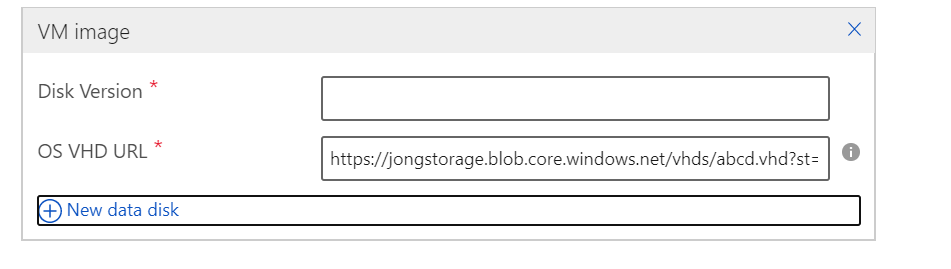
I was able to generate a valid SAS URI using the following CLI command:
az storage container generate-sas --account-name jongstorage --name vhds --permissions rl --start 2019-11-19T20:00:00Z --expiry 2020-11-19T10:00:00Z
Take that SAS and append it to your full URI to the blob.
https://jongstorage.blob.core.windows.net/vhds/abcd.vhd?st=2019-11-19T20%3A00%3A00Z&se=2020-11-19T10%3A00%3A00Z&sp=rl&sv=2018-11-09&sr=c&sig=t/4WTjT
Will look into SDK now.
jongio
on 21 Nov 2019
I was able to generate a valid SAS URI using the following SDK code:
from azure.storage.blob import generate_container_sas

account = 'jongstorage'
container = 'vhds'
blob = 'abcd.vhd'
key = '6jTfXoquan9iIXB7nXA8xki3gFhAcjPeFEvVevku8sAjJ3'
sas = generate_container_sas(account, container, account_key=key, permission='rl', start='2019-11-19T10:31:00Z', expiry='2020-11-19T10:00:00Z')
uri = f'https://{account}.blob.core.windows.net/{container}/{blob}?{sas}'

print(uri)
This code also works using ContainerSasPermissions
from azure.storage.blob import generate_container_sas, ContainerSasPermissions

account = 'jongstorage'
container = 'vhds'
blob = 'abcd.vhd'
key = '6jTfXoquan9iIXB7nXA8xki3gFhAcjPeFEvVevku8sAj'
sas = generate_container_sas(
    account, container,
    account_key=key,
    permission=ContainerSasPermissions(read=True, list=True),
    start='2019-11-19T10:31:00Z',
    expiry='2020-11-19T10:00:00Z')

uri = f'https://{account}.blob.core.windows.net/{container}/{blob}?{sas}'

print(uri)
jongio
on 21 Nov 2019
Thanks for your help @jongio,
I figured out what the issue was with my requests.
My .vhd is located at the following location:
system/Microsoft.Compute/Images/images
where system is the name of the container.
Turns out that when _creating_ the SAS, the container must be the top level container, (in this case the string system), whereas when _using_ the SAS in the URI, the URI must contain the full path of the .vhd (which includes system/Microsoft.Compute/Images/images).
LazzariPaolo
on 21 Nov 2019
Thanks for working with Microsoft on GitHub! Tell us how you feel about your experience using the reactions on this comment.
![msftbot[bot] picture](https://avatars2.githubusercontent.com/in/26612?v=4&s=40) msftbot[bot]
on 21 Nov 2019
msftbot[bot]
on 21 Nov 2019
Glad to hear you figured it out. Please let us know if you have any further issues.
jongio
on 21 Nov 2019
Related issues
 raviteja59
·
3Comments
raviteja59
·
3Comments
 logachev
·
3Comments
logachev
·
3Comments
 lmazuel
·
3Comments
lmazuel
·
3Comments
 smereczynski
·
4Comments
smereczynski
·
4Comments
 shreyasmoolya09
·
3Comments
shreyasmoolya09
·
3Comments