Azure-sdk-for-python: ScheduleTrigger class fails to deserialize JSON code from Datafactory UI
ScheduleTrigger class fails to deserialize JSON code from Datafactory UI
Overview
Good afternoon Azure Team. My team is using the Azure Datafactory UI to build our ETL Workflows and we have been checking in the JSON code surfaced by the UI for our Pipelines and Scheduled Triggers in order to programmatically deploy them from one customer environment to the next.
Issue
When attempting to use the Python ADF Client/Model classes for the Scheduled Trigger type, the trigger client is returning an exception.
Exception
Traceback (most recent call last):
  File "test.py", line 80, in <module>
    create_trigger(rg_name, df_name, raw_datafactory_trigger_definition)
  File "test.py", line 77, in create_trigger
    t_obj
  File "/Users/aaron/.pyenv/versions/3.5.2/lib/python3.5/site-packages/azure/mgmt/datafactory/operations/triggers_operations.py", line 167, in create_or_update
    body_content = self._serialize.body(trigger, 'TriggerResource')
  File "/Users/aaron/.pyenv/versions/3.5.2/lib/python3.5/site-packages/msrest/serialization.py", line 579, in body
    raise errors[0]
  File "/Users/aaron/.pyenv/versions/3.5.2/lib/python3.5/site-packages/msrest/serialization.py", line 221, in validate
    Serializer.validate(value, debug_name, **self._validation.get(attr_name, {}))
  File "/Users/aaron/.pyenv/versions/3.5.2/lib/python3.5/site-packages/msrest/serialization.py", line 662, in validate
    raise ValidationError("required", name, True)
msrest.exceptions.ValidationError: Parameter 'ScheduleTrigger.recurrence' can not be None.
Sample failing trigger client code
I have included to JSON trigger definitions. One is the raw JSON returned by ADF which fails. The other is a modified version of that JSON which successfully runs.
from azure.common.client_factory import get_client_from_cli_profile
from azure.mgmt.datafactory import DataFactoryManagementClient
from azure.mgmt.datafactory.models.schedule_trigger import ScheduleTrigger

rg_name = 'rg-test'
df_name = 'df-test'

# This is the raw JSON surfaced by the Datafactory UI
raw_datafactory_trigger_definition = {
    "name": "Daily Ingestion",
    "properties": {
        "runtimeState": "Started",
        "pipelines": [
            {
                "pipelineReference": {
                    "referenceName": "Daily Ingestion Pipeline",
                    "type": "PipelineReference"
                }
            }
        ],
        "type": "ScheduleTrigger",
        "typeProperties": {
            "recurrence": {
                "frequency": "Day",
                "interval": 1,
                "startTime": "2019-06-09T09:45:00Z",
                "timeZone": "UTC",
                "schedule": {
                    "hours": [
                        9
                    ]
                }
            }
        }
    }
}

# This is the fixed JSON that doesn't break the client.
# Note how I have removed the `properties` attribute and moved all the properties to the root level of the definition dictionary
mitigated_datafactory_trigger_definition = {
    "runtimeState": "Started",
    "pipelines": [
        {
            "pipelineReference": {
                "referenceName": "Daily Ingestion Pipeline",
                "type": "PipelineReference"
            }
        }
    ],
    "type": "ScheduleTrigger",
    "typeProperties": {
        "recurrence": {
            "frequency": "Day",
            "interval": 1,
            "startTime": "2019-06-09T09:45:00Z",
            "timeZone": "UTC",
            "schedule": {
                "hours": [
                    9
                ]
            }
        }
    }
}

def create_trigger(rg_name, df_name, trigger_definition):
    # Get Azure Data Factory Client
    # Run `az login` and set default account
    adf_client = get_client_from_cli_profile(DataFactoryManagementClient)

    t_obj = ScheduleTrigger.deserialize(data=trigger_definition)

    # Create the Pipeline
    t = adf_client.triggers.create_or_update(
        rg_name,
        df_name,
        'Test Trigger',
        t_obj
    )

# Create trigger using raw JSON
create_trigger(rg_name, df_name, raw_datafactory_trigger_definition)
# Fails with "msrest.exceptions.ValidationError: Parameter 'ScheduleTrigger.recurrence' can not be None."

# Succeeds in creating the Trigger we expect
create_trigger(rg_name, df_name, mitigated_datafactory_trigger_definition)
Cause
I believe this is caused due to misconfigured attribute mapping in the ScheduleTrigger class definition. The model deserializer functions uses the _attribute_map to create the Scheduled Trigger class from JSON. Right now, the key value for recurrence is typeProperties.recurrence.
Looking at the JSON returned by Data Factory for a ScheduleTrigger, it should be properties.typeProperties.recurrence. It seems like all the Trigger types have this mismatch between their model definitions and the JSON returned by the Datafactory service.
We have be able to deploy pipelines using the raw Data Factory JSON using the same deserialize/client pattern, because the PipelineResource class attribute map looks for its properties starting with properties. Should Triggers also define their attribute maps this way?
 aarondwest
All 10 comments
Thank you for opening this issue! We are routing it to the appropriate team for follow up.
 praries880
on 18 Jun 2019
praries880
on 18 Jun 2019
@hvermis your thoughts? Swagger trouble? Or am I too late in terms of Swagger updates?
 lmazuel
on 19 Jun 2019
lmazuel
on 19 Jun 2019
@lmazuel This seems to be specific for Python generation
 hvermis
on 19 Jun 2019
hvermis
on 19 Jun 2019
I'm happy to answer any questions you may have :)
aarondwest
on 19 Jun 2019
@hvermis , this is not Python specific, the only way to have this behavior is if the Swagger defines recurrence as required.
If recurrence is required, then the error is on you @aaronkensci :)
If recurrence is not, @hvermis that would mean the Swagger needs correction. I don't know if this field is actually required myself without you telling me :)
lmazuel
on 26 Jun 2019
The recurrence is required
hvermis
on 26 Jun 2019
@aaronkensci actually re-reading your issue, the "properties" node missing is expected, the SDK is designed to remove some layer that doesn't make sense. So that's not a bug, that's by design :)
lmazuel
on 27 Jun 2019
@lmazuel. Acknowledged that it is by design, but why does the Azure Data Factory UI return the properties layer? Is this something a Data Factory team member could answer?
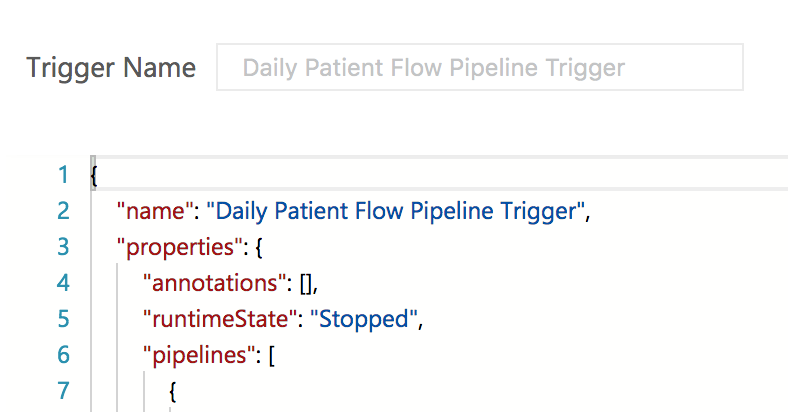
This image is from the Data Factory UI and contains the properties wrapper around the trigger definition. _Other_ resources like Pipelines and Linked Services have this properties wrapper.
aarondwest
on 15 Jul 2019
@aaronkensci Our UI is showing the json as-is - the properties are part of the model, which you can see in the swagger.
https://github.com/Azure/azure-rest-api-specs/blob/master/specification/datafactory/resource-manager/Microsoft.DataFactory/stable/2018-06-01/entityTypes/Trigger.json#L13
hvermis
on 16 Jul 2019
Thank you for the prompt response @hvermis. Please understand that I have no context on where the Swagger definitions for Azure resources are used.
To simplify the problem, I'd like to understand why this workflow fails.
1) I create a trigger in Azure Data Factory.
2) I copy paste the JSON code of that trigger using the Data Factory UI.
3) I use the Azure SDK to create_or_update the trigger using the JSON I got from the UI.
4) Create or update fails with msrest.exceptions.ValidationError: Parameter 'ScheduleTrigger.recurrence' can not be None.
I can do the exact same thing with the Pipeline JSON and it works just fine.
If I remove the properties property from my Trigger JSON, the create_or_update command succeeds. Do you understand my confusion as to why an Azure SDK user would need to edit the JSON for Triggers but _not_ for Pipelines?
aarondwest
on 17 Jul 2019
Related issues
 smereczynski
·
4Comments
smereczynski
·
4Comments
 vnimbalkar
·
4Comments
vnimbalkar
·
4Comments
 lumigogogo
·
3Comments
lumigogogo
·
3Comments
 jmlero
·
3Comments
jmlero
·
3Comments
 Koppens
·
4Comments
Koppens
·
4Comments
Most helpful comment
Thank you for opening this issue! We are routing it to the appropriate team for follow up.