Azure-sdk-for-net: [QUESTION] Why do the Track 2 SDKs not support targeting .NET Core 2.0?
Describe the bug
Please provide the description of issue you're seeing.
When I open HDInsight service's solution via VS2017, I can't build this solution, I get the bellow error
Severity    Code    Description Project File    Line    Suppression State
Error       The current .NET SDK does not support targeting .NET Core 2.0.  Either target .NET Core 1.1 or lower, or use a version of the .NET SDK that supports .NET Core 2.0. Microsoft.Azure.Management.HDInsight.Tests  C:\Program Files (x86)\Microsoft Visual Studio\2017\Professional\MSBuild\Sdks\Microsoft.NET.Sdk\build\Microsoft.NET.TargetFrameworkInference.targets    112
Expected behavior
What is the expected behavior?
The expected behavior is that there is not error when I open HDInsight service's solution
Actual behavior (include Exception or Stack Trace)
What is the actual behavior?
There is error when I open HDInsight's solution.
The current .NET SDK does not support targeting .NET Core 2.0. Either target .NET Core 1.1 or lower, or use a version of the .NET SDK that supports .NET Core 2.0.
To Reproduce
Steps to reproduce the behavior (include a code snippet, screenshot, or any additional information that might help us reproduce the issue)
- Check the latest source code
- Open HDInsight service's solution with VS2017
Environment:
- Name and version of the Library package used: [e.g. Azure.Storage.Blobs 12.2.0]
- Hosting platform or OS and .NET runtime version (
dotnet --infooutput for .NET Core projects): [e.g. Azure AppService or Windows 10 .NET Framework 4.8]
dotnet --info

.NET Core SDK (reflecting any global.json):
 Version:   3.1.403
 Commit:    9e895200cd

Runtime Environment:
 OS Name:     Windows
 OS Version:  10.0.18363
 OS Platform: Windows
 RID:         win10-x64
 Base Path:   C:\Program Files\dotnet\sdk\3.1.403\

Host (useful for support):
  Version: 3.1.9
  Commit:  774fc3d6a9

.NET Core SDKs installed:
  1.0.1 [C:\Program Files\dotnet\sdk]
  1.0.4 [C:\Program Files\dotnet\sdk]
  1.1.14 [C:\Program Files\dotnet\sdk]
  2.1.202 [C:\Program Files\dotnet\sdk]
  2.1.508 [C:\Program Files\dotnet\sdk]
  2.1.512 [C:\Program Files\dotnet\sdk]
  2.1.519 [C:\Program Files\dotnet\sdk]
  2.1.801 [C:\Program Files\dotnet\sdk]
  2.2.108 [C:\Program Files\dotnet\sdk]
  2.2.401 [C:\Program Files\dotnet\sdk]
  3.1.403 [C:\Program Files\dotnet\sdk]

.NET Core runtimes installed:
  Microsoft.AspNetCore.All 2.1.12 [C:\Program Files\dotnet\shared\Microsoft.AspNetCore.All]
  Microsoft.AspNetCore.All 2.1.16 [C:\Program Files\dotnet\shared\Microsoft.AspNetCore.All]
  Microsoft.AspNetCore.All 2.1.23 [C:\Program Files\dotnet\shared\Microsoft.AspNetCore.All]
  Microsoft.AspNetCore.All 2.2.6 [C:\Program Files\dotnet\shared\Microsoft.AspNetCore.All]
  Microsoft.AspNetCore.App 2.1.12 [C:\Program Files\dotnet\shared\Microsoft.AspNetCore.App]
  Microsoft.AspNetCore.App 2.1.16 [C:\Program Files\dotnet\shared\Microsoft.AspNetCore.App]
  Microsoft.AspNetCore.App 2.1.23 [C:\Program Files\dotnet\shared\Microsoft.AspNetCore.App]
  Microsoft.AspNetCore.App 2.2.6 [C:\Program Files\dotnet\shared\Microsoft.AspNetCore.App]
  Microsoft.AspNetCore.App 3.1.9 [C:\Program Files\dotnet\shared\Microsoft.AspNetCore.App]
  Microsoft.NETCore.App 1.0.4 [C:\Program Files\dotnet\shared\Microsoft.NETCore.App]
  Microsoft.NETCore.App 1.0.16 [C:\Program Files\dotnet\shared\Microsoft.NETCore.App]
  Microsoft.NETCore.App 1.1.1 [C:\Program Files\dotnet\shared\Microsoft.NETCore.App]
  Microsoft.NETCore.App 1.1.13 [C:\Program Files\dotnet\shared\Microsoft.NETCore.App]
  Microsoft.NETCore.App 2.0.9 [C:\Program Files\dotnet\shared\Microsoft.NETCore.App]
  Microsoft.NETCore.App 2.1.12 [C:\Program Files\dotnet\shared\Microsoft.NETCore.App]
  Microsoft.NETCore.App 2.1.16 [C:\Program Files\dotnet\shared\Microsoft.NETCore.App]
  Microsoft.NETCore.App 2.1.23 [C:\Program Files\dotnet\shared\Microsoft.NETCore.App]
  Microsoft.NETCore.App 2.2.6 [C:\Program Files\dotnet\shared\Microsoft.NETCore.App]
  Microsoft.NETCore.App 3.1.9 [C:\Program Files\dotnet\shared\Microsoft.NETCore.App]
  Microsoft.WindowsDesktop.App 3.1.9 [C:\Program Files\dotnet\shared\Microsoft.WindowsDesktop.App]

To install additional .NET Core runtimes or SDKs:
  https://aka.ms/dotnet-download
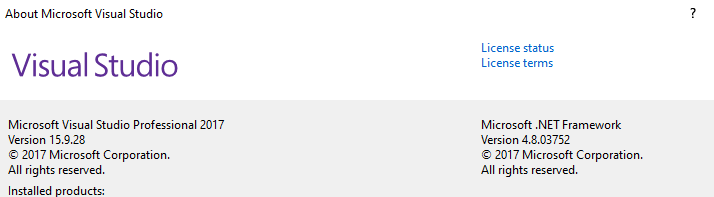
- IDE and version : [e.g. Visual Studio 16.3]
 aim-for-better
All 8 comments
Every service's solution has the same issue.
aim-for-better
on 9 Nov 2020
If I use VS2019, then there is not this error.
aim-for-better
on 9 Nov 2020
I'll defer to @tg-msft and @KrzysztofCwalina for discussion of why these specific target frameworks were chosen.
If you're interested in working with Visual Studio 2017 or targeting earlier versions of the language, this sample may be helpful.
 jsquire
on 9 Nov 2020
jsquire
on 9 Nov 2020
Some of our tooling requires 2019 and we document that requirement at https://github.com/Azure/azure-sdk-for-net/blob/master/CONTRIBUTING.md#prerequisites. @chidozieononiwu might remember why?
All of our libraries are .NET Standard 2.0 which works fine for customers running .NET Core 2.0.
 tg-msft
on 9 Nov 2020
tg-msft
on 9 Nov 2020
This issue seems to be a result of us pinning an SDK version in global.json. To get past this just go ahead an remove the sdk section of the global.json file and the correct SDK compatible with VS 2017 will be selected. @weshaggard Do you see any other issues with this?
 chidozieononiwu
on 10 Nov 2020
chidozieononiwu
on 10 Nov 2020
There are number of features in the later .NET Core SDK that aren't supported in VS 2017. In particular the minimal LTS version of .NET Core is 2.1 and requires VS 2019. To work on our libraries you should please update to VS2019 and follow the other prerequisites listed at https://github.com/Azure/azure-sdk-for-net/blob/master/CONTRIBUTING.md#prerequisites.
 weshaggard
on 10 Nov 2020
weshaggard
on 10 Nov 2020
Hi, we're sending this friendly reminder because we haven't heard back from you in 7 days. We need more information about this issue to help address it. Please be sure to give us your input. If we don't hear back from you within 14 days of this comment the issue will be automatically closed. Thank you!
![msftbot[bot] picture](https://avatars2.githubusercontent.com/in/26612?v=4&s=40) msftbot[bot]
on 17 Nov 2020
msftbot[bot]
on 17 Nov 2020
It would seem the discussion has tapered off and there's an authoritative answer. I'm going to close this out; please feel free to reopen if you would like to discuss further.
jsquire
on 17 Nov 2020
Related issues
 svengeance
·
30Comments
svengeance
·
30Comments
 gregmus
·
34Comments
jsquire
·
39Comments
jsquire
·
25Comments
gregmus
·
34Comments
jsquire
·
39Comments
jsquire
·
25Comments
 nphmuller
·
32Comments
nphmuller
·
32Comments