Azure-sdk-for-net: Microsoft.Azure.Search 5.0.2 high memory usage
We're seeing high web server memory usage when using version _5.0.2_ of the Microsoft.Azure.Search package. Reverting back to _5.0.1_ seems to resolve the issue. The app in question is deployed to an Azure web app running in an ASEv2.
Anyone else experiencing this issue?
 jonasbutt
All 22 comments
@jonasbutt There were no code changes in version 5.0.2, just documentation changes. The only material change is that the minimum required versions of Microsoft.Rest.ClientRuntime and Microsoft.Rest.ClientRuntime.Azure went up (from 2.3.11 to 2.3.12 and from 3.3.12 to 3.3.13, respectively). Are you observing similar issues with other Azure .NET SDKs with the same dependencies?
@shahabhijeet Is there a known issue with high memory usage in the latest version of ClientRuntime?
 brjohnstmsft
on 20 Aug 2018
brjohnstmsft
on 20 Aug 2018
This was the first time we experienced this type of memory issue with the Azure SDK.
This was the diff to fix our issue:

jonasbutt
on 21 Aug 2018
@jonasbutt without knowing what your scenario is, it's hard to even recommend/suggest you any workaround.
Can you let me know how can I repro this issue, but in the mean time, can you upgrade your ClientRuntime reference to the latest package version and see if that resolves the issue.
 shahabhijeet
on 21 Aug 2018
shahabhijeet
on 21 Aug 2018
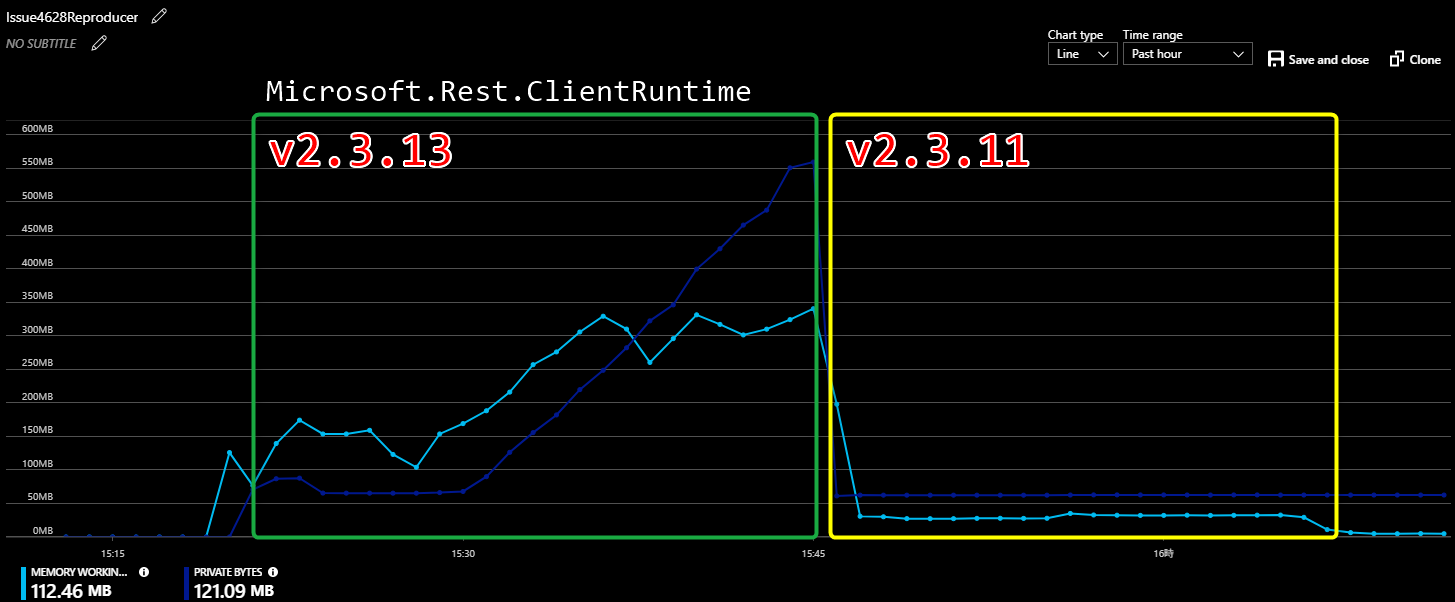
In my Web App with Search SDK, Microsoft.Rest.ClientRuntime 2.3.12 or above shows memory usage increasing constantly, and Private Memory never released.

 KimihikoSaito
on 28 Aug 2018
KimihikoSaito
on 28 Aug 2018
@KimihikoSaito -- Thanks for the data. @shahabhijeet -- Can you please investigate?
brjohnstmsft
on 28 Aug 2018
I tested again with an Web App with ASP.NET MVC project it has single controller and single action method below.
And issued GET requests (1req / 100ms) about 15 minutes.
Microsoft.Rest.ClientRuntime v2.3.13 seems it has memory leak issue.
```
public class HomeController : Controller
{
private static readonly String SearchServiceName = ConfigurationManager.AppSettings["AzureSearchServiceName"];
private static readonly String SearchIndexName = ConfigurationManager.AppSettings["AzureSearchIndexName"];
private static readonly String SearchServiceQueryKey = ConfigurationManager.AppSettings["AzureSearchQueryKey"];
private static readonly SearchIndexClient SearchClient = new SearchIndexClient(SearchServiceName, SearchIndexName, new SearchCredentials(SearchServiceQueryKey));
private static String DocumentID => "4994dbe4-4ba6-4838-9474-2cf8de355a78";

[Route("")]
public async Task<ActionResult> Index()
{
    var document = await SearchClient.Documents.GetAsync<Document>(DocumentID);
    return new HttpStatusCodeResult(HttpStatusCode.NoContent);
}
}
KimihikoSaito
on 28 Aug 2018
Great work with regards to the reproduction steps @KimihikoSaito
jonasbutt
on 28 Aug 2018
@jonasbutt @KimihikoSaito I am going to add this to our backlog and will get this investigated and fixed in our next release.
Next release will happen within a month. Will update once I know the exact date.
shahabhijeet
on 30 Aug 2018
I have noticed a similar issue in our code.
We dived in using JetBrains dotMemory and noticed that the default RetryDelegatingHandler in the client appears to keep a hold of every request and response that goes through the client; quickly inflating the memory usage of the client. From what I saw by decompiling the code, the bug appears to be that inside RetryDelegatingHandler.SendAsync, an event is registered on this.RetryPolicy.Retrying which I believe is never unregistered. This event handler will capture both the response and the request.
Here's a screenshot of what the memory looks like around those retry policies and what lead me to believe that they are not disposed correctly:
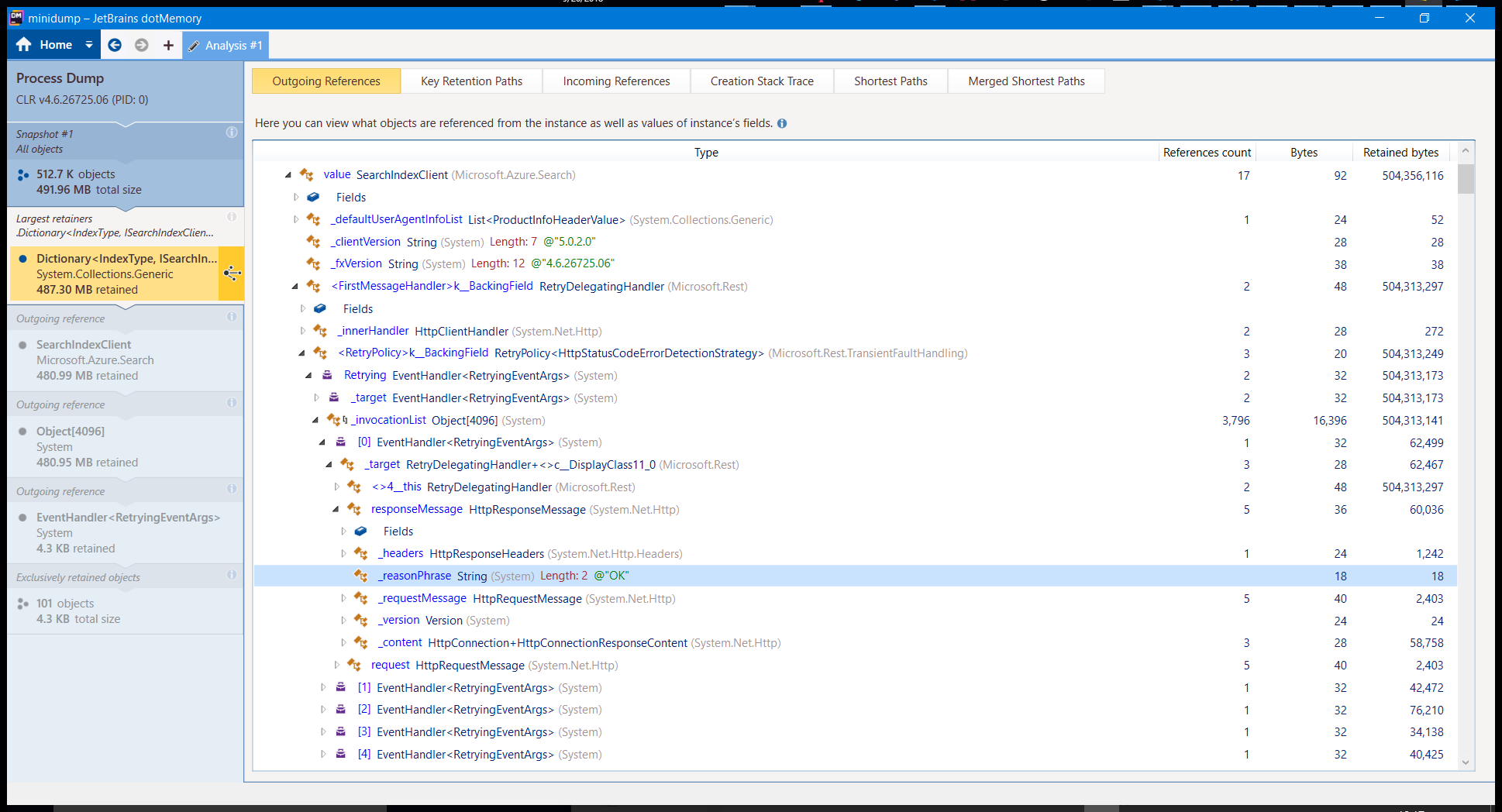
In this screenshot, you can see that a handler is still holding onto a request, even though its response came back with a HTTP 200 status code.
 kawazoe
on 20 Sep 2018
kawazoe
on 20 Sep 2018
@kawazoe Thanks for this analysis!
@shahabhijeet Does this help? Any ETA on a fix?
brjohnstmsft
on 20 Sep 2018
@brjohnstmsft the fix has been published on nuget.org, you will need the following components
shahabhijeet
on 2 Oct 2018
@kawazoe @jonasbutt @KimihikoSaito Can you try upgrading to the latest versions of Microsoft.Rest.ClientRuntime and Microsoft.Rest.ClientRuntime.Azure and let us know if that helps?
brjohnstmsft
on 2 Oct 2018
I just tried the latest version of both packages and it seems to fix our problem. Memory is now GCed as expected.
kawazoe
on 10 Oct 2018
@kawazoe Thanks for the confirming. We'll release a new version of the Azure Search SDK that references the new ClientRuntime libraries soon.
brjohnstmsft
on 15 Oct 2018
The new version of Microsoft.Azure.Search that points to the updated ClientRuntime packages is now available on NuGet.
brjohnstmsft
on 4 Nov 2018
@brjohnstmsft
I'm a colleague of @jonasbutt, and we have tried the lastest version of both packages, and indeed, I can confirm the fixes seems to be fixed.
 maartenoosterhoff
on 12 Nov 2018
maartenoosterhoff
on 12 Nov 2018
We are using the 5.0.3 with restclient 2.3.17 and RestClientAzure 3.3.18 but the memory leak is still there
Last 24hs

 fabiomaulo
on 25 Nov 2018
fabiomaulo
on 25 Nov 2018
AZ 200 Certificate? any suggestion on this
 brijesh1ec
on 25 Nov 2018
brijesh1ec
on 25 Nov 2018
@fabiomaulo Can you try Search 5.0.3 with ClientRuntime 2.3.11 and ClientRuntime.Azure 3.3.12? That will help us to isolate the problem. If you still see the issue, does it go away if you downgrade Search to 5.0.1?
@brijesh1ec I'm not sure what you're asking.
brjohnstmsft
on 26 Nov 2018
Ok Bruce, I'll try before with 5.0.1 and then 5.0.3 overriding the version of clientRuntime.
Just give me a few days to organize the "_Fire in the hole_" version of that API.
P.D. For the vNext of the SDK, please, use netstandard2.0 instead of 1.4 (there is a known issue with System.Net.Http when you mix with fullFW).
fabiomaulo
on 27 Nov 2018
@fabiomaulo The target framework for all Azure .NET SDKs is managed centrally, so the Search SDK will support netstandard2.0 when the rest of the Azure SDKs do. There's a discussion about this here.
brjohnstmsft
on 27 Nov 2018
@fabiomaulo Any news?
maartenoosterhoff
on 13 Dec 2018
Related issues
 cannehag
·
4Comments
cannehag
·
4Comments
 yhuangf
·
3Comments
yhuangf
·
3Comments
 vladbarosan
·
4Comments
vladbarosan
·
4Comments
 PejmanNik
·
4Comments
PejmanNik
·
4Comments
 ohadschn
·
3Comments
ohadschn
·
3Comments
Most helpful comment
The new version of Microsoft.Azure.Search that points to the updated
ClientRuntimepackages is now available on NuGet.