Azure-sdk-for-net: AppAuthentication Can't retrieve tokens via Azure CLI or VS when debugging a web app in IIS
When we debug a web app configured to run in IIS in Visual Studio, the AppAuthentication library fails to retrieve tokens, as it seems to resolve the user profile directory as "C:\WINDOWS\system32\config\systemprofile" instead of the user running Visual Studio or the user that IIS app pool is running as. Would there be anything that can be done to alleviate this issue? Thanks!
 vludax
All 12 comments
I tried this out, and if the app pool in IIS for the web app is configured to run as your current user account, it worked fine for me. I tried both Visual Studio and Azure CLI and was able to get token using both. I tired using a .NET Framework Web application.
Are you sure you configured app pool to run under the correct account? It should be the account you are logged into the machine as and running Visual Studio under.
For Visual Studio, AppAuthentication library gets the user profile path using “LOCALAPPDATA” environment variable. You can check the value of that variable on your machine to see if there is an issue there.
For Azure CLI, it does not directly use the user profile, but makes a process call to “az account get-access-token”.
 varunsh-msft
on 30 Jul 2018
varunsh-msft
on 30 Jul 2018
Hi @varunsh-msft ,
Thank you for getting back to us.
It is the fact that we run VS as admin that resolves "LOCALAPPDATA" as "C:\WINDOWS\system32\config\systemprofile". Azure CLI seems to be retrieving the same value, based on the inner errors it produces.
In order to run web application in IIS, we need to run Visual Studio as admin, otherwise the following message is displayed when we attempt to switch from IIS Express to IIS:
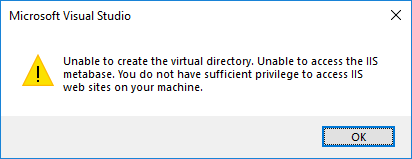
If we change the project to run in IIS as admin and then restart VS as non-admin, it fails to load the project:

The IIS app that we set the virtual path too does run as the same user that gets the above errors.
vludax
on 31 Jul 2018
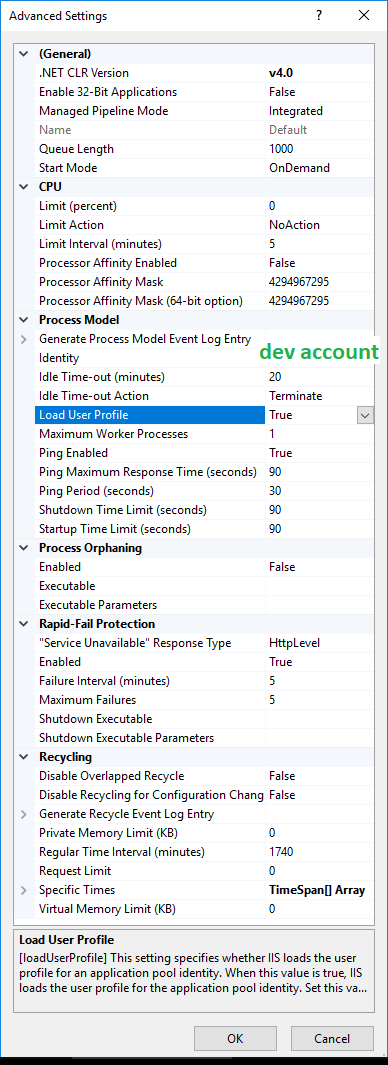
You can please set "Load User Profile" property to True in the app pool identity "Advanced settings"? That should fix it.
varunsh-msft
on 31 Jul 2018
I've check that setting, and it was already enabled (it's running on the default app pool). See screenshot below.
The following message is included in the thrown exception when we call GetAccessTokenAsync:
Parameters: Connectionstring: [No connection string specified], Resource: 5ed093e8-ed09-4822-a512-1d8af757b43e, Authority: . Exception Message: Tried to get token using Visual Studio. Access token could not be acquired. Visual Studio Token provider file not found at "C:\WINDOWS\system32\config\systemprofile\AppData\Local.IdentityService\AzureServiceAuthtokenprovider.json"
Parameters: Connectionstring: [No connection string specified], Resource: 5ed093e8-ed09-4822-a512-1d8af757b43e, Authority: . Exception Message: Tried to get token using Azure CLI. Access token could not be acquired. ERROR: Please run 'az login' to setup account.
Restarting the application in IIS Express while running VS as admin solves the problem.
vludax
on 1 Aug 2018
Any update on this? I have same problem exact and need my website running on my Local IIS when debugging in Visual Studio 2017
 JonasJes
on 14 Aug 2018
JonasJes
on 14 Aug 2018
I looked into this, and you can fix the issue by setting "setProfileEnvironment" to true.
https://docs.microsoft.com/en-us/iis/configuration/system.applicationhost/applicationpools/add/processmodel
_"When setProfileEnvironment is set to True, WAS creates an environment block to pass to CreateProcessAsUser when creating a worker process. This ensures that the environment is set based on the user profile for the new process."_
Steps:
- Go to %windir%\system32\inetsrv\config\applicationHost.config
- Search for setProfileEnvironment. If it is set to false, change it to true. If it is not present, add it to the processModel element in the application pool, and set it to true.
I tried these steps on Windows 10 with Visual Studio on a new Azure VM, and was able to run it after setting "setProfileEnvironment" to true.
varunsh-msft
on 22 Aug 2018
Hi @varunsh-msft, thank you for investigating the issue and suggesting the solution! We've tested it, and it worked as expected. We consider this issue to be resolved in our case.
vludax
on 22 Aug 2018
Thanks! Can you please close the issue then?
varunsh-msft
on 22 Aug 2018
I have the same issue and the same fix worked, but I'm confused as to why this is. The documentation for the applicationHost.config file states that setProfileEnvironment defaults to true when not specified.
 paulhickman-a365
on 29 Aug 2018
paulhickman-a365
on 29 Aug 2018
@varunsh-msft the "setProfileEnvironment" did not work for us. Like vludax, it runs fine in IIS Express. We are running VS 2017 as administrator in order to run in IIS. I'm wondering if it has something to do with the fact we are only using Azure Active Directory (not on-prem/full AD > machine not joined to the domain, etc). We login to our dev machines via our Azure Active Directory credentials. Thoughts?
Microsoft.Azure.Services.AppAuthentication.AzureServiceTokenProviderException
HResult=0x80131500
Message=Parameters: Connection String: [No connection string specified], Resource: https://vault.azure.net, Authority: https://login.windows.net/c191f8c9-b4cb-47de-971b-dc01ee887392. Exception Message: Tried the following 4 methods to get an access token, but none of them worked.
Parameters: Connection String: [No connection string specified], Resource: https://vault.azure.net, Authority: https://login.windows.net/c191f8c9-b4cb-47de-971b-dc01ee887392. Exception Message: Tried to get token using Managed Service Identity. Unable to connect to the Managed Service Identity (MSI) endpoint. Please check that you are running on an Azure resource that has MSI setup.
Parameters: Connection String: [No connection string specified], Resource: https://vault.azure.net, Authority: https://login.windows.net/c191f8c9-b4cb-47de-971b-dc01ee887392. Exception Message: Tried to get token using Visual Studio. Access token could not be acquired. Visual Studio Token provider file not found at "C:\Windows\ServiceProfiles\NetworkService\AppData\Local.IdentityService\AzureServiceAuthtokenprovider.json"
Parameters: Connection String: [No connection string specified], Resource: https://vault.azure.net, Authority: https://login.windows.net/c191f8c9-b4cb-47de-971b-dc01ee887392. Exception Message: Tried to get token using Azure CLI. Access token could not be acquired. 'az' is not recognized as an internal or external command,
operable program or batch file.
Parameters: Connection String: [No connection string specified], Resource: https://vault.azure.net, Authority: https://login.windows.net/c191f8c9-b4cb-47de-971b-dc01ee887392. Exception Message: Tried to get token using Active Directory Integrated Authentication. Access token could not be acquired. Failed to get user name from the operating system.Inner Exception : No mapping between account names and security IDs was done
Source=Microsoft.Azure.Services.AppAuthentication
StackTrace:
at Microsoft.Azure.Services.AppAuthentication.AzureServiceTokenProvider.d__14.MoveNext()
at System.Runtime.ExceptionServices.ExceptionDispatchInfo.Throw()
at System.Runtime.CompilerServices.TaskAwaiter.HandleNonSuccessAndDebuggerNotification(Task task)
at Microsoft.Azure.Services.AppAuthentication.AzureServiceTokenProvider.<b__8_0>d.MoveNext()
at System.Runtime.ExceptionServices.ExceptionDispatchInfo.Throw()
at System.Runtime.CompilerServices.TaskAwaiter.HandleNonSuccessAndDebuggerNotification(Task task)
at Microsoft.Azure.KeyVault.KeyVaultCredential.d__11.MoveNext()
at System.Runtime.ExceptionServices.ExceptionDispatchInfo.Throw()
at System.Runtime.CompilerServices.TaskAwaiter.HandleNonSuccessAndDebuggerNotification(Task task)
at Microsoft.Azure.KeyVault.KeyVaultCredential.d__13.MoveNext()
at System.Runtime.ExceptionServices.ExceptionDispatchInfo.Throw()
at System.Runtime.CompilerServices.TaskAwaiter.HandleNonSuccessAndDebuggerNotification(Task task)
at Microsoft.Azure.KeyVault.KeyVaultClient.d__66.MoveNext()
at System.Runtime.ExceptionServices.ExceptionDispatchInfo.Throw()
at System.Runtime.CompilerServices.TaskAwaiter.HandleNonSuccessAndDebuggerNotification(Task task)
at Microsoft.Azure.KeyVault.KeyVaultClientExtensions.d__50.MoveNext()
at System.Runtime.ExceptionServices.ExceptionDispatchInfo.Throw()
at System.Runtime.CompilerServices.TaskAwaiter.HandleNonSuccessAndDebuggerNotification(Task task)
at System.Runtime.CompilerServices.TaskAwaiter`1.GetResult()
 wjchristenson2
on 26 Feb 2019
wjchristenson2
on 26 Feb 2019
@wjchristenson2 did you get this figured out?
 dgliwa
on 7 Dec 2019
dgliwa
on 7 Dec 2019
@dgliwa no we did not. I believe it has to do with the fact that our machines are not joined to a domain (classic) - we are logging into azure AD/hybrid. As a result, the IIS/app pool process is not running under the AD credentials needed to authenticate to AKV.
wjchristenson2
on 7 Dec 2019
Related issues
 yhuangf
·
3Comments
yhuangf
·
3Comments
 realrubberduckdev
·
3Comments
realrubberduckdev
·
3Comments
 msfcolombo
·
4Comments
msfcolombo
·
4Comments
 Assassinbeast
·
3Comments
Assassinbeast
·
3Comments
 tudort-iquest
·
3Comments
tudort-iquest
·
3Comments
Most helpful comment
I looked into this, and you can fix the issue by setting "setProfileEnvironment" to true.
https://docs.microsoft.com/en-us/iis/configuration/system.applicationhost/applicationpools/add/processmodel
_"When setProfileEnvironment is set to True, WAS creates an environment block to pass to CreateProcessAsUser when creating a worker process. This ensures that the environment is set based on the user profile for the new process."_
Steps:
I tried these steps on Windows 10 with Visual Studio on a new Azure VM, and was able to run it after setting "setProfileEnvironment" to true.