Azure-sdk-for-js: Potential Leak in long running node processes
npm info @azure/keyvault-secrets
@azure/[email protected] | MIT | deps: 6 | versions: 4
Isomorphic client library for Azure KeyVault's secrets.
https://github.com/Azure/azure-sdk-for-js#readme
keywords: node, azure, typescript, browser, isomorphic, keyvault
dist
.tarball: https://registry.npmjs.org/@azure/keyvault-secrets/-/keyvault-secrets-4.0.0-preview.4.tgz
.shasum: 6b85728dfc5249f0f3b351fa572323e1a27e4e4a
.integrity: sha512-xOC+JwODcsTr62ng10uU6+6nEaf+gyR55ZosWBKYt0haoFJP/2RcEI5OS5I1H/unEwMGSePiosIqNvRHjwdTfA==
.unpackedSize: 1.9 MB
dependencies:
@azure/abort-controller: 1.0.0-preview.1 @azure/core-http: 1.0.0-preview.2 @azure/identity: 1.0.0-preview.2
@azure/core-arm: 1.0.0-preview.2 @azure/core-paging: 1.0.0-preview.1 tslib: ^1.9.3
maintainers:
- azure-sdk azure-sdk-npmjs@microsoft.com
- mikeharder mharder@microsoft.com
dist-tags:
latest: 4.0.0-preview.4 next: 4.0.0-preview.4
published 3 weeks ago by azure-sdk azure-sdk-npmjs@microsoft.com
Describe the bug
Our Auth service has a pattern where it will consume more and more resources until it is killed by liveness probe failure in our cluster.
We suspected @azure/keyvault-secrets so we build a very simple script (below) to confirm.
As you can see, over the course of 30 minutes+ your round trip time to interact with kevault will increase until it is no longer usable.
To Reproduce
100% Reproducible in all environments. Steps to reproduce the behavior:
- save the following code and run it in node or pm2
const {DefaultAzureCredential} = require('@azure/identity');
const {SecretsClient} = require('@azure/keyvault-secrets');

function sleep (time) {
  return new Promise((resolve) => setTimeout(resolve, time));
}

const config = {
  AZURE_KEY_VAULT_URI: process.env.AZURE_KEY_VAULT_URI,
  AZURE_CREDENTIALS: new DefaultAzureCredential(),
};

const ITERATIONS = 50000;

async function main() {
  for (let i = 0; i < ITERATIONS; i += 1) {
    let secrets = new SecretsClient(config.AZURE_KEY_VAULT_URI, config.AZURE_CREDENTIALS);
    try {
      let stime = Date.now();
      await secrets.setSecret("key", "value");
      let secret = await secrets.getSecret("key");
      let etime = Date.now();
      console.log(i, secret.value, etime-stime);
    } catch (err) {
      console.log("------------");
      console.log("ERROR");
      console.log(err);
      console.log("------------");
      await sleep(200);
    }
  }
}


main();
- Run script.
Expected behavior
Each iteration of the above script should be relatively atomic. Round trip time should not increase over time
Screenshots
Application after running for less than a minute
https://imgur.com/KLX5BGl
Application after running for 100+ minutes
https://imgur.com/Sj6Jfjs
``
 dmattatall-teradici
All 8 comments
@dmattatall-teradici: Thanks for the detailed description, we will try to reproduce this.
 mikeharder
on 5 Sep 2019
mikeharder
on 5 Sep 2019
Thanks,
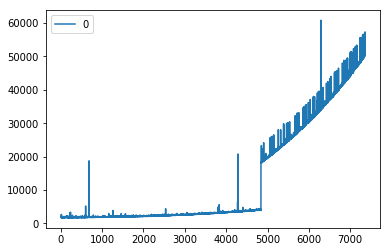
There is also a very strange beheviour that after ~4800 iterations, the latency just shoots up.
I've attached a graph and log output of a node process manager.
dmattatall-teradici
on 5 Sep 2019
@dmattatall-teradici: I think you will need to add the attachments to the issue via the web UI. It appears the email-reply-to-issue bridge doesn't support email attachments.
mikeharder
on 5 Sep 2019
Graph Showing "jump"
Logs showing "jump" after 4840 iterations
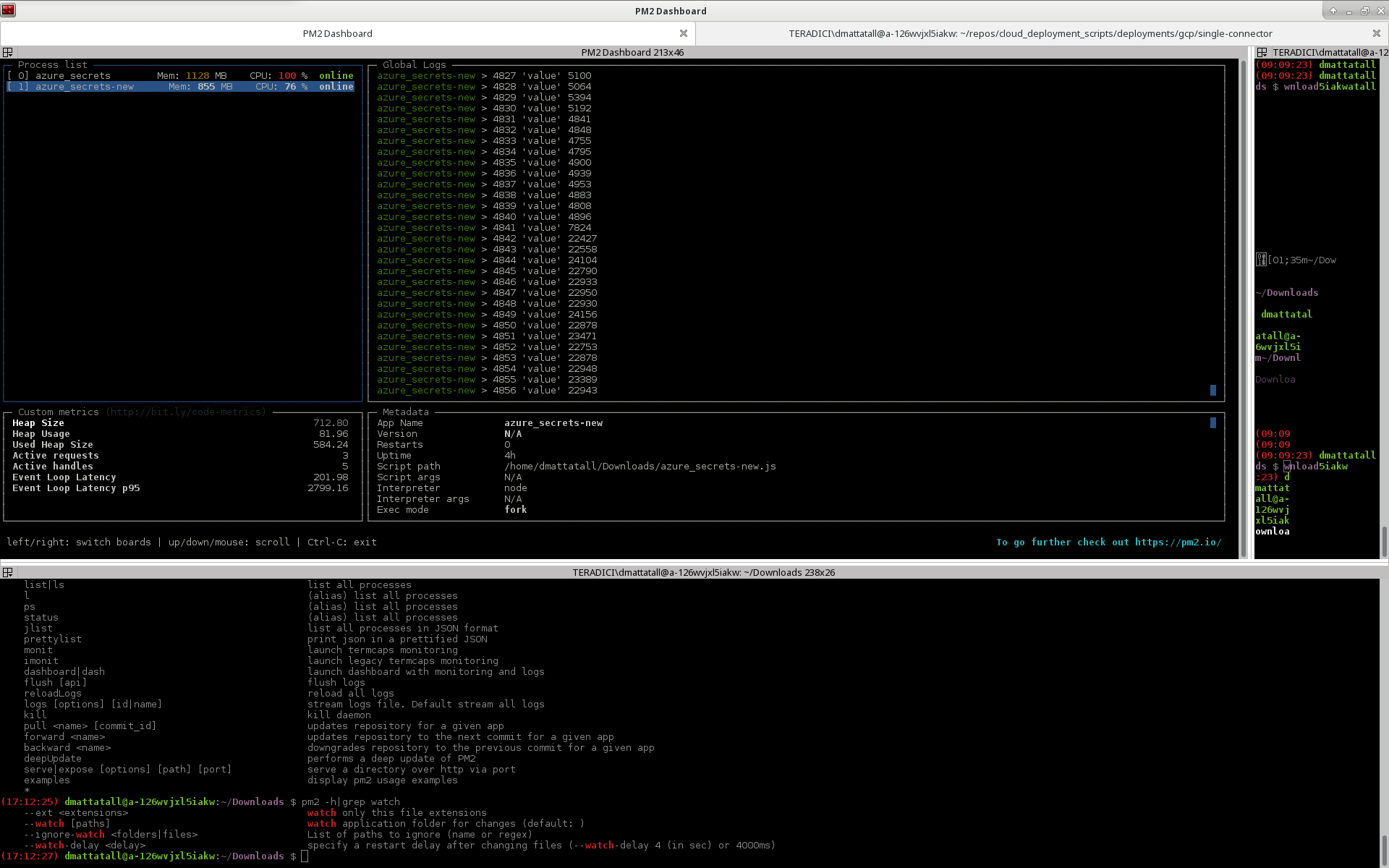
These were two independent runs on two different machines in two different networks. The keyvault itself shows no correlated slowdown.
If the client process is restarted the latency drops down to how it's supposed to be.
dmattatall-teradici
on 5 Sep 2019
@dmattatall-teradici: We believe we are able to reproduce the increase in latency you are seeing. We are still investigating the root cause, and it may take up to several days.
mikeharder
on 6 Sep 2019
@dmattatall-teradici: We believe this is fixed in our master branch, and the fix should be included in our next preview release. If you would like to test the fix sooner, you can manually download and install the packages from our CI server:
- Browse to https://dev.azure.com/azure-sdk/public/_build?definitionId=614&_a=summary
- Select the latest successful build of master (currently https://dev.azure.com/azure-sdk/public/_build/results?buildId=104343&view=results)
- Under "Artifacts:" click "3 published"
- Hover over "packages", and click the down arrow at the right side of the screen. This downloads a zipfile of latest packages.
- Unzip
packages.zip - Manually install the new packages into your application by running
npm install <tarball file>. You will need the following packages:
@azure/[email protected]@azure/[email protected]@azure/[email protected]@azure/[email protected]@azure/[email protected]@azure/[email protected]@azure/[email protected]
- Update your
package.jsonto use these versions
mikeharder
on 7 Sep 2019
Thanks for working with Microsoft on GitHub! Tell us how you feel about your experience using the reactions on this comment.
![msftbot[bot] picture](https://avatars.githubusercontent.com/in/26612?v=4&s=40) msftbot[bot]
on 7 Sep 2019
msftbot[bot]
on 7 Sep 2019
I can confirm this has resolved the issue!
Thanks @mikeharder for the diligent work!
dmattatall-teradici
on 9 Sep 2019
Related issues
 AElharouny
·
4Comments
AElharouny
·
4Comments
 ahmedspiir
·
3Comments
ahmedspiir
·
3Comments
 kaerm
·
4Comments
kaerm
·
4Comments
 isaacjoe
·
4Comments
isaacjoe
·
4Comments
 Ward6548
·
3Comments
Ward6548
·
3Comments
Most helpful comment
I can confirm this has resolved the issue!
Thanks @mikeharder for the diligent work!