Azure-sdk-for-java: [Feature Req] Allow configuring block size for BlobInputStream
Query/Question
What is the ideal way to download large blobs? If we use the normal download, then it would download into an in-memory buffer and can cause OutOfMemory issues, I presume. Another alternative is to download it to a file. I assume that this is the preferred approach.
But what about using the blob's input stream to download the blob? I think this downloads a chunk of data into a local buffer which is wrapped in an Input stream. Is this correct?
Why is this not a Bug or a feature Request?
Question about the best approach among already implemented features.
Setup (please complete the following information if applicable):
- OS: Ubuntu 18.04
- IDE : IntelliJ 19.1.4
- SDK: azure-storage-blob v12.7.0
Information Checklist
Kindly make sure that you have added all the following information above and checkoff the required fields otherwise we will treat the issuer as an incomplete report
- [x] Query Added
- [x] Setup information Added
 somanshreddy
All 9 comments
Hi, @somanshreddy. Thank you for your question. Downloading to a file is typically a good option when you're worried about memory constraints. Once the file is on disk, you can selectively read sections of it and free memory as necessary.
Using a BlobInputStream is also a good approach. You can control the block size, which specifies how much data is retrieved in each request to Storage. The tradeoff here is that you will be making more requests to Storage. This may slow down your application as we have to issue a new read request whenever the local buffer backing the stream is drained.
Finally, doing a straight download actually shouldn't apply too much memory pressure. The underlying http client uses pooled memory, so it at least won't grow without bound. If the client reads fast enough such that all the pooled memory is used, it will wait for some of those buffers to be released before reading more from the network stream. Having said that, managing large downloads in a single stream can be tricky because of errors that might interrupt the stream for a variety of reasons. We do have a mechanism to help with that which will attempt to automatically resume a download from where it left off, but it can't prevent these errors entirely.
Please let me know if you have further questions.
 rickle-msft
on 2 Sep 2020
rickle-msft
on 2 Sep 2020
@rickle-msft For BlobInputStream, can we control the block size? I see in the v12.7.0 SDK that the Chunk size is fixed ( 4 KB ) in the constructor of BlobInputStream. Also, more requests would of course result in higher latency, but I assume there is a monetary cost associated as well? Would a GET on a Blob of 8 KB result in being billed for 2 GETs ( if block size is 4 KB ) ?
For the straight download, you mentioned the buffers being released. Forgive me for my lack of knowledge in this area. How would the buffers be released?
somanshreddy
on 2 Sep 2020
@somanshreddy Looks like you're right about it being fixed, though I think it's actually fixed at 4mb. I thought we had already updated that, but seems my memory failed. If you would like to make that feature request, I can bring that up to my team.
As far as pricing, you can see more details here, but from what I'm gathering, you aren't actually charged for reading data, only the networking costs associated with it, and that is billed based on throughput, not number of requests. All that is to say, I don't think the number of requests you make to read your data should affect billing, only the amount of data you're reading.
Apologies for using some unnecessary jargon. Basically once you consume them, they should get automatically released. My point there is that your memory usage in doing a simple download should be constrained by the size of the buffer pool and not grow without bound to match the size of your blob.
rickle-msft
on 2 Sep 2020
@rickle-msft Oops, that is right. It is 4 MB. Not sure why I was fixated on KB in my head :)
Yes, I think that it would be a useful feature. Since this method takes care of handling the offsets with its internal Ranged GETs.
As for the pricing, the costs are per 10,000 requests. And since the BlobInputStream internally calls the Ranged GET, I assume that would be charged as a new request every time the local buffer is emptied?
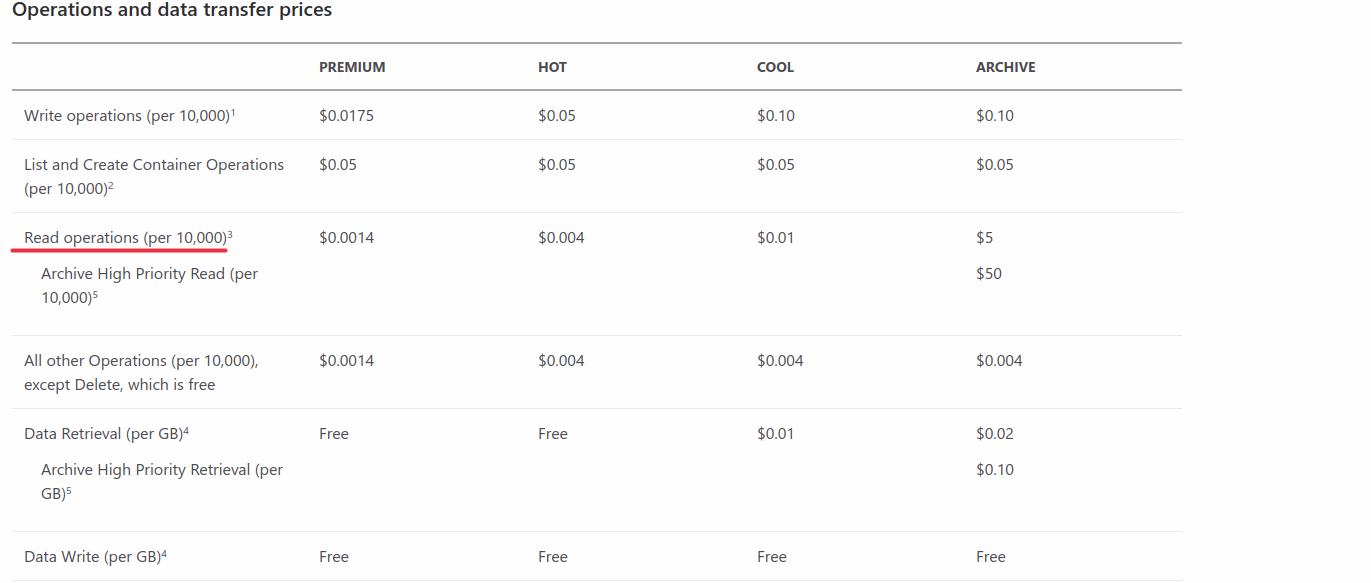
Hmm. For the simple download, that is only if we consume them, right? But if we have the below,
ByteArrayOutputStream outputStream = new ByteArrayOutputStream();
blob.download(outputStream);
then the download would behave as a blocking call and would attempt to load the blob into memory. What would be the expected behaviour if a blob is greater than 2^31 - 1 bytes, and hence cannot fit in the byte stream array?
somanshreddy
on 2 Sep 2020
@somanshreddy I've added the feature request tag for when we get to our next round of sdk features.
Ah. I missed that row :). Yes, so it would increase the number of transactions and hence the cost to use the BlobInputStream.
We don't take into account the stream we're writing to, so the expected behavior is just whatever ByteArrayOutputStream does when too much data is written to it, which seems unspecified in the javadocs. If you're concerned about overflowing the size of a byte array, I'd recommend using a different stream implementation
rickle-msft
on 2 Sep 2020
@rickle-msft Thank you for adding this as a feature request :+1:
Okay. I don't think there is an alternative to the byte stream unless we write it into a file? I just wanted to understand from the developers of the SDK, about what their intention was while adding the GET APIs and how they intended the download of large blobs.
somanshreddy
on 2 Sep 2020
I think when blobs reach the multi-GB size the pattern we typically see is to put it into a file before processing it locally. It ends up being faster because we can parallelize the download, and it doesn't have the same concerns around memory consumption. So that would be my recommendation.
rickle-msft
on 2 Sep 2020
Cool, thank you @rickle-msft . I appreciate the time you have taken to answer all my questions :1st_place_medal:
somanshreddy
on 2 Sep 2020
Absolutely! Our goal is to ensure you have as good an experience as possible using Azure Services and SDKs! I hope you have found the answers satisfactory, and please do let me know if you need anything else
rickle-msft
on 2 Sep 2020
Related issues
 algra4
·
4Comments
algra4
·
4Comments
 knutwannheden
·
4Comments
knutwannheden
·
4Comments
 thanhngo219
·
4Comments
thanhngo219
·
4Comments
 ronny-sphera
·
3Comments
ronny-sphera
·
3Comments
 jordanjennings
·
5Comments
jordanjennings
·
5Comments