Azure-sdk-for-java: [BUG] BlobAsyncClient.download() corrupts the file
Describe the bug
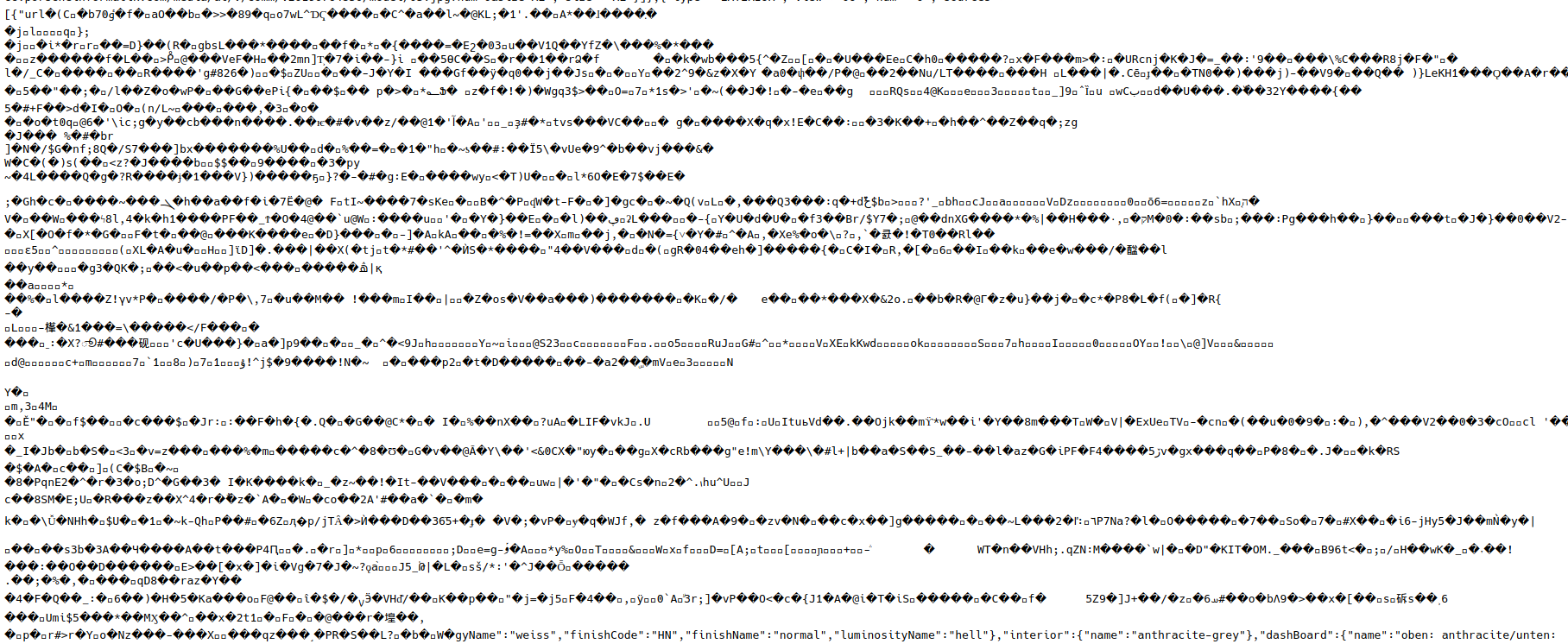
BlobAsyncClient.download() returns a corrupted data stream.
To Reproduce
Upload a file to azure storage and download it via the Java Async client.
Demo-Spring application to reproduce the problem (see also screeenshot how to use)
azure-dl.zip
In order to launch configure azure.endpoint either via commandline, application.properties or environment variable AZURE_ENDPOINT=, needs to be complete blob service URL including SAS token.
Note: to change the azure container name use azure.container, it defaults to test.
Code Snippet
@RestController
public class WebEndpoint {
    private final WebClient webClient;
    private final BlobContainerAsyncClient azureClient;

    public WebEndpoint(WebClient.Builder webClient,
                       BlobServiceAsyncClient azureClient,
                       @Value("${azure.container:test}") String container) {
        this.webClient = webClient.build();
        this.azureClient = azureClient.getBlobContainerAsyncClient(container);
    }

    @GetMapping("/download")
    public ResponseEntity<Flux<ByteBuffer>> download(
        @RequestParam("file") String filename,
        @RequestParam(value = "wc", defaultValue = "false") boolean useWebClient
    ) {
        return ResponseEntity.ok()
            .body(useWebClient ? webClientDownload(filename) : azureClientDownload(filename));
    }

    private Flux<ByteBuffer> webClientDownload(String filename) {
        return this.webClient.get()
            .uri(this.azureClient.getBlobAsyncClient(filename).getBlobUrl())
            .exchange()
            .flatMapMany(c -> c.body(BodyExtractors.toDataBuffers()))
            .map(DataBuffer::asByteBuffer);
    }

    private Flux<ByteBuffer> azureClientDownload(String filename) {
        return this.azureClient.getBlobAsyncClient(filename).download();
    }
}
Expected behavior
The file is not corrupt
Screenshots
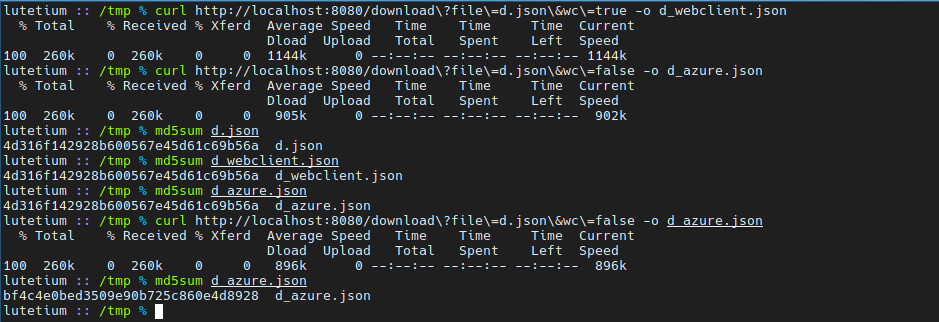
Running the code above:

Part of the corrupted file (in the middle):
Additional Info
This does also not work when using a different event loop as outlined in #7910
Buffering the whole flux before sending it doesn't change anything:
            .map(ByteBufferBackedInputStream::new)
            .buffer()
            .map(data -> new SequenceInputStream(Collections.enumeration(data)))
            .map(data -> {
                try {
                    return ByteBuffer.wrap(data.readAllBytes());
                } catch (IOException e) {
                    throw new RuntimeException(e);
                }
            })
Also neither delaySequence nor delayElements have an effect.
Setup (please complete the following information):
- OS: Archlinux
- IDE : IntelliJ
- Azure Client: 12.3.0
Information Checklist
Kindly make sure that you have added all the following information above and checkoff the required fields otherwise we will treat the issuer as an incomplete report
- [X] Bug Description Added
- [X] Repro Steps Added
- [X] Setup information Added
 Dav1dde
All 21 comments
@Dav1dde Thank you for reporting this. I seem to be missing a link in this workflow. You mention a corrupted file, but I don't see you writing to a file anywhere; I only see you calling download, which only goes to memory. Can you please share the code that writes data to the file or otherwise explain how you are comparing the downloaded data with the source?
 rickle-msft
on 6 Feb 2020
rickle-msft
on 6 Feb 2020
@rickle-msft the flux from download gets served by spring-webflux, as you can see in the screenshots I download it via curl and run md5sum on it, the hashes do not match (on the second download).
The demo I linked can reproduce this rather easily.
Dav1dde
on 6 Feb 2020
@rickle-msft maybe the screenshots helps:
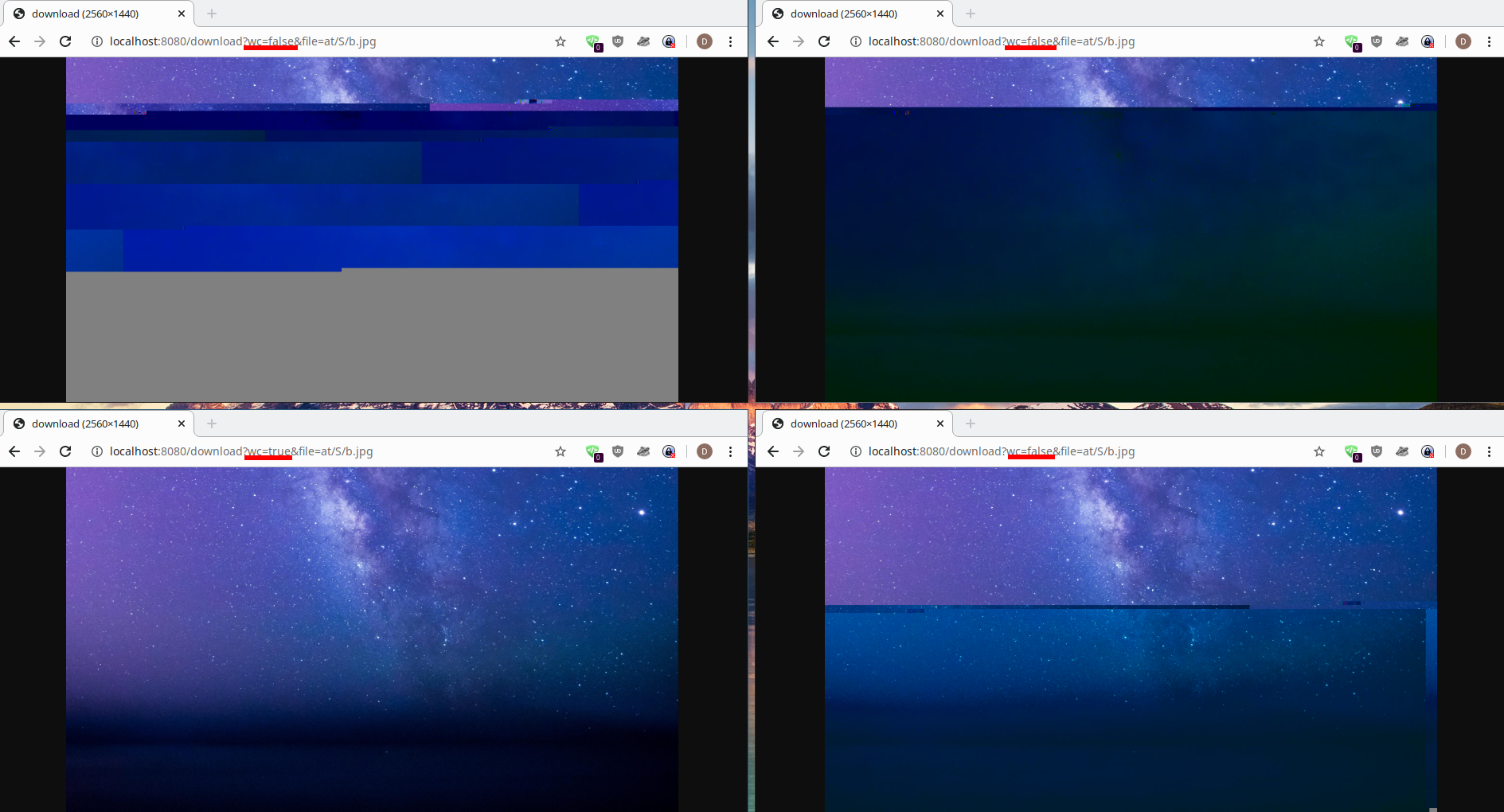
wc=true will use the Spring WebClient instead of the Azure async client's #download()
On localhost:8080 is the demo application running I uploaded above with just a slight change, which is completely unrelated to the corruption problem and is only in the wc=true codepath:
        String url = this.azureClient.getBlobContainerUrl() + "/" + filename;

        return this.webClient.get()
            .uri(url)
            .exchange()
            .filter(r -> r.statusCode() != HttpStatus.NOT_FOUND)
            .switchIfEmpty(Mono.error(new RuntimeException("Blob not found: " + url)))
            .flatMapMany(c -> c.body(BodyExtractors.toDataBuffers()))
            .map(DataBuffer::asByteBuffer);
The whole issue is quite scary, we're planing on storing millions of images which need to be preserved for probably a decade or more. There cannot be any data corruption, luckily this only happens when downloading instead of uploading.
Dav1dde
on 6 Feb 2020
@Dav1dde Thank you for the extra details. I certainly understand your concern and assure you that we take data corruption issues, or even the possibility of data corruption, very seriously. We'll spend some time investigating this and get back to you soon with an update.
@alzimmermsft (who works on the networking stack in Azure Core) can you please also take a look at this?
rickle-msft
on 6 Feb 2020
@Dav1dde I'm having trouble understanding what's going on with the demo, which could come from my inexperience with Spring. I've specified an endpoint in my application.properties file. When I run the application, I see:
2020-02-06 13:50:36.954  INFO 78512 --- [           main] c.example.demo.AzureDownloadApplication  : Starting AzureDownloadApplication on MININT-BEE24Q7 with PID 78512 (C:\Users\frley\Downloads\azure-dl\azure-dl\target\classes started by frley in C:\Users\frley\Downloads\azure-dl\azure-dl)
2020-02-06 13:50:36.964  INFO 78512 --- [           main] c.example.demo.AzureDownloadApplication  : No active profile set, falling back to default profiles: default
2020-02-06 13:50:39.045  INFO 78512 --- [           main] o.s.b.web.embedded.netty.NettyWebServer  : Netty started on port(s): 8080
2020-02-06 13:50:39.049  INFO 78512 --- [           main] c.example.demo.AzureDownloadApplication  : Started AzureDownloadApplication in 2.563 seconds (JVM running for 3.061)
and then nothing else happens. Is this expected?
And when you say the download flux gets served by a spring-webflux, you're saying that's how the data gets written to the file? Can you elaborate on/share some resources about spring-webflux?
rickle-msft
on 7 Feb 2020
Might be a short in the dark, but I guess - pooled DirectBuffer (which backs ByteBuffer in Flux) is getting released before Spring write it to wire.
If we do a copy via map like below then it works, at least on my local test it worked.
private Flux<ByteBuffer> azureClientDownload(String filename) {
    Flux<ByteBuffer> fb = this.azureClient.getBlobAsyncClient(filename)
        .download();
   return fb.map(bb -> {
            int length = bb.remaining();
            byte[] byteArray = new byte[length];
            bb.get(byteArray);
            return ByteBuffer.wrap(byteArray);
   });
}
Mostly what going would be org.springframework.http.ResponseEntity is aggregating the Flux<ByteBuffer>. The aggregation drain the stream (i.e. cause all onNext to be called which result reactor-netty to release the chunk) and aggregated result might be holding reference to these released chunks which result in malformed data.
I'm not familar with spring code base so hard to point where exactly in spring this could be happening, but above test shows something like this is going on.
 anuchandy
on 7 Feb 2020
anuchandy
on 7 Feb 2020
It looks like there is some validity in above assumption. I tried to simulate what reactor-netty is doing.
Below is a modified version of azureClientDownload which serves a local file as Flux<ByteBuffer> instead of going to blob storage. For each chunk read from file, it allocate the ByteBuffer from Pooled Direct Allocator, store the chunk and emit. To simulate release-as-downstream-conume scenario, it stores references to the previously emitted ByteBuffer and release it before emitting next ByteBuffer.
private Flux<ByteBuffer> azureClientDownload(String filename) {
    return fileAsFluxByteBuffer("anuimage.jpg", // locally existing file
            true // true means release previously emitted pooled ByteBuffer
    );
}
```java
private static Flux
PooledByteBufAllocator allocator = PooledByteBufAllocator.DEFAULT;
final ByteBuf[] prevDirectByteRef = new ByteBuf[1];
return Flux.using(() -> {
File file = new File(fileName);
return new FileInputStream(file);
},
localFileStream -> {
Pair pair = new Pair();
return Flux.just(true)
.repeat()
.map(ignore -> {
if (destroyOnNext && prevDirectByteRef[0] != null) {
// Release previously emitted direct buffer before
// emitting next direct buffer.
prevDirectByteRef[0].release();
}
byte[] buffer = new byte[4096];
try {
int numBytes = localFileStream.read(buffer);
if (numBytes > 0) {
ByteBuf directByteBuf
= allocator.directBuffer().writeBytes(buffer, 0, numBytes);
prevDirectByteRef[0] = directByteBuf;
return pair.buffer(directByteBuf.nioBuffer()).readBytes(numBytes);
} else {
return pair.buffer(null).readBytes(numBytes);
}
} catch (IOException ioe) {
throw Exceptions.propagate(ioe);
}
})
.takeUntil(p -> p.readBytes() == -1)
.filter(p -> p.readBytes() > 0)
.map(Pair::buffer);
},
localFileStream -> {
try {
localFileStream.close();
} catch (IOException ioe) {
Exceptions.propagate(ioe);
}
});
}
```java
private static class Pair {
    private ByteBuffer byteBuffer;
    private int readBytes;

    ByteBuffer buffer() {
        return this.byteBuffer;
    }

    int readBytes() {
        return this.readBytes;
    }

    Pair buffer(ByteBuffer byteBuffer) {
        this.byteBuffer = byteBuffer;
        return this;
    }

    Pair readBytes(int cnt) {
        this.readBytes = cnt;
        return this;
    }
}
@rickle-msft the application successfully starts, now you have a web server running on port 8080 and you can visit it with any browser: http://localhost:8080/download?file=path/to/file/in/azure.jpg, the file query param is just a filename in azure and with the wc query param you can switch between the azure client and spring's web client (just a HTTP client using Netty).
@anuchandy shouldnt the code I added under Additional Information do exactly that, copy the entire buffer in the flux before giving it to spring? I tried making sure it's not a spring issue with this code.
May still very well be related to spring, I just think it's not simply because I couldn't reproduce this with any other library and I tried copying and joining buffers before they reached spring.
Dav1dde
on 7 Feb 2020
@anuchandy I think I understand what you mean, the buffering is the problem, before the flux is fully buffered ByteBuffer's are already getting re-used. This sounds like a bug to me, the client should be honoring the client's request. I am not too deep into the reactor internals, so I may be wrong here but for now this makes sense to me.
Example:
- Subscriber requests 1 element -> Azure client can reuse the buffers after sending 1 element
- Subscriber requests 10 elements -> Azure client needs to allocate at least 10 buffers and can reuse them after 10 elements
- Subscriber requests unlimited elements (
.buffer()) -> Azure client can't re-use any buffers
Using .log() one can see that Spring requests batches of 64 buffers after the initial requests, so this would fit my theory.
Edit: Mh maybe this is not going to work, because there is no gurantuee someone even more upstream requested more elements but someone inbetween is using limitRequest():
client.download()
    .limitRequest(1)
    .buffer()
Maybe you just can't re-use buffers.
Dav1dde
on 7 Feb 2020
@Dav1dde yes buffer operator in this case does the collection of Direct pooled ByteBuf. Internally as each item added to the collection, the onNext call from upstream returns and that result in reactor-netty to return ByteBuf to pool, finally the collection contain reference to ByteBufs those are released. The code I shared, copy the direct ByteBuf to heap and pass it down to subscriber.
anuchandy
on 7 Feb 2020
This is the code doing copy to heap and that passed my test.
private Flux<ByteBuffer> azureClientDownload(String filename) {
    Flux<ByteBuffer> fb = this.azureClient.getBlobAsyncClient(filename)
        .download();
   return fb.map(bb -> {
            int length = bb.remaining();
            byte[] byteArray = new byte[length];
            bb.get(byteArray);
            return ByteBuffer.wrap(byteArray);
   });
}
This makes sense, but imo from a user standpoint this is pretty bad, even if it was documented. I just hope upload and friends dont suffer from similar problems.
Maybe related (similar issue in spring, fixed in 2017): https://github.com/spring-projects/spring-framework/issues/20619
Dav1dde
on 7 Feb 2020
@Dav1dde just a minor comment that the WebClient code is simpler using retrieve:
    private Flux<ByteBuffer> webClientDownload(String filename) {
        return this.webClient.get()
            .uri(this.azureClient.getBlobAsyncClient(filename).getBlobUrl())
            .retrieve()
            .bodyToFlux(ByteBuffer.class);
    }
Use of exchange as mentioned in the Javadoc requires you to always consume or release the body, so for example the following could be an issue if a 404 comes with a body, so for most cases prefer use of retrieve which takes care of all this and also provides status handlers if you want to handle say 404:
        return this.webClient.get()
            .uri(url)
            .exchange()
            .filter(r -> r.statusCode() != HttpStatus.NOT_FOUND)
            .switchIfEmpty(Mono.error(new RuntimeException("Blob not found: " + url)))
            .flatMapMany(c -> c.body(BodyExtractors.toDataBuffers()))
            .map(DataBuffer::asByteBuffer);
That said, I can try to shed some light. When you return a Flux<ByteBuffer> form a WebFlux controller, that's used to write the response through Reactor Netty, which after writing will release each buffer. This is covered in our docs and is how Netty works by design. The idea is that pooled buffers are returned to the pool and ready for re-use.
 rstoyanchev
on 7 Feb 2020
rstoyanchev
on 7 Feb 2020
@rstoyanchev thanks for the insight, I always forget .retrieve() exists.
So if I understand you correctly Spring's buffer pooling mechanism is independent from the underlaying implementation but on Netty it integrates with Netty. This explains why the WebClient is working properly.
Still from what I can tell this basically means for the Azure Client, if you use #download() and there is any buffering involved (probably always will be) you have to copy each buffer. Which seems terribly inefficient.
I wonder how S3 does it, the Azure implementation was just a drop-in replacement and S3 didnt have these artifacts, maybe they don't pool buffers?
Dav1dde
on 7 Feb 2020
Spring does have an DataBuffer abstraction that works with Netty and with other clients and servers, but I don't think that's what explains why it's working.
It has more to do with the way pooled buffers are handled (Netty or not). When running on Netty, WebClient uses a buffer factory that delegates to Netty's ByteBufAllocator to allocate new (pooled) direct buffers. Those are then used for writing the response after which Netty takes care of returning them to the pool. So we don't ever recycle buffers. Rather we always obtain them from the pool.
If, and this is a big if since I don't know anything about the Azure client, but based on the above thread, I'm guessing that the Azure Client uses pooled buffers of its own and expects to be able to re-use them somehow, but I can't see how it would know when it's okay to re-use them. Underneath Netty does the writing asynchronously and it may not happen right away. You can also increment the reference count by 1 in anticipation of Netty decrementing it but again I don't see how you would know when the buffer has been written and when it can be reused.
rstoyanchev
on 7 Feb 2020
@rstoyanchev thank you for sharing spring WebClient internals.
@Dav1dde completely agree with you, the extra map user has to do to workaround this is a bad experience. I put it there just to unblock your work while we’re working on this.
To give you an update: we have an internal ongoing thread between SDK team and reactor/spring team on this. Will update here once the root cause is identified.
We also want to thank you for providing such a detailed and clean repro app, it really helped up to make progress.
anuchandy
on 7 Feb 2020
@anuchandy sure - happy to help, thanks for looking into it. For now I'll stick to Spring's WebClient.
Personally it would be nice if the Azure client "just" worked with Spring, but I can see how this is a hard problem to solve (API wise). Probably best to have a simple interface which returns unpooled (or copied) data, while having a more advanced API that requires the user to free/release the buffers explicitly and automatically integrates into Spring (if possible).
Just my two cents, you guys are gonna figure it out, especially with the Spring/Reactor people on your side ;)
Dav1dde
on 7 Feb 2020
@Dav1dde - our team fixed this and released azure-storage-blob 12.3.1 https://repo1.maven.org/maven2/com/azure/azure-storage-blob/12.3.1/
Also released following subset of SDKs those were affected by this bug -
https://repo1.maven.org/maven2/com/azure/azure-storage-blob-batch/12.3.1/
https://repo1.maven.org/maven2/com/azure/azure-storage-blob-cryptography/12.3.1/
https://repo1.maven.org/maven2/com/azure/azure-storage-file-share/12.1.1/
https://repo1.maven.org/maven2/com/azure/azure-storage-file-datalake/12.0.0-beta.11/
anuchandy
on 12 Feb 2020
@anuchandy thanks for the quick fix, haven't had time to test it, but I am confident it's working.
I'll close this, would be nice to see an API that uses the same reference counting mechanism as Netty/Spring and integrates with Spring, but I feel this is not the scope of this issue.
Dav1dde
on 12 Feb 2020
@Dav1dde do you want to open another tracking issue for the better spring integration. That's definitely something we want to work well.
 Petermarcu
on 12 Feb 2020
Petermarcu
on 12 Feb 2020
One such fix would be what @Dav1dde has proposed at #8057, which is pending his successful signing of the CLA.
 JonathanGiles
on 16 Feb 2020
JonathanGiles
on 16 Feb 2020
Related issues
 abelmariam
·
4Comments
abelmariam
·
4Comments
 amitbaer
·
3Comments
amitbaer
·
3Comments
 buchizo
·
4Comments
buchizo
·
4Comments
 shubhambhattar
·
4Comments
shubhambhattar
·
4Comments
 dkirrane
·
4Comments
dkirrane
·
4Comments
Most helpful comment
@anuchandy sure - happy to help, thanks for looking into it. For now I'll stick to Spring's
WebClient.Personally it would be nice if the Azure client "just" worked with Spring, but I can see how this is a hard problem to solve (API wise). Probably best to have a simple interface which returns unpooled (or copied) data, while having a more advanced API that requires the user to free/release the buffers explicitly and automatically integrates into Spring (if possible).
Just my two cents, you guys are gonna figure it out, especially with the Spring/Reactor people on your side ;)