Azure-sdk-for-go: Automation Job Schedule API randomly changes case of parameters
Bug Report
github.com/Azure/azure-sdk-for-go/services/automation/mgmt/2015-10-31/automation @ SDK v1.26
taken from user @draggeta: https://github.com/terraform-providers/terraform-provider-azurerm/pull/3386
Here is a real (redacted) production example I have. These are the parameters in my runbook:
[CmdletBinding()]
param (
    [Parameter(Mandatory = $true)]
    [string]$ResourceGroupName,

    [Parameter(Mandatory = $true)]
    [string]$StorageAccountName,

    [Parameter(Mandatory = $true)]
    [string]$ContainerName,

    [Parameter(Mandatory = $true)]
    [string]$Connection,

    [Parameter(Mandatory = $true)]
    [string]$SeriesName,

    [Parameter()]
    [int]$Runtime = 3600,

    [Parameter()]
    [string]$MediaType = "mp3",

    [Parameter()]
    [int]$KeepCount = 10,

    [Parameter(Mandatory = $true)]
    [uri]$EpisodeUri,

    [Parameter(Mandatory = $true)]
    [uri]$WebhookUri
)
This is my tf file:
resource "azurerm_automation_job_schedule" "musica_e_poesia" {
  resource_group_name     = "${azurerm_resource_group.recording.name}"
  automation_account_name = "automationaccountname"
  schedule_name           = "Música e Poesia"
  runbook_name            = "Get-Radio"

  parameters = {
    Connection         = "AzureRunAsConnection"
    ContainerName      = "recordings"
    MediaType          = "mp3"
    ResourceGroupName  = "resourcegroupname"
    Runtime            = 4200
    StorageAccountName = "storageaccountname"
    WebhookUri         = "https://url1"
    EpisodeUri         = "http://url2"
    KeepCount          = 10
    SeriesName         = "Música e Poesia"
  }
}
This is what happens every time when I apply it if I don't change the parameter cases:
Terraform will perform the following actions:

-/+ azurerm_automation_job_schedule.musica_e_poesia (new resource required)
      id:                            "/subscriptions/00000000-0000-0000-0000-000000000000/resourceGroups/resourcegroupname/providers/Microsoft.Automation/automationAccounts/automationaccountname/jobSchedules/10000001-1001-1001-1001-100000000001" => <computed> (forces new resource)
      automation_account_name:       "automationaccountname" => "automationaccountname"
      job_schedule_id:               "10000001-1001-1001-1001-100000000001" => <computed>
      parameters.%:                  "10" => "10"
      parameters.Connection:         "AzureRunAsConnection" => "AzureRunAsConnection"
      parameters.ContainerName:      "recordings" => "recordings"
      parameters.EpisodeUri:         "" => "http://url2" (forces new resource)
      parameters.KeepCount:          "" => "10" (forces new resource)
      parameters.MediaType:          "mp3" => "mp3"
      parameters.ResourceGroupName:  "resourcegroupname" => "resourcegroupname"
      parameters.Runtime:            "4200" => "4200"
      parameters.SeriesName:         "" => "Música e Poesia" (forces new resource)
      parameters.StorageAccountName: "storageaccountname" => "storageaccountname"
      parameters.WebhookUri:         "https://url1" => "https://url1"
      parameters.episodeUri:         "http://url2" => "" (forces new resource)
      parameters.keepCount:          "10" => "" (forces new resource)
      parameters.seriesName:         "Música e Poesia" => "" (forces new resource)
      resource_group_name:           "resourcegroupname" => "resourcegroupname"
      runbook_name:                  "Get-Radio" => "Get-Radio"
      schedule_name:                 "Música e Poesia" => "Música e Poesia"
As you can see, the KeepCount, EpisodeUri and SeriesName parameters have wrong casing, while the rest are correct.
@jhendrixMSFT
 katbyte
All 22 comments
heads up that we're also seeing this with User Assigned Identities now too: https://github.com/terraform-providers/terraform-provider-azurerm/issues/3443
 tombuildsstuff
on 15 May 2019
tombuildsstuff
on 15 May 2019
Just to test it out, I removed all the resources I had and deployed them with different names. The issue remained. The odd thing is that the changes to camelCase are exactly the same. The same three parameters have the casing issue. There is probably some constant in the Azure backend that causes it.
 draggeta
on 16 May 2019
draggeta
on 16 May 2019
@jhendrixMSFT, any word on this one as its blocking a PR?
katbyte
on 11 Jun 2019
Following up with the RP about this...
 jhendrixMSFT
on 11 Jun 2019
jhendrixMSFT
on 11 Jun 2019
@katbyte to clarify, are the items that are having their case changed keys in the Runbook.Tags map?
jhendrixMSFT
on 12 Jun 2019
I've been following the terraform provider PR, and I believe the primary issue is with the parameters map having inconsistent casing.
... the KeepCount, EpisodeUri and SeriesName parameters have wrong casing, while the rest are correct. Thankfully the casing stays consistently correct or wrong.
see https://github.com/terraform-providers/terraform-provider-azurerm/pull/3386#issuecomment-491455692
 ernstae
on 12 Jun 2019
ernstae
on 12 Jun 2019
Ah ok RunbookProperties.Parameters?
jhendrixMSFT
on 12 Jun 2019
From what I can see (had to look at the PR again), it's the JobScheduleProperties.Parameters.
draggeta
on 12 Jun 2019
@katbyte @draggeta have either of you tried adding additional logging to debug this further? I wrote a sample app to call JobScheduleClient.Create followed by JobScheduleClient.Get using the same parameter values above and I see them returned with the case preserved. Also note that in the provided output the three items with their case munged have duplicate entries in the list, once with the correct case and once with the munged case. Seems like something else is at work here, unless I misunderstand the provided output.
jhendrixMSFT
on 18 Jun 2019
@jhendrixMSFT to be honest, I havent. I'll try and do that when I have time.
I've just looked at the runbook via resources.azure.com and it seems that the parameters go wrong there right from the start. Here is a gif where I add a new runbook (same PowerShell script as before) and then check how the parameters look in Azure.
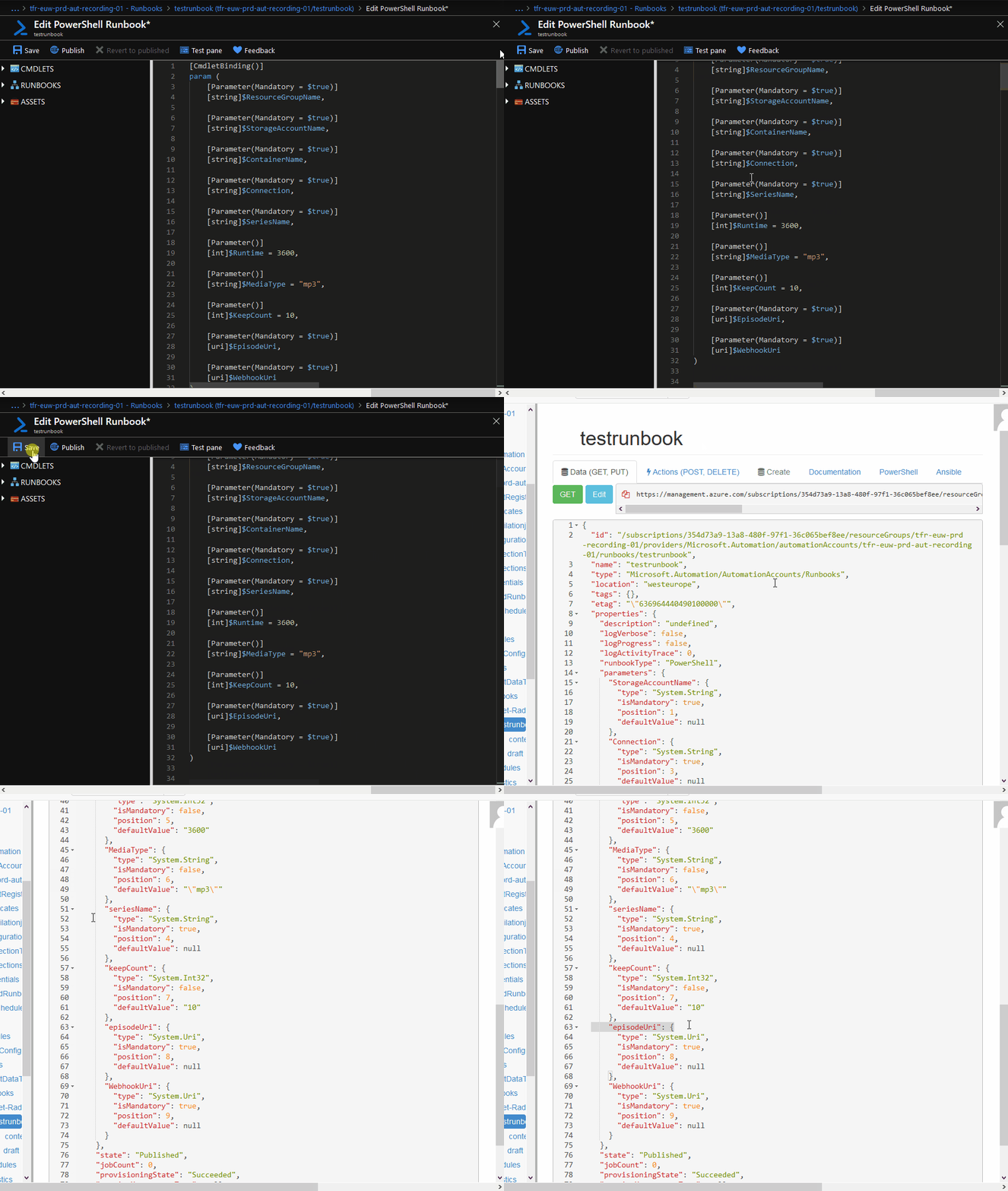
Some of the parameters seem to go wrong the moment they are accepted by Azure. As the same parameters changes happen each time with this script, it may be that the changes are dependent on the script itself.
If you want, you can test it with the script I'm using:
Get-Radio
From what I can see, it's probably an Azure issue and not with the SDK.
draggeta
on 18 Jun 2019
Also note that in the provided output the three items with their case munged have duplicate entries in the list, once with the correct case and once with the munged case. Seems like something else is at work here, unless I misunderstand the provided output.
That is basically Terraform showing the diff. It receives the camel case variables from the API and those are not defined by me. That is why Terraform is planning to remove those.
TF also notices that the Pascal case counterparts were not in the API return and plans to add those.
draggeta
on 18 Jun 2019
After re-running my repro I noticed that while the three items cited here have their case preserved the item containerName does not. So there does appear to be something going on with the REST endpoint. I'll follow up with the service team about this.
jhendrixMSFT
on 18 Jun 2019
The issue is on the service side and not in the SDK code. The underlying DB schema was over normalized and does not take casing into account when deduping the parameter name in a given region. This effectively means that the first user to create a parameter in a region is the one that determines its casing. The service itself is case insensitive so everything operates as expected.
 Bpoe
on 20 Jun 2019
Bpoe
on 20 Jun 2019
On an internal thread @bpoe suggested a workaround of adding a prefix to the parameter names, e.g. <AccountName>_ or <RunbookName>_ (or maybe even both). Is this feasible? Given the nature of the bug it might not get fixed any time soon.
jhendrixMSFT
on 20 Jun 2019
@Bpoe, @jhendrixMSFT That is quite a funny cause. For me it is ok to change the casing to match what is returned or make the parameters case insensitive on TF's side, but I'm just a contributor.
@katbyte let me know what the next steps are and I'll make it so 😊
draggeta
on 20 Jun 2019
@draggeta, @jhendrixMSFT, prefixes aren't a viable solution and ideally we would want the bug fixed. I'm not sure how feasible it would be to ignore case here as it's both the key and value that needs to be case insensitive.
The only thing we can do on the TF side is try add a DiffSuppressFunc that ignores case for both the key & values in the map (and validate that there are no duplicate entries after ignoring case) however I've never tried this and i'm not 100% confident it'll work.
This would also mean the case in TF won't match the casing in the portal/CLI.
katbyte
on 3 Jul 2019
@katbyte I believe it's only the key that has to be case insensitive. The value doesn't seem to be normalized.
draggeta
on 4 Jul 2019
Also, PowerShell is case insensitive, so you cannot have two parameters in same file named count and Count.
draggeta
on 4 Jul 2019
Correcting the over normalization of parameter names that @bpoe mentioned would be a risky fix for us to take in the product. If the casing of the parameter name causes anyone difficulty, you can make your parameter unique by pre-pending a string to it such as your automation account id, a guid, etc.
 jeffzabel
on 24 Jul 2019
jeffzabel
on 24 Jul 2019
Closing as per the above comment.
 andyw248
on 12 Dec 2019
andyw248
on 12 Dec 2019
Thanks for working with Microsoft on GitHub! Tell us how you feel about your experience using the reactions on this comment.
![msftbot[bot] picture](https://avatars.githubusercontent.com/in/26612?v=4&s=40) msftbot[bot]
on 12 Dec 2019
msftbot[bot]
on 12 Dec 2019
@andyw248,
While i understand that it may be risky, it doesn't really make this not a bug or something that should be addressed at some point by the product in a future API or version. Thus i'm not sure it should be closed.
katbyte
on 29 Dec 2019
Related issues
 jakubigla
·
3Comments
jakubigla
·
3Comments
 colemickens
·
3Comments
colemickens
·
3Comments
 mbfrahry
·
4Comments
mbfrahry
·
4Comments
 lawrencegripper
·
4Comments
lawrencegripper
·
4Comments
 BrendanThompson
·
3Comments
BrendanThompson
·
3Comments