Azure-sdk-for-go: Generated wrong SAS url for blob service using emulator
I am trying to generate a SAS url for blob service to upload a file. I tried both this sdk and Azure Storage Explorer. The url (sig part) generated are different and the one from this sdk cannot upload file with curl.
Here is my code to generate the sas url (skip error handling):
client, _ := storage.NewEmulatorClient()
blobService := client.GetBlobService()
container := blobService.GetContainerReference("testfolder")
options := storage.CreateContainerOptions{Access: storage.ContainerAccessTypePrivate}
container.CreateIfNotExists(&options)
blob := container.GetBlobReference(name)
blob.CreateBlockBlob(nil)
url, _ := blob.GetSASURI(time.Date(2017, 10, 1, 0, 0, 0, 0, time.Local), "w")
Generated url is http://127.0.0.1:10000/devstoreaccount1/testfolder/testfile?se=2017-09-30T16%3A00%3A00Z&sig=sVcV11mVeHkfUnjwMDInOyVn4VYpb%2BycdjISXBRICEs%3D&sp=w&spr=https%2Chttp&sr=b&sv=2016-05-31.
Here is how I generated sas url from Azure Storage Explorer:
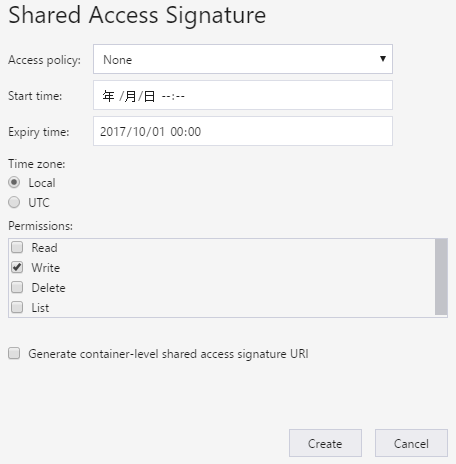
Generated url is http://127.0.0.1:10000/devstoreaccount1/testfolder/testfile?se=2017-09-30T16%3A00%3A00Z&sp=w&sv=2016-05-31&sr=b&sig=Tyrg2ccc0RXyRz5xfkcSVDvjjoRivygrGb%2ByTLf0jJY%3D.
The sig part is different. Now I use curl to test the two urls:
# the url from go sdk
> curl -XPUT -H "Content-Length:11" -d "hello world" -H "x-ms-blob-type:BlockBlob" "http://127.0.0.1:10000/devstoreaccount1/testfolder/testfile?se=2017-09-30T16%3A00%3A00Z&sig=sVcV11mVeHkfUnjwMDInOyVn4VYpb%2BycdjISXBRICEs%3D&sp=w&spr=https%2Chttp&sr=b&sv=2016-05-31"
<?xml version="1.0" encoding="utf-8"?><Error><Code>AuthenticationFailed</Code><Message>Server failed to authenticate the request. Make sure the value of Authorization header is formed correctly including the signature.
RequestId:0baa9ec3-8a54-4429-9cb4-7d7a158daedd
Time:2017-08-21T03:00:01.7315310Z</Message><AuthenticationErrorDetail>Signature did not match. String to sign used was w

2017-09-30T16:00:00Z
/blob/devstoreaccount1/testfolder/testfile


https,http
2016-05-31


</AuthenticationErrorDetail></Error>

# the url from storage explorer
> curl -XPUT -H "Content-Length:11" -d "hello world" -H "x-ms-blob-type:BlockBlob" "http://127.0.0.1:10000/devstoreaccount1/testfolder/testfile?se=2017-09-30T16%3A00%3A00Z&sp=w&sv=2016-05-31&sr=b&sig=Tyrg2ccc0RXyRz5xfkcSVDvjjoRivygrGb%2ByTLf0jJY%3D"
(exited without error and output, the data is put into the blob)
Some other details: version of emulator is 5.2.0.0, version of storage explorer is 0.8.16, git commit of this repo is "0b09de4174ca0cadcd3abb4aa31267c6f5ccebbb", I'm using Go 1.8.1 amd64 on Windows.
 zyzheng
All 4 comments
@zyzheng Fixed! Thanks for the very awesome and detailed issue description :)
 mcardosos
on 29 Aug 2017
mcardosos
on 29 Aug 2017
Hi @mcardosos Thanks for the fix.
However, I think your fix has broken other emulator api. For example, a very simple create container code:
(borrowed from https://github.com/Azure-Samples/storage-blob-go-getting-started)
    client, _ := storage.NewEmulatorClient()
    blobService := client.GetBlobService()
    container := blobService.GetContainerReference("testfolder")
    options := storage.CreateContainerOptions{Access: storage.ContainerAccessTypePrivate}
    _, err := container.CreateIfNotExists(&options)
    fmt.Printf("%s", err)
The output is
storage: service returned error: StatusCode=403, ErrorCode=AuthenticationFailed, ErrorMessage=Server failed to authenticate the request. Make sure the value of Authorization header is formed correctly including the signature.
RequestId:dcc169b7-5bef-42c4-a059-a38ff44cc7c5
Time:2017-08-30T02:40:55.0880330Z, RequestInitiated=Wed, 30 Aug 2017 02:40:55 GMT, RequestId=dcc169b7-5bef-42c4-a059-a38ff44cc7c5, API Version=, QueryParameterName=, QueryParameterValue=
@zyzheng Fixed :)
mcardosos
on 31 Aug 2017
@mcardosos Thanks for the quick fix, it works now.
zyzheng
on 1 Sep 2017
Related issues
 colemickens
·
3Comments
colemickens
·
3Comments
 StrongMonkey
·
4Comments
StrongMonkey
·
4Comments
 ncw
·
4Comments
ncw
·
4Comments
 yannart
·
3Comments
yannart
·
3Comments
 szaher
·
4Comments
szaher
·
4Comments
Most helpful comment
@zyzheng Fixed! Thanks for the very awesome and detailed issue description :)