Azure-quickstart-templates: Real Time AI Alert with ARM
How do I create an real time availability alert with ARM?
If I export out one I see
"criteria": {
"odata.type": "Microsoft.Azure.Monitor.WebtestLocationAvailabilityCriteria"
},
Google WebtestLocationAvailabilityCriteria and you see no reference anywhere.
and I try to create a "type": "Microsoft.Insights/metricAlerts" and it says the "scope" is invalid, but its the same format as the exported version.
 bbakermmc
All 9 comments
I've got the same issue:
New-AzureRmResourceGroupDeployment : 13:26:47 - Resource microsoft.insights/metricalerts 'xxx' failed with message '{
  "Code": "BadRequest",
  "Message": "Alert scope is invalid."
}'
 tim-cools
on 12 Oct 2018
tim-cools
on 12 Oct 2018
I had the exact same problem. Was banging my head against the screen to try to solve this, and finally found the problem. So the above error would happen if you use redeploy, or base your ARM template on the output generated from the "Automation script" menu item in the portal. It clearly does not generate all required data for the ARM template, which I've actually had problems with before.
So the solution is to take a view with "Resource Explorer" in the portal, and doing that reveals 3 missing parameters for the "criteria" property section of the metricsalerts.
So just add the following to the "criteria" property of the metricsalerts resource, keeping the existing as it is :
"webTestId": "HERE GOES THE RESOURCEID OF THE WEBTEST",
"componentId": "HERE GOES THE RESOURCEID OF THE APPLICATION INSIGHTS COMPONENT",
"failedLocationCount": 1
Hope it's clear - and hope someone at MS will fix the "Automation script" soon - this is not the first time I've experienced this.
 michaelthyregod
on 15 Oct 2018
michaelthyregod
on 15 Oct 2018
@michaelthyregod Our metric alerts dont show up in the RE, unless Im looking in the wrong place. I see the webTests.
Can you just provide a quick example/screen shot also where you see it in RE.
bbakermmc
on 15 Oct 2018
@bbakermmc I can't provide example or screenshot(not my tenant), but when you say RE, are you using resources.azure.com? If so, then it's the wrong one - it looks like that one does not show all, as you also noted.
I'm using the Resource Explorer extension in the Azure portal - you can find it in "All services" - search for Resource Explorer. In there I can see the metricalerts resource, and see the additional parameters
Let me know if you still can't see it.
michaelthyregod
on 15 Oct 2018
@michaelthyregod thanks! Of course you need 9 UI that show basically the same info lol.
bbakermmc
on 15 Oct 2018
@michaelthyregod Your fix deserves a serious upvote. Thank you. The ARM template generator still doesn't have the three properties, and the error message is still "Alert scope is invalid.".
Additionally, I didn't get the metricalert in the Resource Explorer. I assume it should have been here:
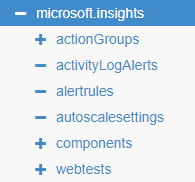
Instead, I found it by starting up Fiddler and using Get-AzResource to get the alert resource, and then seeing the three properties you mentioned:
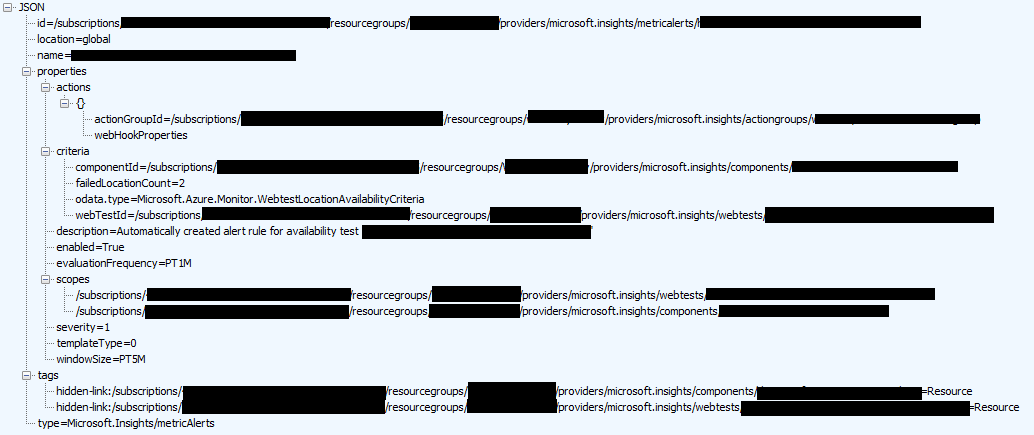
 rwatjen
on 2 Jul 2019
rwatjen
on 2 Jul 2019
Why this issue was closed if that problem still there?
 danielquest
on 9 Oct 2019
danielquest
on 9 Oct 2019
Here is finally a good official MSDN example how to have the test together with the alert in ARM.
 psfinaki
on 19 Dec 2019
psfinaki
on 19 Dec 2019
Here is finally a good official MSDN example how to have the test together with the alert in ARM.
This needs to be linked to in the AppInsights and Appservice documentation so you don't chase your tail looking at the 'old' way of doing it.
 RMcD
on 26 Oct 2020
RMcD
on 26 Oct 2020
Related issues
 INGourav
·
9Comments
INGourav
·
9Comments
 ScottyMac52
·
7Comments
ScottyMac52
·
7Comments
 craiglandis
·
3Comments
craiglandis
·
3Comments
 andyofengland
·
9Comments
andyofengland
·
9Comments
 bazauto
·
7Comments
bazauto
·
7Comments
Most helpful comment
I had the exact same problem. Was banging my head against the screen to try to solve this, and finally found the problem. So the above error would happen if you use redeploy, or base your ARM template on the output generated from the "Automation script" menu item in the portal. It clearly does not generate all required data for the ARM template, which I've actually had problems with before.
So the solution is to take a view with "Resource Explorer" in the portal, and doing that reveals 3 missing parameters for the "criteria" property section of the metricsalerts.
So just add the following to the "criteria" property of the metricsalerts resource, keeping the existing as it is :
"webTestId": "HERE GOES THE RESOURCEID OF THE WEBTEST",
"componentId": "HERE GOES THE RESOURCEID OF THE APPLICATION INSIGHTS COMPONENT",
"failedLocationCount": 1
Hope it's clear - and hope someone at MS will fix the "Automation script" soon - this is not the first time I've experienced this.