Azure-pipelines-tasks: NuGet restores Service Fabric project with .NET Framework 4.7.2 instead of .NET Core 3.1
I've been trying to setup a SeviceFabric CI in DevOps and I am unable to find a way to tell MSBuild that my app is a .NET Core app and not a .NET Framework 4.7.2 app. Is there another way to do that from within my project file aside from the usual .NET Core TargetFramework element in csproj file so MSBuild stops thinking that it is a .NET Framework app?
Type: Question
Task Name: MSBuild
Agent: Hosted
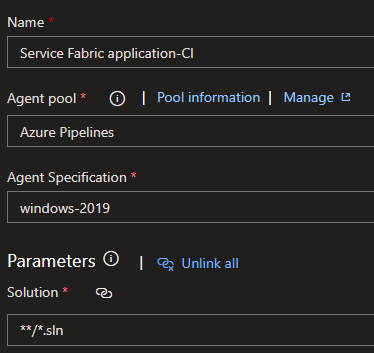
pool:
  name: Azure Pipelines
  demands:
  - msbuild
  - Cmd

variables:
  BuildPlatform: 'x64'

steps:
- task: UseDotNet@2
  displayName: 'Use .NET Core sdk 3.1.x'
  inputs:
    version: 3.1.x

- task: NuGetToolInstaller@1
  displayName: 'Use NuGet '
  inputs:
    checkLatest: true

- task: NuGetCommand@2
  displayName: 'NuGet restore'
  inputs:
    restoreSolution: '$(Parameters.solution)'

============================
===This is where it fails===
============================
- task: MSBuild@1
  displayName: 'Build solution **/*.sln'
  inputs:
    platform: '$(BuildPlatform)'
    configuration: '$(BuildConfiguration)'
    msbuildArguments: '/p:Deterministic=true /p:PathMap=$(Agent.BuildDirectory)=C:\'

- task: MSBuild@1
  displayName: 'Build solution **\*.sfproj'
  inputs:
    platform: '$(BuildPlatform)'
    configuration: '$(BuildConfiguration)'
    msbuildArguments: '/t:Package /p:PackageLocation=$(build.artifactstagingdirectory)\applicationpackage'

- task: CopyFiles@2
  displayName: 'Copy Files to: $(build.artifactstagingdirectory)\pdbs'
  inputs:
    SourceFolder: '$(build.artifactstagingdirectory)\applicationpackage'
    Contents: '**\*.pdb'
    TargetFolder: '$(build.artifactstagingdirectory)\pdbs'

- task: DeleteFiles@1
  displayName: 'Delete files from $(build.artifactstagingdirectory)\applicationpackage'
  inputs:
    SourceFolder: '$(build.artifactstagingdirectory)\applicationpackage'
    Contents: '**\*.pdb'

- task: ServiceFabricUpdateManifests@2
  displayName: 'Update Service Fabric Manifests (Manifest versions)'
  inputs:
    applicationPackagePath: '$(build.artifactstagingdirectory)\applicationpackage'
    versionSuffix: '.$(build.buildnumber)'
    updateOnlyChanged: true
    pkgArtifactName: drop

- task: CopyFiles@2
  displayName: 'Copy Files to: $(build.artifactstagingdirectory)\projectartifacts'
  inputs:
    SourceFolder: '$(system.defaultworkingdirectory)'
    Contents: |
     **\PublishProfiles\*.xml
     **\ApplicationParameters\*.xml
    TargetFolder: '$(build.artifactstagingdirectory)\projectartifacts'
  condition: succeededOrFailed()

- task: PublishBuildArtifacts@1
  displayName: 'Publish Artifact: drop'
  inputs:
    PathtoPublish: '$(build.artifactstagingdirectory)'
  condition: succeededOrFailed()
Fails with error
##[error]The nuget command failed with exit code(1) and error(NU1201: Project Delivery is not compatible with net472 (.NETFramework,Version=v4.7.2). Project Delivery supports: netcoreapp3.1 (.NETCoreApp,Version=v3.1)
 secret-agent-B
All 19 comments
Can I ask a question please:
Was the SF app created from the "Visual Studio - New Project Template? Because as you create a new SF project, it asks for the framework which is the full .NETFramework 4.7/4.8. Once you create that, you need to specify the Service Fabric Service and your options are:
.NET Core - Stateless, Stateful, Stateless ASP.NET Core, Stateful ASP.NET Core
.NET Framework (4.7/4.8) - Stateless Service, Stateful Service, Stateless ASP.NET Core, Stateful Asp.NET Core (requiring .NET Core SDK 2.1)
Reason I ask is:
If you went with the SF Project Template using a .NET Core service (which uses .NET Core) then your build pipeline may require both nuget restore and dotnet restore
See doco here on NuGetCommand@2 - https://docs.microsoft.com/en-us/azure/devops/pipelines/tasks/package/nuget?view=azure-devops
Use this task to install and update NuGet package dependencies, or package and publish NuGet packages. Uses NuGet.exe and works with .NET Framework apps. For .NET Core and .NET Standard apps, use the .NET Core task.
 temelj
on 3 Jul 2020
temelj
on 3 Jul 2020
The only options there when I created the service fabric project was .NET Framework. But the service within we're all created using .NET Core.
secret-agent-B
on 3 Jul 2020
I will add the .NET Core tasks. Thank you.
secret-agent-B
on 3 Jul 2020
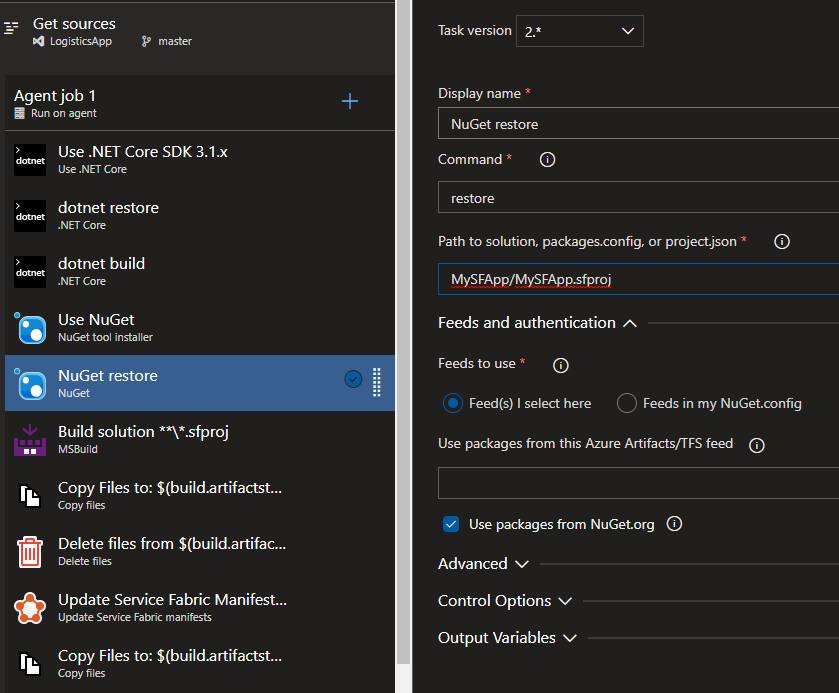
I am now able to build the .NET Core projects but when I restore the .sfproj project using NuGet restore, it fails because the .NET Core services are referenced by that project and it tries to do the same thing it was doing before,
secret-agent-B
on 3 Jul 2020
Correct I was expecting that. You need a dotnetcore take to restore core packages and another classic nuget task to restore sfproj packages
temelj
on 3 Jul 2020
That is what I did. You'll notice on the screenshot that I have .NET Core tasks to take care of the .NET Core projects and the I have the NuGet restore only restoring the sfproj. Would you like me to add a .NET Core task to restore the sfproj too for its .NET Core references?
secret-agent-B
on 3 Jul 2020
Yeah, adding a .NET Core task to build the sfproj didn't work.
secret-agent-B
on 3 Jul 2020
top of yaml to define some variables
variables:
- name: BuildConfiguration
  value: Release
- name: BuildPlatform
  value: x64
- name: AppPackageLocation
  value: $(Build.ArtifactStagingDirectory)/applicationpackage
later in the yaml at the BUILD step
    - task: DotNetCoreCLI@2
      displayName: 'Restore Packages'
      inputs:
        command: 'restore'
        projects: '**/*.csproj'
        ##feedsToUse: 'config'
        ##nugetConfigPath: 'NuGet.Config'
        feedsToUse: 'select'
        vstsFeed: 'PRIVATE_FEED_GUID'
        includeNuGetOrg: false
    - task: NuGetCommand@2
      displayName: Restore packages
      inputs:
        command: 'restore'
        restoreSolution: '**/*.sfproj'
        ##feedsToUse: 'config'
        ##nugetConfigPath: 'NuGet.Config'
        feedsToUse: 'select'
        vstsFeed: 'PRIVATE_FEED_GUID'
        includeNuGetOrg: false
        restoreDirectory: packages
    - task: VSBuild@1
      displayName: 'Build solution (release)'
      enabled: false
      inputs:
        solution: '**\*.sln'
        vsVersion: latest
        platform: '$(BuildPlatform)'
        configuration: $(BuildConfiguration)
        clean: true
    - task: VSBuild@1
      displayName: 'Build solution for Service Fabric'
      inputs:
        solution: '**\*.sfproj'
        vsVersion: latest
        msbuildArgs: '/t:Package /p:PackageLocation=$(AppPackageLocation)'
        platform: '$(BuildPlatform)'
        configuration: $(BuildConfiguration)
    - task: ServiceFabricUpdateManifests@2
      displayName: 'Update Service Fabric Manifest Versions'
      inputs:
        applicationPackagePath: '$(AppPackageLocation)'
        versionSuffix: '$(Build.BuildNumber)'
        versionBehavior: Replace
        updateOnlyChanged: true
        pkgArtifactName: drop
Keep in mind that I've used a private feed to fetch some packages from - you probably don't need that.
Also keep in mind that - task: DotNetCoreCLI@2 can restore & build directly from a **/*.sln file - i am yet to try that out to see if the double restore & build steps are even required.
Probably are because DotNetCoreCLI will target only .NET Core SDK
but to build *.sfproj you need to target the full .NET 4.7/4.8 framework
temelj
on 3 Jul 2020
I get that sfproj needs the full .NET 4.7/4.8 Framework and to do that you'll need to use the NuGet task. The issue now is that my services are .NET Core and are being referenced by the sfproj. So now whenever I try to build sfproj I get The nuget command failed with exit code(1) and error(NU1201: Project Delivery is not compatible with net472 (.NETFramework,Version=v4.7.2). Project Delivery supports: netcoreapp3.1 (.NETCoreApp,Version=v3.1) because the service is suing .NET Core 3.1.
secret-agent-B
on 3 Jul 2020
I have a project with exactly that scenario and it is restoring, building and deploying fine.
Basically, i don't think it is an issue with the azure pipelines tasks, but more about how they are being applied for your particular usecase.
temelj
on 3 Jul 2020
I created a new project with an empty .NET Core in a new repo with a new Pipeline and I get the same result. Not really sure what I am missing here.
secret-agent-B
on 7 Jul 2020
Might we worth while posting some logs? (and your updated pipeline yaml) I am not sure how else to help.
I've been successfully restoring, building and deploying Service Fabric Apps (with .NET Core 3.1 web api project) to an on-prem cluster for a while.
Are you still doing it in this order?
steps:
- task: UseDotNet@2
  displayName: 'Use .NET Core sdk 3.1.x'
  inputs:
    version: 3.1.x

- task: NuGetToolInstaller@1
  displayName: 'Use NuGet '
  inputs:
    checkLatest: true

- task: NuGetCommand@2
  displayName: 'NuGet restore'
  inputs:
    restoreSolution: '$(Parameters.solution)'

============================
===This is where it fails===
============================
- task: MSBuild@1
  displayName: 'Build solution **/*.sln'
  inputs:
    platform: '$(BuildPlatform)'
    configuration: '$(BuildConfiguration)'
    msbuildArguments: '/p:Deterministic=true /p:PathMap=$(Agent.BuildDirectory)=C:\'

- task: MSBuild@1
  displayName: 'Build solution **\*.sfproj'
  inputs:
    platform: '$(BuildPlatform)'
    configuration: '$(BuildConfiguration)'
    msbuildArguments: '/t:Package /p:PackageLocation=$(build.artifactstagingdirectory)\applicationpackage'
because that's nothing like I've commented above. - ie: MSBUILD Solution is wrong to start off with
temelj
on 8 Jul 2020
Hey, thank you so much and I really appreciate the help. I have no problems getting .NET Core to restore by the way. Here's the log file I get from the NuGet restore step.
2020-07-07T02:54:21.5657464Z ##[section]Starting: NuGet restore
2020-07-07T02:54:21.5818352Z ==============================================================================
2020-07-07T02:54:21.5818684Z Task         : NuGet
2020-07-07T02:54:21.5819454Z Description  : Restore, pack, or push NuGet packages, or run a NuGet command. Supports NuGet.org and authenticated feeds like Azure Artifacts and MyGet. Uses NuGet.exe and works with .NET Framework apps. For .NET Core and .NET Standard apps, use the .NET Core task.
2020-07-07T02:54:21.5820015Z Version      : 2.171.1
2020-07-07T02:54:21.5820255Z Author       : Microsoft Corporation
2020-07-07T02:54:21.5820567Z Help         : https://docs.microsoft.com/azure/devops/pipelines/tasks/package/nuget
2020-07-07T02:54:21.5820920Z ==============================================================================
2020-07-07T02:54:22.3902128Z SYSTEMVSSCONNECTION exists true
2020-07-07T02:54:22.5487810Z SYSTEMVSSCONNECTION exists true
2020-07-07T02:54:22.9644228Z [command]C:\windows\system32\chcp.com 65001
2020-07-07T02:54:22.9768239Z Active code page: 65001
2020-07-07T02:54:23.0707403Z Detected NuGet version 4.8.2.5835 / 4.8.2+9131ffc4eef705c3fb0457c8cf06cff7af10b6f1
2020-07-07T02:54:23.0731028Z SYSTEMVSSCONNECTION exists true
2020-07-07T02:54:23.0905826Z [command]C:\hostedtoolcache\windows\NuGet\4.8.2\x64\nuget.exe sources Add -NonInteractive -Name NuGetOrg -Source https://api.nuget.org/v3/index.json -ConfigFile d:\a\1\Nuget\tempNuGet_85.config
2020-07-07T02:54:24.1572663Z Package Source with Name: NuGetOrg added successfully.
2020-07-07T02:54:24.1719499Z [command]C:\hostedtoolcache\windows\NuGet\4.8.2\x64\nuget.exe restore d:\a\1\s\MyDemoApp.sln -Verbosity Detailed -NonInteractive -ConfigFile d:\a\1\Nuget\tempNuGet_85.config
2020-07-07T02:56:01.0270909Z NuGet Version: 4.8.2.5835
2020-07-07T02:56:01.0272131Z MSBuild auto-detection: using msbuild version '16.6.0.22303' from 'C:\Program Files (x86)\Microsoft Visual Studio\2019\Enterprise\MSBuild\Current\bin'. Use option -MSBuildVersion to force nuget to use a specific version of MSBuild.
2020-07-07T02:56:01.0273417Z WARNING: Project file d:\a\1\s\Framework\MyDemoApp.Communication\MyDemoApp.Communication.csproj cannot be found.
2020-07-07T02:56:01.0274546Z MSBuild P2P timeout [ms]: 120000
2020-07-07T02:56:01.0277384Z C:\Program Files (x86)\Microsoft Visual Studio\2019\Enterprise\MSBuild\Current\bin\msbuild.exe "C:\Users\VssAdministrator\AppData\Local\Temp\NuGetScratch\332oxk4p.wgy.nugetinputs.targets" /t:GenerateRestoreGraphFile /nologo /nr:false /v:q /p:NuGetRestoreTargets="C:\Users\VssAdministrator\AppData\Local\Temp\NuGetScratch\re4v5z4b.02x.nugetrestore.targets" /p:RestoreUseCustomAfterTargets="True" /p:RestoreTaskAssemblyFile="C:\hostedtoolcache\windows\NuGet\4.8.2\x64\nuget.exe" /p:RestoreSolutionDirectory="d:\a\1\s\\" /p:RestoreConfigFile="d:\a\1\Nuget\tempNuGet_85.config" /p:SolutionDir="d:\a\1\s\\" /p:SolutionName="MyDemoApp"
2020-07-07T02:56:01.0279471Z
2020-07-07T02:56:01.0279813Z Running restore with 4 concurrent jobs.
2020-07-07T02:56:01.0280403Z Reading project file d:\a\1\s\Domain\Delivery\MyDemoApp.Delivery\MyDemoApp.Delivery.csproj.
2020-07-07T02:56:01.0281375Z Reading project file d:\a\1\s\Domain\MyDemoApp.Communication.Domain\MyDemoApp.Communication.Domain.csproj.
2020-07-07T02:56:01.0282550Z Reading project file d:\a\1\s\Domain\Security\MyDemoApp.Security\MyDemoApp.Security.csproj.
2020-07-07T02:56:01.0283237Z Reading project file d:\a\1\s\Domain\Delivery\MyDemoApp.Delivery.Test\MyDemoApp.Delivery.Test.csproj.
2020-07-07T02:56:01.0283867Z Restoring packages for d:\a\1\s\Domain\Delivery\MyDemoApp.Delivery\MyDemoApp.Delivery.csproj...
2020-07-07T02:56:01.0284922Z Restoring packages for d:\a\1\s\Domain\MyDemoApp.Communication.Domain\MyDemoApp.Communication.Domain.csproj...
2020-07-07T02:56:01.0285670Z Restoring packages for d:\a\1\s\Domain\Delivery\MyDemoApp.Delivery.Test\MyDemoApp.Delivery.Test.csproj...
2020-07-07T02:56:01.0286357Z Restoring packages for d:\a\1\s\Domain\Security\MyDemoApp.Security\MyDemoApp.Security.csproj...
2020-07-07T02:56:01.0288184Z Restoring packages for .NETCoreApp,Version=v3.1...
2020-07-07T02:56:01.0292055Z Restoring packages for .NETStandard,Version=v2.0...
2020-07-07T02:56:01.0292504Z Restoring packages for .NETStandard,Version=v2.0...
2020-07-07T02:56:01.0294120Z Restoring packages for .NETCoreApp,Version=v3.1...
2020-07-07T02:56:01.0294702Z   GET https://api.nuget.org/v3-flatcontainer/microsoft.windowsdesktop.app.runtime.win-x64/index.json
2020-07-07T02:56:01.0295350Z   GET https://api.nuget.org/v3-flatcontainer/microsoft.aspnetcore.app.runtime.win-x64/index.json
2020-07-07T02:56:01.0296427Z   GET https://api.nuget.org/v3-flatcontainer/microsoft.servicefabric.services.remoting/index.json
2020-07-07T02:56:01.0298889Z   OK https://api.nuget.org/v3-flatcontainer/microsoft.aspnetcore.app.runtime.win-x64/index.json 15ms
2020-07-07T02:56:01.0299595Z   GET https://api.nuget.org/v3-flatcontainer/microsoft.netcore.app.runtime.win-x64/index.json
2020-07-07T02:56:01.0300261Z   GET https://api.nuget.org/v3-flatcontainer/microsoft.servicefabric.services/index.json
2020-07-07T02:56:01.0300955Z   OK https://api.nuget.org/v3-flatcontainer/microsoft.netcore.app.runtime.win-x64/index.json 15ms
2020-07-07T02:56:01.0301755Z   GET https://api.nuget.org/v3-flatcontainer/microsoft.aspnetcore.app.runtime.win-x64/3.1.0/microsoft.aspnetcore.app.runtime.win-x64.3.1.0.nupkg
2020-07-07T02:56:01.0302522Z   GET https://api.nuget.org/v3-flatcontainer/stylecop.analyzers/index.json
2020-07-07T02:56:01.0303206Z   GET https://api.nuget.org/v3-flatcontainer/microsoft.netcore.app.runtime.win-x64/3.1.0/microsoft.netcore.app.runtime.win-x64.3.1.0.nupkg
2020-07-07T02:56:01.0303954Z   OK https://api.nuget.org/v3-flatcontainer/microsoft.servicefabric.services.remoting/index.json 56ms
2020-07-07T02:56:01.0304738Z   OK https://api.nuget.org/v3-flatcontainer/microsoft.aspnetcore.app.runtime.win-x64/3.1.0/microsoft.aspnetcore.app.runtime.win-x64.3.1.0.nupkg 13ms
2020-07-07T02:56:01.0305940Z   OK https://api.nuget.org/v3-flatcontainer/microsoft.windowsdesktop.app.runtime.win-x64/index.json 66ms
2020-07-07T02:56:01.0306716Z   GET https://api.nuget.org/v3-flatcontainer/microsoft.servicefabric.services.remoting/4.1.417/microsoft.servicefabric.services.remoting.4.1.417.nupkg
2020-07-07T02:56:01.0307673Z   GET https://api.nuget.org/v3-flatcontainer/microsoft.windowsdesktop.app.runtime.win-x64/3.1.0/microsoft.windowsdesktop.app.runtime.win-x64.3.1.0.nupkg
2020-07-07T02:56:01.0309139Z   OK https://api.nuget.org/v3-flatcontainer/microsoft.windowsdesktop.app.runtime.win-...
2020-07-07T02:56:01.1757182Z Checking compatibility for System.Diagnostics.Contracts 4.0.1 with .NETCoreApp,Version=v3.1 (win7-x64).
2020-07-07T02:56:01.1757599Z Checking compatibility for System.Threading.Overlapped 4.0.1 with .NETCoreApp,Version=v3.1 (win7-x64).
2020-07-07T02:56:01.1758054Z Checking compatibility for runtime.any.System.Text.Encoding.Extensions 4.0.11 with .NETCoreApp,Version=v3.1 (win7-x64).
2020-07-07T02:56:01.1758502Z Checking compatibility for runtime.win7.System.Private.Uri 4.0.1 with .NETCoreApp,Version=v3.1 (win7-x64).
2020-07-07T02:56:01.1759147Z Checking compatibility for runtime.any.System.Globalization.Calendars 4.0.1 with .NETCoreApp,Version=v3.1 (win7-x64).
2020-07-07T02:56:01.1759581Z All packages and projects are compatible with .NETCoreApp,Version=v3.1 (win7-x64).

...

2020-07-07T02:56:01.1759841Z Committing restore...
2020-07-07T02:56:01.1760239Z Generating MSBuild file d:\a\1\s\MyDemoApp.Gateway\obj\MyDemoApp.Gateway.csproj.nuget.g.props.
2020-07-07T02:56:01.1760666Z Generating MSBuild file d:\a\1\s\MyDemoApp.Gateway\obj\MyDemoApp.Gateway.csproj.nuget.g.targets.
2020-07-07T02:56:01.1761065Z Writing lock file to disk. Path: d:\a\1\s\MyDemoApp.Gateway\obj\project.assets.json
2020-07-07T02:56:01.1761476Z Writing cache file to disk. Path: d:\a\1\s\MyDemoApp.Gateway\obj\MyDemoApp.Gateway.csproj.nuget.cache
2020-07-07T02:56:01.1761889Z Restore completed in 7.17 sec for d:\a\1\s\MyDemoApp.Gateway\MyDemoApp.Gateway.csproj.
2020-07-07T02:56:01.1762218Z
2020-07-07T02:56:01.1762307Z
2020-07-07T02:56:01.1762466Z NuGet Config files used:
2020-07-07T02:56:01.1762679Z     d:\a\1\Nuget\tempNuGet_85.config
2020-07-07T02:56:01.1762843Z
2020-07-07T02:56:01.1762970Z Feeds used:
2020-07-07T02:56:01.1763164Z     https://api.nuget.org/v3/index.json
2020-07-07T02:56:01.1763316Z
2020-07-07T02:56:01.1763453Z Installed:
2020-07-07T02:56:01.1763738Z     1 package(s) to d:\a\1\s\Domain\Delivery\MyDemoApp.Delivery.Test\MyDemoApp.Delivery.Test.csproj
2020-07-07T02:56:01.1764161Z     9 package(s) to d:\a\1\s\Domain\MyDemoApp.Communication.Domain\MyDemoApp.Communication.Domain.csproj
2020-07-07T02:56:01.1764549Z     35 package(s) to d:\a\1\s\Framework\MyDemoApp.Data\MyDemoApp.Data.csproj
2020-07-07T02:56:01.1764880Z     1 package(s) to d:\a\1\s\MyDemoApp\MyDemoApp.sfproj
2020-07-07T02:56:01.1765216Z     12 package(s) to d:\a\1\s\Domain\Delivery\MyDemoApp.Delivery\MyDemoApp.Delivery.csproj
2020-07-07T02:56:01.1765610Z     10 package(s) to d:\a\1\s\Domain\Security\MyDemoApp.Security\MyDemoApp.Security.csproj
2020-07-07T02:56:01.1765983Z     77 package(s) to d:\a\1\s\MyDemoApp.Gateway\MyDemoApp.Gateway.csproj
2020-07-07T02:56:01.2150832Z ##[error]The nuget command failed with exit code(1) and error(NU1201: Project MyDemoApp.Delivery is not compatible with net472 (.NETFramework,Version=v4.7.2). Project MyDemoApp.Delivery supports: netcoreapp3.1 (.NETCoreApp,Version=v3.1)
NU1201: Project MyDemoApp.Security is not compatible with net472 (.NETFramework,Version=v4.7.2). Project MyDemoApp.Security supports: netcoreapp3.1 (.NETCoreApp,Version=v3.1)
NU1201: Project MyDemoApp.Gateway is not compatible with net472 (.NETFramework,Version=v4.7.2). Project MyDemoApp.Gateway supports: netcoreapp3.1 (.NETCoreApp,Version=v3.1)
NU1201: Project MyDemoApp.Delivery is not compatible with net472 (.NETFramework,Version=v4.7.2) / win. Project MyDemoApp.Delivery supports: netcoreapp3.1 (.NETCoreApp,Version=v3.1)
NU1201: Project MyDemoApp.Security is not compatible with net472 (.NETFramework,Version=v4.7.2) / win. Project MyDemoApp.Security supports: netcoreapp3.1 (.NETCoreApp,Version=v3.1)
NU1201: Project MyDemoApp.Gateway is not compatible with net472 (.NETFramework,Version=v4.7.2) / win. Project MyDemoApp.Gateway supports: netcoreapp3.1 (.NETCoreApp,Version=v3.1)
NU1201: Project MyDemoApp.Delivery is not compatible with net472 (.NETFramework,Version=v4.7.2) / win-x64. Project MyDemoApp.Delivery supports: netcoreapp3.1 (.NETCoreApp,Version=v3.1)
NU1201: Project MyDemoApp.Security is not compatible with net472 (.NETFramework,Version=v4.7.2) / win-x64. Project MyDemoApp.Security supports: netcoreapp3.1 (.NETCoreApp,Version=v3.1)
NU1201: Project MyDemoApp.Gateway is not compatible with net472 (.NETFramework,Version=v4.7.2) / win-x64. Project MyDemoApp.Gateway supports: netcoreapp3.1 (.NETCoreApp,Version=v3.1)
NU1201: Project MyDemoApp.Delivery is not compatible with net472 (.NETFramework,Version=v4.7.2) / win-x86. Project MyDemoApp.Delivery supports: netcoreapp3.1 (.NETCoreApp,Version=v3.1)
NU1201: Project MyDemoApp.Security is not compatible with net472 (.NETFramework,Version=v4.7.2) / win-x86. Project MyDemoApp.Security supports: netcoreapp3.1 (.NETCoreApp,Version=v3.1)
NU1201: Project MyDemoApp.Gateway is not compatible with net472 (.NETFramework,Version=v4.7.2) / win-x86. Project MyDemoApp.Gateway supports: netcoreapp3.1 (.NETCoreApp,Version=v3.1)
Errors in d:\a\1\s\MyDemoApp\MyDemoApp.sfproj
    NU1201: Project MyDemoApp.Delivery is not compatible with net472 (.NETFramework,Version=v4.7.2). Project MyDemoApp.Delivery supports: netcoreapp3.1 (.NETCoreApp,Version=v3.1)
    NU1201: Project MyDemoApp.Security is not compatible with net472 (.NETFramework,Version=v4.7.2). Project MyDemoApp.Security supports: netcoreapp3.1 (.NETCoreApp,Version=v3.1)
    NU1201: Project MyDemoApp.Gateway is not compatible with net472 (.NETFramework,Version=v4.7.2). Project MyDemoApp.Gateway supports: netcoreapp3.1 (.NETCoreApp,Version=v3.1)
    NU1201: Project MyDemoApp.Delivery is not compatible with net472 (.NETFramework,Version=v4.7.2) / win. Project MyDemoApp.Delivery supports: netcoreapp3.1 (.NETCoreApp,Version=v3.1)
    NU1201: Project MyDemoApp.Security is not compatible with net472 (.NETFramework,Version=v4.7.2) / win. Project MyDemoApp.Security supports: netcoreapp3.1 (.NETCoreApp,Version=v3.1)
    NU1201: Project MyDemoApp.Gateway is not compatible with net472 (.NETFramework,Version=v4.7.2) / win. Project MyDemoApp.Gateway supports: netcoreapp3.1 (.NETCoreApp,Version=v3.1)
    NU1201: Project MyDemoApp.Delivery is not compatible with net472 (.NETFramework,Version=v4.7.2) / win-x64. Project MyDemoApp.Delivery supports: netcoreapp3.1 (.NETCoreApp,Version=v3.1)
    NU1201: Project MyDemoApp.Security is not compatible with net472 (.NETFramework,Version=v4.7.2) / win-x64. Project MyDemoApp.Security supports: netcoreapp3.1 (.NETCoreApp,Version=v3.1)
    NU1201: Project MyDemoApp.Gateway is not compatible with net472 (.NETFramework,Version=v4.7.2) / win-x64. Project MyDemoApp.Gateway supports: netcoreapp3.1 (.NETCoreApp,Version=v3.1)
    NU1201: Project MyDemoApp.Delivery is not compatible with net472 (.NETFramework,Version=v4.7.2) / win-x86. Project MyDemoApp.Delivery supports: netcoreapp3.1 (.NETCoreApp,Version=v3.1)
    NU1201: Project MyDemoApp.Security is not compatible with net472 (.NETFramework,Version=v4.7.2) / win-x86. Project MyDemoApp.Security supports: netcoreapp3.1 (.NETCoreApp,Version=v3.1)
    NU1201: Project MyDemoApp.Gateway is not compatible with net472 (.NETFramework,Version=v4.7.2) / win-x86. Project MyDemoApp.Gateway supports: netcoreapp3.1 (.NETCoreApp,Version=v3.1))
2020-07-07T02:56:01.2171806Z ##[error]Packages failed to restore
2020-07-07T02:56:01.2182515Z ##[section]Finishing: NuGet restore
I figured it out. I have Directory.Build.props, stylecop.json and StyleCop.ruleset on the same directory where SLN file is. I removed these files and my build started going through.
Directory.Build.props
<Project>
<!-- StyleCop Analyzers configuration -->
  <PropertyGroup>
    <CodeAnalysisRuleSet>$(SolutionDir)StyleCop.ruleset</CodeAnalysisRuleSet>
  </PropertyGroup>
  <ItemGroup>
    <PackageReference Include="StyleCop.Analyzers" Version="1.1.118" PrivateAssets="all" />
    <AdditionalFiles Include="$(SolutionDir)stylecop.json" Link="stylecop.json" />
    <AdditionalFiles Include="$(SolutionDir)stylecop.ruleset" Link="StyleCop.ruleset" />
  </ItemGroup>
</Project>
Stylecop.ruleset
<?xml version="1.0" encoding="utf-8"?>
<RuleSet Name="Development ruleset" Description=" " ToolsVersion="16.0">
 ...
</RuleSet>
I ended up adding those files in my .gitingore because I still want to be able to take advantage of stylecop without consciously referencing it as I add more projects. Thanks!
secret-agent-B
on 10 Jul 2020
I am facing the exact same issue with my projects, having the Directory.Build.props, stylecop.json and StyleCop.ruleset causes my build to fail. Removing them resolves the issue.
But I would like to keep these changes in place and setup a standard for the team.
Does anyone know why these files cause the problem? And how to get around it?
 nealsu
on 23 Jul 2020
nealsu
on 23 Jul 2020
I have a feeling your issues are again caused by how you've setup your repository and pipeline and nothing to do with a "bug" in nuget restore and the pipeline tasks.
As for Directory.Build.props - don't place them in the solution folder - that's an anti pattern.
I have mine in the src folder where all projects are. (Note that the sfproj is under the repo root)
I have an additional Directory.Build.props in my tests folder which is slightly different - contains coverlet specific package references.
temelj
on 23 Jul 2020
I don't know if this is just a problem / bug with Service Fabric projects (*.sfproj) that reference .net core applications. But they are the only projects that fail during the nuget restore when the Directory.Build.props contains a PackageReference, everything else about the Directory.Build.props doesn't trigger these errors.
Removing the below package reference but keeping the rest of the contents of Directory.Build.props allows the nuget restore to pass.
<ItemGroup>
    <PackageReference Include="StyleCop.Analyzers" Version="1.1.118" PrivateAssets="all" />
 </ItemGroup>
As mentioned in my comment above, the issue lies with the Service Fabric (.sfproj). Thanks @temelj for the hint with regards to your project structure. Knowing that your .sfproj sits at the root, where as mine sit within my /src folder meant that the Directory.Build.props were being applied to all projects. Which then resulted in the nuget restore error.
The trick I applied was to conditionally apply configuration, the condition could be improved or be more specific:
Condition="'$(MSBuildProjectExtension)' != '.sfproj'"
Full example:
    <!-- StyleCop Analyzers configuration -->
    <PropertyGroup Condition="'$(MSBuildProjectExtension)' != '.sfproj'">
        <GenerateDocumentationFile>true</GenerateDocumentationFile>
        <CodeAnalysisRuleSet>$(MSBuildThisFileDirectory)codeanalysis.ruleset</CodeAnalysisRuleSet>
    </PropertyGroup>

    <ItemGroup Condition="'$(MSBuildProjectExtension)' != '.sfproj'">
        <PackageReference Include="Microsoft.CodeAnalysis.FxCopAnalyzers" Version="3.0.0" PrivateAssets="all" IncludeAssets="runtime; build; native; contentfiles; analyzers; buildtransitive" />
        <PackageReference Include="StyleCop.Analyzers" Version="1.1.118" PrivateAssets="all" IncludeAssets="runtime; build; native; contentfiles; analyzers; buildtransitive" />
        <AdditionalFiles Include="$(MSBuildThisFileDirectory)stylecop.json" Link="stylecop.json" />
        <None Include="$(CodeAnalysisRuleSet)" Condition="'$(CodeAnalysisRuleSet)' != ''" Link="%(Filename)%(Extension)" />
    </ItemGroup>
Related issues
 MichaelWhiteCodingForFun
·
3Comments
MichaelWhiteCodingForFun
·
3Comments
 jared-hexagon
·
3Comments
jared-hexagon
·
3Comments
 Mardoxx
·
3Comments
Mardoxx
·
3Comments
 syltaxue
·
3Comments
syltaxue
·
3Comments
 NatMarchand
·
3Comments
NatMarchand
·
3Comments