Azure-pipelines-tasks: UseDotNet not available on-premises
Question, Bug, or Feature?
Type: Bug
Enter Task Name: UseDotNet@2
Environment
- Server: Azure DevOps Server 2019, 17.143.28621.4
- Agent: private, 2.165.0
Issue Description
The .NET Core team has deprecated their old releases.json file, which makes the DotNetCoreInstaller fail if the requested .NET core SDK version is not installed. The stated solution usually is to use the UseDotNet@2 task. However, this task is not available using the on-premise pipelines, even when using YAML definitions and an up-to-date VSTS-agent.
# Excerpt of azure-pipelines.yaml
steps:
- task: UseDotNet@2
  inputs:
    packageType: 'sdk'
    version: '3.1.201'
Error logs
It's not possible to queue with diagnostics, because this also fails with the message that causes the build to fail:
Job Job1: Step references task 'UseDotNet' at version '2' which does not exist.
 hangy
hangy
All 5 comments
yes being on-prem, this is an issue.
 peckhamm
on 22 Apr 2020
peckhamm
on 22 Apr 2020
I'm using a hosted agent, different version of .net core. Seeing a similar issue
Detected platform (Primary): win-x64
Checking if a cached copy exists for this version...
The cache does not contain the requested version of .NET Core. Downloading and installing it now.
Getting URL to download .NET Core sdk version: 2.2.104.
(node:4500) Warning: Use Cipheriv for counter mode of aes-256-ctr
(node:4500) Warning: Use Cipheriv for counter mode of aes-256-ctr
(node:4500) Warning: Use Cipheriv for counter mode of aes-256-ctr
(node:4500) Warning: Use Cipheriv for counter mode of aes-256-ctr
(node:4500) Warning: Use Cipheriv for counter mode of aes-256-ctr
(node:4500) Warning: Use Cipheriv for counter mode of aes-256-ctr
[error]Unexpected token : in JSON at position 3
 harre096
on 23 Apr 2020
harre096
on 23 Apr 2020
@harre096 You sure you weren't hit by the github hiccup earlier? See #12742
 Rutix
on 23 Apr 2020
Rutix
on 23 Apr 2020
For what it’s worth, we are running a build agent on version 2.153.1 for our on-premise Azure DevOps Server (not sure exactly which version we are using). And there, we have access to the UseDotNet@2 task and have been since at least the end of last year:
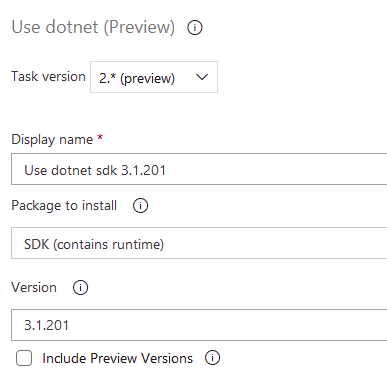
We are using the UI but copying the YAML for it, this is shown:
steps:
- task: UseDotNet@2
  displayName: 'Use dotnet sdk 3.1.201'
  inputs:
    version: 3.1.201
 poke
on 23 Apr 2020
poke
on 23 Apr 2020
@poke Amazing. Thanks for the hint! I've just upgraded our TFS from 17.143.28621.4 to 17.153.29522.3, and apparently, now the task actually is available.
Whats "great" about this is that it's not mentioned in the release notes, and the docs (src) also say that the task is not available.
hangy
on 24 Apr 2020
Related issues
 fedemkr
·
3Comments
fedemkr
·
3Comments
 ThomasBarnekow
·
3Comments
ThomasBarnekow
·
3Comments
 montebhoover
·
3Comments
montebhoover
·
3Comments
 MarkIannucci
·
3Comments
MarkIannucci
·
3Comments
 Mardoxx
·
3Comments
Mardoxx
·
3Comments