Azure-pipelines-tasks: Azure CLI task (v1 and v2) fails due to Az CLI cosmos db commands
Required Information
Entering this information will route you directly to the right team and expedite traction.
Question, Bug, or Feature?
Type: Bug
Enter Task Name:
Azure CLI
The following is some of the task information I copied from the version 2.x
2020-01-18T09:58:50.8550617Z ==============================================================================
2020-01-18T09:58:50.8550721Z Task         : Azure CLI
2020-01-18T09:58:50.8550831Z Description  : Run Azure CLI commands against an Azure subscription in a PowerShell Core/Shell script when running on Linux agent or PowerShell/Powershell Core/Batch script when running on Windows agent.
2020-01-18T09:58:50.8550956Z Version      : 2.0.4
2020-01-18T09:58:50.8551014Z Author       : Microsoft Corporation
2020-01-18T09:58:50.8551106Z Help         : https://docs.microsoft.com/azure/devops/pipelines/tasks/deploy/azure-cli
Environment
Azure DevOps
Issue Description
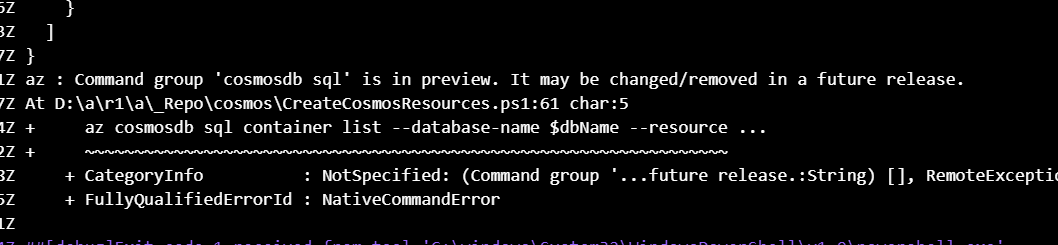
When running our release pipeline tasks, Azure CLI -- both v1 and v2 -- fails due to issues like the one in the screenshot above.
The weird thing is that previously I was using az cosmosdb collection list -- command, and it failed because it was deprecated, and the error message said me to use az cosmosdb sql container list -- and it now fails because this command is in preview mode? What type of sorcery is that?
I guess the more appropriate place to post this question would be Azure CLI repo but I am fine with a workaround too. If there is a way to stop such messages to fail my Azure DevOps pipelines, I would take it and leave for a while.
Error Logs
I have copied the lines from the log starting from the line the error first appeared.
2020-01-18T09:59:35.1095251Z az : Command group 'cosmosdb sql' is in preview. It may be changed/removed in a future release.
2020-01-18T09:59:35.1095947Z At D:\a\r1\a\_Repo\cosmos\CreateCosmosResources.ps1:61 char:5
2020-01-18T09:59:35.1096394Z +     az cosmosdb sql container list --database-name $dbName --resource ...
2020-01-18T09:59:35.1097022Z +     ~~~~~~~~~~~~~~~~~~~~~~~~~~~~~~~~~~~~~~~~~~~~~~~~~~~~~~~~~~~~~~~~~
2020-01-18T09:59:35.1097328Z     + CategoryInfo          : NotSpecified: (Command group '...future release.:String) [], RemoteException
2020-01-18T09:59:35.1097635Z     + FullyQualifiedErrorId : NativeCommandError
2020-01-18T09:59:35.1097911Z
2020-01-18T09:59:35.1530064Z ##[debug]Exit code 1 received from tool 'C:\windows\System32\WindowsPowerShell\v1.0\powershell.exe'
2020-01-18T09:59:35.1537475Z ##[debug]STDIO streams have closed for tool 'C:\windows\System32\WindowsPowerShell\v1.0\powershell.exe'
2020-01-18T09:59:35.1574278Z ##[debug]task result: Failed
2020-01-18T09:59:35.1628106Z ##[error]Script failed with error: Error: The process 'C:\windows\System32\WindowsPowerShell\v1.0\powershell.exe' failed with exit code 1
2020-01-18T09:59:35.1638525Z ##[debug]Processed: ##vso[task.issue type=error;]Script failed with error: Error: The process 'C:\windows\System32\WindowsPowerShell\v1.0\powershell.exe' failed with exit code 1
2020-01-18T09:59:35.1654137Z ##[debug]Processed: ##vso[task.complete result=Failed;]Script failed with error: Error: The process 'C:\windows\System32\WindowsPowerShell\v1.0\powershell.exe' failed with exit code 1
2020-01-18T09:59:35.1655534Z ##[debug]which 'az'
2020-01-18T09:59:35.1692767Z ##[debug]found: 'C:\Program Files (x86)\Microsoft SDKs\Azure\CLI2\wbin\az.cmd'
2020-01-18T09:59:35.1693188Z ##[debug]which 'az'
2020-01-18T09:59:35.1803310Z ##[debug]found: 'C:\Program Files (x86)\Microsoft SDKs\Azure\CLI2\wbin\az.cmd'
2020-01-18T09:59:35.1803736Z ##[debug]C:\Program Files (x86)\Microsoft SDKs\Azure\CLI2\wbin\az.cmd arg:  account clear
2020-01-18T09:59:35.1814650Z ##[debug]C:\Program Files (x86)\Microsoft SDKs\Azure\CLI2\wbin\az.cmd arg:  account clear
2020-01-18T09:59:35.1817968Z ##[debug]exec tool: C:\Program Files (x86)\Microsoft SDKs\Azure\CLI2\wbin\az.cmd
2020-01-18T09:59:35.1818855Z ##[debug]exec tool: C:\Program Files (x86)\Microsoft SDKs\Azure\CLI2\wbin\az.cmd
Some other pieces from the log
I found this interesting so decided to copy these lines here too. They simply show a warning as well as the current Azure CLI and some other binary versions:
2020-01-18T09:59:09.4959225Z WARNING: You have 2 updates available. Consider updating your CLI installation. Instructions can be found at https://docs.microsoft.com/en-us/cli/azure/install-azure-cli
2020-01-18T09:59:09.4960353Z azure-cli                         2.0.78 *
2020-01-18T09:59:09.4967175Z
2020-01-18T09:59:09.4967572Z command-modules-nspkg              2.0.3
2020-01-18T09:59:09.4967775Z core                              2.0.78 *
2020-01-18T09:59:09.4967980Z nspkg                              3.0.4
2020-01-18T09:59:09.4968182Z telemetry                          1.0.4
2020-01-18T09:59:09.4968327Z
2020-01-18T09:59:09.4968485Z Extensions:
2020-01-18T09:59:09.4968676Z azure-devops                      0.16.0
 tarikguney
All 7 comments
Hi @tarikguney ,
I was not able to repro this issue. The command _az cosmosdb sql container list --account-name "\
 tejasd1990
on 20 Jan 2020
tejasd1990
on 20 Jan 2020
I have executed the following command to update the CLI version, which updated the CLI to 2.0.80, which is the latest version according to the documentation here: https://docs.microsoft.com/en-us/cli/azure/install-azure-cli-windows?view=azure-cli-latest
Invoke-WebRequest -Uri https://aka.ms/installazurecliwindows -OutFile .\AzureCLI.msi; Start-Process msiexec.exe -Wait -ArgumentList '/I AzureCLI.msi /quiet'
Even after I have updated the CLI version, I am still getting the following error:
2020-01-21T01:00:57.6998863Z az : Command group 'cosmosdb sql' is in preview. It may be changed/removed in a future release.
2020-01-21T01:00:57.6999537Z At D:\a\r1\a\_Repo\cosmos\CreateCosmosResources.ps1:64 char:5
2020-01-21T01:00:57.6999894Z +     az cosmosdb sql container list --database-name $dbName --resource ...
2020-01-21T01:00:57.7000231Z +     ~~~~~~~~~~~~~~~~~~~~~~~~~~~~~~~~~~~~~~~~~~~~~~~~~~~~~~~~~~~~~~~~~
2020-01-21T01:00:57.7000624Z     + CategoryInfo          : NotSpecified: (Command group '...future release.:String) [], RemoteException
2020-01-21T01:00:57.7000950Z     + FullyQualifiedErrorId : NativeCommandError
2020-01-21T01:00:57.7001246Z
2020-01-21T01:00:57.7431507Z ##[debug]Exit code 1 received from tool 'C:\windows\System32\WindowsPowerShell\v1.0\powershell.exe'
2020-01-21T01:00:57.7438148Z ##[debug]STDIO streams have closed for tool 'C:\windows\System32\WindowsPowerShell\v1.0\powershell.exe'
2020-01-21T01:00:57.7472659Z ##[debug]task result: Failed
2020-01-21T01:00:57.7525672Z ##[error]Script failed with error: Error: The process 'C:\windows\System32\WindowsPowerShell\v1.0\powershell.exe' failed with exit code 1
I cannot paste the entire stack as it is a company code and includes sensitive information. But this is the new --version information:
2020-01-21T00:58:25.2930992Z [command]C:\windows\system32\cmd.exe /D /S /C ""C:\Program Files (x86)\Microsoft SDKs\Azure\CLI2\wbin\az.cmd" --version"
2020-01-21T00:58:42.5987554Z azure-cli                         2.0.80
2020-01-21T00:58:42.6155837Z
2020-01-21T00:58:42.6157436Z command-modules-nspkg              2.0.3
2020-01-21T00:58:42.6158340Z core                              2.0.80
2020-01-21T00:58:42.6158746Z nspkg                              3.0.4
2020-01-21T00:58:42.6159042Z telemetry                          1.0.4
2020-01-21T00:58:42.6159252Z
2020-01-21T00:58:42.6159634Z Extensions:
2020-01-21T00:58:42.6159871Z azure-devops                      0.16.0
2020-01-21T00:58:42.6160085Z
2020-01-21T00:58:42.6160453Z Python location 'C:\Program Files (x86)\Microsoft SDKs\Azure\CLI2\python.exe'
2020-01-21T00:58:42.6160767Z Extensions directory 'C:\Program Files\Common Files\AzureCliExtensionDirectory'
2020-01-21T00:58:42.6182825Z
2020-01-21T00:58:42.6197961Z Python (Windows) 3.6.6 (v3.6.6:4cf1f54eb7, Jun 27 2018, 02:47:15) [MSC v.1900 32 bit (Intel)]
2020-01-21T00:58:42.6282195Z
2020-01-21T00:58:42.6290638Z Legal docs and information: aka.ms/AzureCliLegal
2020-01-21T00:58:42.6316161Z
2020-01-21T00:58:42.9053902Z
2020-01-21T00:58:42.9158309Z
2020-01-21T00:58:42.9266022Z Your CLI is up-to-date.
2020-01-21T00:58:42.9268874Z
2020-01-21T00:58:42.9271371Z Please let us know how we are doing: https://aka.ms/clihats
And the command I am running is:
az cosmosdb sql container list --database-name $dbName --resource-group $resGrp --account-name $acctName
Previously, we were using az cosmosdb database command, which started throwing the command deprecated error and the scripts started exiting with codes other than 0.
I am using Hosted agents as well. Windows 2019, in particular, as I observed that such issues are more visible in Windows servers than Ubuntu.
tarikguney
on 21 Jan 2020
The only way I am able to repro the error you are getting is if the standard error stream is redirected to the standard output stream, i.e. with the command _(az sql container list --account-name "\
Can you let me know whether your scenario is like this?
If this is your scenario, then this is an issue we had investigated earlier. The problem is with the powershell version on hosted windows 2019 agent. Once it is upgraded to a sufficient version, this issue will be resolved. Meanwhile, the workaround would be either to use hosted windows 2017 agent, or uncheck the 'Fail on Standard Error' option and rely on exit codes instead.
tejasd1990
on 21 Jan 2020
Thanks for the answers, @tejasd1990 .
In my case, I had to apply both of your recommendations:
- Unchecked "Fail on standard error"
- Changed the agent from Windows 2019 to Windows 2016.
I am still getting all those deprecated or preview warnings but they don't fail the release pipelines. However, the whole thing still looks like a bug. Not sure if they will be addressed since I don't think unchecking Fail on Standard Error is a good practice for release pipelines. Also, having to change the agent is still a bug.
What's the procedure from here on? Is this bug report going to be followed up on or closed?
tarikguney
on 21 Jan 2020
Hey @tarikguney glad to hear that you are unblocked here.
Regarding your queries -
Messages containing
deprecatedorpreviewwarnings are part of Azure CLI commands and will be displayed irrespective of the agent that runs the script.Unchecking
Fail on Standard Errormakes the script rely on exit codes returned by each command. This is one of the standard practices followed to determine the result of the scripting commands.Agreed, the windows 2019 agent is still having issues executing the script when a warning occurs. In the meantime can you please use the other agent as suggested above.
Let us know if you have further queries.
Thanks
 jalajmsft
on 27 Jan 2020
jalajmsft
on 27 Jan 2020
Closing this for now. Feel free to reopen for further queries.
jalajmsft
on 3 Feb 2020
It happens the same with webapp config access-restriction.
 gsscoder
on 12 May 2020
gsscoder
on 12 May 2020
Related issues
 jabbera
·
3Comments
jabbera
·
3Comments
 syltaxue
·
3Comments
syltaxue
·
3Comments
 MichaelWhiteCodingForFun
·
3Comments
MichaelWhiteCodingForFun
·
3Comments
 Mardoxx
·
3Comments
Mardoxx
·
3Comments
 MikahB
·
3Comments
MikahB
·
3Comments
Most helpful comment
The only way I am able to repro the error you are getting is if the standard error stream is redirected to the standard output stream, i.e. with the command _(az sql container list --account-name "\&1_
Can you let me know whether your scenario is like this?
If this is your scenario, then this is an issue we had investigated earlier. The problem is with the powershell version on hosted windows 2019 agent. Once it is upgraded to a sufficient version, this issue will be resolved. Meanwhile, the workaround would be either to use hosted windows 2017 agent, or uncheck the 'Fail on Standard Error' option and rely on exit codes instead.