Azure-pipelines-tasks: Maven Task Fails with HTTP 501. Central Repo no longer accepts http traffic, must be https
Note
Issues in this repo are for tracking bugs, feature requests and questions for the tasks in this repo
For a list:
https://github.com/Microsoft/azure-pipelines-tasks/tree/master/Tasks
If you have an issue or request for the Azure Pipelines service, use developer community instead:
https://developercommunity.visualstudio.com/spaces/21/index.html )
Required Information
Entering this information will route you directly to the right team and expedite traction.
Question, Bug, or Feature?
Type: Bug
Enter Task Name: Maven
list here (V# not needed):
https://github.com/Microsoft/azure-pipelines-tasks/tree/master/Tasks
Environment
Server - Azure Pipelines
- If using Azure Pipelines, provide the account name, team project name, build definition name/build number:
Agent - Hosted or Private: Hosted
- If using Hosted agent, provide agent queue name: Azure Pipelines 17
Issue Description
As of 1/15 Maven central repo no longer accepts unencrypted http traffic. https://support.sonatype.com/hc/en-us/articles/360041287334.
When using maven build the attached log is generated.
Task logs
[Enable debug logging and please provide the zip file containing all the logs for a speedy resolution]
Troubleshooting
Checkout how to troubleshoot failures and collect debug logs: https://docs.microsoft.com/en-us/vsts/build-release/actions/troubleshooting
Error logs
[Insert error from the logs here for a quick overview]
[mavenFail.txt](https://github.com/microsoft/azure-pipelines-tasks/files/4067708/mavenFail.txt)
 anbecvar
All 21 comments
Effective January 15, 2020, The Central Repository no longer supports insecure communication over plain HTTP and requires that all requests to the repository are encrypted over HTTPS.
 arunans23
on 16 Jan 2020
arunans23
on 16 Jan 2020
@anbecvar what version of the Maven task are you using? Versions 2.x and 3.x should not be seeing this issue (correct me if you see otherwise) so if you upgrade to them that will fix your problem. Version 1 is the only one with this issue and we are not supporting any new fixes to that anymore
 leantk
on 16 Jan 2020
leantk
on 16 Jan 2020
@leantk Hi Leah. This is causing our Hosted Maven builds to fail as well. We're using version 3.161.0 of the Maven task in our builds (presumably the latest version). And since we're using hosted, it appears the version of Maven being used is 3.2.2
3.2.2.  [command]C:\Windows\system32\cmd.exe /D /S /C "C:\java\maven\apache-maven-3.2.2\bin\mvn.bat -f D:\a\1\s\pom.xml package"
[INFO] Scanning for projects...
...a bit further down we see this...
Downloading: http://repo.maven.apache.org/maven2/org/apache/maven/plugins/maven-resources-plugin/2.7/maven-resources-plugin-2.7.pom

[INFO] ------------------------------------------------------------------------
[INFO] BUILD FAILURE
[INFO] ------------------------------------------------------------------------
[INFO] Total time: 2.590 s
[INFO] Finished at: 2020-01-16T19:40:35+00:00
[INFO] Final Memory: 8M/135M
[INFO] ------------------------------------------------------------------------
[ERROR] Plugin org.apache.maven.plugins:maven-resources-plugin:2.7 or one of its dependencies could not be resolved: Failed to read artifact descriptor for org.apache.maven.plugins:maven-resources-plugin:jar:2.7: Could not transfer artifact org.apache.maven.plugins:maven-resources-plugin:pom:2.7 from/to central (http://repo.maven.apache.org/maven2): Failed to transfer file: http://repo.maven.apache.org/maven2/org/apache/maven/plugins/maven-resources-plugin/2.7/maven-resources-plugin-2.7.pom. Return code is: 501 , ReasonPhrase:HTTPS Required. -> [Help 1]
[ERROR]
[ERROR] To see the full stack trace of the errors, re-run Maven with the -e switch.
[ERROR] Re-run Maven using the -X switch to enable full debug logging.
[ERROR]
Based on SO link above, it appears we'd need at least Maven 3.6.0 in order to use HTTPS.
I was attempting to find the list of packages on the Hosted images to see what version(s) of Maven were available but the link has escaped me. If it matters, we're using JDK 1.8 in our builds.
 jeffyoung
on 16 Jan 2020
jeffyoung
on 16 Jan 2020
Same here. 3.2.2 of maven (hosted build). I’ve been able to mitigate the problem by adding the following to my Pom.xml
Thanks,
Anthony
Senior Service Engineer
Millennium E/2343
(425) 705-0783
[cid:[email protected]]
From: Jeff Young notifications@github.com
Sent: Thursday, January 16, 2020 11:54 AM
To: microsoft/azure-pipelines-tasks azure-pipelines-tasks@noreply.github.com
Cc: Anthony Becvar anbecvar@microsoft.com; Mention mention@noreply.github.com
Subject: Re: [microsoft/azure-pipelines-tasks] Maven Task Fails with HTTP 501. Central Repo no longer accepts http traffic, must be https (#12156)
@leantkhttps://nam06.safelinks.protection.outlook.com/?url=https%3A%2F%2Fgithub.com%2Fleantk&data=02%7C01%7Canbecvar%40microsoft.com%7C70cacc9134454905f5ff08d79abde411%7C72f988bf86f141af91ab2d7cd011db47%7C0%7C0%7C637148012692673206&sdata=nLV3omt1driuN5Pjy8nawE%2Fz5nOHhZWSi6SqrGWUIqc%3D&reserved=0 Hi Leah. This is causing our Hosted Maven builds to fail as well. We're using version 3.161.0 of the Maven task in our builds (presumably the latest version). And since we're using hosted, it appears the version of Maven being used is 3.2.2
3.2.2. [command]C:\Windows\system32\cmd.exe /D /S /C "C:\java\maven\apache-maven-3.2.2\bin\mvn.bat -f D:\a\1\s\pom.xml package"
[INFO] Scanning for projects...
...a bit further down we see this...
[INFO] ------------------------------------------------------------------------
[INFO] BUILD FAILURE
[INFO] ------------------------------------------------------------------------
[INFO] Total time: 2.590 s
[INFO] Finished at: 2020-01-16T19:40:35+00:00
[INFO] Final Memory: 8M/135M
[INFO] ------------------------------------------------------------------------
[ERROR] Plugin org.apache.maven.plugins:maven-resources-plugin:2.7 or one of its dependencies could not be resolved: Failed to read artifact descriptor for org.apache.maven.plugins:maven-resources-plugin:jar:2.7: Could not transfer artifact org.apache.maven.plugins:maven-resources-plugin:pom:2.7 from/to central (http://repo.maven.apache.org/maven2): Failed to transfer file: http://repo.maven.apache.org/maven2/org/apache/maven/plugins/maven-resources-plugin/2.7/maven-resources-plugin-2.7.pom. Return code is: 501 , ReasonPhrase:HTTPS Required. -> [Help 1]
[ERROR]
[ERROR] To see the full stack trace of the errors, re-run Maven with the -e switch.
[ERROR] Re-run Maven using the -X switch to enable full debug logging.
[ERROR]
Based on SO link above, it appears we'd need at least Maven 3.6.0 in order to use HTTPS.
I was attempting to find the list of packages on the Hosted images to see what version(s) of Maven were available but the link has escaped me. If it matters, we're using JDK 1.8 in our builds.
—
You are receiving this because you were mentioned.
Reply to this email directly, view it on GitHubhttps://nam06.safelinks.protection.outlook.com/?url=https%3A%2F%2Fgithub.com%2Fmicrosoft%2Fazure-pipelines-tasks%2Fissues%2F12156%3Femail_source%3Dnotifications%26email_token%3DAETBNUZB25X5DHOBTBUBWX3Q6C3PDA5CNFSM4KHKQZBKYY3PNVWWK3TUL52HS4DFVREXG43VMVBW63LNMVXHJKTDN5WW2ZLOORPWSZGOEJFKQNQ%23issuecomment-575318070&data=02%7C01%7Canbecvar%40microsoft.com%7C70cacc9134454905f5ff08d79abde411%7C72f988bf86f141af91ab2d7cd011db47%7C0%7C0%7C637148012692673206&sdata=NcOGaNdJue2G3jq8dTrL59PdEHIFonuBYu3Y3%2Bm4n1s%3D&reserved=0, or unsubscribehttps://nam06.safelinks.protection.outlook.com/?url=https%3A%2F%2Fgithub.com%2Fnotifications%2Funsubscribe-auth%2FAETBNUZIGAXH36TCCHAUHCDQ6C3PDANCNFSM4KHKQZBA&data=02%7C01%7Canbecvar%40microsoft.com%7C70cacc9134454905f5ff08d79abde411%7C72f988bf86f141af91ab2d7cd011db47%7C0%7C0%7C637148012692683199&sdata=KNArQHQsmnL0Sv0kpcN2lR0x%2FNXgnpFYHTplq7N%2B2X0%3D&reserved=0.
anbecvar
on 16 Jan 2020
Hey @jeffyoung! So interesting that it's picking up Maven from under the Java directory. We do have Maven 3.6.2 installed on the machines but in a different location. You can follow the versions of the installed software on the images here for future reference: https://github.com/actions/virtual-environments/blob/master/images/win/Windows2019-Readme.md#maven
When I run a script to echo Maven home and version I get this:
========================== Starting Command Output ===========================
"C:\windows\system32\cmd.exe" /D /E:ON /V:OFF /S /C "CALL "d:\a\_temp\e69692ec-db61-4bbe-abf0-e8f676e4d32e.cmd""
Add other tasks to build, test, and deploy your project.
See https://aka.ms/yaml
Apache Maven 3.6.2 (40f52333136460af0dc0d7232c0dc0bcf0d9e117; 2019-08-27T15:06:16Z)
Maven home: C:\ProgramData\chocolatey\lib\maven\apache-maven-3.6.2\bin\..
Java version: 1.8.0_222, vendor: Azul Systems, Inc., runtime: C:\Program Files\Java\zulu-8-azure-jdk_8.40.0.25-8.0.222-win_x64\jre
Default locale: en_US, platform encoding: Cp1252
OS name: "windows server 2019", version: "10.0", arch: "amd64", family: "windows"
I'm curious why the newer version of Maven isn't being picked up then but let me try and dig more into it.
leantk
on 16 Jan 2020
Thanks @leantk! @anbecvar provided a workaround that we're using in the meantime. I figure it'll take longer to make a fix to either the task (likely) or the image (less likely if Maven 3.6 is already present) than the workaround. Looks like there's an issue over on the forum as well: https://developercommunity.visualstudio.com/content/problem/887520/maven-switched-to-https.html
jeffyoung
on 17 Jan 2020
It seems some of the images do contain the correct version :
default, my hosted build used
Apache Maven 3.2.2 (45f7c06d68e745d05611f7fd14efb6594181933e; 2014-06-17T13:51:42+00:00)
Maven home: C:\java\maven\apache-maven-3.2.2
Java version: 1.8.0_102, vendor: Oracle Corporation
Java home: C:\java\jdk\jdk1.8.0_102\jre
Default locale: en_US, platform encoding: Cp1252
OS name: "windows server 2012 r2", version: "6.3", arch: "amd64", family: "dos"
It works if you choose the following image :
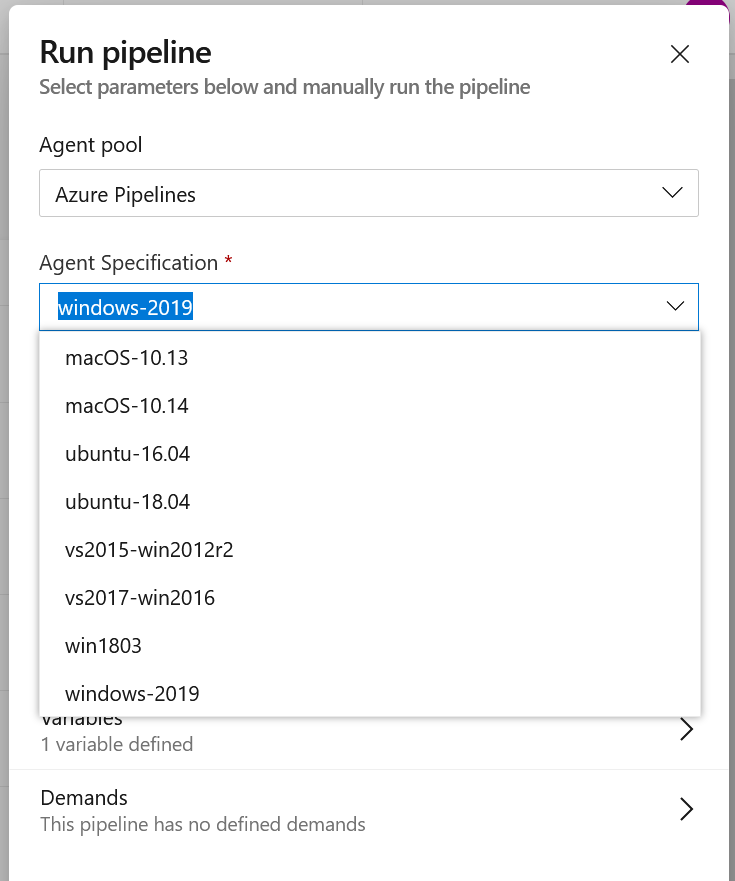
(Run pipeline > Agent pool : Azure Pipelines > Agent Specification : windows-2019 )
Apache Maven 3.6.2 (40f52333136460af0dc0d7232c0dc0bcf0d9e117; 2019-08-27T15:06:16Z)
Maven home: C:\ProgramData\chocolatey\lib\maven\apache-maven-3.6.2\bin..
Java version: 1.8.0_222, vendor: Azul Systems, Inc., runtime: C:\Program Files\Java\zulu-8-azure-jdk_8.40.0.25-8.0.222-win_x64\jre
Default locale: en_US, platform encoding: Cp1252
OS name: "windows server 2019", version: "10.0", arch: "amd64", family: "windows"
 vanbogba
on 21 Jan 2020
vanbogba
on 21 Jan 2020
By changing agent pool to Azure Pipelines --> windows-2019 ( agent specification) solved our issue.
 pbakhil
on 21 Jan 2020
pbakhil
on 21 Jan 2020
Oh I see you are using the older image types and not Windows 2019. Let me see if an update is scheduled for those. I know we eventually want to get people off those images and onto the newer ones but let me find the schedule for that.
leantk
on 21 Jan 2020
By changing agent pool to Azure Pipelines --> windows-2019 solved our issue related to maven version but this agent doesn't have oracle jdk it contain only jdk provided by zulu. Is there a way to have oracle jdk in window-2019 agent.
 mohitsingh0610
on 22 Jan 2020
mohitsingh0610
on 22 Jan 2020
So to confirm, the older images like vs2015-win2012r2 are being retired so moving to windows-2019 or windows-latest is the correct solution here. There will not be anymore updates done to the older image since they are going away:
https://devblogs.microsoft.com/devops/removing-older-images-in-azure-pipelines-hosted-pools/
leantk
on 22 Jan 2020
@mohitsingh0610 the Oracle JDK cannot come pre-installed on the build machines anymore due to Oracle licensing issues. I apologize for the inconvenience. We added a task that allows you to install a Java SDK of your choice though if needed. Please see the following doc which will require you to provide the JDK you would like to use: https://docs.microsoft.com/en-us/azure/devops/pipelines/tasks/tool/java-tool-installer?view=azure-devops
leantk
on 22 Jan 2020
I'm going to close this out as resolved but please feel free to reopen it if you are still seeing issues or if you need my help with anything else
leantk
on 22 Jan 2020
Right now, if I trigger a build, and use
_(Run pipeline > Agent pool : Hosted )_
windows server 2012 r2 is used.
Is it possible to use another default that reflects the upcoming changes?
vanbogba
on 22 Jan 2020
@vanbogba what does your UI look like? Mine looks like this but I wonder if it's an opt in feature that maybe isn't turned on for you. I remember Hosted used to be shown but I want to see to make sure I'm remembering correctly
leantk
on 22 Jan 2020
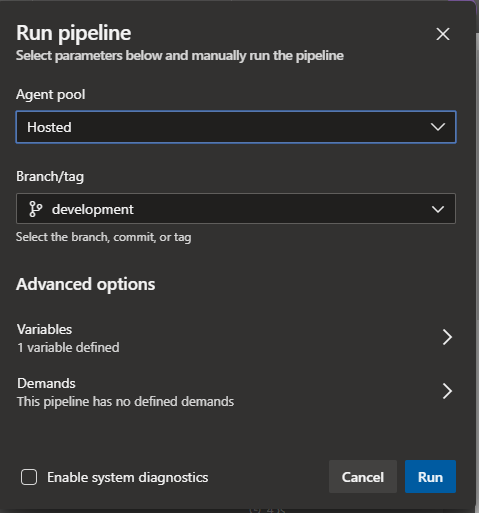
For me, the Agent Pool dropdown is initialized with 'Hosted' as value, no agent specification needed.
Once I have selected another value in the dropdown, 'Hosted' can't be chosen anymore.
If I choose 'Azure Pipelines', the Agent specification dropdown is shown.
To be clear - the initial issue is solved for me, we can update and run our pipelines using the correct agent. It only seems like an odd behavior - if you don't specify an agent, the "default" is a deprecated image.
vanbogba
on 23 Jan 2020
 bekagaw653
on 23 Jan 2020
bekagaw653
on 23 Jan 2020
I'm going to close this out as resolved but please feel free to reopen it if you are still seeing issues or if you need my help with anything else
@leantk I follwed the instructions of using the new agent specification of windows-2019, which fixed the issue, however, I have another step that is using the SonarCloud analysis and publishing, and I now get the below error on that:
The SonarQube MSBuild integration failed: SonarQube was unable to collect the required information about your projects.
Possible causes:
  1. The project has not been built - the project must be built in between the begin and end steps
  2. An unsupported version of MSBuild has been used to build the project. Currently MSBuild 14.0.25420.1 and higher are supported.
  3. The begin, build and end steps have not all been launched from the same folder
  4. None of the analyzed projects have a valid ProjectGuid and you have not used a solution (.sln)
21:36:21.959  Post-processing failed. Exit code: 1
The process d:\a\_tasks\SonarCloudPrepare_14d9cde6-c1da-4d55-aa01-2965cd301255\1.9.0\classic-sonar-scanner-msbuild\SonarScanner.MSBuild.exe failed with exit code 1
 abakran1
on 23 Jan 2020
abakran1
on 23 Jan 2020
Solved Here Maven dependencies are failing with a 501 error
bekagaw653
on 28 Jan 2020
For me, the Agent Pool dropdown is initialized with 'Hosted' as value, no agent specification needed.
Once I have selected another value in the dropdown, 'Hosted' can't be chosen anymore.If I choose 'Azure Pipelines', the Agent specification dropdown is shown.
To be clear - the initial issue is solved for me, we can update and run our pipelines using the correct agent. It only seems like an odd behavior - if you don't specify an agent, the "default" is a deprecated image.
@vanbogba thanks for pointing that out and I'll take a look at that. You're correct. We shouldn't push people into using a pool that is being deprecated
leantk
on 29 Jan 2020
in linux i was able to resolve this by removing maven cache folder at /home/user/.m2
 felipebutcher
on 2 Mar 2020
felipebutcher
on 2 Mar 2020
Related issues
 jared-hexagon
·
3Comments
jared-hexagon
·
3Comments
 TheRealEdwardCullen
·
3Comments
TheRealEdwardCullen
·
3Comments
 Mardoxx
·
3Comments
Mardoxx
·
3Comments
 MikahB
·
3Comments
MikahB
·
3Comments
 HenrikStanley
·
3Comments
HenrikStanley
·
3Comments
Most helpful comment
Same here. 3.2.2 of maven (hosted build). I’ve been able to mitigate the problem by adding the following to my Pom.xml
Thanks,
Anthony
Senior Service Engineer
Millennium E/2343
(425) 705-0783
[cid:[email protected]]
From: Jeff Young notifications@github.com
Sent: Thursday, January 16, 2020 11:54 AM
To: microsoft/azure-pipelines-tasks azure-pipelines-tasks@noreply.github.com
Cc: Anthony Becvar anbecvar@microsoft.com; Mention mention@noreply.github.com
Subject: Re: [microsoft/azure-pipelines-tasks] Maven Task Fails with HTTP 501. Central Repo no longer accepts http traffic, must be https (#12156)
@leantkhttps://nam06.safelinks.protection.outlook.com/?url=https%3A%2F%2Fgithub.com%2Fleantk&data=02%7C01%7Canbecvar%40microsoft.com%7C70cacc9134454905f5ff08d79abde411%7C72f988bf86f141af91ab2d7cd011db47%7C0%7C0%7C637148012692673206&sdata=nLV3omt1driuN5Pjy8nawE%2Fz5nOHhZWSi6SqrGWUIqc%3D&reserved=0 Hi Leah. This is causing our Hosted Maven builds to fail as well. We're using version 3.161.0 of the Maven task in our builds (presumably the latest version). And since we're using hosted, it appears the version of Maven being used is 3.2.2
3.2.2. [command]C:\Windows\system32\cmd.exe /D /S /C "C:\java\maven\apache-maven-3.2.2\bin\mvn.bat -f D:\a\1\s\pom.xml package"
[INFO] Scanning for projects...
...a bit further down we see this...
Downloading: http://repo.maven.apache.org/maven2/org/apache/maven/plugins/maven-resources-plugin/2.7/maven-resources-plugin-2.7.pom
[INFO] ------------------------------------------------------------------------
[INFO] BUILD FAILURE
[INFO] ------------------------------------------------------------------------
[INFO] Total time: 2.590 s
[INFO] Finished at: 2020-01-16T19:40:35+00:00
[INFO] Final Memory: 8M/135M
[INFO] ------------------------------------------------------------------------
[ERROR] Plugin org.apache.maven.plugins:maven-resources-plugin:2.7 or one of its dependencies could not be resolved: Failed to read artifact descriptor for org.apache.maven.plugins:maven-resources-plugin:jar:2.7: Could not transfer artifact org.apache.maven.plugins:maven-resources-plugin:pom:2.7 from/to central (http://repo.maven.apache.org/maven2): Failed to transfer file: http://repo.maven.apache.org/maven2/org/apache/maven/plugins/maven-resources-plugin/2.7/maven-resources-plugin-2.7.pom. Return code is: 501 , ReasonPhrase:HTTPS Required. -> [Help 1]
[ERROR]
[ERROR] To see the full stack trace of the errors, re-run Maven with the -e switch.
[ERROR] Re-run Maven using the -X switch to enable full debug logging.
[ERROR]
Based on SO link above, it appears we'd need at least Maven 3.6.0 in order to use HTTPS.
I was attempting to find the list of packages on the Hosted images to see what version(s) of Maven were available but the link has escaped me. If it matters, we're using JDK 1.8 in our builds.
—
You are receiving this because you were mentioned.
Reply to this email directly, view it on GitHubhttps://nam06.safelinks.protection.outlook.com/?url=https%3A%2F%2Fgithub.com%2Fmicrosoft%2Fazure-pipelines-tasks%2Fissues%2F12156%3Femail_source%3Dnotifications%26email_token%3DAETBNUZB25X5DHOBTBUBWX3Q6C3PDA5CNFSM4KHKQZBKYY3PNVWWK3TUL52HS4DFVREXG43VMVBW63LNMVXHJKTDN5WW2ZLOORPWSZGOEJFKQNQ%23issuecomment-575318070&data=02%7C01%7Canbecvar%40microsoft.com%7C70cacc9134454905f5ff08d79abde411%7C72f988bf86f141af91ab2d7cd011db47%7C0%7C0%7C637148012692673206&sdata=NcOGaNdJue2G3jq8dTrL59PdEHIFonuBYu3Y3%2Bm4n1s%3D&reserved=0, or unsubscribehttps://nam06.safelinks.protection.outlook.com/?url=https%3A%2F%2Fgithub.com%2Fnotifications%2Funsubscribe-auth%2FAETBNUZIGAXH36TCCHAUHCDQ6C3PDANCNFSM4KHKQZBA&data=02%7C01%7Canbecvar%40microsoft.com%7C70cacc9134454905f5ff08d79abde411%7C72f988bf86f141af91ab2d7cd011db47%7C0%7C0%7C637148012692683199&sdata=KNArQHQsmnL0Sv0kpcN2lR0x%2FNXgnpFYHTplq7N%2B2X0%3D&reserved=0.