Azure-pipelines-tasks: Azure CLI classic task seems to only evaluate first line in 'inline script' mode
I'm under the impression that the Azure CLI task ( in the classical editor ) - in 'inline script' mode, evaluates only the first line of the script in Azure.
Steps to recreate:
- Create classic pipeline
- Add Azure CLI task
- Add two lines of 'az group list' for instance:

- Observe output. In my case - I downloaded RAW logs - and here are the interesting bits:
    2019-11-20T10:04:22.1675908Z ##[section]Starting: Azure CLI
    2019-11-20T10:04:22.1783470Z ==============================================================================
    2019-11-20T10:04:22.1783967Z Task         : Azure CLI
    2019-11-20T10:04:22.1784150Z Description  : Run Azure CLI commands against an Azure subscription in a Shell script when running on Linux agent or Batch script when running on Windows agent.
    2019-11-20T10:04:22.1784533Z Version      : 1.156.0
    2019-11-20T10:04:22.1785114Z Author       : Microsoft Corporation
    2019-11-20T10:04:22.1785307Z Help         : https://docs.microsoft.com/azure/devops/pipelines/tasks/deploy/azure-cli
    2019-11-20T10:04:22.1785543Z ==============================================================================
    2019-11-20T10:04:22.5750301Z [command]C:\windows\system32\cmd.exe /D /S /C ""C:\Program Files (x86)\Microsoft SDKs\Azure\CLI2\wbin\az.cmd" --version"
    2019-11-20T10:04:44.5431683Z WARNING: You have 2 updates available. Consider updating your CLI installation.
    2019-11-20T10:04:44.5432788Z azure-cli                         2.0.75 *
    2019-11-20T10:04:44.5433598Z
    2019-11-20T10:04:44.5434104Z command-modules-nspkg              2.0.3
    2019-11-20T10:04:44.5434513Z core                              2.0.75 *
    2019-11-20T10:04:44.5435524Z nspkg                              3.0.4
    2019-11-20T10:04:44.5435974Z telemetry                          1.0.4
    2019-11-20T10:04:44.5436334Z
    2019-11-20T10:04:44.5436747Z Extensions:
    2019-11-20T10:04:44.5437170Z azure-devops                      0.13.0
    2019-11-20T10:04:44.5437547Z
    2019-11-20T10:04:44.5437963Z Python location 'C:\Program Files (x86)\Microsoft SDKs\Azure\CLI2\python.exe'
    2019-11-20T10:04:44.5438557Z Extensions directory 'C:\Program Files\Common Files\AzureCliExtensionDirectory'
    2019-11-20T10:04:44.5438895Z
    2019-11-20T10:04:44.5439440Z Python (Windows) 3.6.6 (v3.6.6:4cf1f54eb7, Jun 27 2018, 02:47:15) [MSC v.1900 32 bit (Intel)]
    2019-11-20T10:04:44.5439766Z
    2019-11-20T10:04:44.5440099Z Legal docs and information: aka.ms/AzureCliLegal
    2019-11-20T10:04:44.5440439Z
    2019-11-20T10:04:44.5440712Z
    2019-11-20T10:04:44.5441702Z Setting AZURE_CONFIG_DIR env variable to: D:\a\_temp\.azclitask
    2019-11-20T10:04:44.5442565Z Setting active cloud to: AzureCloud
    2019-11-20T10:04:56.8798559Z D:\a\1\s>az group list
    2019-11-20T10:04:59.1661337Z [
     ... looks good
    2019-11-20T10:04:59.1733516Z ]
    2019-11-20T10:04:59.2803945Z [command]C:\windows\system32\cmd.exe /D /S /C ""C:\Program Files (x86)\Microsoft SDKs\Azure\CLI2\wbin\az.cmd" account clear"
    2019-11-20T10:05:00.6450107Z ##[section]Finishing: Azure CLI
I'm running on the vs2017-win2016 agent. My buddy @rebremer figured out that on a Linux hosted agent, the problem does not occur. Futhermore - the YML that I tried also has no problems - although also runs on Linux:
trigger:
  - master

  pool:
    vmImage: 'ubuntu-latest'

  steps:
  - script: echo Hello, world!
    displayName: 'Run a one-line script'

  - script: |
      echo Add other tasks to build, test, and deploy your project.
      echo See https://aka.ms/yaml
    displayName: 'Run a multi-line script'

  - task: AzureCLI@2
    inputs:
      azureSubscription: 'Microsoft Azure Internal Consumption(5fcb0d36-846f-4721-86e9-47f6c43494fd)'
      scriptType: 'bash'
      scriptLocation: 'inlineScript'
      inlineScript: |
        az group list
        az group list
So could this be Windows specific ?
 jochenvanwylick
All 4 comments
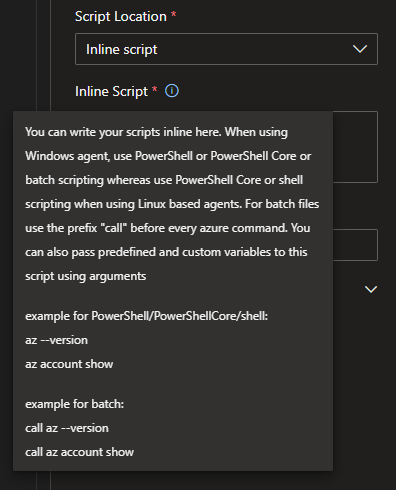
For some reason, it helps to write "call" in front of every line when running az commands on windows. Something to do with bash, it is slightly mentioned in the help popout for the inline script.
 rsitrifork
on 21 Nov 2019
rsitrifork
on 21 Nov 2019
@rsitrifork is absolutely right here. For windows agent batch script whereas for Linux based agent shell script gets executed. For batch files use the prefix "call" before every azure command.
For Azure CLI v1 version:
example for shell:
az --version
az account showexample for batch:
call az --version
call az account show
You can find details in the tooltip for the InlineScript field in the classic editor.
 jalajmsft
on 21 Nov 2019
jalajmsft
on 21 Nov 2019
Hi @rsitrifork and @jalajmsft - thanks the response, and I'm sure that will solve the issue. I actually read that though and didn't consider it because of the 'for batch files, use ...'. I since I was doing an inline script it wasn't applicable. But you're wrapping the inline script in batch then I suppose.
Thanks !
jochenvanwylick
on 22 Nov 2019
Hey @jochenvanwylick thank you for your inputs, we will update the help text to avoid confusion. Closing this. Feel free to reopen/ open a new issue for further quires.
jalajmsft
on 25 Nov 2019
Related issues
 fedemkr
·
3Comments
fedemkr
·
3Comments
 HenrikStanley
·
3Comments
HenrikStanley
·
3Comments
 divyesh-parikh
·
3Comments
divyesh-parikh
·
3Comments
 gregpakes
·
3Comments
gregpakes
·
3Comments
 yaananth
·
3Comments
yaananth
·
3Comments
Most helpful comment
For some reason, it helps to write "call" in front of every line when running az commands on windows. Something to do with bash, it is slightly mentioned in the help popout for the inline script.