Azure-pipelines-tasks: BLOCKING: Latest AzurePowershell@4 (4.159.2) -> Get-AzContext returns $null
Note
For a list:
https://github.com/Microsoft/azure-pipelines-tasks/tree/master/Tasks
If you have an issue or request for the Azure Pipelines service, use developer community instead:
https://developercommunity.visualstudio.com/spaces/21/index.html )
Required Information
Entering this information will route you directly to the right team and expedite traction.
Question, Bug, or Feature?
Type: BUG
Enter Task Name: AzurePowershell@4 (4.159.2)
list here (V# not needed):
https://github.com/Microsoft/azure-pipelines-tasks/tree/master/Tasks
Environment
Azure Pipelines
- If using Azure Pipelines, provide the account name, team project name, build definition name/build number: msazure.visualstudio.com
Agent - Private:
Server 2019 with latest VS 2019 installed
Issue Description
We depend on the AzurePowershell VSTS task to use resources in our Azure subs. With the latest deployment of the task 4.159.2 (today) we can no longer get the context to change to the appropriate subscription in the tenant, hence our builds, deployments, etc are blocked. The previous version of the task 4.157.4 was working just fine.
Azure PowerShell version on hosted VM: 2.3.2
We need someone to look at what the heck happened with the latest version ....
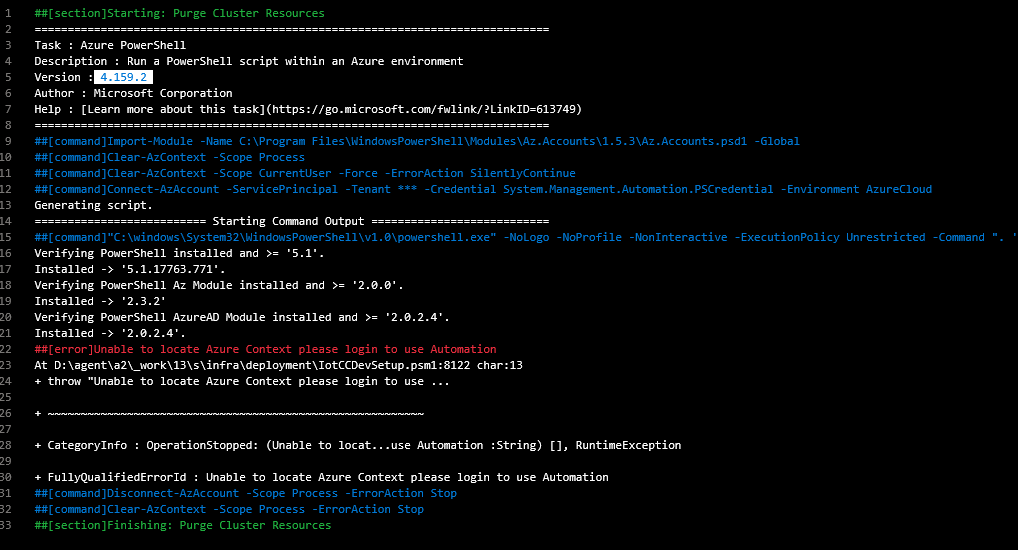
Task logs
[Enable debug logging and please provide the zip file containing all the logs for a speedy resolution]
Here is an example of diagnostics enabled with a call to Get-AzContext in an Azure PowerShell task we have
150
[debug]Loading 'Assembly' from path 'C:\Program Files\WindowsPowerShell\Modules\Az.Accounts\1.6.2\Microsoft.Rest.ClientRuntime.dll'.
151
[debug]Loading 'Assembly' from path 'C:\Program Files\WindowsPowerShell\Modules\Az.Accounts\1.6.2\Microsoft.Rest.ClientRuntime.dll'.
152
[debug]Loading 'Assembly' from path 'C:\Program Files\WindowsPowerShell\Modules\Az.Accounts\1.6.2\Microsoft.Rest.ClientRuntime.Azure.dll'.
153
[debug]Loading 'Assembly' from path 'C:\Program Files\WindowsPowerShell\Modules\Az.Accounts\1.6.2\Microsoft.Rest.ClientRuntime.Azure.dll'.
154
[debug]Loading 'Assembly' from path 'C:\Program Files\WindowsPowerShell\Modules\Az.Accounts\1.6.2\Microsoft.WindowsAzure.Storage.dll'.
155
[debug]Loading 'Assembly' from path 'C:\Program Files\WindowsPowerShell\Modules\Az.Accounts\1.6.2\Microsoft.WindowsAzure.Storage.dll'.
156
[debug]Loading 'Assembly' from path 'C:\Program Files\WindowsPowerShell\Modules\Az.Accounts\1.6.2\Microsoft.WindowsAzure.Storage.DataMovement.dll'.
157
[debug]Loading 'Assembly' from path 'C:\Program Files\WindowsPowerShell\Modules\Az.Accounts\1.6.2\Microsoft.WindowsAzure.Storage.DataMovement.dll'.
158
[debug]Loading 'Assembly' from path 'C:\Program Files\WindowsPowerShell\Modules\Az.Accounts\1.6.2\Microsoft.Azure.PowerShell.Clients.Aks.dll'.
159
[debug]Loading 'Assembly' from path 'C:\Program Files\WindowsPowerShell\Modules\Az.Accounts\1.6.2\Microsoft.Azure.PowerShell.Clients.Aks.dll'.
160
[debug]Loading 'Assembly' from path 'C:\Program Files\WindowsPowerShell\Modules\Az.Accounts\1.6.2\Microsoft.Azure.PowerShell.Strategies.dll'.
161
[debug]Loading 'Assembly' from path 'C:\Program Files\WindowsPowerShell\Modules\Az.Accounts\1.6.2\Microsoft.Azure.PowerShell.Strategies.dll'.
162
[debug]Loading 'FormatsToProcess' from path 'C:\Program Files\WindowsPowerShell\Modules\Az.Accounts\1.6.2\Accounts.format.ps1xml'.
163
[debug]Loading 'FormatsToProcess' from path 'C:\Program Files\WindowsPowerShell\Modules\Az.Accounts\1.6.2\Accounts.generated.format.ps1xml'.
164
[debug]Populating RepositorySourceLocation property for module Az.Accounts.
165
[debug]Loading module from path 'C:\Program Files\WindowsPowerShell\Modules\Az.Accounts\1.6.2\Az.Accounts.psm1'.
166
[debug]Loading module from path 'C:\Program Files\WindowsPowerShell\Modules\Az.Accounts\1.6.2\Microsoft.Azure.PowerShell.Cmdlets.Accounts.dll'.
167
[debug]Importing cmdlet 'Get-AzProfile'.
168
[debug]Importing cmdlet 'Register-AzModule'.
169
[debug]Importing cmdlet 'Select-AzProfile'.
170
[debug]Importing cmdlet 'Connect-AzAccount'.
171
[debug]Importing cmdlet 'Disconnect-AzAccount'.
172
[debug]Importing cmdlet 'Get-AzContext'.
173
[debug]Importing cmdlet 'Import-AzContext'.
174
[debug]Importing cmdlet 'Save-AzContext'.
175
[debug]Importing cmdlet 'Set-AzContext'.
176
[debug]Importing cmdlet 'Disable-AzDataCollection'.
177
[debug]Importing cmdlet 'Enable-AzDataCollection'.
178
[debug]Importing cmdlet 'Add-AzEnvironment'.
179
[debug]Importing cmdlet 'Get-AzEnvironment'.
180
[debug]Importing cmdlet 'Remove-AzEnvironment'.
181
[debug]Importing cmdlet 'Set-AzEnvironment'.
182
[debug]Importing cmdlet 'Send-Feedback'.
183
[debug]Importing cmdlet 'Get-AzSubscription'.
184
[debug]Importing cmdlet 'Get-AzTenant'.
185
[debug]Importing cmdlet 'Uninstall-AzureRm'.
186
[debug]Importing cmdlet 'Resolve-AzError'.
187
[debug]Importing cmdlet 'Clear-AzDefault'.
188
[debug]Importing cmdlet 'Get-AzDefault'.
189
[debug]Importing cmdlet 'Set-AzDefault'.
190
[debug]Importing cmdlet 'Disable-AzureRmAlias'.
191
[debug]Importing cmdlet 'Enable-AzureRmAlias'.
192
[debug]Importing cmdlet 'Disable-AzContextAutosave'.
193
[debug]Importing cmdlet 'Enable-AzContextAutosave'.
194
[debug]Importing cmdlet 'Get-AzContextAutosaveSetting'.
195
[debug]Importing cmdlet 'Clear-AzContext'.
196
[debug]Importing cmdlet 'Remove-AzContext'.
197
[debug]Importing cmdlet 'Rename-AzContext'.
198
[debug]Importing cmdlet 'Select-AzContext'.
199
[debug]Importing alias 'Login-AzAccount'.
200
[debug]Importing alias 'Login-AzureRmAccount'.
201
[debug]Importing alias 'Add-AzAccount'.
202
[debug]Importing alias 'Logout-AzAccount'.
203
[debug]Importing alias 'Logout-AzureRmAccount'.
204
[debug]Importing alias 'Remove-AzAccount'.
205
[debug]Importing alias 'Save-AzProfile'.
206
[debug]Importing alias 'Select-AzSubscription'.
207
[debug]Importing alias 'Get-AzureRmDomain'.
208
[debug]Importing alias 'Get-AzDomain'.
209
[debug]Importing alias 'Resolve-Error'.
210
[debug]Exporting function 'Test-DotNet'.
211
[debug]Exporting function 'Write-InstallationCheckToFile'.
212
[debug]Exporting cmdlet 'Get-AzProfile'.
213
[debug]Exporting cmdlet 'Register-AzModule'.
214
[debug]Exporting cmdlet 'Select-AzProfile'.
215
[debug]Exporting cmdlet 'Connect-AzAccount'.
216
[debug]Exporting cmdlet 'Disconnect-AzAccount'.
217
[debug]Exporting cmdlet 'Get-AzContext'.
218
[debug]Exporting cmdlet 'Import-AzContext'.
219
[debug]Exporting cmdlet 'Save-AzContext'.
220
[debug]Exporting cmdlet 'Set-AzContext'.
221
[debug]Exporting cmdlet 'Disable-AzDataCollection'.
222
[debug]Exporting cmdlet 'Enable-AzDataCollection'.
223
[debug]Exporting cmdlet 'Add-AzEnvironment'.
224
[debug]Exporting cmdlet 'Get-AzEnvironment'.
225
[debug]Exporting cmdlet 'Remove-AzEnvironment'.
226
[debug]Exporting cmdlet 'Set-AzEnvironment'.
227
[debug]Exporting cmdlet 'Send-Feedback'.
228
[debug]Exporting cmdlet 'Get-AzSubscription'.
229
[debug]Exporting cmdlet 'Get-AzTenant'.
230
[debug]Exporting cmdlet 'Uninstall-AzureRm'.
231
[debug]Exporting cmdlet 'Resolve-AzError'.
232
[debug]Exporting cmdlet 'Clear-AzDefault'.
233
[debug]Exporting cmdlet 'Get-AzDefault'.
234
[debug]Exporting cmdlet 'Set-AzDefault'.
235
[debug]Exporting cmdlet 'Disable-AzureRmAlias'.
236
[debug]Exporting cmdlet 'Enable-AzureRmAlias'.
237
[debug]Exporting cmdlet 'Disable-AzContextAutosave'.
238
[debug]Exporting cmdlet 'Enable-AzContextAutosave'.
239
[debug]Exporting cmdlet 'Get-AzContextAutosaveSetting'.
240
[debug]Exporting cmdlet 'Clear-AzContext'.
241
[debug]Exporting cmdlet 'Remove-AzContext'.
242
[debug]Exporting cmdlet 'Rename-AzContext'.
243
[debug]Exporting cmdlet 'Select-AzContext'.
244
[debug]Exporting alias 'Login-AzAccount'.
245
[debug]Exporting alias 'Login-AzureRmAccount'.
246
[debug]Exporting alias 'Add-AzAccount'.
247
[debug]Exporting alias 'Logout-AzAccount'.
248
[debug]Exporting alias 'Logout-AzureRmAccount'.
249
[debug]Exporting alias 'Remove-AzAccount'.
250
[debug]Exporting alias 'Save-AzProfile'.
251
[debug]Exporting alias 'Select-AzSubscription'.
252
[debug]Exporting alias 'Get-AzureRmDomain'.
253
[debug]Exporting alias 'Get-AzDomain'.
254
[debug]Exporting alias 'Resolve-Error'.
255
[debug]Importing cmdlet 'Add-AzEnvironment'.
256
[debug]Importing cmdlet 'Clear-AzContext'.
257
[debug]Importing cmdlet 'Clear-AzDefault'.
258
[debug]Importing cmdlet 'Connect-AzAccount'.
259
[debug]Importing cmdlet 'Disable-AzContextAutosave'.
260
[debug]Importing cmdlet 'Disable-AzDataCollection'.
261
[debug]Importing cmdlet 'Disable-AzureRmAlias'.
262
[debug]Importing cmdlet 'Disconnect-AzAccount'.
263
[debug]Importing cmdlet 'Enable-AzContextAutosave'.
264
[debug]Importing cmdlet 'Enable-AzDataCollection'.
265
[debug]Importing cmdlet 'Enable-AzureRmAlias'.
266
[debug]Importing cmdlet 'Get-AzContext'.
267
[debug]Importing cmdlet 'Get-AzContextAutosaveSetting'.
268
[debug]Importing cmdlet 'Get-AzDefault'.
269
[debug]Importing cmdlet 'Get-AzEnvironment'.
270
[debug]Importing cmdlet 'Get-AzProfile'.
271
[debug]Importing cmdlet 'Get-AzSubscription'.
272
[debug]Importing cmdlet 'Get-AzTenant'.
273
[debug]Importing cmdlet 'Import-AzContext'.
274
[debug]Importing cmdlet 'Register-AzModule'.
275
[debug]Importing cmdlet 'Remove-AzContext'.
276
[debug]Importing cmdlet 'Remove-AzEnvironment'.
277
[debug]Importing cmdlet 'Rename-AzContext'.
278
[debug]Importing cmdlet 'Resolve-AzError'.
279
[debug]Importing cmdlet 'Save-AzContext'.
280
[debug]Importing cmdlet 'Select-AzContext'.
281
[debug]Importing cmdlet 'Select-AzProfile'.
282
[debug]Importing cmdlet 'Send-Feedback'.
283
[debug]Importing cmdlet 'Set-AzContext'.
284
[debug]Importing cmdlet 'Set-AzDefault'.
285
[debug]Importing cmdlet 'Set-AzEnvironment'.
286
[debug]Importing cmdlet 'Uninstall-AzureRm'.
287
[debug]Importing alias 'Add-AzAccount'.
288
[debug]Importing alias 'Get-AzDomain'.
289
[debug]Importing alias 'Login-AzAccount'.
290
[debug]Importing alias 'Logout-AzAccount'.
291
[debug]Importing alias 'Remove-AzAccount'.
292
[debug]Importing alias 'Resolve-Error'.
293
[debug]Importing alias 'Save-AzProfile'.
294
[debug]Importing alias 'Select-AzSubscription'.
295
[debug]Imported module version: 1.6.2
296
[debug]Leaving Import-AzModule.
297
[debug]Initializing Az Module.
298
[debug]AZURE_HTTP_USER_AGENT: 'VSTS_41bf5486-7392-4b7a-a7e3-a735c767e3b3_build_43219_0'
299
[debug]Entering Set-UserAgent_Core.
300
[debug] UserAgent: 'VSTS_41bf5486-7392-4b7a-a7e3-a735c767e3b3_build_43219_0'
301
[debug]Leaving Set-UserAgent_Core.
302
[command]Clear-AzContext -Scope Process
303
[command]Clear-AzContext -Scope CurrentUser -Force -ErrorAction SilentlyContinue
304
[command]Connect-AzAccount -ServicePrincipal -Tenant * -Credential System.Management.Automation.PSCredential -Environment AzureCloud
305
[debug]Leaving Initialize-AzModule.
306
Generating script.
307
[debug]Asserting leaf path exists: 'C:\windows\System32\WindowsPowerShell\v1.0\powershell.exe'
308
========================== Starting Command Output ===========================
309
[debug]Entering Invoke-VstsTool.
310
[debug] Arguments: '-NoLogo -NoProfile -NonInteractive -ExecutionPolicy Unrestricted -Command ". 'd:\agent\a1_work_temp\70722065-b061-475a-8966-3de89ca3861d.ps1'"'
311
[debug] FileName: 'C:\windows\System32\WindowsPowerShell\v1.0\powershell.exe'
312
[debug] WorkingDirectory: 'd:\agent\a1_work\15\s'
313
[command]"C:\windows\System32\WindowsPowerShell\v1.0\powershell.exe" -NoLogo -NoProfile -NonInteractive -ExecutionPolicy Unrestricted -Command ". 'd:\agent\a1_work_temp\70722065-b061-475a-8966-3de89ca3861d.ps1'"
314
VERBOSE: C:\Modules\azurerm_2.1.0 is not present in
315
C:\Modules\az_2.3.2;C:\Users\tfsbuild\Documents\WindowsPowerShell\Modules;C:\Program
316
Files\WindowsPowerShell\Modules;C:\windows\system32\WindowsPowerShell\v1.0\Modules;C:\Program Files\Microsoft
317
Monitoring Agent\Agent\PowerShell\;C:\Program Files\Microsoft Monitoring Agent\Agent\AzureAutomation\7.3.396.0
318
VERBOSE: C:\Modules\azure_2.1.0 is not present in
319
C:\Modules\az_2.3.2;C:\Users\tfsbuild\Documents\WindowsPowerShell\Modules;C:\Program
320
Files\WindowsPowerShell\Modules;C:\windows\system32\WindowsPowerShell\v1.0\Modules;C:\Program Files\Microsoft
321
Monitoring Agent\Agent\PowerShell\;C:\Program Files\Microsoft Monitoring Agent\Agent\AzureAutomation\7.3.396.0
322
VERBOSE: The value of the module path is: C:\Modules\az_2.3.2
323
VERBOSE: The updated value of the PSModulePath is:
324
C:\Modules\az_2.3.2;C:\Modules\az_2.3.2;C:\Users\tfsbuild\Documents\WindowsPowerShell\Modules;C:\Program
325
Files\WindowsPowerShell\Modules;C:\windows\system32\WindowsPowerShell\v1.0\Modules;C:\Program Files\Microsoft
326
Monitoring Agent\Agent\PowerShell\;C:\Program Files\Microsoft Monitoring Agent\Agent\AzureAutomation\7.3.396.0
327
VERBOSE: Loading module from path 'D:\agent\a1_work\15\s\infra\deployment\ClusterManager\clustermanager.psm1'.
328
VERBOSE: Exporting function 'Test-CMCluster'.
329
VERBOSE: Exporting function 'Get-CMClusters'.
330
VERBOSE: Exporting function 'Get-CMClusterIds'.
331
VERBOSE: Exporting function 'Get-CMCluster'.
332
VERBOSE: Exporting function 'Set-CMCluster'.
333
VERBOSE: Exporting function 'Remove-CMCluster'.
334
VERBOSE: Exporting function 'New-CMCluster'.
335
VERBOSE: Exporting function 'Lock-CMCluster'.
336
VERBOSE: Exporting function 'Unlock-CMCluster'.
337
VERBOSE: Exporting function 'Get-CMIsLocked'.
338
VERBOSE: Exporting function 'Set-CMEnvironmentFromCluster'.
339
VERBOSE: Exporting function 'Invoke-CMRetryingCommand'.
340
VERBOSE: Exporting function 'Invoke-CMLog'.
341
VERBOSE: Importing function 'Get-CMCluster'.
342
VERBOSE: Importing function 'Get-CMClusterIds'.
343
VERBOSE: Importing function 'Get-CMClusters'.
344
VERBOSE: Importing function 'Get-CMIsLocked'.
345
VERBOSE: Importing function 'Invoke-CMLog'.
346
VERBOSE: Importing function 'Invoke-CMRetryingCommand'.
347
VERBOSE: Importing function 'Lock-CMCluster'.
348
VERBOSE: Importing function 'New-CMCluster'.
349
VERBOSE: Importing function 'Remove-CMCluster'.
350
VERBOSE: Importing function 'Set-CMCluster'.
351
VERBOSE: Importing function 'Set-CMEnvironmentFromCluster'.
352
VERBOSE: Importing function 'Test-CMCluster'.
353
VERBOSE: Importing function 'Unlock-CMCluster'.
354
VERBOSE: ------------------------------------------------------------
355
VERBOSE: The script was invoked with the following parameters:
356
VERBOSE: -SubscriptionId: zzz
357
VERBOSE: -StorageAccountName: zzz
358
VERBOSE: -Automation
359
VERBOSE: -Enabled
360
VERBOSE: -SetJobScopedEnvironment
361
VERBOSE: ------------------------------------------------------------
362
VERBOSE: Loading module from path 'C:\Program
363
Files\WindowsPowerShell\Modules\Az.Accounts\1.6.2\Microsoft.Azure.PowerShell.Cmdlets.Accounts.dll'.
364
VERBOSE: Importing cmdlet 'Get-AzProfile'.
365
VERBOSE: Importing cmdlet 'Register-AzModule'.
366
VERBOSE: Importing cmdlet 'Select-AzProfile'.
367
VERBOSE: Importing cmdlet 'Connect-AzAccount'.
368
VERBOSE: Importing cmdlet 'Disconnect-AzAccount'.
369
VERBOSE: Importing cmdlet 'Get-AzContext'.
370
VERBOSE: Importing cmdlet 'Import-AzContext'.
371
VERBOSE: Importing cmdlet 'Save-AzContext'.
372
VERBOSE: Importing cmdlet 'Set-AzContext'.
373
VERBOSE: Importing cmdlet 'Disable-AzDataCollection'.
374
VERBOSE: Importing cmdlet 'Enable-AzDataCollection'.
375
VERBOSE: Importing cmdlet 'Add-AzEnvironment'.
376
VERBOSE: Importing cmdlet 'Get-AzEnvironment'.
377
VERBOSE: Importing cmdlet 'Remove-AzEnvironment'.
378
VERBOSE: Importing cmdlet 'Set-AzEnvironment'.
379
VERBOSE: Importing cmdlet 'Send-Feedback'.
380
VERBOSE: Importing cmdlet 'Get-AzSubscription'.
381
VERBOSE: Importing cmdlet 'Get-AzTenant'.
382
VERBOSE: Importing cmdlet 'Uninstall-AzureRm'.
383
VERBOSE: Importing cmdlet 'Resolve-AzError'.
384
VERBOSE: Importing cmdlet 'Clear-AzDefault'.
385
VERBOSE: Importing cmdlet 'Get-AzDefault'.
386
VERBOSE: Importing cmdlet 'Set-AzDefault'.
387
VERBOSE: Importing cmdlet 'Disable-AzureRmAlias'.
388
VERBOSE: Importing cmdlet 'Enable-AzureRmAlias'.
389
VERBOSE: Importing cmdlet 'Disable-AzContextAutosave'.
390
VERBOSE: Importing cmdlet 'Enable-AzContextAutosave'.
391
VERBOSE: Importing cmdlet 'Get-AzContextAutosaveSetting'.
392
VERBOSE: Importing cmdlet 'Clear-AzContext'.
393
VERBOSE: Importing cmdlet 'Remove-AzContext'.
394
VERBOSE: Importing cmdlet 'Rename-AzContext'.
395
VERBOSE: Importing cmdlet 'Select-AzContext'.
396
VERBOSE: Importing alias 'Login-AzAccount'.
397
VERBOSE: Importing alias 'Login-AzureRmAccount'.
398
VERBOSE: Importing alias 'Add-AzAccount'.
399
VERBOSE: Importing alias 'Logout-AzAccount'.
400
VERBOSE: Importing alias 'Logout-AzureRmAccount'.
401
VERBOSE: Importing alias 'Remove-AzAccount'.
402
VERBOSE: Importing alias 'Save-AzProfile'.
403
VERBOSE: Importing alias 'Select-AzSubscription'.
404
VERBOSE: Importing alias 'Get-AzureRmDomain'.
405
VERBOSE: Importing alias 'Get-AzDomain'.
406
VERBOSE: Importing alias 'Resolve-Error'.
407
[debug]STDERR: Run Connect-AzAccount to login.
408
[debug]STDERR: At D:\agent\a1_work\15\s\infra\deployment\ClusterManager\scripts\Set-Lease.ps1:163 char:5
409
[debug]+ throw "Run Connect-AzAccount to login."
410
[debug]
411
[debug]STDERR: + ~~~~~~~~~~~
412
[debug]
413
[debug]STDERR: + CategoryInfo : OperationStopped: (Run Connect-AzAccount to login.:String) [], RuntimeException
414
[debug]
415
[debug]STDERR: + FullyQualifiedErrorId : Run Connect-AzAccount to login.
416
[debug]
417
[debug]STDERR:
418
[debug]
419
[debug]Exit code: 1
420
[debug]Leaving Invoke-VstsTool.
421
[error]Run Connect-AzAccount to login.
422
At D:\agent\a1_work\15\s\infra\deployment\ClusterManager\scripts\Set-Lease.ps1:163 char:5
423
- throw "Run Connect-AzAccount to login."
424
425
~~~~~~~~~~~
426
427
- CategoryInfo : OperationStopped: (Run Connect-AzAccount to login.:String) [], RuntimeException
428
429
- FullyQualifiedErrorId : Run Connect-AzAccount to login.
430
[debug]Processed: ##vso[task.logissue type=error]Run Connect-AzAccount to login.%0D%0AAt D:\agent\a1_work\15\s\infra\deployment\ClusterManager\scripts\Set-Lease.ps1:163 char:5%0D%0A+ throw "Run Connect-AzAccount to login."%0D%0A%0D%0A+ ~~~~~~~~~~~%0D%0A%0D%0A + CategoryInfo : OperationStopped: (Run Connect-AzAccount to login.:String) [%5D, RuntimeException%0D%0A%0D%0A + FullyQualifiedErrorId : Run Connect-AzAccount to login.
431
[debug]Processed: ##vso[task.complete result=Failed]Error detected
432
[debug]Importing function 'CmdletHasMember'.
433
[debug]Importing function 'Disconnect-AzureAndClearContext'.
434
[debug]Importing function 'Initialize-AzModule'.
435
[debug]Importing function 'Initialize-Azure'.
436
[debug]Importing function 'Initialize-AzureRMModule'.
437
[debug]Importing function 'Remove-EndpointSecrets'.
438
[debug]Trying to disconnect from Azure and clear context at process scope
439
[debug]Cannot verify the Microsoft .NET Framework version 4.7.2 because it is not included in the list of permitted versions.
440
[debug]Populating RepositorySourceLocation property for module Az.Accounts.
441
[debug]Loading module from path 'C:\Program Files\WindowsPowerShell\Modules\Az.Accounts\1.6.2\Az.Accounts.psm1'.
442
[command]Disconnect-AzAccount -Scope Process -ErrorAction Stop
443
[command]Clear-AzContext -Scope Process -ErrorAction Stop
444
[section]Finishing: Acquire Cluster Lease by Automation
Troubleshooting
Checkout how to troubleshoot failures and collect debug logs: https://docs.microsoft.com/en-us/vsts/build-release/actions/troubleshooting
Error logs
 jpwarner67
All 40 comments
This is also blocking us severely. In our Azure DevOps Release pipeline, we get the following error when using Azure Powershell 4.*:
2019-10-23T03:29:36.4566280Z ##[error]New-AzApplicationInsights : No account found in the context. Please login using Connect-AzAccount.
 tarikguney
on 23 Oct 2019
tarikguney
on 23 Oct 2019
One thing I am trying as a work around to get builds, etc going (while this is investigated) is to copy the previous version Azure PowerShell task as the latest version under the agent tasks. I am only able to do this since it is our private pool and I have access to the VMs.
The simple repro is to have an azure powershell task that runs a script that just calls Get-AzContext and verifies that the return value is non-null. Unfortunately, it may not be reproducible on all agent VMs …
jpwarner67
on 23 Oct 2019
Any updated on this?
This is also blocking us severely as multiple of our release tasks depend on the Az module, which means that depend on version 4 of the Azure powershell task. Currently ALL of our deployments are failing with the issue:
[error]New-AzResourceGroupDeployment : Run Connect-AzAccount to login.
Any time-frame on a fix?
 dapontin
on 23 Oct 2019
dapontin
on 23 Oct 2019
I'm also running into this issue. Simple reproduction as suggested by @jpwarner67 above:
- Create new release definition
- Add Azure PowerShell v4 task with this inline script:
$context = Get-AzContext if ($context -eq $null) { Write-Error "Context is null" } else { $context } - Run
- Observe failure.
NOTE: I can only reproduce on our self-hosted agent. The hosted agent (vs2017-win2016) works.
Agent version on self-hosted: 2.140.0
Agent version on hosted agent: 2.158.0
So perhaps updating the agent version will solve the problem (I don't have access to that in the affected organization, so I can't try it myself).
Updating the self-hosted agent to 2.158.0 did not make a difference.
 rwatjen
on 23 Oct 2019
rwatjen
on 23 Oct 2019
Hi, I see the script is trying to run 'Connect-AzAccount' command again. Azure PowerShell task already do so with the given service connection details.
Any reason why we are trying connect again? Are you trying to access a different subscription other than which is specified in the service connection?
I am not able to reproduce the issue in my private agent. For me "Get-AzContext" is working fine. I have installed Az module with the below command (as per Azure PS documentation)
Install-Module -Name Az -Repository PSGallery -Force
can you please check if the script you are running is working from local powershell on the agent machine?
 niadak
on 23 Oct 2019
niadak
on 23 Oct 2019
Its failing for us too. I used following simple inline script with a private agent.
$context = Get-AzContext

if ($context -eq $null) {
  Write-Error "Context is null"
} else {
  $context
}
Here is the output
2019-10-23T14:59:22.8415737Z ##[command]Import-Module -Name C:\Program Files\WindowsPowerShell\Modules\Az.Accounts\1.6.2\Az.Accounts.psd1 -Global
2019-10-23T14:59:24.3340785Z ##[command]Clear-AzContext -Scope Process
2019-10-23T14:59:25.0863822Z ##[command]Clear-AzContext -Scope CurrentUser -Force -ErrorAction SilentlyContinue
2019-10-23T14:59:25.6228951Z ##[command]Connect-AzAccount -ServicePrincipal -Tenant *** -Credential System.Management.Automation.PSCredential -Environment AzureCloud
2019-10-23T14:59:27.4014314Z ##[command] Set-AzContext -SubscriptionId 68****-******* -TenantId ***
2019-10-23T14:59:27.9174184Z Generating script.
2019-10-23T14:59:27.9911682Z ========================== Starting Command Output ===========================
2019-10-23T14:59:28.0086713Z ##[command]"C:\Windows\System32\WindowsPowerShell\v1.0\powershell.exe" -NoLogo -NoProfile -NonInteractive -ExecutionPolicy Unrestricted -Command ". 'C:\agent\_work\_temp\62a44dda-f7a5-4135-aa4f-49c3902834dc.ps1'"
2019-10-23T14:59:31.6693268Z ##[error]C:\agent\_work\_temp\62a44dda-f7a5-4135-aa4f-49c3902834dc.ps1 : Context is null
 bluem9
on 23 Oct 2019
bluem9
on 23 Oct 2019
Not sure what you mean by running Connect-AzAccount again. Our script is not doing that. It merely checks the context to change to a different sub if necessary. The context is $null in which case we are indicating that an interactive login needs to happen. Other folks call APIs in there scripts which do similar things and are expecting a context.
Again, see the canonical (simple) repro above and try different agents if necessary. It won't repro on every type of agent --- you may need to try several types of agents to see a repro. I haven't been able to narrow down agent differences where it does and does not repro.
Lastly, briefly looking at recent changes leading up to the latest Azure PowerShell task version, it shows that there were significant changes merged related to PowerShell core support(?). Not clear if that is related. In any case, this issue will be a significant problem if this is not addressed soon.
jpwarner67
on 23 Oct 2019
@niadak : I'm not sure what you mean by "I see the script is trying to run 'Connect-AzAccount' command again"
The repro script only calls Get-AzContext. It is the Azure PowerShell task which calls Connect-AzAccount and it seems to do it only once.
I have now also tried this in a different Azure DevOps organization. The agents there all run the Azure PowerShell task version 4.157.4, where it works fine. (I don't know why they aren't updating to 4.159.2).
@niadak: In your repro attempt on your self-hosted agent, did it use 4.159.2?
The exact same release definition with only a single task does not work in the original organization where the agent picks version 4.159.2.
In the original organization, we had a successful release of a service yesterday - but according to the logs from that it used version 4.157.4.
rwatjen
on 23 Oct 2019
We've been troubleshooting this problem for several hours now.
We've in a very similar situation where up until today our deployment pipeline worked fine with version 4.157.4, from today we started experiencing issues connecting to Azure KeyVault where although it correctly connects (using Connect-AzAccount and then sets the correct subscription) it then fails to retrieve a secret from KeyVault, failing with an error:
2019-10-23T15:31:17.5247104Z ##[error]Get-AzKeyVaultSecret : Run Connect-AzAccount to login.
We can see from the logs that the new version of the task is: 4.159.2
Oddly, a temporary Azure Key Vault task also fails but with a "tunneling socket could not be established, statusCode=504" error. Not sure if this helps or is a red-herring.
This pipeline is running on a private hosted agent.
 damonsiusta
on 23 Oct 2019
damonsiusta
on 23 Oct 2019
confirming we are seeing this problem on all of our jobs using Azure powershell tasks.
They all appear to fail due to the task failing to login.
We are mainly on vs2017-win2016 hosted agents.
problem started overnight with version 4.159.2 of the task.
yesterday all builds were successful running version 4.157.4 of the task.
Please fix ASAP
 Andy-bridle
on 23 Oct 2019
Andy-bridle
on 23 Oct 2019
I can also confirm that I am seeing this issue. One thing I noticed is that if I run against a hosted pool on our instance it works, but against a custom agent it's having issues, so it seems to be specific to the environment, though that may just be because they have different versions.
 KyleZielinski
on 23 Oct 2019
KyleZielinski
on 23 Oct 2019
This appears to be the PR that created the .2 version of the task, and being that it deals with tokens, I believe it is likely related.
@ds-ms, @utk-ch ##
11378
KyleZielinski
on 23 Oct 2019
To work around this on a private agent, you can go to each agent directory _work_tasks\AzurePowerShell and rename 4.159.2 to 4.159.2_temp and then copy 4.157.4 and name it 4.159.2
This essentially forces a rollback to the previous version of the task before this bug was introduced.
 CYoderDev
on 24 Oct 2019
CYoderDev
on 24 Oct 2019
I am facing the same issue with hosted agent. I have different scenario - release pipelines with version 3 (AzureRM module) and version 4 (Az module) tasks. The task AzurePowershell@4 works fine when it is alone in the release pipeline. It throws the same error "Run Connect-AzAccount to login." in th pipelines where task AzurePowershell@3 executed before. Same behaviour on WS2016-VS2017 and WS2019-VS2019 agents. "Use PowerShell Core" for @4 task doesn't help.
BTW, it use to work just fine as this week week Monday, when task version was 4.157.4.
Reproduction steps.
- Create new release pipeline
- add AzurePowershell@4, add inline script
Get-AzContext -ListAvailable
Print API version for Microsoft.Web/sites
(Get-AzResourceProvider -ProviderNamespace Microsoft.Web | Select-Object -ExpandProperty ResourceTypes | Where-Object ResourceTypeName -eq 'sites' | Select-Object -ExpandProperty ApiVersions)[0]
- Set Azure PS version to use latest
- save and run pipeline, it will produce log like this:
`##[section]Starting: Azure PowerShell script: InlineScript copy
Task : Azure PowerShell
Description : Run a PowerShell script within an Azure environment
Version : 4.159.2
Author : Microsoft Corporation
Help : Learn more about this task
[command]Import-Module -Name C:\Modules\az_2.6.0\Az.Accounts\1.6.2\Az.Accounts.psd1 -Global
[command]Clear-AzContext -Scope Process
[command]Clear-AzContext -Scope CurrentUser -Force -ErrorAction SilentlyContinue
[command]Connect-AzAccount -ServicePrincipal -Tenant * -Credential System.Management.Automation.PSCredential -Environment AzureCloud
[command] Set-AzContext -SubscriptionId sub_guid -TenantId *
Generating script.
========================== Starting Command Output ===========================
[command]"C:\windows\System32\WindowsPowerShell\v1.0\powershell.exe" -NoLogo -NoProfile -NonInteractive -ExecutionPolicy Unrestricted -Command ". 'D:\a_temp\d3c040b7-6af5-4405-ba
Name Account SubscriptionName Environment TenantId
SUB_Name (sub_guid... SUB_Name AzureCloud tenat_id...
2018-11-01
[command]Disconnect-AzAccount -Scope Process -ErrorAction Stop
[command]Clear-AzContext -Scope Process -ErrorAction Stop
[section]Finishing: Azure PowerShell script: InlineScript copy`
- Clone task
- move clone to be first task in pipeline,
- switch version to @3
- change inline script to
Get-AzureRMResourceGroup - Save and run pipeline, the original tasks will fail with log similar to this:
##[section]Starting: Azure PowerShell script: InlineScript copy
Task : Azure PowerShell
Description : Run a PowerShell script within an Azure environment
Version : 4.159.2
Author : Microsoft Corporation
Help : Learn more about this task
[command]Import-Module -Name C:\Modules\az_2.6.0\Az.Accounts\1.6.2\Az.Accounts.psd1 -Global
[command]Clear-AzContext -Scope Process
[command]Clear-AzContext -Scope CurrentUser -Force -ErrorAction SilentlyContinue
[command]Connect-AzAccount -ServicePrincipal -Tenant * -Credential System.Management.Automation.PSCredential -Environment AzureCloud
[command] Set-AzContext -SubscriptionId sub_guid -TenantId *
Generating script.
========================== Starting Command Output ===========================
[command]"C:\windows\System32\WindowsPowerShell\v1.0\powershell.exe" -NoLogo -NoProfile -NonInteractive -ExecutionPolicy Unrestricted -Command ". 'D:\a_temp\38a4a013-fa69-4
##[error]Get-AzResourceProvider : Run Connect-AzAccount to login.
ee6-ae2d-35245a263c51.ps1:4 char:2
oviderNamespace Microsoft.Web | Select-Obj ...
~~~~~~~~~
CloseError: (:) [Get-AzResourceProvider], PSInvalidOperationException
Microsoft.Azure.Commands.ResourceManager.Cmdlets.Implementation.GetAzureProviderCmdlet
[command]Disconnect-AzAccount -Scope Process -ErrorAction Stop
[command]Clear-AzContext -Scope Process -ErrorAction Stop
[section]Finishing: Azure PowerShell script: InlineScript copy
 gaikovoi
on 24 Oct 2019
gaikovoi
on 24 Oct 2019
We're experiencing the same error. Our tasks with 4.1.157.4 work fine, but when they were updated to 4.1.159.0, they stopped working.
 NateB2
on 24 Oct 2019
NateB2
on 24 Oct 2019
Looking at it. Will update shortly
niadak
on 24 Oct 2019
To work around this on a private agent, you can go to each agent directory _work_tasks\AzurePowerShell and rename 4.159.2 to 4.159.2_temp and then copy 4.157.4 and name it 4.159.2
This essentially forces a rollback to the previous version of the task before this bug was introduced.
Won't the agents automatically update the task when you go to run again?
KyleZielinski
on 24 Oct 2019
@KyleZielinski It will not update the task if the folder 4.159.2 is already present.
niadak
on 24 Oct 2019
Just to update here, we are preparing a fix and will rollout the fix. Will update once the fix is available.
niadak
on 24 Oct 2019
@niadak Thanks! It was the news we all have been waiting!
tarikguney
on 24 Oct 2019
This appears to be the PR that created the .2 version of the task, and being that it deals with tokens, > I believe it is likely related.
@ds-ms, @utk-ch ##11378
@KyleZielinski The fix in that PR could have impacted the flow if your self-hosted agent is Linux based, but from the logs it looks like yours is a windows based agent.
 ds-ms
on 24 Oct 2019
ds-ms
on 24 Oct 2019
Hi All, We have rolled out V4.159.3 with a fix for the issue. Please try now and let us know if you are still facing the issue.
niadak
on 24 Oct 2019
4.159.3 works on our agents. Thank you for the quick fix.
rwatjen
on 24 Oct 2019
Also works on our hosted agents. Thanks for the fix!
dapontin
on 24 Oct 2019
Seems to be working in my scenario. Thank you for quick fix!
gaikovoi
on 24 Oct 2019
any relationship why i'm getting different error now?
2019-10-24T12:45:12.3720247Z ##[command]Clear-AzContext -Scope Process -ErrorAction Stop
2019-10-24T12:45:12.7980448Z ##[debug]Caught exception from task script.
2019-10-24T12:45:12.8011476Z ##[debug]Error record:
2019-10-24T12:45:12.8725302Z ##[debug]Set-AzResourceGroup : Operation returned an invalid status code 'Forbidden'
2019-10-24T12:45:12.8735795Z ##[debug]At D:\a\_temp\60db5fb7-37dd-4fd5-9707-583306628241.ps1:1 char:1
2019-10-24T12:45:12.8747306Z ##[debug]+ Set-AzResourceGroup -Name 123 -Tag @{Department="IT"}
2019-10-24T12:45:12.8759767Z ##[debug]+ ~~~~~~~~~~~~~~~~~~~~~~~~~~~~~~~~~~~~~~~~~~~~~~~~~~~~~
2019-10-24T12:45:12.8773460Z ##[debug]    + CategoryInfo          : CloseError: (:) [Set-AzResourceGroup], CloudException
2019-10-24T12:45:12.8785736Z ##[debug]    + FullyQualifiedErrorId : Microsoft.Azure.Commands.ResourceManager.Cmdlets.Implementation.SetAzureResourceGroupCmd    let
2019-10-24T12:45:12.8799485Z ##[debug]
Found the issue myself. The error message was not clear and it should be resource group doesnt exist.
 majorvin
on 24 Oct 2019
majorvin
on 24 Oct 2019
Closing this issue as this is fixed.
@majorvin , Not sure if this is related. Seems like the script is failing for some reason. Feel free to create a new issue for it if required..
niadak
on 24 Oct 2019
Thanks! I have verified the fix in our VM pools.
Quick question, is/will the repro be added to tests for future releases?
Thanks
jpwarner67
on 24 Oct 2019
Thank you, 4.159.3 fix worked for us.
bluem9
on 24 Oct 2019
Works now! Thanks.
tarikguney
on 24 Oct 2019
Ack, fixed.
KyleZielinski
on 24 Oct 2019
We're still getting this error when we select the "Powershell Core" option in the Azure PowerShell task. We're using the VS 2019 build agents.
NateB2
on 30 Oct 2019
I'm still seeing the issue as well when I select the "Powershell Core" option but in my case it's on a private agent
 NickGraham101
on 31 Oct 2019
NickGraham101
on 31 Oct 2019
Can someone tell me how to apply the fix V4.159.3?
We recently began using TFS 2019.
We have a windows agent where we are running Azure PowerShell script.
We are using version 4.0 preview version of powershell task
It fails with error: "Object reference not set to an instance of object"
 rajcheval
on 6 Nov 2019
rajcheval
on 6 Nov 2019
@NickGraham101 I am also seeing this issue in V4.159.3.
 brushwood24
on 8 Nov 2019
brushwood24
on 8 Nov 2019
@brushwood24 The issue is still there in V4.159.3 version when "Powershell Core" option is enabled and we are fixing the issue in V5 task and the task will be available in next update.
There is no easy workaround for V4.159.3 version if you want to use PowerShell-Core option.
@rajcheval , Which version of the task you are using? You can upload the new version of the task to the TFS 2019 instance using tfx command line tool.
niadak
on 21 Nov 2019
@niadak when to expect V5 on hosted agents? I want to move my client to PS Core and this issue is a blocker for us.
gaikovoi
on 5 Dec 2019
AzurePowerShellV5 will be deployed in next sprint deployment. It will take ~3 weeks to reach all the accounts.
niadak
on 6 Dec 2019
4.159.7 is causing the same issue, how can we revert back to 4.159.3 on hosted agents?
 gunnertwin
on 18 Dec 2019
gunnertwin
on 18 Dec 2019
I am having same issue with task: AzurePowerShell@5
When I list Get-ChildItem '/usr/share' what I see is below;
d-----          12/10/19 12:34 AM                az_1.0.0
d-----          12/10/19 12:34 AM                az_1.6.0
d-----          12/10/19 12:34 AM                az_2.3.2
d-----          12/10/19 12:35 AM                az_2.6.0
I guess there should be higher versions?
 reyou
on 24 Dec 2019
reyou
on 24 Dec 2019
Related issues
 jared-hexagon
·
3Comments
jared-hexagon
·
3Comments
 MikahB
·
3Comments
MikahB
·
3Comments
 alexszilagyi
·
3Comments
alexszilagyi
·
3Comments
 pharring
·
3Comments
pharring
·
3Comments
 HenrikStanley
·
3Comments
HenrikStanley
·
3Comments
Most helpful comment
Just to update here, we are preparing a fix and will rollout the fix. Will update once the fix is available.