Azure-pipelines-tasks: UseDotNet@2 cant find sdk version matching 3.x
Note
Issues in this repo are for tracking bugs, feature requests and questions for the tasks in this repo
For a list:
https://github.com/Microsoft/azure-pipelines-tasks/tree/master/Tasks
If you have an issue or request for the Azure Pipelines service, use developer community instead:
https://developercommunity.visualstudio.com/spaces/21/index.html )
Required Information
Entering this information will route you directly to the right team and expedite traction.
Question, Bug, or Feature?
Type: Bug
Enter Task Name:UseDotNet@2
https://github.com/Microsoft/azure-pipelines-tasks/tree/master/Tasks
Environment
Server - Azure Pipelines
Agent - Private
Windows 10
Issue Description
Unable to find a matching version of DotNetCore sdk for 3.x
Including parameter includePreviewVersions finds the latest preview version of 3.1, but I want the latest current version. (currently 3.0.100)
##[section]Starting: UseDotNet
==============================================================================
Task         : Use dotnet
Description  : Acquires a specific version of the .NET Core SDK from the internet or the local cache and adds it to the PATH. Use this task to change the version of .NET Core used in subsequent tasks. Additionally provides proxy support.
Version      : 2.0.5
Author       : Microsoft Corporation
Help         : https://aka.ms/AA4xgy0
==============================================================================
Tool to install: .NET Core sdk version 3.x.
##[error]Failed while getting version 3.x from channel 3.1 with error: {}
##[error]sdk version matching: 3.x could not be found
##[section]Finishing: UseDotNet
Error logs
##[error]Failed while getting version 3.x from channel 3.1 with error: {}
##[error]sdk version matching: 3.x could not be found
 justinswork
All 15 comments
I have just changed mine to 3.0.x - I guess work has started on the 3.1 branch so, for stability, it is probably best to use 3.0.x.
 alastairupton
on 15 Oct 2019
alastairupton
on 15 Oct 2019
While changing it to 3.0.x works, 3.x should still work as well. This broke my pipelines as well, and the documentation still states that using Major.x will supply the latest Minor version.
 mhdubose
on 15 Oct 2019
mhdubose
on 15 Oct 2019
Yeah, this broke our build too
 joshlang
on 15 Oct 2019
joshlang
on 15 Oct 2019
Same
 wrkettlitz
on 16 Oct 2019
wrkettlitz
on 16 Oct 2019
Hi @justinswork, @alastairupton, @mhdubose, @joshlang, @wrkettlitz
Thanks for reporting this. We are investigating this issue. Will update soon.
The issue seems with the latest 3.1 version which is in preview state. The versions are fetched from
this releases file.
Meanwhile, as a workaround, can you try with enabling the _"Include Preview Versions"_ in your existing builds/releases? That should make it work.
Also, as suggested by @alastairupton, you can use 3.0.x for now
 tejasd1990
on 16 Oct 2019
tejasd1990
on 16 Oct 2019
Hi all, we are working on the fix and will update once it is rolled out. Meanwhile, you can unblock yourselves with the above suggested workarounds.
tejasd1990
on 16 Oct 2019
Same, this has broken all our 26 build pipelines!!
Acording to https://docs.microsoft.com/en-us/azure/devops/pipelines/tasks/tool/dotnet-core-tool-installer?view=azure-devops, 3.x is a valid value.
Please fix this asap as this is a blocking issue.
 Eneuman
on 17 Oct 2019
Eneuman
on 17 Oct 2019
@Eneuman There's an easy fix for you in the meantime - change it to 3.0.x
They've already merged a fix so it should be live soon, anyway.
joshlang
on 17 Oct 2019
@joshlang @Eneuman it looks like PR #11577 will fix the bug, but it is still being worked on at the time. The 3.0.x workaround is ok for now, hopefully it gets fixed soon though!
justinswork
on 17 Oct 2019
Hi all,
we have started the rollout for this fix. I will update once the rollout is complete.
tejasd1990
on 22 Oct 2019
Hi all,
the fix has been rolled out. Let us know in case you still face the error. We will close this issue.
tejasd1990
on 25 Oct 2019
I got to this thread by the issue referenced by @hiyadav, but our build actually broke because it is now using 3.x while we specify it to use 2.2. Is this related?
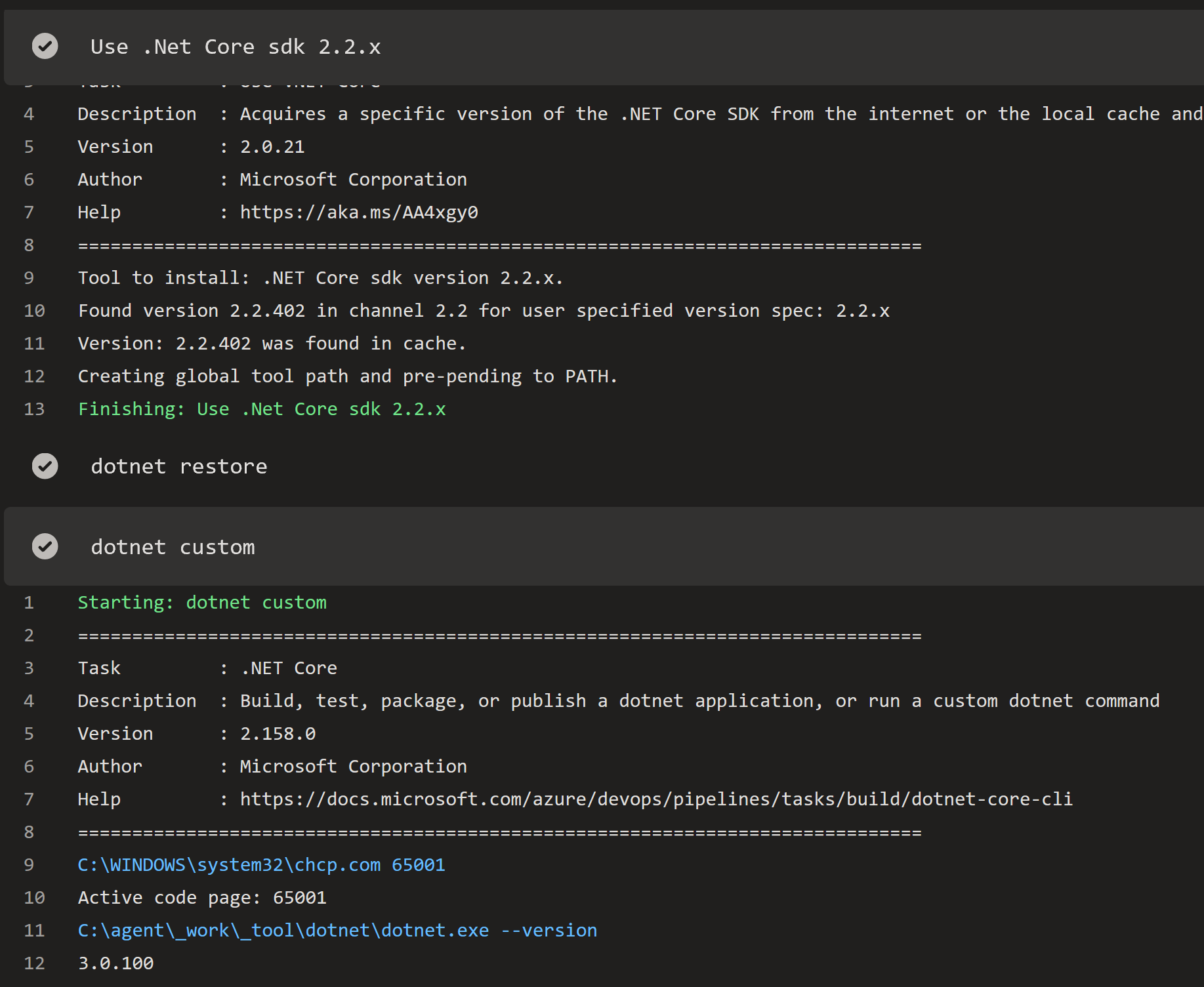
The dotnet custom command just uses a dotnet task with the --version.
 ezuidema
on 26 Oct 2019
ezuidema
on 26 Oct 2019
@ezuidema I would just open a new issue if none are directly related. From experience having multiple slightly related bugs combined into the one issue makes it hard to track.
 glennawatson
on 26 Oct 2019
glennawatson
on 26 Oct 2019
Changing the 'Path to Install .Net Core' to append '/sdk' does fix my issue. Still weird it spontaneously broke.
ezuidema
on 30 Oct 2019
Closing this issue item as the original issue got fixed.
@ezuidema feel free to raise new issue item for your scenario!
 vinodkumar3
on 31 Oct 2019
vinodkumar3
on 31 Oct 2019
Related issues
 Mardoxx
·
3Comments
Mardoxx
·
3Comments
 syltaxue
·
3Comments
syltaxue
·
3Comments
 ThomasBarnekow
·
3Comments
ThomasBarnekow
·
3Comments
 timfish
·
3Comments
timfish
·
3Comments
 TheRealEdwardCullen
·
3Comments
TheRealEdwardCullen
·
3Comments
Most helpful comment
While changing it to 3.0.x works, 3.x should still work as well. This broke my pipelines as well, and the documentation still states that using Major.x will supply the latest Minor version.