Azure-pipelines-tasks: AzureCLIV2 Powershell - Warnings cause task to fail
Question, Bug, or Feature?
Type: Bug
Enter Task Name: AzureCLI@2
https://github.com/microsoft/azure-pipelines-tasks/tree/master/Tasks/AzureCLIV2
Environment
- Server - Azure Pipelines
- Agent - Azure Pipelines/windows-2019
Issue Description
When running a Powershell script with AzureCLI@2 task, warnings cause the task to fail
I am running task AzureCLI@2 with the following parameters:
Script Type: Powershell
Script Location: Script path
The task fails when running the following cli command:
az extension add --name application-insights --output none
Task logs
2019-10-10T14:36:14.7814025Z ##[section]Starting: Deploy Infrastructure
2019-10-10T14:36:14.7947267Z ==============================================================================
2019-10-10T14:36:14.7947368Z Task : Azure CLI
2019-10-10T14:36:14.7947442Z Description : Run Azure CLI commands against an Azure subscription in a PowerShell Core/Shell script when running on Linux agent or PowerShell/PowerSheell Core/Batch script when running on Windows agent.
2019-10-10T14:36:14.7947842Z Version : 2.0.2
2019-10-10T14:36:14.7947910Z Author : Microsoft Corporation
2019-10-10T14:36:14.7947966Z Help : https://docs.microsoft.com/azure/devops/pipelines/tasks/deploy/azure-cli
2019-10-10T14:36:14.7948026Z ==============================================================================
2019-10-10T14:36:15.1054382Z [command]C:windowssystem32cmd.exe /D /S /C ""C:Program Files (x86)Microsoft SDKsAzureCLI2wbinaz.cmd" --version"
2019-10-10T14:37:00.7242985Z azure-cli 2.0.74
2019-10-10T14:37:00.7257121Z
2019-10-10T14:37:00.7347673Z command-modules-nspkg 2.0.3
2019-10-10T14:37:00.7387728Z core 2.0.74
2019-10-10T14:37:00.7579370Z nspkg 3.0.4
2019-10-10T14:37:00.7944597Z telemetry 1.0.3
2019-10-10T14:37:00.9787229Z
2019-10-10T14:37:00.9891266Z Extensions:
2019-10-10T14:37:00.9896586Z azure-devops 0.12.0
2019-10-10T14:37:00.9900722Z
2019-10-10T14:37:00.9902677Z Python location 'C:Program Files (x86)Microsoft SDKsAzureCLI2python.exe'
2019-10-10T14:37:00.9902960Z Extensions directory 'C:Program FilesCommon FilesAzureCliExtensionDirectory'
2019-10-10T14:37:00.9903291Z
2019-10-10T14:37:00.9903503Z Python (Windows) 3.6.6 (v3.6.6:4cf1f54eb7, Jun 27 2018, 02:47:15) [MSC v.1900 32 bit (Intel)]
2019-10-10T14:37:00.9903666Z
2019-10-10T14:37:00.9903839Z Legal docs and information: aka.ms/AzureCliLegal
2019-10-10T14:37:00.9904182Z
2019-10-10T14:37:00.9904516Z
2019-10-10T14:37:00.9905024Z Your CLI is up-to-date.
2019-10-10T14:37:00.9906031Z Setting AZURE_CONFIG_DIR env variable to: d:a_temp.azclitask
2019-10-10T14:37:00.9906476Z Setting active cloud to: AzureCloud
2019-10-10T14:37:00.9909623Z [command]C:windowssystem32cmd.exe /D /S /C ""C:Program Files (x86)Microsoft SDKsAzureCLI2wbinaz.cmd" cloud set -n AzureCloud"
2019-10-10T14:37:16.7455460Z [command]C:windowssystem32cmd.exe /D /S /C ""C:Program Files (x86)Microsoft SDKsAzureCLI2wbinaz.cmd" login --service-principal -u * -p --tenant "
2019-10-10T14:37:22.8458200Z [
2019-10-10T14:37:22.8459204Z {
2019-10-10T14:37:22.8459422Z "cloudName": "AzureCloud",
2019-10-10T14:37:22.8459673Z "id": "",
2019-10-10T14:37:22.8459874Z "isDefault": true,
2019-10-10T14:37:22.8460084Z "name": "",
2019-10-10T14:37:22.8460294Z "state": "Enabled",
2019-10-10T14:37:22.8460635Z "tenantId": "",
2019-10-10T14:37:22.8460869Z "user": {
2019-10-10T14:37:22.8461099Z "name": "",
2019-10-10T14:37:22.8461284Z "type": "servicePrincipal"
2019-10-10T14:37:22.8461487Z }
2019-10-10T14:37:22.8461652Z }
2019-10-10T14:37:22.8461844Z ]
2019-10-10T14:37:22.8697836Z [command]C:windowssystem32cmd.exe /D /S /C ""C:Program Files (x86)Microsoft SDKsAzureCLI2wbinaz.cmd" account set --subscription *"
2019-10-10T14:37:24.2363473Z [command]C:windowsSystem32WindowsPowerShellv1.0powershell.exe -NoLogo -NoProfile -NonInteractive -ExecutionPolicy Unrestricted -Command ". 'd:a_tempazureclitaskscript1570718175058.ps1'"
2019-10-10T14:37:41.1064102Z az : WARNING: The installed extension 'application-insights' is in preview.
2019-10-10T14:37:41.1065174Z At D:ar1adocumentationinfrastructuretemplatesazuredeploy.ps1:32 char:1
2019-10-10T14:37:41.1065836Z + az extension add --name application-insights --output none
2019-10-10T14:37:41.1066242Z + ~~~~~~~~~~~~~~
2019-10-10T14:37:41.1069945Z + CategoryInfo : NotSpecified: (WARNING: The in... is in preview.:String) [], RemoteException
2019-10-10T14:37:41.1070589Z + FullyQualifiedErrorId : NativeCommandError
2019-10-10T14:37:41.1071029Z
2019-10-10T14:37:41.1339946Z ##[error]Script failed with error: Error: The process 'C:windowsSystem32WindowsPowerShellv1.0powershell.exe' failed with exit code 1
2019-10-10T14:37:41.1470675Z [command]C:windowssystem32cmd.exe /D /S /C ""C:Program Files (x86)Microsoft SDKsAzureCLI2wbinaz.cmd" account clear"
2019-10-10T14:37:42.5093241Z ##[section]Finishing: Deploy Infrastructure
Error logs
2019-10-10T14:37:41.1064102Z az : WARNING: The installed extension 'application-insights' is in preview.
2019-10-10T14:37:41.1065174Z At D:ar1adocumentationinfrastructuretemplatesazuredeploy.ps1:32 char:1
2019-10-10T14:37:41.1065836Z + az extension add --name application-insights --output none
2019-10-10T14:37:41.1066242Z + ~~~~~~~~~~~~~~
2019-10-10T14:37:41.1069945Z + CategoryInfo : NotSpecified: (WARNING: The in... is in preview.:String) [], RemoteException
2019-10-10T14:37:41.1070589Z + FullyQualifiedErrorId : NativeCommandError
2019-10-10T14:37:41.1071029Z
2019-10-10T14:37:41.1339946Z ##[error]Script failed with error: Error: The process 'C:windowsSystem32WindowsPowerShellv1.0powershell.exe' failed with exit code 1
 maciejporebski
All 19 comments
@jalajmsft can you please take a look
 bishal-pdMSFT
on 10 Oct 2019
bishal-pdMSFT
on 10 Oct 2019
Hey @maciekporebski, can you please set the "ErrorActionPreference = Continue" and re-try. You can read about it here. This should avoid the task to fail.
If you are still facing the issue, please share the complete logs by setting the pipeline variable system.debug = true and the PowerShell script.
 jalajmsft
on 11 Oct 2019
jalajmsft
on 11 Oct 2019
Hi @maciekporebski,
this seems like an issue with the azure cli version 2.0.74. It appears that even successful commands write to the stderr stream. As a workaround, can you uncheck the _'Fail on Standard Error'_ option and rely on command exit codes for failure cases?
 tejasd1990
on 16 Oct 2019
tejasd1990
on 16 Oct 2019
@jalajmsft this is what we are currently using as a workaround, however we would like the task to still fail on actual errors rather than continue
@tejasd1990 we have 'Fail on Standard Error' unchecked but the task still fails unless error action is set to continue in the script
maciejporebski
on 16 Oct 2019
@maciekporebski
Couple of things here, firstly azure cli version 2.0.74 started pushing warnings in stderr stream which started causing this issue and secondly this issue is being handled fine in AzurePipelines/windows-2016 agent but not in AzurePipelines/windows-2019.
To unblock yourself and avoid setting "ErrorActionPreference = Continue", please use AzurePipelines/windows-2016 agent.
Please try the steps mentioned above and let us know if you are completely unblocked.
 vinodkumar3
on 29 Oct 2019
vinodkumar3
on 29 Oct 2019
@maciekporebski
Did you get chance to try out the suggested approach ?
vinodkumar3
on 4 Nov 2019
@vinodkumar3
Yes the tasks successfully run on windows-2016:
2019-11-04T13:50:41.8207733Z WARNING: The installed extension 'application-insights' is in preview.
2019-11-04T13:50:50.8874344Z WARNING: The default kind for created storage account will change to 'StorageV2' from 'Storage' in future
While running on windows-2019 fails:
2019-11-04T13:48:57.9553336Z az : WARNING: The installed extension 'application-insights' is in preview.
2019-11-04T13:48:57.9554018Z At D:ar1aInfrastructureartifacttemplatesazuredeploy.ps1:32 char:1
2019-11-04T13:48:57.9554424Z + az extension add --name application-insights
2019-11-04T13:48:57.9557559Z + ~~~~~~~~~~~~
2019-11-04T13:48:57.9557890Z + CategoryInfo : NotSpecified: (WARNING: The in... is in preview.:String) [], RemoteException
2019-11-04T13:48:57.9558228Z + FullyQualifiedErrorId : NativeCommandError
2019-11-04T13:48:57.9558507Z
2019-11-04T13:48:58.0225768Z ##[error]Script failed with error: Error: The process 'C:windowsSystem32WindowsPowerShellv1.0powershell.exe' failed with exit code 1
Is this something that's likely to be handled correctly in the future in windows-2019?
Thanks.
maciejporebski
on 4 Nov 2019
@maciekporebski as per our investigations we have not been able to find a root cause till now. We will be going deeper to figure out why this is happening. @jalajmsft will be helping us with that.
bishal-pdMSFT
on 7 Nov 2019
It seems like the issue is with Powershell version 5.1.17763 installed in windows-2019. The warning messages are written to the error stream return 1 as exit code instead of 0 resulting in the task to fail. We will update the windows-2019 image with the updated PowerShell version.
jalajmsft
on 27 Nov 2019
This may be related:
I'm seeing a difference in this behaviour between Azure Pipelines self-hosted Build Agents.
One running Win2016 behaves correctly, one running Win2019 does not.
Warning messages are displayed as errors in task logs and tasks fail.
This affects task types: "run command line" "run python command", etc.
 robal
on 4 Dec 2019
robal
on 4 Dec 2019
Hey @robal can you please share the logs of your pipeline to get more information on the issue.
jalajmsft
on 6 Dec 2019
Closing this issue for now. Have redirected the issue to image generation repo.
Feel free to re-open for further queries.
jalajmsft
on 6 Dec 2019
I found this also to be an issue when using the Charles Zipp task to use Terraform in the release pipeline. Runs as long as Azure CLI version is <= 2.0.72
The build agent I use is vs2017-win2016 but still I get a warning as error: "##[error]Error: WARNING: The default kind for created storage account will change to 'StorageV2' from 'Storage' in the future".
Quite annoying.
 jeanpaulsmit
on 19 Dec 2019
jeanpaulsmit
on 19 Dec 2019
@jalajmsft please take a look as this is an issue even with win 2016 agent
bishal-pdMSFT
on 20 Dec 2019
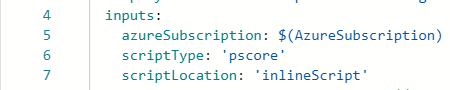
One solution to this was to use 'pscore' in your tasks in task->inputs->scriptType instead of 'ps' until a fix can be implemented.
 asingh014
on 30 Dec 2019
asingh014
on 30 Dec 2019
I am experiencing this issue with the AzureCLIv2 task as well. By changing to use pscore instead of ps we were able to get around the issue. The warning we are getting stems from the AzureCLIv2 task not having the most recent version of the cli 2.0.78 -> 2.0.80
Failing version
- task: AzureCLI@2
      displayName: Purge CDN Endpoint
      inputs:
        azureSubscription: 'XXXX'
        scriptType: ps
        scriptLocation: inlineScript
        inlineScript: |
            az --version
Produces output
2020-01-29T14:36:54.4996689Z ##[section]Starting: Purge CDN Endpoint
2020-01-29T14:36:54.5124574Z ==============================================================================
2020-01-29T14:36:54.5124651Z Task         : Azure CLI
2020-01-29T14:36:54.5124734Z Description  : Run Azure CLI commands against an Azure subscription in a PowerShell Core/Shell script when running on Linux agent or PowerShell/Powershell Core/Batch script when running on Windows agent.
2020-01-29T14:36:54.5124804Z Version      : 2.0.4
2020-01-29T14:36:54.5124864Z Author       : Microsoft Corporation
2020-01-29T14:36:54.5124921Z Help         : https://docs.microsoft.com/azure/devops/pipelines/tasks/deploy/azure-cli
2020-01-29T14:36:54.5125012Z ==============================================================================
2020-01-29T14:36:54.7179140Z [command]C:\windows\system32\cmd.exe /D /S /C ""C:\Program Files (x86)\Microsoft SDKs\Azure\CLI2\wbin\az.cmd" --version"
2020-01-29T14:36:56.7514969Z azure-cli                         2.0.78 *
2020-01-29T14:36:56.7515364Z WARNING: You have 2 updates available. Consider updating your CLI installation. Instructions can be found at https://docs.microsoft.com/en-us/cli/azure/install-azure-cli
2020-01-29T14:36:56.7515423Z
2020-01-29T14:36:56.7515484Z command-modules-nspkg              2.0.3
2020-01-29T14:36:56.7515537Z core                              2.0.78 *
2020-01-29T14:36:56.7515604Z nspkg                              3.0.4
2020-01-29T14:36:56.7515657Z telemetry                          1.0.4
 abvaden
on 29 Jan 2020
abvaden
on 29 Jan 2020
@bishal-pdMSFT, @jalajmsft: I hit similar issues directly running a PowerShell Core (pwsh) script. On Windows 2019, the second time a message is written to stderr the script is terminated. While Windows 2016 and Ubuntu handle this correctly.
Here is a pipeline yml showing a minimal repro:
https://github.com/mikeharder/AzurePipelineTests/blob/powershell-stderr/azure-pipelines.yml
And here's a public pipeline showing the results:
https://dev.azure.com/mharder/public/_build/results?buildId=591&view=results
Can you confirm if this is the same issue, or should I create a new issue? I'm not sure because my repro uses PowerShell Core rather than PowerShell 5.
 mikeharder
on 29 Feb 2020
mikeharder
on 29 Feb 2020
@bishal-pdMSFT , @jalajmsft : I'm having the same issue running PowerShell Core on a custom agent on Windows server 2012. It's putting the following message as an error:
##[error]The installed extension 'application-insights' is in preview.
##[error]Script has output to stderr. Failing as failOnStdErr is set to true.
And we had the Az CLI version updated:
azure-cli                          2.8.0

command-modules-nspkg              2.0.3
core                               2.8.0
nspkg                              3.0.4
telemetry                          1.0.4

Extensions:
application-insights               0.1.1
azure-devops                      0.17.0
eventgrid                          0.4.9
Any idea how to solve it?
 Snipisx
on 10 Jul 2020
Snipisx
on 10 Jul 2020
@snipisx you have set failOnStdError to be true. The task will fail if anything is written to standard error stream. You can turn that setting off.
bishal-pdMSFT
on 12 Jul 2020
Related issues
 yaananth
·
3Comments
yaananth
·
3Comments
 MichaelWhiteCodingForFun
·
3Comments
MichaelWhiteCodingForFun
·
3Comments
 alexszilagyi
·
3Comments
alexszilagyi
·
3Comments
 NatMarchand
·
3Comments
NatMarchand
·
3Comments
 MikahB
·
3Comments
MikahB
·
3Comments