Azure-pipelines-tasks: Exception Message: The pipeline is not valid.
Note
Issues in this repo are for tracking bugs, feature requests and questions for the tasks in this repo
For a list:
https://github.com/Microsoft/azure-pipelines-tasks/tree/master/Tasks
If you have an issue or request for the Azure Pipelines service, use developer community instead:
https://developercommunity.visualstudio.com/spaces/21/index.html )
Required Information
Entering this information will route you directly to the right team and expedite traction.
Question, Bug, or Feature?
Type: Bug
Enter Task Name: Azure PowerShell
list here (V# not needed):
https://github.com/Microsoft/azure-pipelines-tasks/tree/master/Tasks
Environment
Server - Azure Pipelines or TFS on-premises?
If using TFS on-premises, provide the version:
If using Azure Pipelines, provide the account name, team project name, build definition name/build number:
Agent - Hosted or Private: Private
If using Hosted agent, provide agent queue name:
If using private agent, provide the OS of the machine running the agent and the agent version:
Issue Description
We are setting Azure Subscription dynamically for the Azure PowerShell task. The $(ResourceGroup.Subscription) is an output variable from a preceding task. This was working fine on July 25th, 2019. But this week we started seeing the pipeline validation exception.
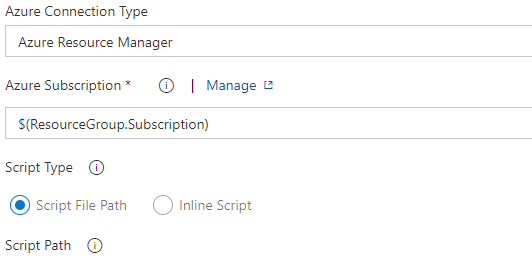
Exception Message: The pipeline is not valid. Job Phase_1: Step AzurePowerShell input ConnectedServiceNameARM references service connection $(ResourceGroup.Subscription) which could not be found. The service connection does not exist or has not been authorized for use. For authorization details, refer to https://aka.ms/yamlauthz. (type PipelineValidationException)
Task logs
[Enable debug logging and please provide the zip file containing all the logs for a speedy resolution]

Troubleshooting
Checkout how to troubleshoot failures and collect debug logs: https://docs.microsoft.com/en-us/vsts/build-release/actions/troubleshooting
Error logs
Exception Message: The pipeline is not valid. Job Phase_1: Step AzurePowerShell input ConnectedServiceNameARM references service connection $(ResourceGroup.Subscription) which could not be found. The service connection does not exist or has not been authorized for use. For authorization details, refer to https://aka.ms/yamlauthz. (type PipelineValidationException)

 MaheshPesani
All 10 comments
@MaheshPesani could you please share the detailed logs, you can send it to RM_Customer_Queries[AT]microsoft[DOT]com.
 chshrikh
on 8 Aug 2019
chshrikh
on 8 Aug 2019
@MaheshPesani could you please confirm if you are using YML pipeline or regular Release definition
chshrikh
on 8 Aug 2019
@MaheshPesani Can you please share the account name, project name and definition name. Also, since when have you seen this error? Have there been any changes in the definition?
You can send these details along with the full release logs to RM_Customer_Queries[AT]microsoft[DOT]com
 ObsidianVoid
on 8 Aug 2019
ObsidianVoid
on 8 Aug 2019
@MaheshPesani could you please confirm if you are using YML pipeline or regular Release definition
@chshrikh We are using a regular Release definition.
MaheshPesani
on 8 Aug 2019
The issue has been fixed after discussion over email.
ObsidianVoid
on 2 Dec 2019
Whats the fix?
 VinodVulavakayala
on 12 Jan 2020
VinodVulavakayala
on 12 Jan 2020
I'm having the same issue using YAML pipeline and providing azure subscription name using variable group. Pipeline fails on compile time with error:
Step AzureResourceGroupDeployment input ConnectedServiceName references service connection $(lib-var-azure-subscription) which could not be found.
@ObsidianVoid What was the fix in this case?
 ivan-sam
on 17 Jan 2020
ivan-sam
on 17 Jan 2020
@ivan-sam Did you find an answer? I'm stuck there now.
 MisinformedDNA
on 28 Jul 2020
MisinformedDNA
on 28 Jul 2020
The issue has been fixed after discussion over email.
What was the fix?
 JozoSlejko
on 4 Aug 2020
JozoSlejko
on 4 Aug 2020
I believe I read that azureSubscription/ConnectedServiceName/ConnectedServiceNameARM must be known at compile-time. And it appears that queued variables, as well as group variables, are not used at compile-time and, thus, not used in the evaluation.
So the workaround (as far as I can tell) is to use some combination of YAML-defined variables, parameters, variable templates, template conditions and/or environment variables (that are already set at compile time). I might be wrong on one (or more) of those, but the key thing is that they have to be determined early on in the process.
Seems to me that a var group is predefined and should be useable, but that does not appear to be the case. Hope this helps.
MisinformedDNA
on 4 Aug 2020
Related issues
 pharring
·
3Comments
pharring
·
3Comments
 gregpakes
·
3Comments
gregpakes
·
3Comments
 HenrikStanley
·
3Comments
HenrikStanley
·
3Comments
 TheRealEdwardCullen
·
3Comments
TheRealEdwardCullen
·
3Comments
 alexszilagyi
·
3Comments
alexszilagyi
·
3Comments