Azure-pipelines-tasks: Parameter 'toolPath' cannot be null or empty.
@xutpuu commented on Feb 28, 2019, 12:57 PM UTC:
I add Python task and wrote inline script to run on self-hosted pool. In the build it failed with error "Parameter 'toolPath' cannot be null or empty." I tried to add tool "Use Python Version" but I can't undetstand where I should add $AGENT_TOOLSDIRECTORY.
I installed Python on build machine and added python to PATH.
Document Details
⚠ _Do not edit this section. It is required for docs.microsoft.com ➟ GitHub issue linking._
- ID: 1eeb2956-beca-447d-c9a6-a859f3cfc4bf
- Version Independent ID: 89f2a014-99bb-420d-265c-42515d30c80b
- Content: Python Script task - Azure Pipelines
- Content Source: docs/pipelines/tasks/utility/python-script.md
- Product: devops
- GitHub Login: steved0x
- Microsoft Alias: brcrista
This issue was moved by davidstaheli from MicrosoftDocs/vsts-docs#3514.
 move[bot]
All 7 comments
@colindomoney commented on Mar 17, 2019, 11:22 AM UTC:
I had a similar issue - I ended up doing a local install of Python 3.6.5 from source using the --prefix option to locate this inside my _work/_tool directory. I also had to create a symlink to python3 to python or I got the above message. I'll write this up in detail and post here - it is possible to get this to work.
move[bot]
on 5 Jul 2019
@davidstaheli commented on Jul 5, 2019, 6:49 PM UTC:
Thanks for reporting this. We're going to move this issue to this repo:
https://github.com/Microsoft/azure-pipelines-tasks
/move to Microsoft/azure-pipelines-tasks
move[bot]
on 5 Jul 2019
@xutpuu Are you still having this issue?
The PythonScript task will take in an optional path for pythonInterpreter or attempt to find python on the path
Can you verify that you added python to the path (and not python3 or something similar)?
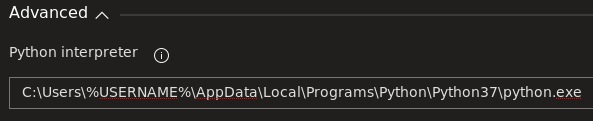
You can also just try inputting the path to where your python is installed using the pythonInterpreter input option.
Let me know if that helps
 joshmgross
on 17 Jul 2019
joshmgross
on 17 Jul 2019
I had the same issue. The solution for me was to explicitly set the Python interpreter path in the task.
 rjackowens
on 30 Jul 2019
rjackowens
on 30 Jul 2019
https://github.com/actions/virtual-environments/blob/master/images/win/Windows2019-Readme.md
Ctrl+F "use python version"
 joao-carvalheira
on 16 Dec 2019
joao-carvalheira
on 16 Dec 2019
Or maybe use a conda enviroment:
joao-carvalheira
on 16 Dec 2019
Closing this out with an action item to improve docs. Re-open if you still see this is an issue
 leantk
on 14 Jan 2020
leantk
on 14 Jan 2020
Related issues
 fedemkr
·
3Comments
fedemkr
·
3Comments
 ThomasBarnekow
·
3Comments
ThomasBarnekow
·
3Comments
 MikahB
·
3Comments
MikahB
·
3Comments
 MichaelWhiteCodingForFun
·
3Comments
MichaelWhiteCodingForFun
·
3Comments
 NatMarchand
·
3Comments
NatMarchand
·
3Comments
Most helpful comment
I had the same issue. The solution for me was to explicitly set the Python interpreter path in the task.