Azure-pipelines-tasks: MSBuild 16 / VS2019 not supported
@CZEMacLeod commented on May 6, 2019, 11:05 PM UTC:
The msbuildVersionOption does not have 16 available as an option.
The MSBuild and Visual Studio Build tasks have been updated already.
Document Details
⚠ _Do not edit this section. It is required for docs.microsoft.com ➟ GitHub issue linking._
- ID: 17217289-b764-14a7-e3d9-862d1d9cf503
- Version Independent ID: e1dd6942-3210-a148-b971-af869272c9a3
- Content: Xamarin.Android build and release task - Azure Pipelines
- Content Source: docs/pipelines/tasks/build/xamarin-android.md
- Product: devops
- Technology: devops-cicd
- GitHub Login: davidstaheli
- Microsoft Alias: dastahel
This issue was moved by davidstaheli from MicrosoftDocs/vsts-docs#4157.
 move[bot]
All 13 comments
@Thorocaine commented on May 22, 2019, 12:22 AM UTC:
If you set the pool name to Hosted Windows 2019 with VS2019 it will try running on VS15, not find it, and _fall back_ to 16.
move[bot]
on 5 Jul 2019
@CZEMacLeod commented on May 22, 2019, 2:08 PM UTC:
Thorocaine that's fine if you are not using your own build servers which have both installed.
move[bot]
on 5 Jul 2019
@davidstaheli commented on Jul 5, 2019, 4:16 PM UTC:
Thanks for reporting this. We're going to move this issue to this repo:
https://github.com/Microsoft/azure-pipelines-tasks
/move to Microsoft/azure-pipelines-tasks
move[bot]
on 5 Jul 2019
I can´t update some libs (like Fody) at our project because of this
C:Users\VssAdministrator.nuget\packages\fody\5.1.1\build\Fody.targets(38,5): Error : Fody is only supported on MSBuild 16 and above. Current version: 15.
Process 'msbuild.exe' exited with code '1'.
 xleon
on 11 Jul 2019
xleon
on 11 Jul 2019
Me either (Fody). Any idea when this is going to be fixed?
 Osmosis311
on 22 Jul 2019
Osmosis311
on 22 Jul 2019
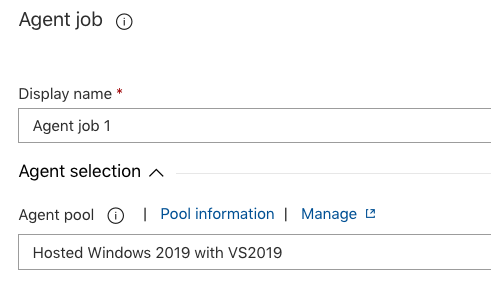
It was not obvious but I managed to fix this. It´s not enough to set VS version in the "Visual Studio Build" step.
You need to select the agent job and set the version in there:
xleon
on 23 Jul 2019
I'm getting the log message:
C:\Users\VssAdministrator\.nuget\packages\fody\5.1.1\build\Fody.targets(38,5): error : Fody is only supported on MSBuild 16 and above. Current version: 15. [d:\a\1\s\NetFabric.Hyperlinq\NetFabric.Hyperlinq.csproj]
I tried changing the vmImage parameter to windows-2019 but it didn't fix the issue.
Do I need to change anything else?
 aalmada
on 28 Jul 2019
aalmada
on 28 Jul 2019
Do I need to change anything else?
Did you also set it up in the "Visual Studio Build" step?
xleon
on 28 Jul 2019
I use DotNetCoreCLI@2 tasks to build. The link in my previous comment takes you to the YAML.
aalmada
on 28 Jul 2019
I worked around the issue by using a DotNetCoreInstaller@0 task.
https://github.com/microsoft/azure-pipelines-image-generation/issues/862
aalmada
on 2 Aug 2019
Image versions have cycled many times since the original report of this issue. I am assuming the correct versions were shaken out. There was confusion that the UX required job-level selection of the right agent to get that VS version, and if necessary, you can install the version required.
 davekenn
on 19 Dec 2019
davekenn
on 19 Dec 2019
@davekenn I think this issue still exists, the Xamarin.Android build task supports MSBuild versions of:
msbuildVersionOption: '15.0' # Optional. Options: latest, 15.0, 14.0, 12.0, 4.0

If latest is selected the build task uses 15.0. If you run this with the agent specified as "windows-2019", which has MSBuild 16.0, it will fall back to 16.0 and emit a warning:
[warning]Unable to find MSBuild version '15.0' for architecture 'x86'. Falling back to version '16.0'.
That is to say it's interpreting latest as 15.0 (we can't specify 16.0), but falling back to 16.0 because it can't find 15.0. If you run on an agent that has 15.0, but not 16.0, it'll build with 15.0, which is not desired.
To fix this issue, we should be able to specify MSBuild 16.0.
 Adam--
on 3 Apr 2020
Adam--
on 3 Apr 2020
As of now (July 2020) this issue (MSBuild 16 not being available in the above dropdown) is not fixed.
 papuashu
on 16 Jul 2020
papuashu
on 16 Jul 2020
Related issues
 pharring
·
3Comments
pharring
·
3Comments
 montebhoover
·
3Comments
montebhoover
·
3Comments
 MarkIannucci
·
3Comments
MarkIannucci
·
3Comments
 HenrikStanley
·
3Comments
HenrikStanley
·
3Comments
 jabbera
·
3Comments
jabbera
·
3Comments
Most helpful comment
I can´t update some libs (like Fody) at our project because of this