Azure-pipelines-tasks: Trigger a build in Azure DevOps using Services hooks
Hi Team,
I am trying to queue a build in azure devops (VSTS) using Service Hooks.
I am able to trigger a Jenkins build using the service Hooks
example
http://user:[email protected]:8080/job/job-name/build?token=token.
But I need to trigger a build in VSTS using Service hooks
Please guide me
regards,
Naidu
 Naidul
All 15 comments
@Naidul You can use our REST API to Queue a build, see here: https://docs.microsoft.com/en-us/rest/api/azure/devops/build/builds/queue?view=azure-devops-rest-5.0
 joshmgross
on 15 May 2019
joshmgross
on 15 May 2019
Hi Josh Gross
Thanks for your response,
I tried these approach but its not working for me .
Please find the below attachment what I followed
VSTSBuildThroughServiceHooks.docx
Please suggest me
Kind Regards,
Naidu
Naidul
on 15 May 2019
@Naidul What is your use case? I'm not sure if Service Hooks is the correct method
joshmgross
on 15 May 2019
Hi Joshmgross,
Sorry for the delay...
My use case is when ever a work item state updated(Active --> Resolved/Active __> Closed/) then build needs to trigger automatically based on this work item state update event..
Could you please help on this
Regards,
Naidu
Naidul
on 22 May 2019
@Naidul
Service Hooks are mostly used for external services, but it might work in this scenario with a WebHook (https://docs.microsoft.com/en-us/azure/devops/service-hooks/services/webhooks?view=azure-devops)
I see in your attached doc that the URL is incorrect, you'll want to fill in the fields for {organization} and {project} with the name of your Azure DevOps org and project
You'll also need to somehow specify the definition to queue the build, this goes in the request body but that won't be in the Service Hook event. See https://docs.microsoft.com/en-us/rest/api/azure/devops/build/builds/queue?view=azure-devops-rest-5.0#request-body
You could also try setting up a server or function to receive these events and then queue a build from them. That way you'll be able to specify all the necessary information to queue the build.
joshmgross
on 29 May 2019
@Naidul
Naidu, did you ever get this working, as I have a similar requirement
 pwalburn
on 5 Sep 2019
pwalburn
on 5 Sep 2019
To sum it up: There is no real Webbhook support, because Webhook normally don't support POST data .. jut a simple get . The API should allow to pass the build definition id via http query param
 cforce
on 29 Oct 2019
cforce
on 29 Oct 2019
No way to trigger a build using any API from Azure DevOps ?
 marceloavf
on 5 Dec 2019
marceloavf
on 5 Dec 2019
So... any info about this issue?
 picolino
on 10 Mar 2020
picolino
on 10 Mar 2020
I'm able to start or canclel using this curl (reverse engineered from UI). Same hat works below for release pipelines will also work for build. You will find the url, but i think it's "Build/builds/" instead of "Release/releases"
"status":8 is cancel and so far i remember "status":1 (or 0?) was start. Juts try it out
curl -u "username:${DEVOPS_TOKEN}" -X PATCH -H "Content-Type: application/json" -silent --output /dev/null --data '{"status":8,"scheduledDeploymentTime":null,"comment":"Skip Staging because '"${msg}"' "}' https://vsrm.dev.azure.com/daimler-mic/devdataproc/_apis/Release/releases/${RELEASE_RELEASEID}/environments/${RELEASE_ENVIRONMENTID}/?api-version=6.0-preview.6
curl -u "username:${DEVOPS_TOKEN}" -X PATCH -H "Content-Type: application/json" -silent --output /dev/null --data '{"status":1,"scheduledDeploymentTime":null,"comment":"Start Staging"}' https://vsrm.dev.azure.com/daimler-mic/devdataproc/_apis/Release/releases/${RELEASE_RELEASEID}/environments/${RELEASE_ENVIRONMENTID}/?api-version=6.0-preview.6
cforce
on 15 Mar 2020
I was trying to find a solution for a similar problem, where I wanted to monitor a docker base image update in the Azure Container Registry (ACR).
I found three options:
- Trigger downstream builds from a TriggerPipeline task in your Azure DevOps pipeline's yaml file.
- Create a Service Hook in the Azure DevOps project settings, then link it to an Azure Logic App that would _Queue a new build_.
- Create a webhook for the base image in ACR, then link it to an Azure Logic App that would _Queue a new build_.
I would recommend solution (3) because it is easy to set up, more universal and it keeps your build pipelines and project settings clean.
 beauof
on 30 Mar 2020
beauof
on 30 Mar 2020
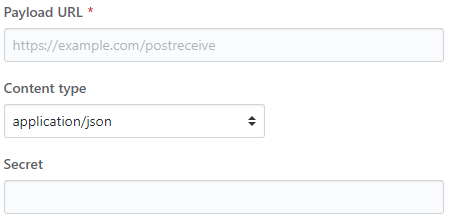
Yes, I am curious as well about this problem, because I try to integrate with the GitHub repository webhooks, but using Personal Access Token. When you specify webhook there, you can only specify URL so it would be very valuable to run it with a build queue in the address:
 rmaziarka
on 18 Apr 2020
rmaziarka
on 18 Apr 2020
In addition to the REST API, one of the other ways could be to use a combination of LogicApp and DevOps Service. LogicApp has a great Azure DevOps task that will trigger a build / release and pass it parameters as well. The LogicApp can be exposed as either a simple webhook or HTTP POST API (if you want to pass parameters). We plan to use this to integrate GitLab (event based outbound webhook) with Azure DevOps in one of our scenarios. Not sure if this the best solution though.
 ameetkonnur
on 23 Apr 2020
ameetkonnur
on 23 Apr 2020
There is a relatively new feature described in the Sprint 172 Release Notes where one can trigger a YAML build via a Service Connection/Service Hook combination. I think this addresses this request.
 theBNT
on 27 Aug 2020
theBNT
on 27 Aug 2020
It looks like this request has been addressed so I'm going to close here. If this is still an issue I'd recommend opening a ticket at https://developercommunity.visualstudio.com/spaces/21/index.html since this repo is mostly for tasks related issues
 damccorm
on 25 Nov 2020
damccorm
on 25 Nov 2020
Related issues
 yaananth
·
3Comments
yaananth
·
3Comments
 fedemkr
·
3Comments
fedemkr
·
3Comments
 MichaelWhiteCodingForFun
·
3Comments
MichaelWhiteCodingForFun
·
3Comments
 MarkIannucci
·
3Comments
MarkIannucci
·
3Comments
 jared-hexagon
·
3Comments
jared-hexagon
·
3Comments