Azure-pipelines-tasks: Publish code coverage task overrides ReportGenerator filters
Required Information
Type: bug
Enter Task Name: PublishCodeCoverageResults@1
Environment
- Server - Azure Pipelines
- Agent - Private
- dotnet-reportgenerator-cli Version="4.1.5"
Issue description
I am configuring azure CI pipeline. And I've added following steps:
- test
- report generator
- publish code coverage
ReportGenerator is the well know tool https://github.com/danielpalme/ReportGenerator
that exists in the Azure Devops marketplace

in the ReportGenerator I apply filters to exclude test projects from the total test coverage report and exclude extra xUnit assemblies from analysis.

In the console log I see that following filters were applied:
-assemblyfilters:-[.tests] -[.Tests] -[xunit.]* -[.Test] -[Xunit.]*
-classfilters:-[.tests] -[.Tests] -[xunit.]* -[.Test] -[Xunit.]*
-filefilters:-[.tests] -[.Tests] -[xunit.]* -[.Test] -[Xunit.]*
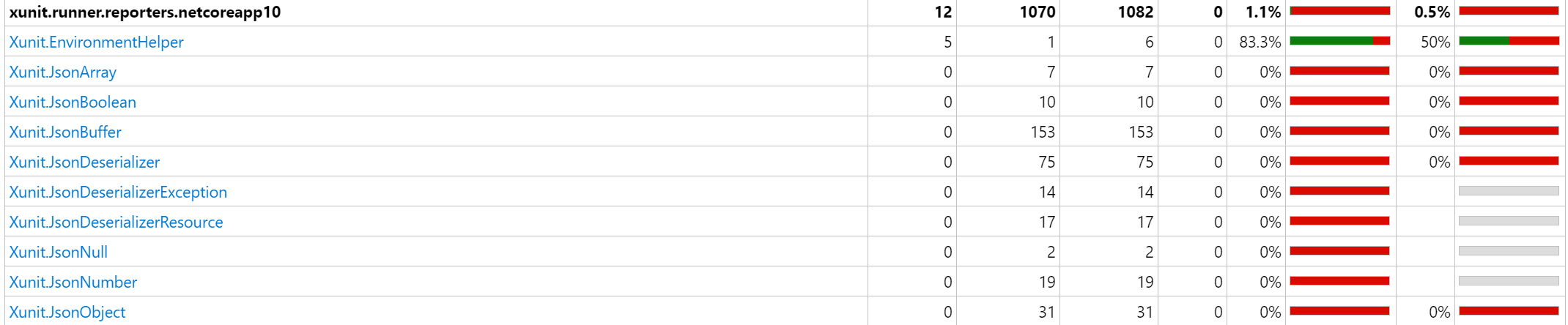
as you also can see, on the next step Publishing code coverage task starts and it re-generates summary report one more time without applying the assembly filtering.
it became like this after integration with reportGenerator tool
https://docs.microsoft.com/en-us/azure/devops/release-notes/2019/sprint-150-update#cobertura-code-coverage-report-updates
how to apply filtering and exclude necessary files from the report on CI, while publishing code coverage step override the filter attributes. Can you also apply settings for filtering classes and assemblies
finale report has data that I don't really need
 nilfdev
All 15 comments
Disclaimer: I'm the maintainer/author of ReportGenerator
I think the new behavior is not what users are expecting.
If you specify a "Report Directory" the users would expect to see exactly the specified report files to appear in the _Code Coverage_ tab of the build results.
Only if the "Report Directory" is not supplied, the Publish Code Coverage Results task should generate a report by itself to enhance the user experience.
@nilfdev
To disable the regeneration of the report, you can use the following environment variable in your build:
disable.coverage.autogenerate: 'true'
 danielpalme
on 12 May 2019
danielpalme
on 12 May 2019
@danielpalme yes.
disable.coverage.autogenerate fixes the problem.
it is not obvious setting.
nilfdev
on 14 May 2019
@nilfdev - thank you for reporting this issue. Adding first-class support for exclusion filters is on the backlog. The suggestion that @danielpalme has made can be used as a workaround in the meantime.
 PBoraMSFT
on 21 May 2019
PBoraMSFT
on 21 May 2019
As I have struggled with this being new to Pipelines, I want to expand on @danielpalme 's suggestion. I tried passing it every which way as a parameter, but it needed to be set at the start of my Yaml file in the following block.
I have it just before the steps, and am listing that for someone else who might need a nudge in the right direction.
variables:
disable.coverage.autogenerate: 'true'
steps:
 mnoreke
on 2 Jul 2019
mnoreke
on 2 Jul 2019
The auto-generated reports don't seem to respect the current theme set in the DevOps GUI. Is this intended? There doesn't seem to be a way to configure the theme used by the auto-generated report, so is the only way to disable autogeneration using above methods, and keep generating it manually?
 Sharparam
on 17 Oct 2019
Sharparam
on 17 Oct 2019
@Sharparam
An option to set the desired theme would be helpful.
Using the "current" theme won't help, since every user in a team might use a different theme.
danielpalme
on 17 Oct 2019
By current theme I mean the report automatically adjusting to the theme used when viewing it. But perhaps this is a limitation in iframes?
Sharparam
on 18 Oct 2019
Correct. That's not possible with iframes.
danielpalme
on 18 Oct 2019
Might be more of a general yaml question, but how can I set this variable in a template - I have a common pipeline for my library projects and it doesn't like having 'variables' in the template file.
 phatcher
on 1 Nov 2019
phatcher
on 1 Nov 2019
Might be more of a general yaml question, but how can I set this variable in a template - I have a common pipeline for my library projects and it doesn't like having 'variables' in the template file.
I looked at my code to see how I solved it, and I set the variable in each caller. A quick search found this article though that might help. Look at the section titled "Variable re-use" and see if it might work for you. :)
https://docs.microsoft.com/en-us/azure/devops/pipelines/process/templates?view=azure-devops
mnoreke
on 1 Nov 2019
This issue is stale because it has been open for 180 days with no activity. Remove the stale label or comment on the issue otherwise this will be closed in 5 days
![github-actions[bot] picture](https://avatars.githubusercontent.com/in/15368?v=4&s=40) github-actions[bot]
on 11 Oct 2020
github-actions[bot]
on 11 Oct 2020
This is still an issue. Running into it now with a client.
 ardalis
on 13 Oct 2020
ardalis
on 13 Oct 2020
@ardalis
Can you check whether the workaround suggested by the @danielpalme works for you.
you can use the following environment variable in your build:
disable.coverage.autogenerate: 'true'
This issue is still in our backlogs.
 nishantms
on 19 Oct 2020
nishantms
on 19 Oct 2020
I can confirm that that did let us have consistency between the HTML report and the generated cobertura.xml file. Thanks.
ardalis
on 19 Oct 2020
we have put this issue in our backlogs. Will work on this as per the priority
nishantms
on 28 Oct 2020
Related issues
 Mardoxx
·
3Comments
Mardoxx
·
3Comments
 NatMarchand
·
3Comments
NatMarchand
·
3Comments
 richard-ob
·
3Comments
richard-ob
·
3Comments
 fedemkr
·
3Comments
fedemkr
·
3Comments
 divyesh-parikh
·
3Comments
divyesh-parikh
·
3Comments
Most helpful comment
Disclaimer: I'm the maintainer/author of ReportGenerator
I think the new behavior is not what users are expecting.
If you specify a "Report Directory" the users would expect to see exactly the specified report files to appear in the _Code Coverage_ tab of the build results.
Only if the "Report Directory" is not supplied, the Publish Code Coverage Results task should generate a report by itself to enhance the user experience.
@nilfdev
To disable the regeneration of the report, you can use the following environment variable in your build: