Azure-pipelines-tasks: Download Pipeline Artifact - wrong match pattern
Type: bug
Enter Task Name: Download Pipeline Artifact uses wrong match pattern
Environment
- Server - Azure Pipelines
- Agent - Hosted
Issue Description
When the build pipeline produces multiple artifacts and we want to choose just a few of them in the release pipeline, the artifact is not downloaded because of a wrong file match pattern. In the sample below out of 3 artifacts we chose 2: IPA and dSYM. Observe how the minimatch pattern tries to filter files which are ALREADY filtered when downloading IPA artifact from the build pipeline:
2019-04-24T07:39:45.4941191Z ##[section]Starting: Download artifact - xxx-CI - IPA
2019-04-24T07:39:45.7521007Z ====================================================================
2019-04-24T07:39:45.7521146Z Task         : Download Pipeline Artifact
2019-04-24T07:39:45.7521213Z Description  : Download Pipeline Artifact
2019-04-24T07:39:45.7521253Z Version      : 1.1.0
2019-04-24T07:39:45.7521292Z Author       : Microsoft Corporation
2019-04-24T07:39:45.7521799Z Help         : Download named artifact from a pipeline to a local path.
2019-04-24T07:39:45.7521847Z ====================================================================
2019-04-24T07:39:47.0049211Z Download artifact to: d:\a\r1\a/xxx-CI/IPA
2019-04-24T07:39:47.7342021Z Information, Minimatch patterns: [IPA/**,dSYM/**]
2019-04-24T07:39:48.1065063Z Information, Filtered 0 files from the Minimatch filters supplied.
2019-04-24T07:39:48.1842303Z Information, Could not initialize dataport.
2019-04-24T07:39:48.2058422Z Information, Downloaded 0.0 MB out of 0.0 MB (100%).
2019-04-24T07:39:48.2744416Z Information, Downloaded 0.0 MB out of 0.0 MB (100%).
2019-04-24T07:39:48.2745688Z Information, Download completed.
Here's an example when ALL artifacts are selected for download. Note the minimatch pattern correctly assumes ** pattern here:
2019-04-24T09:22:23.4140803Z ##[section]Starting: Download artifact - xxx-CI - IPA
2019-04-24T09:22:23.9883092Z ====================================================================
2019-04-24T09:22:23.9883237Z Task         : Download Pipeline Artifact
2019-04-24T09:22:23.9883289Z Description  : Download Pipeline Artifact
2019-04-24T09:22:23.9883350Z Version      : 1.1.0
2019-04-24T09:22:23.9883397Z Author       : Microsoft Corporation
2019-04-24T09:22:23.9883447Z Help         : Download named artifact from a pipeline to a local path.
2019-04-24T09:22:23.9883955Z ====================================================================
2019-04-24T09:22:25.0558180Z Download artifact to: d:\a\r1\a/xxx-CI/IPA
2019-04-24T09:22:25.9683139Z Information, Minimatch patterns: [**]
2019-04-24T09:22:28.3661439Z Information, Filtered 1 files from the Minimatch filters supplied.
2019-04-24T09:22:28.4508002Z Information, Could not initialize dataport.
2019-04-24T09:22:28.4763131Z Information, Downloaded 0.0 MB out of 29.4 MB (0%).
2019-04-24T09:22:33.4876794Z Information, Downloaded 11.9 MB out of 29.4 MB (40%).
2019-04-24T09:22:38.4879766Z Information, Downloaded 28.1 MB out of 29.4 MB (95%).
2019-04-24T09:22:38.7073250Z Information, Downloaded 29.4 MB out of 29.4 MB (100%).
2019-04-24T09:22:38.7073579Z Information, Download completed.
 arek-avanade
All 16 comments
@fadnavistanmay
 mitchdenny
on 25 Apr 2019
mitchdenny
on 25 Apr 2019
Ack. So @arek-avanade , you are trying to download just a single artifact, right? And you need all the files in that artifact ( IPA ), the you don't need to give any minimatch pattern. @owenhuynMSFT - FYI. From what I understand, the minimatch pattern will be applicable to all the artifacts.
 fadnavistanmay
on 25 Apr 2019
fadnavistanmay
on 25 Apr 2019
@fadnavistanmay In the first case I chose 2 artifacts in the DevOps UI: IPA and dSYM. Here's how it looks like:
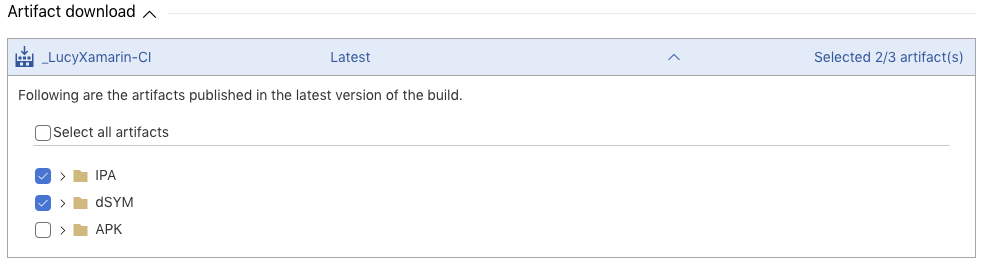
I haven't provided any match patterns myself, but each artifact is downloaded individually in the pipeline and it uses the pattern [IPA/**,dSYM/**]. I think the problem is that even though the artifacts are downloaded one-by-one, the pattern tries to filter them out based on my selection even though we are already downloading them individually based on my selection.
arek-avanade
on 26 Apr 2019
@fadnavistanmay
We are hitting the same issue.
Our Build pipeline produces around 10 artifacts, however, different release pipelines need different artifacts.
Is there any ETA for fix ?
 Rzpeg
on 2 May 2019
Rzpeg
on 2 May 2019
@Rzpeg , sorry for the delay, we are looking into the issue. @omeshp - Could you help here please. Looks like, when the user is selecting a particular artifact to download in RM, the itemPattern (minimatch ) is being set a
fadnavistanmay
on 3 May 2019
@fadnavistanmay Yes, we are adding the artifactname to item patterns at injection time. But I don't see why that should break the download if task is handling the patterns correctly.
 omeshp
on 3 May 2019
omeshp
on 3 May 2019
@fadnavistanmay @omeshp thanks for the followup. It really is affecting our deployment time.
Rzpeg
on 3 May 2019
Hello @omeshp , basically, the minimatch pattern is going in as "
Thanks,
Tanmay
fadnavistanmay
on 3 May 2019
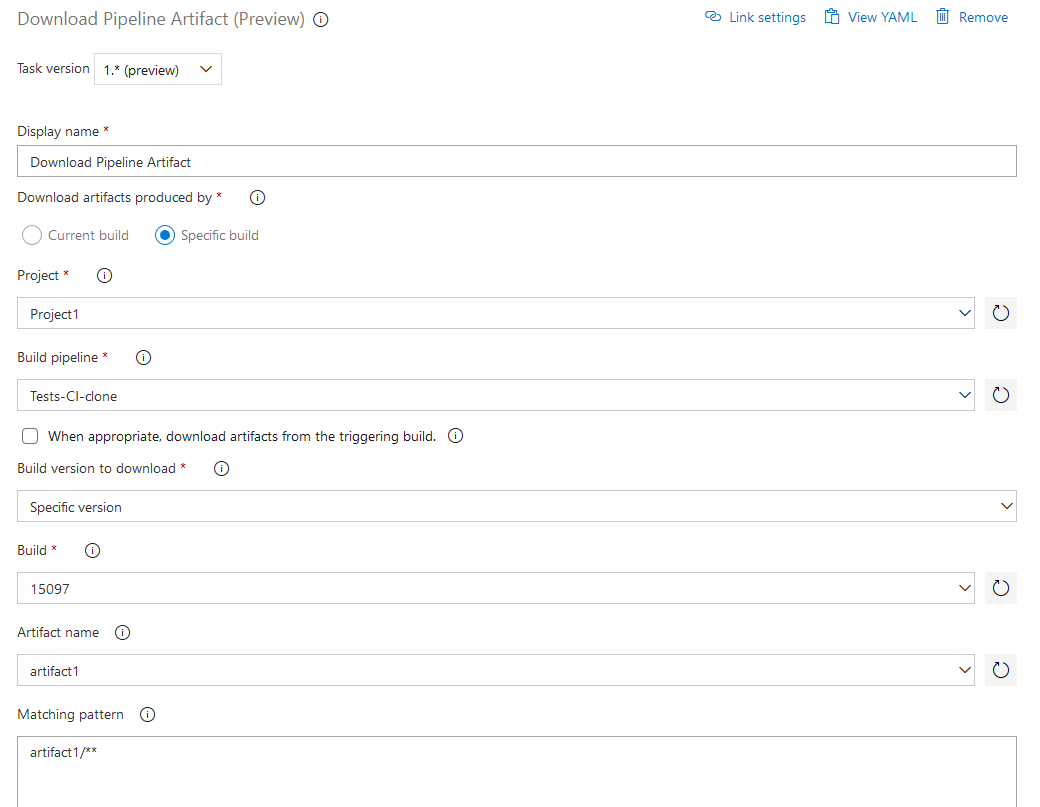
@fadnavistanmay The issue here isn't adding artifactname at injection time, we do the same thing for server build artifact. The issue is how the pattern is handled in the download task. If a pattern like artifactname/** is sent to "Download Pipeline Artifacts" task it skips downloading all the files, on the other hand same pattern works with "Download Build Artifacts" task. Below are the snapshots where it works for one task and not the other:
Working: https://panditaomesh.visualstudio.com/Project1/_build/results?buildId=15101&_a=summary&view=logs

Not Working: https://panditaomesh.visualstudio.com/Project1/_build/results?buildId=15100
omeshp
on 6 May 2019
@omeshp @fadnavistanmay
Is there any progress on the issue ?
Downloading all artifacts is, for some reason, is very slow on Azure Pipelines, the first 5-6 artifacts are downloaded fast (3-10 seconds per 100-200 mb artifact) and the rest take up to 2-4 minutes each, with constant errors (below, it eventually finshes downloading). The issue is causing the deployment process to take close to 30 minutes instead of 5-6 for all our artifacts.
2019-05-07T13:48:02.7803529Z Information, Minimatch patterns: [**]
2019-05-07T13:48:03.3233176Z Information, Filtered 36 files from the Minimatch filters supplied.
2019-05-07T13:48:03.3733942Z Information, Could not initialize dataport.
2019-05-07T13:48:03.3901635Z Information, Downloaded 0.0 MB out of 114.3 MB (0%).
2019-05-07T13:48:08.4002992Z Information, Downloaded 20.3 MB out of 114.3 MB (18%).
2019-05-07T13:48:13.4082137Z Information, Downloaded 34.2 MB out of 114.3 MB (30%).
2019-05-07T13:48:18.4255119Z Information, Downloaded 43.3 MB out of 114.3 MB (38%).
2019-05-07T13:48:23.4277874Z Information, Downloaded 64.0 MB out of 114.3 MB (56%).
2019-05-07T13:48:08.4002992Z Information, Downloaded 20.3 MB out of 114.3 MB (18%).
2019-05-07T13:48:13.4082137Z Information, Downloaded 34.2 MB out of 114.3 MB (30%).
2019-05-07T13:48:18.4255119Z Information, Downloaded 43.3 MB out of 114.3 MB (38%).
2019-05-07T13:48:23.4277874Z Information, Downloaded 64.0 MB out of 114.3 MB (56%).
2019-05-07T13:48:25.6232265Z Warning, [https://xuavsblobprodsu6weus12.blob.core.windows.net/dbe63b98307635479db31e89f778704d55/77BBFF14F8029B264608CE6644F0FEEBFEA578700CB3084E7175BB842AF8D3F001?sv=2017-04-17&sr=b&sig=t3poNXwyeqp6TzS6JJXwiDNdXHB9XPPtc1uLd06oDng%3D&spr=https&se=2019-05-07T16%3A56%3A07Z&sp=r&rscl=x-e2eid-0ad47c55-48f64b5c-aa5a4d23-670004dd-session-fbcd7455-c21842f0-9e2e7d15-31d925a5] Try 1/5, retryable exception caught. Retrying in 00:00:01. Details:
2019-05-07T13:48:25.6232953Z Exception.Data didn't contain key LastRequestResponse or its value was null or not a string. Was HttpRequestExceptionExtensions.SetHttpMessagesForTracing called? System.Net.Http.HttpRequestException: An error occurred while sending the request. ---> System.Net.Http.WinHttpException: Error 12002 calling WINHTTP_CALLBACK_STATUS_REQUEST_ERROR, 'The operation timed out'.
2019-05-07T13:48:25.6233269Z    at System.Threading.Tasks.RendezvousAwaitable`1.GetResult()
2019-05-07T13:48:25.6233479Z    at System.Net.Http.WinHttpHandler.StartRequest(WinHttpRequestState state)
2019-05-07T13:48:25.6233898Z    --- End of inner exception stack trace ---
2019-05-07T13:48:25.6234254Z    at System.Net.Http.HttpClient.FinishSendAsyncBuffered(Task`1 sendTask, HttpRequestMessage request, CancellationTokenSource cts, Boolean disposeCts)
2019-05-07T13:48:25.6234448Z    at Microsoft.VisualStudio.Services.Common.TaskCancellationExtensions.EnforceCancellation[TResult](Task`1 task, CancellationToken cancellationToken, Func`1 makeMessage, String file, String member, Int32 line)
2019-05-07T13:48:25.6234655Z    at Microsoft.VisualStudio.Services.BlobStore.WebApi.DedupStoreHttpClient.<>c__DisplayClass56_0.<<GetRedirectResponseAsync>b__0>d.MoveNext()
2019-05-07T13:48:25.6236244Z --- End of stack trace from previous location where exception was thrown ---
2019-05-07T13:48:25.6236419Z    at Microsoft.VisualStudio.Services.Content.Common.AsyncHttpRetryHelper`1.InvokeAsync(CancellationToken cancellationToken)
2019-05-07T13:48:25.6236784Z Warning, [https://r23vsblobprodsu6weus80.blob.core.windows.net/dbe63b98307635479db31e89f778704d55/AD7CD21379DB8E08F7F09C699C4681CBFCA084F9DD18E6D5755ACFDDDC3941C501?sv=2017-04-17&sr=b&sig=y8soNOPTFdAGN8Y6W%2F7CKcbouRvUjovE71tjTQOiKCo%3D&spr=https&se=2019-05-07T17%3A21%3A17Z&sp=r&rscl=x-e2eid-2f23e6ab-43b943d2-ab71923f-720f8696-session-fbcd7455-c21842f0-9e2e7d15-31d925a5] Try 1/5, retryable exception caught. Retrying in 00:00:01. Details:
2019-05-07T13:48:25.6236985Z Exception.Data didn't contain key LastRequestResponse or its value was null or not a string. Was HttpRequestExceptionExtensions.SetHttpMessagesForTracing called? System.Net.Http.HttpRequestException: An error occurred while sending the request. ---> System.Net.Http.WinHttpException: Error 12002 calling WINHTTP_CALLBACK_STATUS_REQUEST_ERROR, 'The operation timed out'.
2019-05-07T13:48:25.6238506Z    at System.Threading.Tasks.RendezvousAwaitable`1.GetResult()
2019-05-07T13:48:25.6238596Z    at System.Net.Http.WinHttpHandler.StartRequest(WinHttpRequestState state)
2019-05-07T13:48:25.6238662Z    --- End of inner exception stack trace ---
2019-05-07T13:48:25.6238915Z    at System.Net.Http.HttpClient.FinishSendAsyncBuffered(Task`1 sendTask, HttpRequestMessage request, CancellationTokenSource cts, Boolean disposeCts)
2019-05-07T13:48:25.6239017Z    at Microsoft.VisualStudio.Services.Common.TaskCancellationExtensions.EnforceCancellation[TResult](Task`1 task, CancellationToken cancellationToken, Func`1 makeMessage, String file, String member, Int32 line)
2019-05-07T13:48:25.6239306Z    at Microsoft.VisualStudio.Services.BlobStore.WebApi.DedupStoreHttpClient.<>c__DisplayClass56_0.<<GetRedirectResponseAsync>b__0>d.MoveNext()
2019-05-07T13:48:25.6239393Z --- End of stack trace from previous location where exception was thrown ---
2019-05-07T13:48:25.6239826Z    at Microsoft.VisualStudio.Services.Content.Common.AsyncHttpRetryHelper`1.InvokeAsync(CancellationToken cancellationToken)
2019-05-07T13:48:28.4332472Z Information, Downloaded 69.9 MB out of 114.3 MB (61%).
2019-05-07T13:48:33.4436034Z Information, Downloaded 69.9 MB out of 114.3 MB (61%).
2019-05-07T13:48:38.4490631Z Information, Downloaded 69.9 MB out of 114.3 MB (61%).
2019-05-07T13:48:43.4599655Z Information, Downloaded 69.9 MB out of 114.3 MB (61%).
2019-05-07T13:48:46.7912734Z Warning, [https://xlmvsblobprodsu6weus15.blob.core.windows.net/dbe63b98307635479db31e89f778704d55/6643AB92793736F5C5DCE1476DE831A4C95C7AD6AFB0653FE97F2B71942CA20501?sv=2017-04-17&sr=b&sig=zUTwMl6GAqhRfvghtU5O8Oh5ksk%2FYuh7rnGQJpQuVGE%3D&spr=https&se=2019-05-07T16%3A47%3A57Z&sp=r&rscl=x-e2eid-0ad47c55-48f64b5c-aa5a4d23-670004dd-session-fbcd7455-c21842f0-9e2e7d15-31d925a5] Try 1/5, retryable exception caught. Retrying in 00:00:01. Details:
2019-05-07T13:48:46.7913318Z Exception.Data didn't contain key LastRequestResponse or its value was null or not a string. Was HttpRequestExceptionExtensions.SetHttpMessagesForTracing called? System.Net.Http.HttpRequestException: An error occurred while sending the request. ---> System.Net.Http.WinHttpException: Error 12002 calling WINHTTP_CALLBACK_STATUS_REQUEST_ERROR, 'The operation timed out'.
2019-05-07T13:48:46.7914129Z    at System.Threading.Tasks.RendezvousAwaitable`1.GetResult()
2019-05-07T13:48:46.7914334Z    at System.Net.Http.WinHttpHandler.StartRequest(WinHttpRequestState state)
2019-05-07T13:48:46.7914524Z    --- End of inner exception stack trace ---
2019-05-07T13:48:46.7914710Z    at System.Net.Http.HttpClient.FinishSendAsyncBuffered(Task`1 sendTask, HttpRequestMessage request, CancellationTokenSource cts, Boolean disposeCts)
2019-05-07T13:48:46.7915242Z    at Microsoft.VisualStudio.Services.Common.TaskCancellationExtensions.EnforceCancellation[TResult](Task`1 task, CancellationToken cancellationToken, Func`1 makeMessage, String file, String member, Int32 line)
2019-05-07T13:48:46.7915536Z    at Microsoft.VisualStudio.Services.BlobStore.WebApi.DedupStoreHttpClient.<>c__DisplayClass56_0.<<GetRedirectResponseAsync>b__0>d.MoveNext()
2019-05-07T13:48:46.7915723Z --- End of stack trace from previous location where exception was thrown ---
2019-05-07T13:48:46.7915935Z    at Microsoft.VisualStudio.Services.Content.Common.AsyncHttpRetryHelper`1.InvokeAsync(CancellationToken cancellationToken)
@Rzpeg Sorry for the inconvenience, we are working on the fix for partial artifact download and will get it deployed to your account by next week.
@fadnavistanmay Can you look at why download is slow for multiple artifacts in case of pipeline artifacts?
omeshp
on 9 May 2019
@omeshp Thanks for the ETA.
@fadnavistanmay I have created another issue for the timeouts during artifact download: #10343
Rzpeg
on 9 May 2019
@omeshp has it been fixed in production yet ?
Rzpeg
on 23 May 2019
Hi @Rzpeg , Yes the fix has been deployed to the production. Let us know if you are still facing the issue.
omeshp
on 23 May 2019
@omeshp seems to be working now! Deployment time reduced by whoping 70%.
Thanks!
Rzpeg
on 23 May 2019
@Rzpeg Thanks for the confirmation!
omeshp
on 25 May 2019
Related issues
 richard-ob
·
3Comments
richard-ob
·
3Comments
 MichaelWhiteCodingForFun
·
3Comments
MichaelWhiteCodingForFun
·
3Comments
 montebhoover
·
3Comments
montebhoover
·
3Comments
 gregpakes
·
3Comments
gregpakes
·
3Comments
 MarkIannucci
·
3Comments
MarkIannucci
·
3Comments
Most helpful comment
@Rzpeg Sorry for the inconvenience, we are working on the fix for partial artifact download and will get it deployed to your account by next week.
@fadnavistanmay Can you look at why download is slow for multiple artifacts in case of pipeline artifacts?