Azure-pipelines-tasks: Spaces in repository path causes azure-pipelines-tasks build failure
This is not related to builds or tasks on Azure DevOps. This is related to attempting to contribute to this repository.
I am using vscode and I'm on Windows 10.
I have discovered that if you put this repo in a path with a space and then run npm run build the build will fail. This is due to paths not being surrounded by quotes for example on: Line 173 in make-util.js. I am planning on opening a pull request with my fixes to this problem and anywhere else I find failures.
Errors:
tsc --outDir C:\Git Repositories\GitHub\azure-pipelines-tasks\_build\Tasks\Common\securefiles-common --rootDir C:\Git Repositories\GitHub\azure-pipelines-tasks\Tasks\Common\securefiles-common
,error TS6053: File 'Repositories/GitHub/azure-pipelines-tasks/Tasks/Common/securefiles-common.ts' not found.
error TS6053: File 'Repositories/GitHub/azure-pipelines-tasks/_build/Tasks/Common/securefiles-common.ts' not found.
,
npm ERR! code ELIFECYCLE
npm ERR! errno 1
npm ERR! [email protected] build: `node make.js build`
npm ERR! Exit status 1
npm ERR!
npm ERR! Failed at the [email protected] build script.
npm ERR! This is probably not a problem with npm. There is likely additional logging output above.
 Banner-Keith
All 7 comments
@DavidStaheli This looks like an area where you would be a good expert. Please let me know if this cannot be fixed for whatever reason. I'll try to get a PR up right away so you can review my changes.
Banner-Keith
on 3 Apr 2019
It looks like I don't have permissions to create a branch to do my PR.
Banner-Keith
on 3 Apr 2019
Removed "Area: Artifacts" label since it's not an issue with the Artifacts build tasks.
@bryanmacfarlane, could you help us route this to the appropriate team? For future reference, should I use the "route" label for these cases?
 salvmd
on 16 Apr 2019
salvmd
on 16 Apr 2019
I started working in this repository again today and encountered this problem again. Can we get some traction on this? It's a very easy fix with minimal impact.
All I did to fix it was change Line 173 in make-util.js from run('tsc --outDir ' + outDir + ' --rootDir ' + taskPath); to run('tsc --outDir "' + outDir + '" --rootDir "' + taskPath + '"');
Banner-Keith
on 30 Sep 2019
Hey @Banner-Keith sorry for the slow response - I can look at making this change, but would also love a PR fixing that if you're up for it - thoughts?
 damccorm
on 20 Nov 2019
damccorm
on 20 Nov 2019
@damccorm Thanks for the reply. I'd be happy to get a PR out there. I don't seem to have permissions to create a branch on this repository. Could you let me know the best way to proceed so I can get my PR out there?
Banner-Keith
on 20 Nov 2019
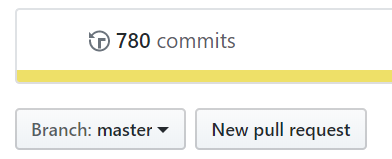
Sure, the best path is to fork the repository, make your changes in the fork's master branch, and then create a PR from that fork. When you make your updates, there should be a "Create PR" button on your fork's github page right below the commits banner
damccorm
on 20 Nov 2019
Related issues
 montebhoover
·
3Comments
montebhoover
·
3Comments
 gregpakes
·
3Comments
gregpakes
·
3Comments
 jabbera
·
3Comments
jabbera
·
3Comments
 timfish
·
3Comments
timfish
·
3Comments
 HenrikStanley
·
3Comments
HenrikStanley
·
3Comments