Azure-pipelines-tasks: Code coverage results is empty (except for download link)
I have a pipeline that is successfully generating a .coverage file artifact. However, nothing shows up in the "Code Coverage" tab.
Based on a few other related threads I found, the file needs to be in a Jacoco format in order for that DevOps tab to work.
So, I tried opening the .coverage file in note bad, and it's a binary file of some kind and I can't tell if it's in the correct format or not.
Here is the log from the Test and Publish steps:
##[section]Starting: Visual Studio Test
==============================================================================
Task         : Visual Studio Test
Description  : Run unit and functional tests (Selenium, Appium, Coded UI test, etc.) using the Visual Studio Test (VsTest) runner. Test frameworks that have a Visual Studio test adapter such as MsTest, xUnit, NUnit, Chutzpah (for JavaScript tests using QUnit, Mocha and Jasmine), etc. can be run. Tests can be distributed on multiple agents using this task (version 2).
Version      : 2.148.7
Author       : Microsoft Corporation
Help         : [More information](https://go.microsoft.com/fwlink/?LinkId=835764)
==============================================================================
SystemVssConnection exists true
SystemVssConnection exists true
SystemVssConnection exists true
Running tests using vstest.console.exe runner.
======================================================
Test selector : Test assemblies
Test filter criteria : null
Search folder : d:\a\1\s
Run in parallel : true
Run in isolation : false
Path to custom adapters : null
Other console options : /Platform:x64
Code coverage enabled : true
Diagnostics enabled : true
SystemVssConnection exists true
Run the tests locally using vstest.console.exe
========================================================
Test selector : Test assemblies
Test assemblies : **\tests\**\*.Tests.dll,!**\obj\**
Test filter criteria : null
Search folder : d:\a\1\s
Run settings file : d:\a\1\s
Run in parallel : true
Run in isolation : false
Path to custom adapters : null
Other console options : /Platform:x64
Code coverage enabled : true
Diagnostics enabled : false
Rerun failed tests: false
VisualStudio version selected for test execution : toolsInstaller
========================================================
======================================================
[command]C:\hostedtoolcache\windows\VsTest\16.0.1\x64\tools\net451\Common7\IDE\Extensions\TestPlatform\vstest.console.exe @d:\a\_temp\6c0296a1-509c-11e9-aabf-058f3e1d3174.txt
Microsoft (R) Test Execution Command Line Tool Version 16.0.1
Copyright (c) Microsoft Corporation.  All rights reserved.

vstest.console.exe
"d:\a\1\s\tests\DevOpsTemplate.Tests\bin\debug\net472\DevOpsTemplate.Tests.dll"
/Settings:"d:\a\_temp\6c135f80-509c-11e9-aabf-058f3e1d3174.runsettings"
/logger:"trx"
/TestAdapterPath:"d:\a\1\s"
/Platform:x64
Starting test execution, please wait...
M i c r o s o f t   ( R )   C o v e r a g e   C o l l e c t i o n   T o o l   V e r s i o n   1 6 . 0 . 3 0 3 1 9 . 0


 C o p y r i g h t   ( c )   M i c r o s o f t   C o r p o r a t i o n .     A l l   r i g h t s   r e s e r v e d .


 2.2321
[xUnit.net 00:00:00.00] xUnit.net VSTest Adapter v2.4.1 (64-bit Desktop .NET 4.0.30319.42000)
[xUnit.net 00:00:01.70]   Discovering: DevOpsTemplate.Tests
[xUnit.net 00:00:02.34]   Discovered:  DevOpsTemplate.Tests
[xUnit.net 00:00:02.35]   Starting:    DevOpsTemplate.Tests
[xUnit.net 00:00:03.19]   Finished:    DevOpsTemplate.Tests
M i c r o s o f t   ( R )   C o v e r a g e   C o l l e c t i o n   T o o l   V e r s i o n   1 6 . 0 . 3 0 3 1 9 . 0


 C o p y r i g h t   ( c )   M i c r o s o f t   C o r p o r a t i o n .     A l l   r i g h t s   r e s e r v e d .


 Passed   DevOpsTest.Tests.TestOne.A
Results File: d:\a\1\s\TestResults\VssAdministrator_fv-az478_2019-03-27_14_27_32_076.trx

Attachments:
  d:\a\1\s\TestResults\1cf2519b-6de4-49cc-b930-fbd067a228f6\VssAdministrator_fv-az478 2019-03-27 14_27_21.coverage

Total tests: 1. Passed: 1. Failed: 0. Skipped: 0.
Test Run Successful.
Test execution time: 9.5364 Seconds
##[section]Async Command Start: Publish test results
Publishing test results to test run '1000852'
Test results remaining: 1. Test run id: 1000852
Published Test Run : https://myproject.visualstudio.com/myproject/_TestManagement/Runs#runId=1000852&_a=runCharts
##[section]Async Command End: Publish test results
##[section]Finishing: Visual Studio Test
And the publish coverage step:
##[section]Starting: Publish code coverage results
==============================================================================
Task         : Publish Code Coverage Results
Description  : Publish Cobertura or JaCoCo code coverage results from a build
Version      : 1.148.0
Author       : Microsoft Corporation
Help         : [More Information](https://go.microsoft.com/fwlink/?LinkID=626485)
==============================================================================
##[warning]No code coverage results were found to publish.
##[section]Finishing: Publish code coverage results
 joshmouch
All 23 comments
Hey @joshmouch,
I don't think the Publish Code Coverage task is the correct task for your situation. It's expecting a summary XML file (not a .coverage), which is why you're seeing the code coverage as empty
The Visual Studio Test task already publishes the information you want and should be viewable as one of the tabs on your pipeline result page. See here for more info on that task: https://docs.microsoft.com/en-us/azure/devops/pipelines/tasks/test/vstest?view=azure-devops
 joshmgross
on 28 Mar 2019
joshmgross
on 28 Mar 2019
If that's true then the code coverage screen is pretty limited, correct? This is what Resharper tells me is covered:

And this is all I see on the DevOps screen. First, the 50% is wrong...

... then when I click on the "Code Coverage succeeded" header, it takes me to the "Code Coverage" tab, which only has a download link and no useful reports.
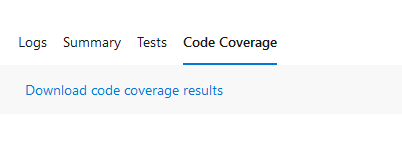
I think I've come to the conclusion that the push here is to use a third party tool for the code coverage results. I've also run across a nuget package called Coverlet which is supposed to convert ".coverage" binary files to xml, so I'll give that a go.
joshmouch
on 29 Mar 2019
@cltshivash may be able to answer your questions.
I don't think converting to an XML file is enough to allow you to use the PublishCodeCoverage task
joshmgross
on 29 Mar 2019
Is there any more news on this? Seems we have the same issue.
 bendursley
on 5 Nov 2019
bendursley
on 5 Nov 2019
Can someone please clarify if the Code Coverage tab is supposed contain only a link to download the results? Or is it supposed to display the results, but it is broken due to a bug in the task?
Not asking you to immediately fix a bug (should there be one), just some information would be much appreciated.
Edit: according to https://github.com/microsoft/azure-pipelines-tasks/issues/11677 the Visual Studio Test task is responsible for the Code Coverage tab being mostly empty.
 stijnherreman
on 29 Nov 2019
stijnherreman
on 29 Nov 2019
@stijnherreman Currently , code coverage task is supposed to contain only link to download results .
For a first class view , we are soon going to roll out this the following:
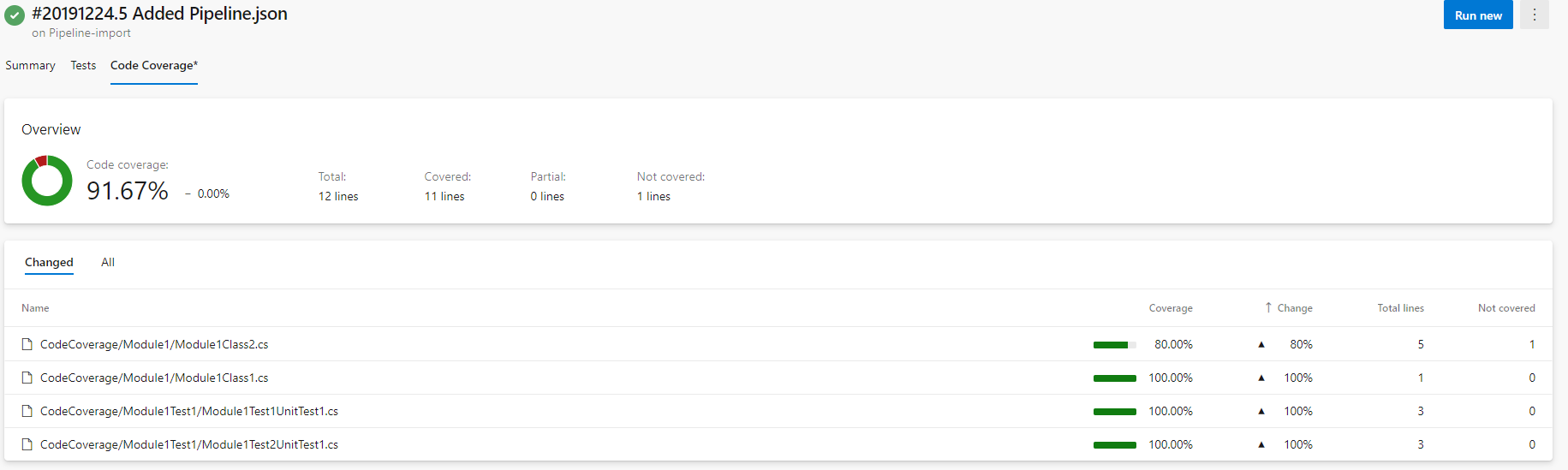

If you are interested in this , we will enable this on your account in couple of days.
You can try this and give us further feedback before this feature becomes GA.
 anshii03
on 9 Jan 2020
anshii03
on 9 Jan 2020
@anshii03 that's great news! I don't have any pipelines on my personal account, could it be enabled on an organization? If so, can I contact you via email?
stijnherreman
on 9 Jan 2020
@stijnherreman this can be enabled on organization also. You can mail on [email protected].
anshii03
on 9 Jan 2020
@stijnherreman Currently , code coverage task is supposed to contain only link to download results .
For a first class view , we are soon going to roll out this the following:
If you are interested in this , we will enable this on your account in couple of days.
You can try this and give us further feedback before this feature becomes GA.
@anshii03 I have started using this in my pipeline on Azure Devops Server and very much interested in seeing the results as well. Is there a timeline when will this be rolled out ? or can I get it enabled in my pipeline as a pre release ?
 hyousuf
on 14 Jan 2020
hyousuf
on 14 Jan 2020
@hyousuf - Please mail your account details on [email protected]. We will enable it on your account as well before release and will love to get your feedback.
anshii03
on 21 Jan 2020
We are closing this ticket now as soon we will be releasing this new view to show the code coverage results.


If anyone is interested in this view , please mail your account details to [email protected]
We will enable this view on your account.
anshii03
on 21 Jan 2020
Hi anshi03
My account in azure devops is carsnow21.visualstudio.com
And this is one of my pipelines where i would like to enable code coverage
summary
https://carsnow21.visualstudio.com/CarsNow/_build?definitionId=3&_a=summary
On Tue, 21 Jan 2020, 05:55 anshii03, notifications@github.com wrote:
@hyousuf https://github.com/hyousuf - Please share your account
details. We will enable it on your account as well before release and will
love to get your feedback.—
You are receiving this because you were mentioned.
Reply to this email directly, view it on GitHub
https://github.com/microsoft/azure-pipelines-tasks/issues/9954?email_source=notifications&email_token=ABR6FQFR7SXVPLCLQ3N3VD3Q62E65A5CNFSM4HBY27I2YY3PNVWWK3TUL52HS4DFVREXG43VMVBW63LNMVXHJKTDN5WW2ZLOORPWSZGOEJOSMSA#issuecomment-576529992,
or unsubscribe
https://github.com/notifications/unsubscribe-auth/ABR6FQGVPLISXEGBI7PVT6LQ62E65ANCNFSM4HBY27IQ
.
hyousuf
on 21 Jan 2020
@hyousuf Please mail your account details on [email protected].
anshii03
on 22 Jan 2020
Hi, I am unable to email account details with error:
Your message to [email protected] couldn't be delivered.
The group sadadirs only accepts messages from people in its organization or on its allowed senders list, and your email address isn't on the list.
richard.torhan Office 365 sadadirs Sender Action Required Sender not allowed | richard.torhan | Office 365 | sadadirs | Sender | | Action Required | | | | | | | | | Sender not allowed
richard.torhan | Office 365 | sadadirs
Sender | | Action Required
| | | | |
| | | |
| | Sender not allowed
How to Fix It It appears you aren't in the same organization as the group (or a sub-group) you're sending to or your email address isn't on the group's allowed senders list. Ask the owner of the group to grant you permission to send to it, and then try again. If the group belongs to a different organization than yours, contact the organization's customer service department for assistance. If the group is in your organization and you don't know who the group owner is, you can find it by doing the following in either Outlook on the web or Outlook: · Open your Sent folder and select the original message. · If you're using Outlook on the web, select the group name located on the To or CC line. If you're using Outlook, double-click the group name located on the To or CC line. · In Outlook on the web, from the pop-up dialog box, choose Owner. In Outlook, choose Contact. The owner's name is listed under Owner. The owner of the group may have intentionally chosen to restrict who can send messages to it, and they may not want to adjust the existing restriction. In this case, you'll have to contact the group members by some other means, such as sending an email message to their individual email addresses or contacting them by phone. | How to Fix It | It appears you aren't in the same organization as the group (or a sub-group) you're sending to or your email address isn't on the group's allowed senders list. Ask the owner of the group to grant you permission to send to it, and then try again. If the group belongs to a different organization than yours, contact the organization's customer service department for assistance. If the group is in your organization and you don't know who the group owner is, you can find it by doing the following in either Outlook on the web or Outlook: | · Open your Sent folder and select the original message. · If you're using Outlook on the web, select the group name located on the To or CC line. If you're using Outlook, double-click the group name located on the To or CC line. · In Outlook on the web, from the pop-up dialog box, choose Owner. In Outlook, choose Contact. The owner's name is listed under Owner. | The owner of the group may have intentionally chosen to restrict who can send messages to it, and they may not want to adjust the existing restriction. In this case, you'll have to contact the group members by some other means, such as sending an email message to their individual email addresses or contacting them by phone.
How to Fix It
It appears you aren't in the same organization as the group (or a sub-group) you're sending to or your email address isn't on the group's allowed senders list. Ask the owner of the group to grant you permission to send to it, and then try again. If the group belongs to a different organization than yours, contact the organization's customer service department for assistance. If the group is in your organization and you don't know who the group owner is, you can find it by doing the following in either Outlook on the web or Outlook:
· Open your Sent folder and select the original message. · If you're using Outlook on the web, select the group name located on the To or CC line. If you're using Outlook, double-click the group name located on the To or CC line. · In Outlook on the web, from the pop-up dialog box, choose Owner. In Outlook, choose Contact. The owner's name is listed under Owner.
The owner of the group may have intentionally chosen to restrict who can send messages to it, and they may not want to adjust the existing restriction. In this case, you'll have to contact the group members by some other means, such as sending an email message to their individual email addresses or contacting them by phone.
 TekuSP
on 12 Feb 2020
TekuSP
on 12 Feb 2020
I got the same email response, I'm hoping there are more people on that distribution list
 ahoefling
on 14 Feb 2020
ahoefling
on 14 Feb 2020
No response in 6 days. @anshii03 Any status?
TekuSP
on 20 Feb 2020
@TekuSP @ahoefling they receive the email, it's just a single mailbox deep in the alias tree that bounces, see https://github.com/MicrosoftDocs/vsts-docs/issues/7183
I've been in contact with the team through [email protected], so rest assured that they are reading your email :)
stijnherreman
on 20 Feb 2020
hi! any updates to when we will be able to see code coverage results in Azure DevOps? It is matter of day, weeks or months?
 MichalKosowski
on 26 Mar 2020
MichalKosowski
on 26 Mar 2020
+1 on update?
 sadjadbp
on 1 Apr 2020
sadjadbp
on 1 Apr 2020
Yep - would be interested to get an update as well.
 randusr836
on 7 Apr 2020
randusr836
on 7 Apr 2020
I never got back from Microsoft and this topic is dead. I demand official response or I will reopen this issue.
TekuSP
on 10 Apr 2020
@anshii03 Do we have an ETA on when this will come out of closed preview?
 Tarig0
on 20 Apr 2020
Tarig0
on 20 Apr 2020
Apologies for the delay in response.
Right now, we don’t have an ETA to share on the new user experience feature for code coverage results. Due to some unforeseen circumstances, we are unable to enroll new users for the private preview as well at this time. Sorry !
We will get back with an update as soon as we are ready to roll this out more broadly for customers to try.
 phanikmmsft
on 24 Apr 2020
phanikmmsft
on 24 Apr 2020
Related issues
 NatMarchand
·
3Comments
NatMarchand
·
3Comments
 divyesh-parikh
·
3Comments
divyesh-parikh
·
3Comments
 alexszilagyi
·
3Comments
alexszilagyi
·
3Comments
 pharring
·
3Comments
pharring
·
3Comments
 HenrikStanley
·
3Comments
HenrikStanley
·
3Comments
Most helpful comment
Can someone please clarify if the Code Coverage tab is supposed contain only a link to download the results? Or is it supposed to display the results, but it is broken due to a bug in the task?
Not asking you to immediately fix a bug (should there be one), just some information would be much appreciated.
Edit: according to https://github.com/microsoft/azure-pipelines-tasks/issues/11677 the Visual Studio Test task is responsible for the Code Coverage tab being mostly empty.