Azure-pipelines-tasks: Broken symlinks blow up the CopyFiles task, even if they wouldn't be matched
Broken symlinks cause the CopyFiles task to blow up, even if the affected file wouldn't be matched. A better error message -- that a broken symlink has been encountered -- would be a good starting point to helping customers diagnose this better. Ideally, if a broken symlink wouldn't be matched, even better behavior would be to warn but don't fail.
I _think_ it's this line: https://github.com/Microsoft/azure-pipelines-tasks/blob/bf3c7099f34c840dd2152f41484a8588b1352536/Tasks/CopyFilesV2/copyfiles.ts#L20. If there's a way to safely fix it in the task-lib so other tasks get the benefit as well, that would be great.
Example customer scenario: https://developercommunity.visualstudio.com/content/problem/420251/copy-files-fails-on-linux-if-the-source-folder-con.html
 vtbassmatt
All 11 comments
@stephenmichaelf I think this was fixed in this commit - https://github.com/Microsoft/azure-pipelines-task-lib/commit/8a1a8a9dec5b6de37ab8835a852f6cf72272634e
We should be able to upgrade the version we consume, I don't think it should be considered breaking (unless customers are relying on the task to blow up when there's a broken symlink?)
 damccorm
on 8 Apr 2019
damccorm
on 8 Apr 2019
Relying on a bug like that seems unlikely. It fails the whole job, which customers tend not to like :)
vtbassmatt
on 9 Apr 2019
That's fair :)
Also, turns out I actually already had a PR open to bump the version we're consuming - https://github.com/Microsoft/azure-pipelines-tasks/pull/9390 - @stephenmichaelf could you take a look? I updated the options so that it should allow broken symlinks
damccorm
on 9 Apr 2019
Lost 3+ hours on this cryptic error yesterday, is the fix available on DevOps yet?
 TomDobbelaere
on 14 Nov 2019
TomDobbelaere
on 14 Nov 2019
Please get the fix for this deployed. I have a submodule containing a third party toolchain, including a number of harmlessly dangling symlinks, and simply having the submodule checked out causes the Copy Binaries task to fail after the build. I am currently working around this by deleting the submodule directory at the end of the build script.
 martinling
on 6 Dec 2019
martinling
on 6 Dec 2019
I merged a PR that should fix this - https://github.com/microsoft/azure-pipelines-tasks/pull/12207 - it should roll out over the next couple weeks
damccorm
on 31 Jan 2020
@damccorm is there a way to check the minor version of the task that a pipeline would be using? In other words, how can we know when this fix has rolled out? I can see the full task version in the logs after a job executes, but when adding a task I only see 2.*. I ran into the same issue with broken symlinks 2 days ago so for now I'm using a powershell script to copy files.
 alexvy86
on 21 Feb 2020
alexvy86
on 21 Feb 2020
It should be in the header of the logs, e.g.
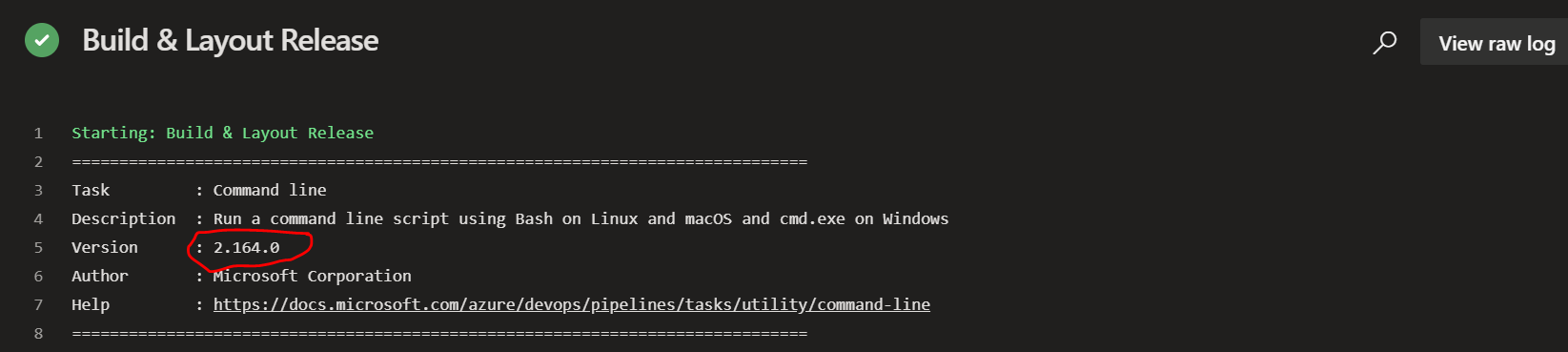
damccorm
on 21 Feb 2020
Yeah, I know it shows up in the logs, I was looking for a way of knowing before I have to execute it (and potentially fail if it doesn't have the fix yet).
alexvy86
on 29 Feb 2020
We have an endpoint you can hit to get what tasks are installed on your account, that has this info - https://dev.azure.com/<org name>/_apis/distributedtask/tasks
damccorm
on 1 Mar 2020
Also, closing since this task has fully rolled out
damccorm
on 1 Mar 2020
Related issues
 syltaxue
·
3Comments
syltaxue
·
3Comments
 MarkIannucci
·
3Comments
MarkIannucci
·
3Comments
 gregpakes
·
3Comments
gregpakes
·
3Comments
 jabbera
·
3Comments
jabbera
·
3Comments
 divyesh-parikh
·
3Comments
divyesh-parikh
·
3Comments