Azure-pipelines-tasks: Using pipeline variables in Azure CLI task
Hello, in Azure Devops pipeline i am using Azure CLI task with inline script on Hosted Ubuntu 1604 agent, is there any way to pass pipeline variables to scipt? as example i want to use this command with variable az resource list -g MYVARIABLE --query "[].name" -o tsv? if so could you provide example. Thanks.
 andriy-tsvikla
All 29 comments
az storage account keys list --account-name $(accountName)
Works fine?
 FireDrunk
on 28 Jan 2019
FireDrunk
on 28 Jan 2019
You can use pipeline variables in the script by passing them as arguments. Example:
Arguments input : $(MYVARIABLE)
Inline script: az resource list -g $1 --query "[].name" -o tsv
where MYVARIABLE is your pipeline variable. Please let me know if this helps.
 dikhakha
on 29 Jan 2019
dikhakha
on 29 Jan 2019
@erikcartman Did you get a chance to try out the above suggestion ?
dikhakha
on 1 Feb 2019
nope $(mypipelinevariable) didn't worked for me. I changed my approach, but thanks anyway
andriy-tsvikla
on 2 Feb 2019
@dikhakha FWIW, I had a working inline script that made use of pipeline variables that worked fine. When I moved the script, unchanged, to a file in the source repository, exposed it as a build artifact and reconfigured the Azure CLI task to use a script path instead, it didn't do variable substitution anymore.
The script uses some 20-ish variables (most of them to set app settings) so I would _really_ like to avoid having to specify them all as script arguments.
 tomasaschan
on 5 Feb 2019
tomasaschan
on 5 Feb 2019
@tomasaschan you should be able to access the pipeline variables in the script as well. All pipeline variables are made available to the script as environment variables, except secret variables. I am wondering if you changed the Job Agent by any chance ? This is because variable names are converted to UPPER CASE and stored so if you are using Ubuntu agent, you might not be getting the values due to case sensitivity. Can you please tell me which job agent are you using ?
dikhakha
on 6 Feb 2019
@dikhakha It's running on Ubuntu 16.04. The variables have names like $(WebApp.Name) - what would that translate to as an environment variable name?
Also, a majority of the variables are imported from Azure KeyVault. They are not marked as secret in the pipeline variables configuration, but they do get masked when included in log outputs. Are they made available as well?
tomasaschan
on 6 Feb 2019
WebApp.Name will be available as WEBAPP_NAME (' ' and '.' is converted to '_'). You can refer to this doc about custom variables.
I did not completely understand the second scenario. If a variable is not marked as secret, it will be available. however, it could be getting masked in the logs because those variables might contain values which are considered as secret like your Azure service connection details.
dikhakha
on 6 Feb 2019
The second scenario is basically this:
I have a variable group that is linked to an Azure KeyVault, and the secrets from there are imported as variables. I then have pipeline variables that refer to the variables from the variable group, in order to map the secret names in Key Vault to something that makes sense for the pipeline, and to handle scopes.
So, for example, say the Key Vault has two secrets; foo-bar-test and foo-bar-prod. They are made available under the same names in the variable group. In the pipeline, I have a pipeline variable Foo.Bar with the value $(foo-bar-test) scoped to Test, and Foo.Bar with the value $(foo-bar-prod) scoped to Prod. In the pipeline variable configuration, Foo.Bar is not marked secret.
So, given the following statement:
All pipeline variables are made available to the script as environment variables, except secret variables.
the question was whether I will have a FOO_BAR environment variable available in the script, or if being imported from Key Vault counts as being a "secret variable".
tomasaschan
on 6 Feb 2019
You can refer to this doc for using variables imported from KeyVault. Secret variables and variables from key vault are considered as secrets therefore they will not be available in the scripts.
dikhakha
on 6 Feb 2019
Closing this issue. Please feel free to reopen if you need more help.
dikhakha
on 12 Feb 2019
You can use pipeline variables in the script by passing them as arguments. Example:
Arguments input : $(MYVARIABLE)
Inline script: az resource list -g $1 --query "[].name" -o tsvwhere MYVARIABLE is your pipeline variable. Please let me know if this helps.
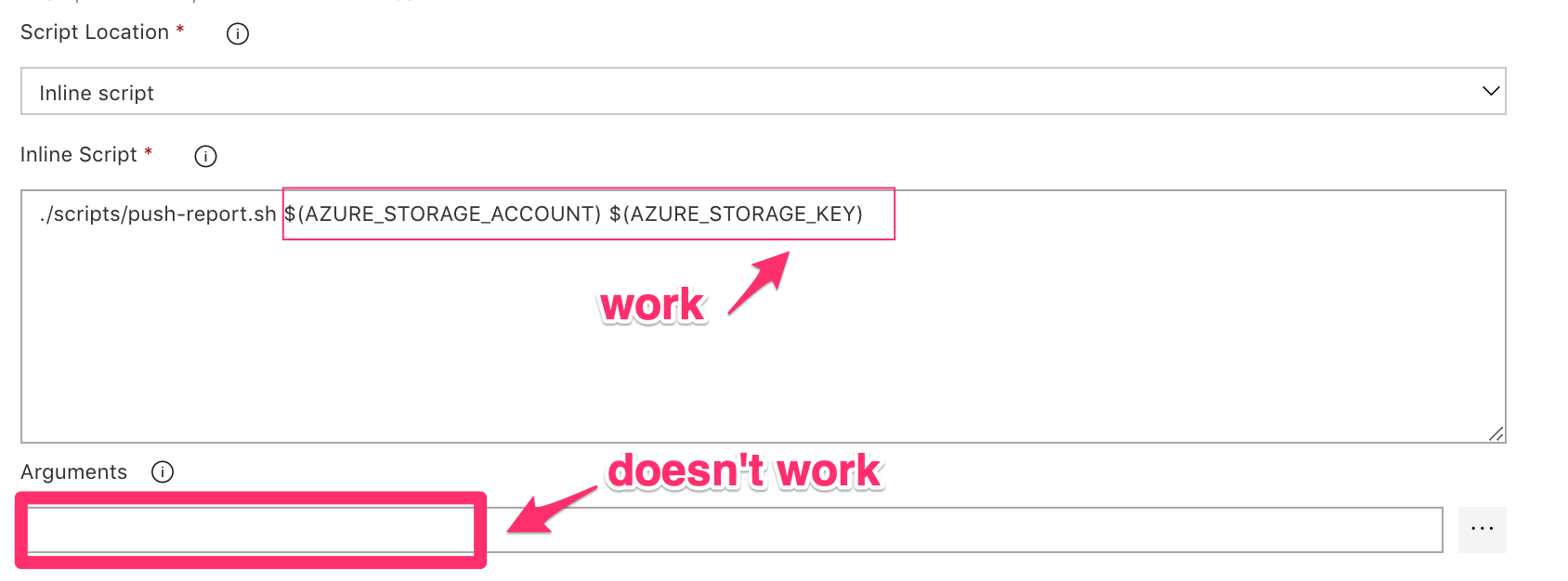
I probably misunderstood you but your instruction didn't work when I try to add the variable in the Arguments sections. It did work when I reference it directly when calling the script
 mydiemho
on 8 Mar 2019
mydiemho
on 8 Mar 2019
@mydiemho in the task UI, you should use the same name as pipeline variable name(without changing case and '.' etc).
Only when accessing the variables as environment variable inside a script you should transform the name.
 bishal-pdMSFT
on 8 Mar 2019
bishal-pdMSFT
on 8 Mar 2019
I'd like to add that I'd also experienced some issues with variables in inline scripts.
I am seeing unreliable behaviour in one pipeline out of many that I have logged here:
https://github.com/Azure/azure-cli/issues/8722#event-2188784135
 uniquelau
on 9 Mar 2019
uniquelau
on 9 Mar 2019
@mydiemho in the task UI, you should use the same name as pipeline variable name(without changing case and '.' etc).
Only when accessing the variables as environment variable inside a script you should transform the name.
I am using the same case. My variable name is all capitalize
mydiemho
on 11 Mar 2019
@mydiemho I stumbled upon something similar, it happened because of trying to reference argument by $1 while running the task in a windows machine. Could you confirm if it's the same case with you?
In windows it should work when you use %1 to reference the argument supplied to Inline script.
 issacnitin
on 12 Mar 2019
issacnitin
on 12 Mar 2019
@mydiemho I stumbled upon something similar, it happened because of trying to reference argument by $1 while running the task in a windows machine. Could you confirm if it's the same case with you?
In windows it should work when you use %1 to reference the argument supplied to Inline script.
I am running this on a Linux agent.
mydiemho
on 12 Mar 2019
@mydiemho Could you share the logs with system.debug variable set to true? You can share them here or at [email protected]
issacnitin
on 13 Mar 2019
@issacnitin here you go
https://dev.azure.com/msft-vott/VoTT/_build/results?buildId=1637
mydiemho
on 14 Mar 2019
@mydiemho Looks like the account value is getting printed correctly when $1 is used. The issue is with azcopy asking for user input when script is ran. You could use --quiet argument along with azcopy to suppress user inputs. Let us know in case of more queries!
issacnitin
on 14 Mar 2019
@issacnitin I don't think we're talking about the same thing. I know $1 works (but only when I pass the variable to the script). $1 doesn't work when I set it in the Arguments sections
mydiemho
on 18 Mar 2019
@mydiemho
From my understanding, you're referring to $1 in your script.
If that's the case then you need to explicitly pass an argument to your script if "Inline" mode is used. You can do that by:
- Directly passing $(AZURE_STORAGE_ACCOUNT) in Inline script,
OR - Passing $(AZURE_STORAGE_ACCOUNT) in the Arguments section and then passing reference further on to your script using $1
So your script would look like:
./scripts/push-report.sh $1 $2
Arguments: $(AZURE_STORAGE_ACCOUNT) $(AZURE_STORAGE_KEY)
Alternately, you can use "Script Path" mode and avoid passing argument explicitly.
Please refer to the images below, these are the working versions of the task:
Passing directly in Inline script
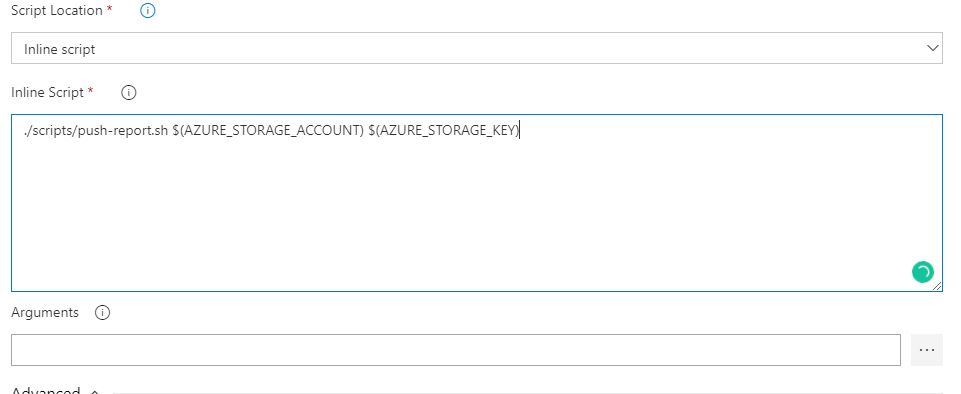
Passing through Arguments in Inline script

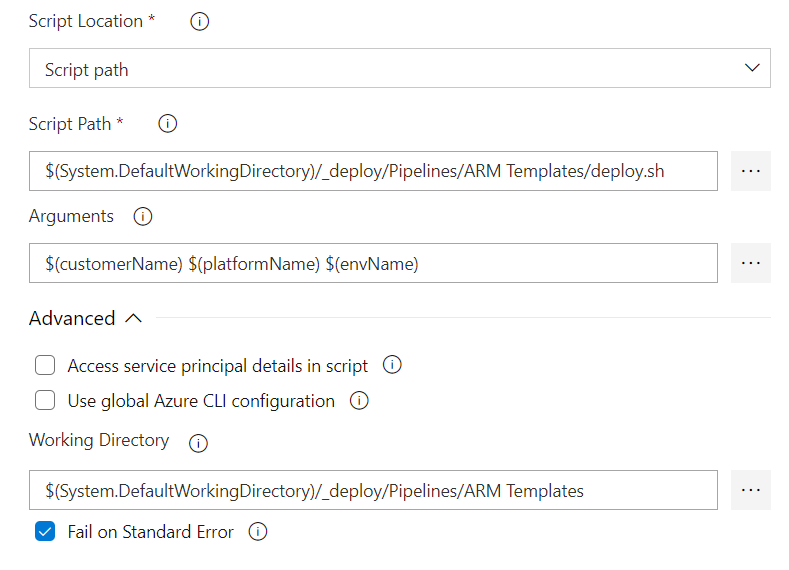
Using Script Path

Let me know if this solves your problem. If you're having more trouble, could you post the release logs for the failure case (with system.debug mode set to True)? And if possible, do share a screenshot of your task as well.
Thanks!
issacnitin
on 21 Mar 2019
@mydiemho - I assume your issue is resolved using @issacnitin's suggestions above. If you still face the issue, feel free to reopen the issue or open a new one.
 amaljg
on 4 Apr 2019
amaljg
on 4 Apr 2019
@issacnitin
Using Script Path does not work, any suggestion?
 sagarkul
on 15 Jul 2019
sagarkul
on 15 Jul 2019
@sagarkul can you provide additional details on the error that you got and how were you accessing variables in the script? Consider opening a new issue if you are not able to resolve with the comments from this thread.
 sachinma
on 15 Jul 2019
sachinma
on 15 Jul 2019
@sagarkul can you provide additional details on the error that you got and how were you accessing variables in the script? Consider opening a new issue if you are not able to resolve with the comments from this thread.
Below is code snippit from deploy.sh
#!/bin/bash

resourceGroupName=$(customerName)-$(platformName)-RG-$(envName)

echo $resourceGroupName
and below is my task screenshot
sagarkul
on 16 Jul 2019
@sagarkul can you provide additional details on the error that you got and how were you accessing variables in the script? Consider opening a new issue if you are not able to resolve with the comments from this thread.
Below is code snippit from deploy.sh
#!/bin/bash

resourceGroupName=$(customerName)-$(platformName)-RG-$(envName)

echo $resourceGroupName
and below is my task screenshot
Do I need to use $1 $2 ... to get values?
I don't want that, as arguments can grow to 15-18. and don't want to rely on sequence number
sagarkul
on 16 Jul 2019
The arguments that you have in "Arguments" parameter will be accessible to the shell script as normal shell variables like $1 $2 . You should access them like that.
sachinma
on 17 Jul 2019
Can we have an if condition in inline script to be able to run az network command only if the environment is dev etc?
 UmairSyed
on 1 Oct 2019
UmairSyed
on 1 Oct 2019
Related issues
 richard-ob
·
3Comments
richard-ob
·
3Comments
 divyesh-parikh
·
3Comments
divyesh-parikh
·
3Comments
 TheRealEdwardCullen
·
3Comments
TheRealEdwardCullen
·
3Comments
 MikahB
·
3Comments
MikahB
·
3Comments
 gregpakes
·
3Comments
gregpakes
·
3Comments
Most helpful comment
@mydiemho
From my understanding, you're referring to $1 in your script.
If that's the case then you need to explicitly pass an argument to your script if "Inline" mode is used. You can do that by:
OR
So your script would look like:
Alternately, you can use "Script Path" mode and avoid passing argument explicitly.
Please refer to the images below, these are the working versions of the task:
Passing directly in Inline script

Passing through Arguments in Inline script

Using Script Path

Let me know if this solves your problem. If you're having more trouble, could you post the release logs for the failure case (with system.debug mode set to True)? And if possible, do share a screenshot of your task as well.
Thanks!