Azure-pipelines-tasks: Publish Code Coverage Results task is not copying HTML files to report artifact
Issue
We have a build pipeline to do front end build. It's been setup according to MS documentation.
Using jest to run tests and generate code coverage results. Tests are run, code coverage numbers are calculated and shown correctly in the build summary.
However "Code coverage" tab showing the following:
Code coverage summary was found, but no artifacts were present to fetch the summary file.
Publish code coverage results task configuration:

Build summary

Code coverage results artifact content.
Note that no html files are present

Publish code coverage task log
Note the folder it's copying to the artifact: /tmp/...

Environment
Azure pipelines
Hosted Ubuntu 1604
Jest config:
"jest": {
    "coverageReporters": [
      "cobertura",
      "html"
    ]
  },
  "jest-junit": {
    "suiteName": "jest tests",
    "output": "test/junit.xml",
    "classNameTemplate": "{classname} - {title}",
    "titleTemplate": "{classname} - {title}",
    "ancestorSeparator": " > ",
    "usePathForSuiteName": "true"
  }
jest version: "^6.0.1"
 gwintca
All 14 comments
I confirm that I have the same problem, started with task version 1.145.0, version 1.139.2 was working without any problem.
Self-Hosted Agent on Windows 10.
Previous version 1.139.2 (working):
2019-01-25T13:39:52.5343982Z ##[section]Starting: Publish code coverage from $(Build.Repository.LocalPath)\coverage\cobertura-coverage.xml
2019-01-25T13:39:52.5347215Z ==============================================================================
2019-01-25T13:39:52.5347257Z Task         : Publish Code Coverage Results
2019-01-25T13:39:52.5347283Z Description  : Publish Cobertura or JaCoCo code coverage results from a build
2019-01-25T13:39:52.5347302Z Version      : 1.139.2
2019-01-25T13:39:52.5347321Z Author       : Microsoft Corporation
2019-01-25T13:39:52.5347340Z Help         : [More Information](https://go.microsoft.com/fwlink/?LinkID=626485)
2019-01-25T13:39:52.5347366Z ==============================================================================
2019-01-25T13:39:52.9938907Z Reading code coverage summary from 'C:\Agents\_work\5\s\coverage\cobertura-coverage.xml'
2019-01-25T13:39:53.0541245Z ##[section]Async Command Start: Publish code coverage
2019-01-25T13:39:53.0541297Z Publishing coverage summary data to TFS server.
2019-01-25T13:39:53.0541335Z  Lines- 2315 of 2315 covered.
2019-01-25T13:39:53.0541358Z  Branches- 445 of 445 covered.
2019-01-25T13:39:53.5622258Z Modifying Cobertura Index file
2019-01-25T13:39:53.5622367Z Publishing code coverage files to TFS server.
2019-01-25T13:39:53.5622450Z Uploading 675 files
2019-01-25T13:39:58.6050658Z Total file: 675 ---- Processed file: 39 (5%)
2019-01-25T13:40:08.7111743Z Total file: 675 ---- Processed file: 134 (19%)
2019-01-25T13:40:18.8210332Z Total file: 675 ---- Processed file: 243 (36%)
2019-01-25T13:40:28.3981303Z Total file: 675 ---- Processed file: 356 (52%)
2019-01-25T13:40:38.4639782Z Total file: 675 ---- Processed file: 455 (67%)
2019-01-25T13:40:48.5715127Z Total file: 675 ---- Processed file: 557 (82%)
2019-01-25T13:40:58.6651692Z Total file: 675 ---- Processed file: 664 (98%)
2019-01-25T13:40:59.6947981Z File upload succeed.
2019-01-25T13:40:59.6988600Z Published 'C:\Agents\_work\5\s\coverage\' as artifact 'Code Coverage Report_1856'
2019-01-25T13:40:59.6988719Z ##[section]Async Command End: Publish code coverage
2019-01-25T13:40:59.6989354Z ##[section]Finishing: Publish code coverage from $(Build.Repository.LocalPath)\coverage\cobertura-coverage.xml
After update to 1.145.0 (broken):
2019-01-29T12:55:58.9068598Z ##[section]Starting: Publish code coverage from $(Build.Repository.LocalPath)\coverage\cobertura-coverage.xml
2019-01-29T12:55:58.9194750Z ==============================================================================
2019-01-29T12:55:58.9194801Z Task         : Publish Code Coverage Results
2019-01-29T12:55:58.9194824Z Description  : Publish Cobertura or JaCoCo code coverage results from a build
2019-01-29T12:55:58.9194936Z Version      : 1.145.0
2019-01-29T12:55:58.9194958Z Author       : Microsoft Corporation
2019-01-29T12:55:58.9194978Z Help         : [More Information](https://go.microsoft.com/fwlink/?LinkID=626485)
2019-01-29T12:55:58.9195000Z ==============================================================================
2019-01-29T12:55:59.4452331Z Reading code coverage summary from 'C:\agent\_work\1\s\coverage\cobertura-coverage.xml'
2019-01-29T12:55:59.5020793Z ##[section]Async Command Start: Publish code coverage
2019-01-29T12:55:59.5020844Z Publishing coverage summary data to TFS server.
2019-01-29T12:55:59.5020886Z  Lines- 2377 of 2377 covered.
2019-01-29T12:55:59.5020905Z  Branches- 455 of 455 covered.
2019-01-29T12:56:00.0138970Z Modifying Cobertura Index file
2019-01-29T12:56:00.0139072Z Publishing code coverage files to TFS server.
2019-01-29T12:56:00.0139098Z Uploading 1 files
2019-01-29T12:56:00.0139146Z File upload succeed.
2019-01-29T12:56:00.0490991Z Published 'C:\Windows\ServiceProfiles\NetworkService\AppData\Local\Temp\Code Coverage Report_1920' as artifact 'Code Coverage Report_1920'
2019-01-29T12:56:00.0491081Z ##[section]Async Command End: Publish code coverage
2019-01-29T12:56:00.0491671Z ##[section]Finishing: Publish code coverage from $(Build.Repository.LocalPath)\coverage\cobertura-coverage.xml
I guess the bug is somewhere here:
https://github.com/Microsoft/azure-pipelines-tasks/commit/7807be3c01741a46db528a35f719a66789b832fe#diff-86f4fdb10b6b13b6044acb24822352b1
 petrce
on 29 Jan 2019
petrce
on 29 Jan 2019
Hi @joshmgross, can you please check if you did not break it? I do not see it in your commit, but it was only change that happened in 1.145.0 right?
petrce
on 29 Jan 2019
ok, I found a workaround, the version "1.145.0" does not allow backslash at the end of the path for the Report directory :(
this is ok: $(System.DefaultWorkingDirectory)\artifacts***$(Configuration)\testresults\coverage
this do not work, silently continues, and do not throw any error: $(System.DefaultWorkingDirectory)\artifacts***$(Configuration)\testresults\coverage\
petrce
on 29 Jan 2019
Confirming above workaround works. Thanks!
gwintca
on 29 Jan 2019
@petrce, @gwintca, I can confirm this is a bug.
@gwintca thanks for the workaround.
 karanjitsingh
on 30 Jan 2019
karanjitsingh
on 30 Jan 2019
Hey @gwintca, thanks for reporting this issue!
@petrce, thanks for narrowing down the issue.
This is indeed a regression introduced in #8913.
The function we use to resolve wildcards (and as of #8913, relative paths as well), did not support having a trailing slash for the pattern matching.
I have a PR to fix this issue is here: #9535 and I will be porting that fix to a release branch so that we can update the task for all users as soon as possible.
You should see an updated task (with Version 148) sometime next week.
 joshmgross
on 8 Feb 2019
joshmgross
on 8 Feb 2019
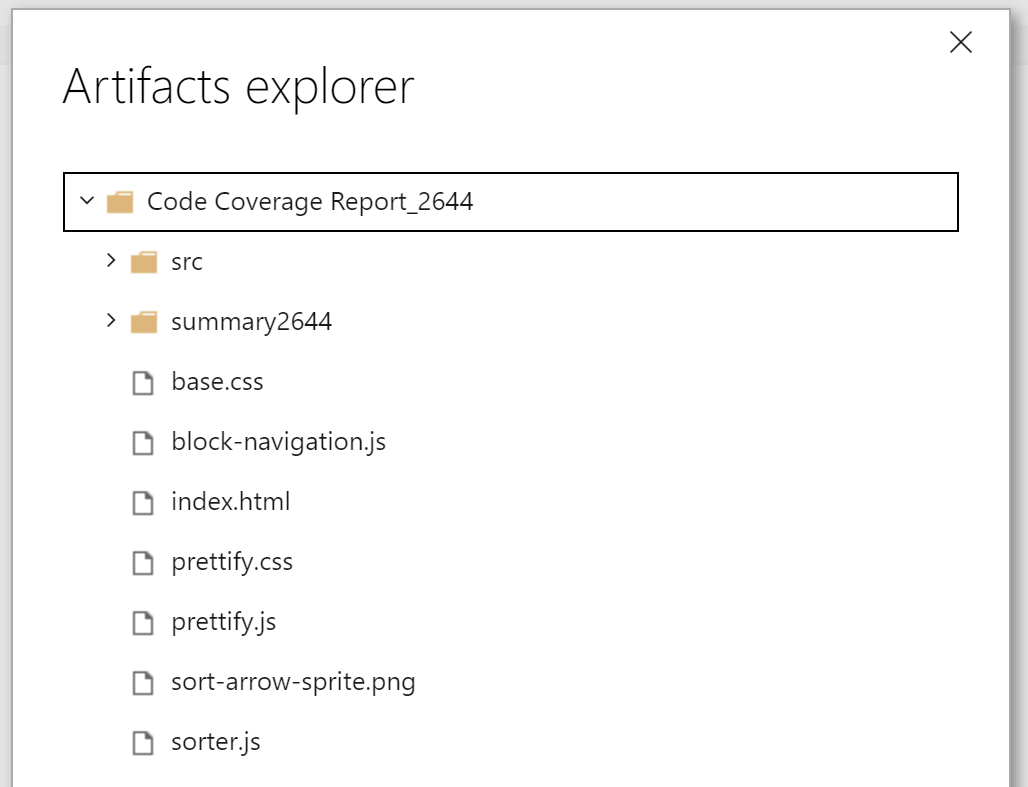
I'm seeing a variation of this issue, where the artifact is ok (not using a trailing backslash) - but I see no rendering of results...
Pipeline: Jest with junit, cobertura and html reporters.
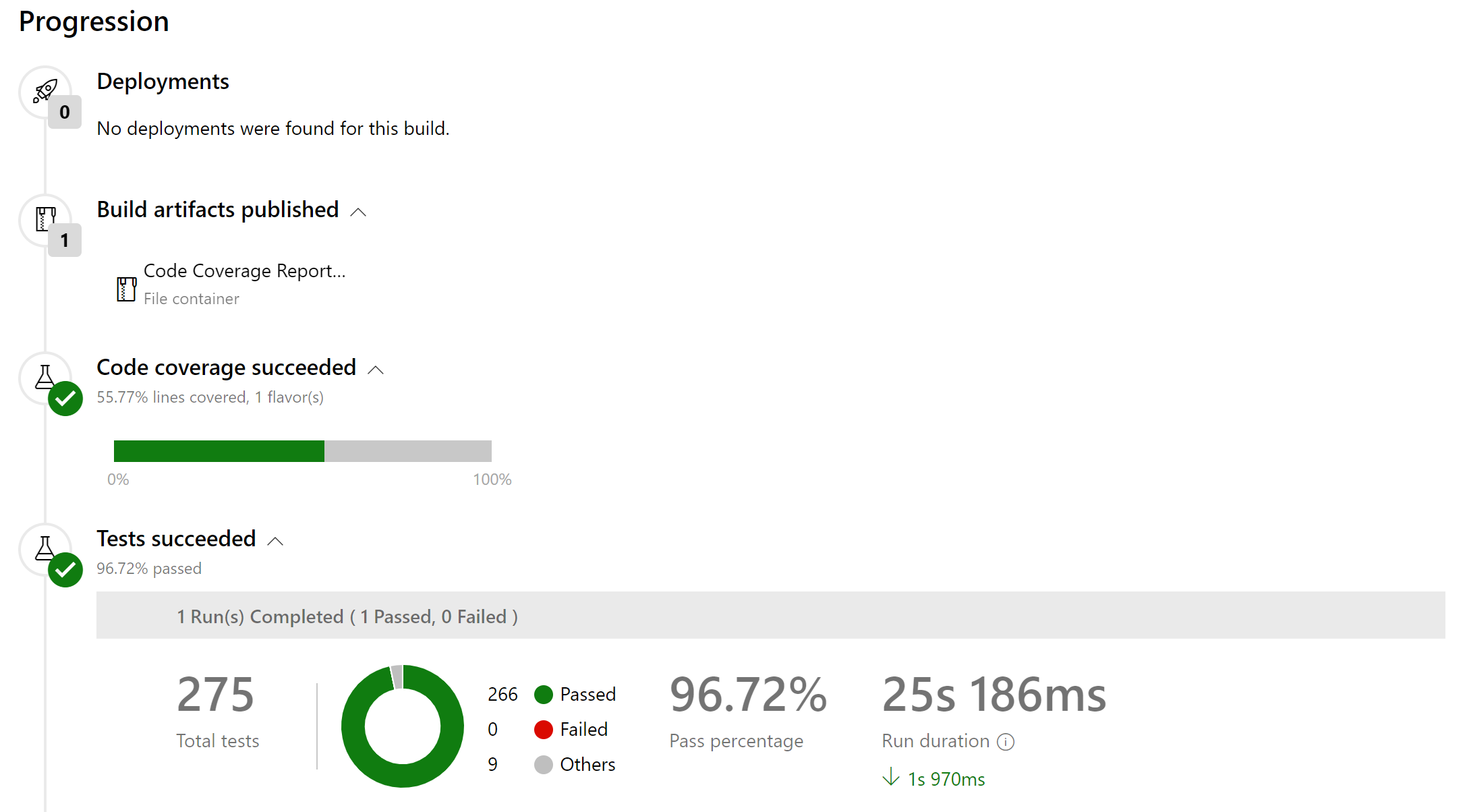
Summary view
The artifact:
Code Coverage Tab:
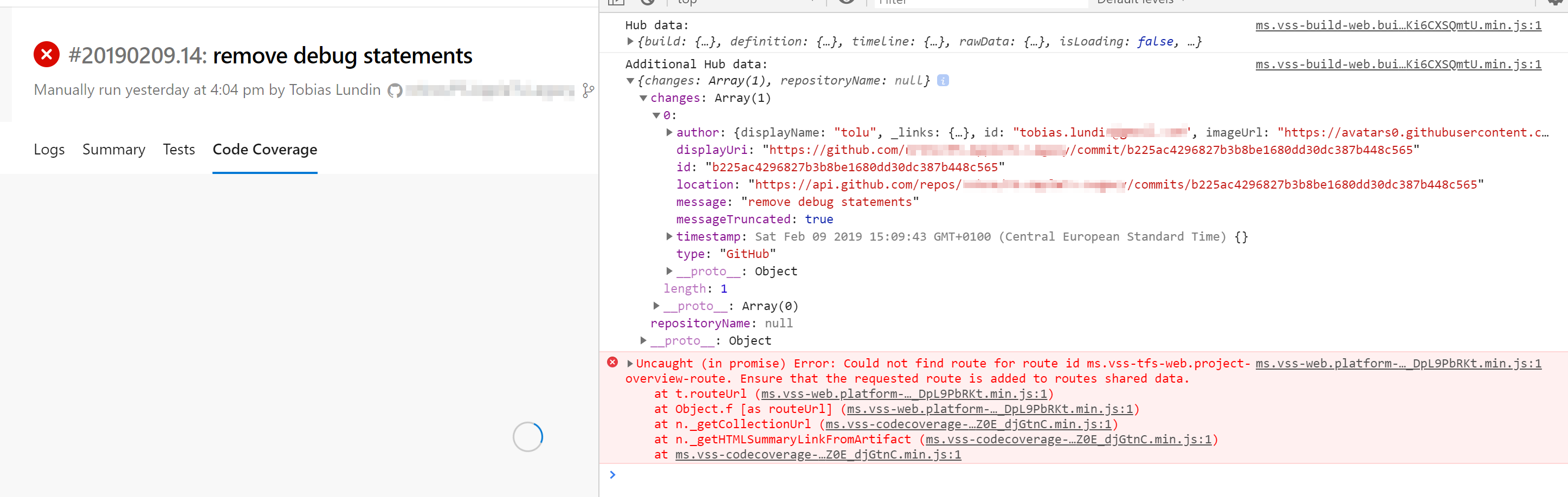
Related issue?
Just say the word and I'll create a separate issue!
 tolu
on 10 Feb 2019
tolu
on 10 Feb 2019
ℹ️ I get the same issue when trying the sample code (unchanged):
https://github.com/MicrosoftDocs/pipelines-javascript
tolu
on 10 Feb 2019
@tolu, the fix for the spinner issue has been made and is pending release.
karanjitsingh
on 13 Feb 2019
We are rolling out this fix and please check for Azure DevOps Release notes for more information on fixes/roll out plans.
 nigurr
on 13 Feb 2019
nigurr
on 13 Feb 2019
Hi guys unfortunately Im experiencing this kind of bug mentioned above, its just works fine from 1.148.0 and suddenly got this problem on 1.150.3. I already tried petrce workaround but no luck on that.
 EricAlvarez292
on 23 Apr 2019
EricAlvarez292
on 23 Apr 2019
@EricAlvarez292, thanks for reporting this, since this thread has a lot of context and has already been closed, can you go ahead and create a new issue with logs. This will help you gain traction for your issue, you can tag me in the issue as well.
karanjitsingh
on 23 Apr 2019
Hi @karanjitsingh, I believe the issue has been closed incorrectly.
I'm also facing the issue in the version 1.150.3.
 guillermomartinez-accenture
on 23 Apr 2019
guillermomartinez-accenture
on 23 Apr 2019
@guillermomartinez-accenture, the thread was closed after we confirmed the fix.
It's possible due to some changes happened in sprints after, this could've regressed. Having a new issue and fresh logs would definitely help.
karanjitsingh
on 23 Apr 2019
Related issues
 ThomasBarnekow
·
3Comments
ThomasBarnekow
·
3Comments
 HenrikStanley
·
3Comments
HenrikStanley
·
3Comments
 pharring
·
3Comments
pharring
·
3Comments
 alexszilagyi
·
3Comments
alexszilagyi
·
3Comments
 MikahB
·
3Comments
MikahB
·
3Comments