Azure-pipelines-tasks: Maven task fails and does not detect Azure Functions Core Tools
Environment
Azure Pipelines
Organization: cloudcaseorg
project name : redocode
build definition name/build number: 20190105.11
- Agent - Hosted or Private:
Private agent : WS 2016, Agent version 2.144.0
Issue Description
I'm trying to build a maven + java + Azure Function project
My error comes with a maven task (Maven DCD/build/DCDFunction/pom.xml).
The task always fails in Step 7.
If i run maven on the same machine (the agent machine), the Step 7 works perfectly and the task completes.
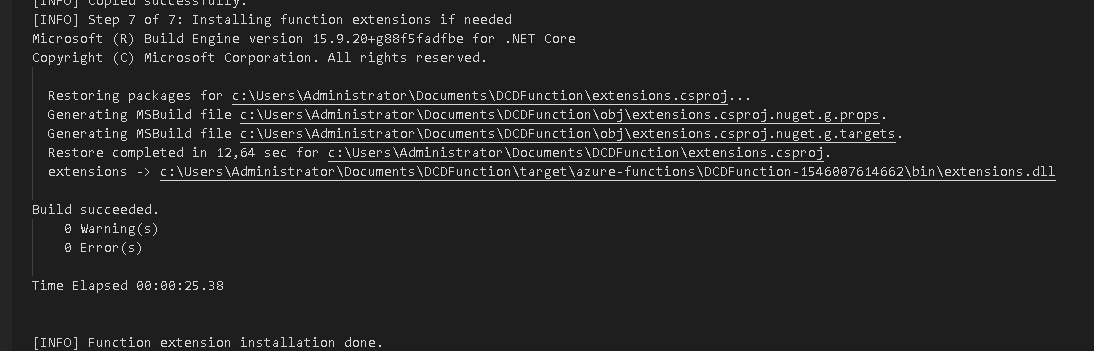
When the task is executed via Azure Pipelines, it fails (See logs below)
Task logs
Error logs
Step 7 of 7: Installing function extensions if needed
2019-01-05T19:28:08.3766381Z [WARNING] Failed to get Azure Functions Core Tools version locally
2019-01-05T19:28:10.8309162Z [INFO] ------------------------------------------------------------------------
2019-01-05T19:28:10.8309633Z [INFO] BUILD FAILURE
2019-01-05T19:28:10.8310036Z [INFO] ------------------------------------------------------------------------
2019-01-05T19:28:10.8310795Z [INFO] Total time: 48.021 s
2019-01-05T19:28:10.8311542Z [INFO] Finished at: 2019-01-05T20:28:10+01:00
2019-01-05T19:28:10.8312199Z [INFO] ------------------------------------------------------------------------
2019-01-05T19:28:10.8322940Z [ERROR] Failed to execute goal com.microsoft.azure:azure-functions-maven-plugin:1.2.1:package (package-functions) on project DCDFunction: Local Azure Functions Core Tools does not exist or is too old to support function extension installation, skip package phase. To install or update it, see: https://aka.ms/azfunc-install -> [Help 1]
2019-01-05T19:28:10.8323455Z [ERROR]
 SamirFarhat
All 14 comments
Hey @SamirFarhat, could you rerun both builds with full debug logging and attach those logs?
 joshmgross
on 7 Jan 2019
joshmgross
on 7 Jan 2019
Hi,
Thanks for the reply.
What do you mean full debug for both ? How can i do this. ?
Thanks
SamirFarhat
on 8 Jan 2019
This is the Azure Pipelines full debug
log_11_135.zip
SamirFarhat
on 8 Jan 2019
@SamirFarhat , could you run Maven with the -e flag so that we can get the stack trace of the error?
joshmgross
on 8 Jan 2019
Thanks, with the -e -X options, i get this:
---- The Agent Machine ----
[INFO] Step 7 of 7: Installing function extensions if needed
[DEBUG] Executing command: func --version
[DEBUG] Executing command: npm view azure-functions-core-tools dist-tags.core
[DEBUG] Executing command: func extensions install -c "C:\Users\Administrator\Documents\DCDFunction"
Microsoft (R) Build Engine version 15.9.20+g88f5fadfbe for .NET Core
Copyright (C) Microsoft Corporation. All rights reserved.
Restoring packages for C:\Users\Administrator\Documents\DCDFunction\extensions.csproj...
Generating MSBuild file C:\Users\Administrator\Documents\DCDFunction\obj\extensions.csproj.nuget.g.props.
Generating MSBuild file C:\Users\Administrator\Documents\DCDFunction\obj\extensions.csproj.nuget.g.targets.
Restore completed in 1,14 sec for C:\Users\Administrator\Documents\DCDFunction\extensions.csproj.
extensions -> C:\Users\Administrator\Documents\DCDFunction\target\azure-functions\DCDFunction-1546007614662\bin\extensions.dll
Build succeeded.
0 Warning(s)
0 Error(s)
Time Elapsed 00:00:04.12
---- Azure Pipeline -----
`[INFO] Step 7 of 7: Installing function extensions if needed
2019-01-08T16:32:13.2968794Z [DEBUG] Executing command: func --version
2019-01-08T16:32:13.4081841Z [WARNING] Failed to get Azure Functions Core Tools version locally
2019-01-08T16:32:13.4082244Z [DEBUG] Executing command: npm view azure-functions-core-tools dist-tags.core
2019-01-08T16:32:15.9226721Z [INFO] ------------------------------------------------------------------------
2019-01-08T16:32:15.9232710Z [INFO] BUILD FAILURE
2019-01-08T16:32:15.9238232Z [INFO] ------------------------------------------------------------------------
2019-01-08T16:32:15.9239468Z [INFO] Total time: 14.103 s
2019-01-08T16:32:15.9240591Z [INFO] Finished at: 2019-01-08T17:32:15+01:00
2019-01-08T16:32:15.9252033Z [INFO] ------------------------------------------------------------------------
2019-01-08T16:32:15.9307842Z [ERROR] Failed to execute goal com.microsoft.azure:azure-functions-maven-plugin:1.2.0:package (package-functions) on project DCDFunction: Local Azure Functions Core Tools does not exist or is too old to support function extension installation, skip package phase. To install or update it, see: https://aka.ms/azfunc-install -> [Help 1]
2019-01-08T16:32:15.9317510Z org.apache.maven.lifecycle.LifecycleExecutionException: Failed to execute goal com.microsoft.azure:azure-functions-maven-plugin:1.2.0:package (package-functions) on project DCDFunction: Local Azure Functions Core Tools does not exist or is too old to support function extension installation, skip package phase. To install or update it, see: https://aka.ms/azfunc-install
2019-01-08T16:32:15.9326130Z at org.apache.maven.lifecycle.internal.MojoExecutor.execute (MojoExecutor.java:215)
2019-01-08T16:32:15.9336912Z at org.apache.maven.lifecycle.internal.MojoExecutor.execute (MojoExecutor.java:156)
2019-01-08T16:32:15.9337614Z at org.apache.maven.lifecycle.internal.MojoExecutor.execute (MojoExecutor.java:148)
2019-01-08T16:32:15.9338135Z at org.apache.maven.lifecycle.internal.LifecycleModuleBuilder.buildProject (LifecycleModuleBuilder.java:117)
2019-01-08T16:32:15.9338779Z at org.apache.maven.lifecycle.internal.LifecycleModuleBuilder.buildProject (LifecycleModuleBuilder.java:81)
2019-01-08T16:32:15.9339281Z at org.apache.maven.lifecycle.internal.builder.singlethreaded.SingleThreadedBuilder.build (SingleThreadedBuilder.java:56)
2019-01-08T16:32:15.9339757Z at org.apache.maven.lifecycle.internal.LifecycleStarter.execute (LifecycleStarter.java:128)
2019-01-08T16:32:15.9456592Z at org.apache.maven.DefaultMaven.doExecute (DefaultMaven.java:305)
2019-01-08T16:32:15.9483025Z at org.apache.maven.DefaultMaven.doExecute (DefaultMaven.java:192)
2019-01-08T16:32:15.9496246Z at org.apache.maven.DefaultMaven.execute (DefaultMaven.java:105)
2019-01-08T16:32:15.9502082Z at org.apache.maven.cli.MavenCli.execute (MavenCli.java:956)
2019-01-08T16:32:15.9509236Z at org.apache.maven.cli.MavenCli.doMain (MavenCli.java:288)
2019-01-08T16:32:15.9510595Z at org.apache.maven.cli.MavenCli.main (MavenCli.java:192)
2019-01-08T16:32:15.9511723Z at sun.reflect.NativeMethodAccessorImpl.invoke0 (Native Method)
2019-01-08T16:32:15.9516727Z at sun.reflect.NativeMethodAccessorImpl.invoke (NativeMethodAccessorImpl.java:62)
2019-01-08T16:32:15.9520647Z at sun.reflect.DelegatingMethodAccessorImpl.invoke (DelegatingMethodAccessorImpl.java:43)
2019-01-08T16:32:15.9530897Z at java.lang.reflect.Method.invoke (Method.java:498)
2019-01-08T16:32:15.9537050Z at org.codehaus.plexus.classworlds.launcher.Launcher.launchEnhanced (Launcher.java:289)
2019-01-08T16:32:15.9546724Z at org.codehaus.plexus.classworlds.launcher.Launcher.launch (Launcher.java:229)
2019-01-08T16:32:15.9552878Z at org.codehaus.plexus.classworlds.launcher.Launcher.mainWithExitCode (Launcher.java:415)
2019-01-08T16:32:15.9560736Z at org.codehaus.plexus.classworlds.launcher.Launcher.main (Launcher.java:356)
2019-01-08T16:32:15.9589665Z Caused by: org.apache.maven.plugin.MojoExecutionException: Local Azure Functions Core Tools does not exist or is too old to support function extension installation, skip package phase. To install or update it, see: https://aka.ms/azfunc-install
2019-01-08T16:32:15.9590309Z at com.microsoft.azure.maven.AbstractAzureMojo.handleException (AbstractAzureMojo.java:367)
2019-01-08T16:32:15.9590851Z at com.microsoft.azure.maven.AbstractAzureMojo.execute (AbstractAzureMojo.java:313)
2019-01-08T16:32:15.9591321Z at com.microsoft.azure.maven.function.AbstractFunctionMojo.execute (AbstractFunctionMojo.java:103)
2019-01-08T16:32:15.9591772Z at org.apache.maven.plugin.DefaultBuildPluginManager.executeMojo (DefaultBuildPluginManager.java:137)
2019-01-08T16:32:15.9592278Z at org.apache.maven.lifecycle.internal.MojoExecutor.execute (MojoExecutor.java:210)
2019-01-08T16:32:15.9594323Z at org.apache.maven.lifecycle.internal.MojoExecutor.execute (MojoExecutor.java:156)
2019-01-08T16:32:15.9595322Z at org.apache.maven.lifecycle.internal.MojoExecutor.execute (MojoExecutor.java:148)
2019-01-08T16:32:15.9595871Z at org.apache.maven.lifecycle.internal.LifecycleModuleBuilder.buildProject (LifecycleModuleBuilder.java:117)
2019-01-08T16:32:15.9602786Z at org.apache.maven.lifecycle.internal.LifecycleModuleBuilder.buildProject (LifecycleModuleBuilder.java:81)
2019-01-08T16:32:15.9612486Z at org.apache.maven.lifecycle.internal.builder.singlethreaded.SingleThreadedBuilder.build (SingleThreadedBuilder.java:56)
2019-01-08T16:32:15.9622143Z at org.apache.maven.lifecycle.internal.LifecycleStarter.execute (LifecycleStarter.java:128)
2019-01-08T16:32:15.9630782Z at org.apache.maven.DefaultMaven.doExecute (DefaultMaven.java:305)
2019-01-08T16:32:15.9640329Z at org.apache.maven.DefaultMaven.doExecute (DefaultMaven.java:192)
2019-01-08T16:32:15.9649456Z at org.apache.maven.DefaultMaven.execute (DefaultMaven.java:105)
2019-01-08T16:32:15.9658539Z at org.apache.maven.cli.MavenCli.execute (MavenCli.java:956)
2019-01-08T16:32:15.9661916Z at org.apache.maven.cli.MavenCli.doMain (MavenCli.java:288)
2019-01-08T16:32:15.9669859Z at org.apache.maven.cli.MavenCli.main (MavenCli.java:192)
2019-01-08T16:32:15.9711369Z at sun.reflect.NativeMethodAccessorImpl.invoke0 (Native Method)
2019-01-08T16:32:15.9716086Z at sun.reflect.NativeMethodAccessorImpl.invoke (NativeMethodAccessorImpl.java:62)
2019-01-08T16:32:15.9716595Z at sun.reflect.DelegatingMethodAccessorImpl.invoke (DelegatingMethodAccessorImpl.java:43)
2019-01-08T16:32:15.9718489Z at java.lang.reflect.Method.invoke (Method.java:498)
2019-01-08T16:32:15.9721006Z at org.codehaus.plexus.classworlds.launcher.Launcher.launchEnhanced (Launcher.java:289)
2019-01-08T16:32:15.9721350Z at org.codehaus.plexus.classworlds.launcher.Launcher.launch (Launcher.java:229)
2019-01-08T16:32:15.9721583Z at org.codehaus.plexus.classworlds.launcher.Launcher.mainWithExitCode (Launcher.java:415)
2019-01-08T16:32:15.9721810Z at org.codehaus.plexus.classworlds.launcher.Launcher.main (Launcher.java:356)
2019-01-08T16:32:15.9722074Z Caused by: java.lang.Exception: Local Azure Functions Core Tools does not exist or is too old to support function extension installation, skip package phase. To install or update it, see: https://aka.ms/azfunc-install
2019-01-08T16:32:15.9722384Z at com.microsoft.azure.maven.function.handlers.FunctionCoreToolsHandlerImpl.assureRequirementAddressed (FunctionCoreToolsHandlerImpl.java:58)
2019-01-08T16:32:15.9722658Z at com.microsoft.azure.maven.function.handlers.FunctionCoreToolsHandlerImpl.installExtension (FunctionCoreToolsHandlerImpl.java:39)
2019-01-08T16:32:15.9722887Z at com.microsoft.azure.maven.function.PackageMojo.installExtension (PackageMojo.java:289)
2019-01-08T16:32:15.9973714Z at com.microsoft.azure.maven.function.PackageMojo.doExecute (PackageMojo.java:95)
2019-01-08T16:32:15.9974122Z at com.microsoft.azure.maven.AbstractAzureMojo.execute (AbstractAzureMojo.java:308)
2019-01-08T16:32:15.9974345Z at com.microsoft.azure.maven.function.AbstractFunctionMojo.execute (AbstractFunctionMojo.java:103)
2019-01-08T16:32:15.9974584Z at org.apache.maven.plugin.DefaultBuildPluginManager.executeMojo (DefaultBuildPluginManager.java:137)
2019-01-08T16:32:15.9974793Z at org.apache.maven.lifecycle.internal.MojoExecutor.execute (MojoExecutor.java:210)
2019-01-08T16:32:15.9975021Z at org.apache.maven.lifecycle.internal.MojoExecutor.execute (MojoExecutor.java:156)
2019-01-08T16:32:15.9975560Z at org.apache.maven.lifecycle.internal.MojoExecutor.execute (MojoExecutor.java:148)
2019-01-08T16:32:15.9975831Z at org.apache.maven.lifecycle.internal.LifecycleModuleBuilder.buildProject (LifecycleModuleBuilder.java:117)
2019-01-08T16:32:15.9976081Z at org.apache.maven.lifecycle.internal.LifecycleModuleBuilder.buildProject (LifecycleModuleBuilder.java:81)
2019-01-08T16:32:15.9976834Z at org.apache.maven.lifecycle.internal.builder.singlethreaded.SingleThreadedBuilder.build (SingleThreadedBuilder.java:56)
2019-01-08T16:32:15.9977149Z at org.apache.maven.lifecycle.internal.LifecycleStarter.execute (LifecycleStarter.java:128)
2019-01-08T16:32:15.9977520Z at org.apache.maven.DefaultMaven.doExecute (DefaultMaven.java:305)
2019-01-08T16:32:15.9977720Z at org.apache.maven.DefaultMaven.doExecute (DefaultMaven.java:192)
2019-01-08T16:32:15.9977929Z at org.apache.maven.DefaultMaven.execute (DefaultMaven.java:105)
2019-01-08T16:32:15.9978111Z at org.apache.maven.cli.MavenCli.execute (MavenCli.java:956)
2019-01-08T16:32:15.9978309Z at org.apache.maven.cli.MavenCli.doMain (MavenCli.java:288)
2019-01-08T16:32:15.9978489Z at org.apache.maven.cli.MavenCli.main (MavenCli.java:192)
2019-01-08T16:32:15.9979001Z at sun.reflect.NativeMethodAccessorImpl.invoke0 (Native Method)
2019-01-08T16:32:15.9979229Z at sun.reflect.NativeMethodAccessorImpl.invoke (NativeMethodAccessorImpl.java:62)
2019-01-08T16:32:15.9979461Z at sun.reflect.DelegatingMethodAccessorImpl.invoke (DelegatingMethodAccessorImpl.java:43)
2019-01-08T16:32:15.9979647Z at java.lang.reflect.Method.invoke (Method.java:498)
2019-01-08T16:32:15.9979871Z at org.codehaus.plexus.classworlds.launcher.Launcher.launchEnhanced (Launcher.java:289)
2019-01-08T16:32:15.9980074Z at org.codehaus.plexus.classworlds.launcher.Launcher.launch (Launcher.java:229)
2019-01-08T16:32:15.9980300Z at org.codehaus.plexus.classworlds.launcher.Launcher.mainWithExitCode (Launcher.java:415)
2019-01-08T16:32:15.9980580Z at org.codehaus.plexus.classworlds.launcher.Launcher.main (Launcher.java:356)
2019-01-08T16:32:15.9980978Z [ERROR]
2019-01-08T16:32:15.9981272Z [ERROR]
2019-01-08T16:32:15.9981700Z [ERROR] For more information about the errors and possible solutions, please read the following articles:
2019-01-08T16:32:15.9981988Z [ERROR] [Help 1] http://cwiki.apache.org/confluence/display/MAVEN/MojoExecutionException
2019-01-08T16:32:17.2139563Z ##[debug]rc:1
2019-01-08T16:32:17.2140730Z ##[debug]success:false
2019-01-08T16:32:17.2169982Z C:\Program Files\apache-maven-3.6.0\bin\mvn.cmd failed with return code: 1
2019-01-08T16:32:17.2172327Z Could not retrieve code analysis results - Maven run failed.
2019-01-08T16:32:17.2182741Z ##[debug]publishCodeCoverage userRunFailed=true
2019-01-08T16:32:17.2186732Z ##[debug]task result: Failed
2019-01-08T16:32:17.2298257Z ##[error]Build failed.
2019-01-08T16:32:17.2316868Z ##[debug]Processed: ##vso[task.issue type=error;]Build failed.
2019-01-08T16:32:17.2342267Z ##[debug]Processed: ##vso[task.complete result=Failed;]Build failed.
2019-01-08T16:32:17.2376101Z ##[section]Finishing: Maven DCD/build/DCDFunction/pom.xml
SamirFarhat
on 8 Jan 2019
I don't know what is going wrong. Looks like executing the commands or one of them is failing.
Executing command: func --version
2019-01-08T16:32:13.4081841Z [WARNING] Failed to get Azure Functions Core Tools version locally
2019-01-08T16:32:13.4082244Z [DEBUG] Executing command: npm view azure-functions-core-tools dist-tags.core
The following are the results when executing the commands on a CMD window:
func --version
2.3.199

npm view azure-functions-core-tools dist-tags.core
2.0.3
So i decided to create a Command Line task on the same build.
The goal is to test:
func --version
npm view azure-functions-core-tools dist-tags.core
And guess what, i got this:
'func' is not recognized as an internal or external command,

So looks like the 'func' command is no system wide or need to be defined on the system env variables. I'm digging in
SamirFarhat
on 8 Jan 2019
Finally i was able to fix it but this is tricky.
Prerequisites to build Azure Function with Maven
You need to install npm and then the Azure Function tools.
This is shown here, you have just to install a series of prerequisites : [https://docs.microsoft.com/en-us/azure/azure-functions/functions-run-local#install-the-azure-functions-core-tools]
What i have noticed in first place, that the way we install the Azure Function Core tools via npm is not global:
{code:java}
npm install -g azure-functions-core-tools
{code}
But if we follow the link within the same page ([https://www.npmjs.com/package/azure-functions-core-tools),] we can see that apprently the right command to use is
{code:java}
npm i -g azure-functions-core-tools --unsafe-perm true{code}
We can see the -g flag --> global
Executing the Azure Pipeline
When executing the Azure Pipeline Step, it fails. After enabling the debug (using maven -X -e), an error appeared
'func' is not recognized as an internal or external command
But when executing func on the command line within my agent machine, it works. So this is now clear that the 'func' is only available for the user i have used to install the core tools.
My Agent machine
I found that the 'func' is only available under my user path
"C:\Users\Administrator\AppData\Roaming\npm\node_modules\azure-functions-core-tools\bin"
and that under "C:\Program Files\nodejs\node_modules\npm\node_modules", there is a pelnty of modules but no "azure-functions-core-tools"
How i solved this
1- I copied the folder azure-functions-core-tools to C:\Program Files\nodejs\node_modules\npm\node_modules"
2- I added a new path to the system path, in order that 'fun' can be recognized

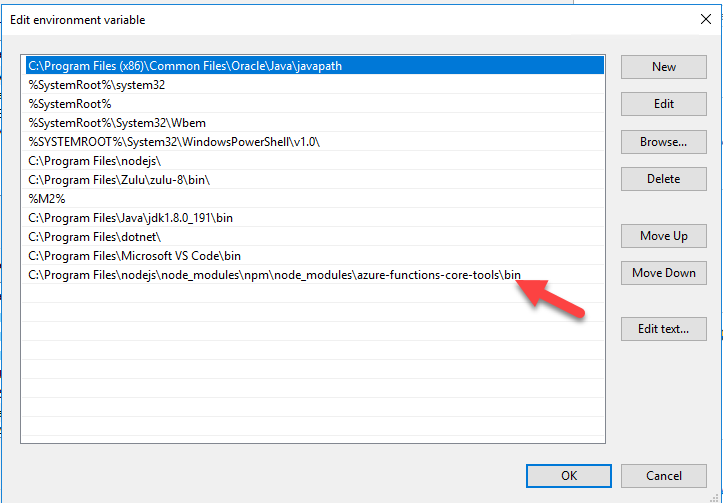
This is a temporary solution, we need to figure out why the azure-functions-core-tools module is not global.
SamirFarhat
on 8 Jan 2019
@SamirFarhat, can you clarify how you are installing azure-functions on your private agent? This sounds like an issue with your npm modules not being on the path, which might be caused by how you installed npm.
joshmgross
on 8 Jan 2019
Like mentioned here : https://docs.microsoft.com/en-us/azure/azure-functions/functions-run-local#install-the-azure-functions-core-tools
But in addition to that, i have done this :
npm i -g azure-functions-core-tools --unsafe-perm true
SamirFarhat
on 8 Jan 2019
I believe those are the same except for the --unsafe-perm true flag as i and install are equivalent.
To fix your issue, make sure your npm modules (specifically azure-functions-core-tools) are on your path and installed as global.
Since this is not an issue with the maven task and instead deals with a private agent I am closing it.
joshmgross
on 8 Jan 2019
Can the Private agent runs under a Service Account. If i install the module using this Service Account session, it can work
SamirFarhat
on 8 Jan 2019
@SamirFarhat Sorry I don't quite understand the issue.
If you need help setting up your private agent, this docs page:
https://docs.microsoft.com/en-us/azure/devops/pipelines/agents/agents?view=vsts
or this repository:
https://github.com/Microsoft/azure-pipelines-agent
may help.
joshmgross
on 8 Jan 2019
Thanks.
SamirFarhat
on 9 Jan 2019
Related issues
 MikahB
·
3Comments
MikahB
·
3Comments
 alexszilagyi
·
3Comments
alexszilagyi
·
3Comments
 yaananth
·
3Comments
yaananth
·
3Comments
 timfish
·
3Comments
timfish
·
3Comments
 Mardoxx
·
3Comments
Mardoxx
·
3Comments
Most helpful comment
Finally i was able to fix it but this is tricky.
Prerequisites to build Azure Function with Maven
You need to install npm and then the Azure Function tools.
This is shown here, you have just to install a series of prerequisites : [https://docs.microsoft.com/en-us/azure/azure-functions/functions-run-local#install-the-azure-functions-core-tools]
What i have noticed in first place, that the way we install the Azure Function Core tools via npm is not global:
{code:java}
npm install -g azure-functions-core-tools
{code}
But if we follow the link within the same page ([https://www.npmjs.com/package/azure-functions-core-tools),] we can see that apprently the right command to use is
{code:java}
npm i -g azure-functions-core-tools --unsafe-perm true{code}
We can see the -g flag --> global
Executing the Azure Pipeline
When executing the Azure Pipeline Step, it fails. After enabling the debug (using maven -X -e), an error appeared
'func' is not recognized as an internal or external command
But when executing func on the command line within my agent machine, it works. So this is now clear that the 'func' is only available for the user i have used to install the core tools.
My Agent machine
I found that the 'func' is only available under my user path
"C:\Users\Administrator\AppData\Roaming\npm\node_modules\azure-functions-core-tools\bin"
and that under "C:\Program Files\nodejs\node_modules\npm\node_modules", there is a pelnty of modules but no "azure-functions-core-tools"
How i solved this
1- I copied the folder azure-functions-core-tools to C:\Program Files\nodejs\node_modules\npm\node_modules"
2- I added a new path to the system path, in order that 'fun' can be recognized
This is a temporary solution, we need to figure out why the azure-functions-core-tools module is not global.