Azure-pipelines-tasks: Publish Pipeline Artifacts Preview - artifacts are not automatically downloaded in release
Environment
Azure Pipelines
Hosted Linux Preview
Issue Description
Build artifacts created via Publish Pipeline Artifacts (preview) are not downloaded in the release pipeline.
After I realized that this task wasn't working in my pipeline, I tried with Publish Build Artifact, which works fine.
To compare the two, I created a build definition using both the Publish Build Artifacts and Publish Pipeline Artifacts tasks, named publish_build_artifact and publish_pipeline_artifact. I added a task to create an out.txt file in $(Build.ArtifactStagingDirectory) as the only file in the artifact.
The build definition:
resources:
- repo: self
queue:
  name: Hosted Linux Preview
steps:
- script: 'echo "foo" > out.txt'
  workingDirectory: '$(Build.ArtifactStagingDirectory)'
  displayName: 'Add file to artifact staging directory'

- task: PublishPipelineArtifact@0
  displayName: 'Publish Pipeline Artifact'
  inputs:
    artifactName: 'publish_pipeline_artifact'
    targetPath: '$(Build.ArtifactStagingDirectory)'


- task: PublishBuildArtifacts@1
  displayName: 'Publish Artifact: publish_build_artifact'
  inputs:
    ArtifactName: 'publish_build_artifact'
_note; the PathToPublish property of PublishBuildArtifacts@1 is $(Build.ArtifactStagingDirectory), but does not show up in the yaml file._
Result:
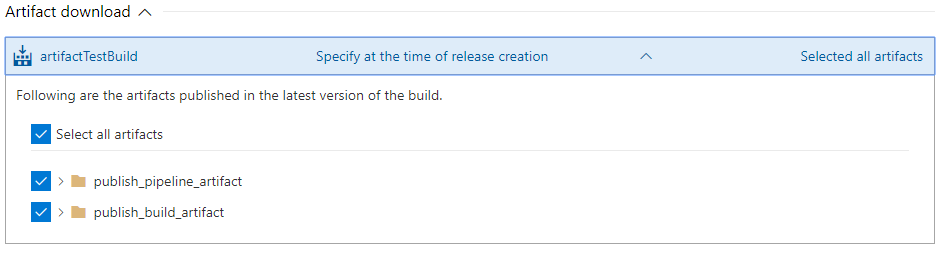
Only the publish_build_artifact is downloaded in the release pipeline, although all artifacts are selected in the stage.
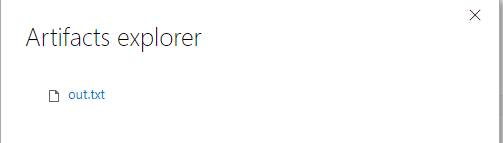
Both artifacts are generated in the build, however there is something curious about their structure. When I view the publish_build_artifact, it is shown as a directory containing the file:
Artifacts list on the build summary page
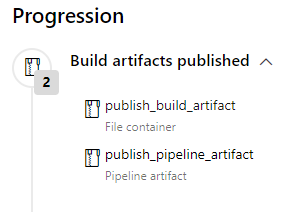
publish_build_artifact

publish_pipeline_artifact
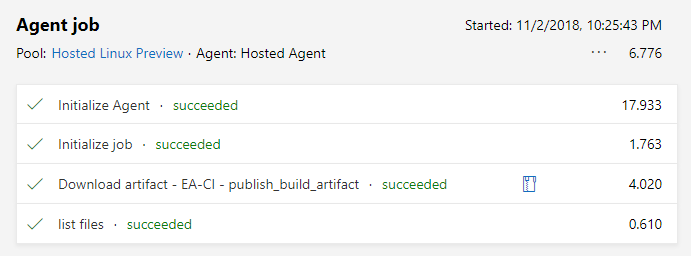
The release simply does a ls -R of working directory. The logs shows only the publlsh_build_artifact being downloaded:
Despite the fact that both artifacts are selected in the stage.
 drch-
drch-
All 9 comments
Found an alternative solution, which was to use the Publish Build Artifacts tasks.
Considering the documentation says that you should use the Publish Pipeline Artifacts tasks for Azure Pipelines, you would think the new task was just a rebranding of the old one.
Lost a lot of hours because a task appears to either be not working or is named poorly.
 davidwesst
on 26 Nov 2018
davidwesst
on 26 Nov 2018
still no fix
 tishion
on 21 Mar 2019
tishion
on 21 Mar 2019
We have enabled auto-download of pipeline artifacts in release. Can you check if it is working for you now? 'Publish Build Artifacts' is for older server based artifacts, 'Publish Pipeline Artifacts' is the one that should be used now.
 omeshp
on 22 Mar 2019
omeshp
on 22 Mar 2019
@omeshp I am pretty sure the 'Publish Build Artifacts' task downloaded the artifacts automatically for me,
but the 'Publish Pipeline Artifacts (preview)' doesn't work for me (have investigated this issue for days).
tishion
on 22 Mar 2019
Thanks @tishion, I enabled the flow couple of hours back so it should be working now. If it isn't working let me know. 'Publish Build Artifacts' should also work but we recommend using 'Publish Pipeline Artifacts'.
omeshp
on 22 Mar 2019
@omeshp I have just tried the Publish Pipeline Artifacts (on VS2017 host), yes, it works now. Thanks!
tishion
on 22 Mar 2019
@tishion Did you mean 'Publish Pipeline Artifacts' ?
omeshp
on 22 Mar 2019
Sorry for typo.
Fixed.
tishion
on 22 Mar 2019
@tishion Thanks for the confirmation.
omeshp
on 22 Mar 2019
Related issues
 richard-ob
·
3Comments
richard-ob
·
3Comments
 MikahB
·
3Comments
MikahB
·
3Comments
 MichaelWhiteCodingForFun
·
3Comments
MichaelWhiteCodingForFun
·
3Comments
 TheRealEdwardCullen
·
3Comments
TheRealEdwardCullen
·
3Comments
 ThomasBarnekow
·
3Comments
ThomasBarnekow
·
3Comments
Most helpful comment
Found an alternative solution, which was to use the Publish Build Artifacts tasks.
Considering the documentation says that you should use the Publish Pipeline Artifacts tasks for Azure Pipelines, you would think the new task was just a rebranding of the old one.
Lost a lot of hours because a task appears to either be not working or is named poorly.