Azure-pipelines-tasks: what are the PR build triggers and how to control those?
Environment
- Server - Azure Pipelines
This a documentation question:
I can't seem to find the protocol for PR build triggers beyond the initial PR submission event.
I'm well aware that once PR is submitted a new build is triggered. All is good and clear here.
Are there are other times when PR build is re-run? Can I trigger one manually if I need to?
Several scenarios to consider:
1) A developer pushes a change that breaks the build, a second later a contributor submits a PR whose status will now be indicated as failing, but not because there is anything wrong with the PR, but because the master branch it's tested against was broken in first place.
The master branch gets fixed and builds pass, the PR status remains broken. How and when will Azure pipelines will attempt to rebuild that PR if at all?
2) master is green, a PR is submitted and it's green too. Now a change is pushed that breaks PR, but the PR's status won't indicate that since its status is now outdated. It was green when it was submitted, but it should be red now.
How and when will Azure pipelines will attempt to rebuild that PR if at all?
3) What if I must force a re-check on a PR, regardless of it's current status.
Yesterday i was experimenting with trying to fix a PR status after breaking the master myself (scenario #1 above), so I thought deleting the failing PR build will re-trigger a new build, but it didn't. And now there is nothing I can do, the PR remains red. I indicated to the contributor that it was my fault and he doesn't need to be concerned about his PR.
Thank you.
 stas00
All 17 comments
Hey @stas00, to answer your questions:
Are there are other times when PR build is re-run? Can I trigger one manually if I need to?
PR Build's will be re-run when the PR is updated (like from a new commit to the PR). If you want to re-run a PR Build, you can click on the build to go to Azure Devops and there under the "..." is an option to rebuild.
See here:
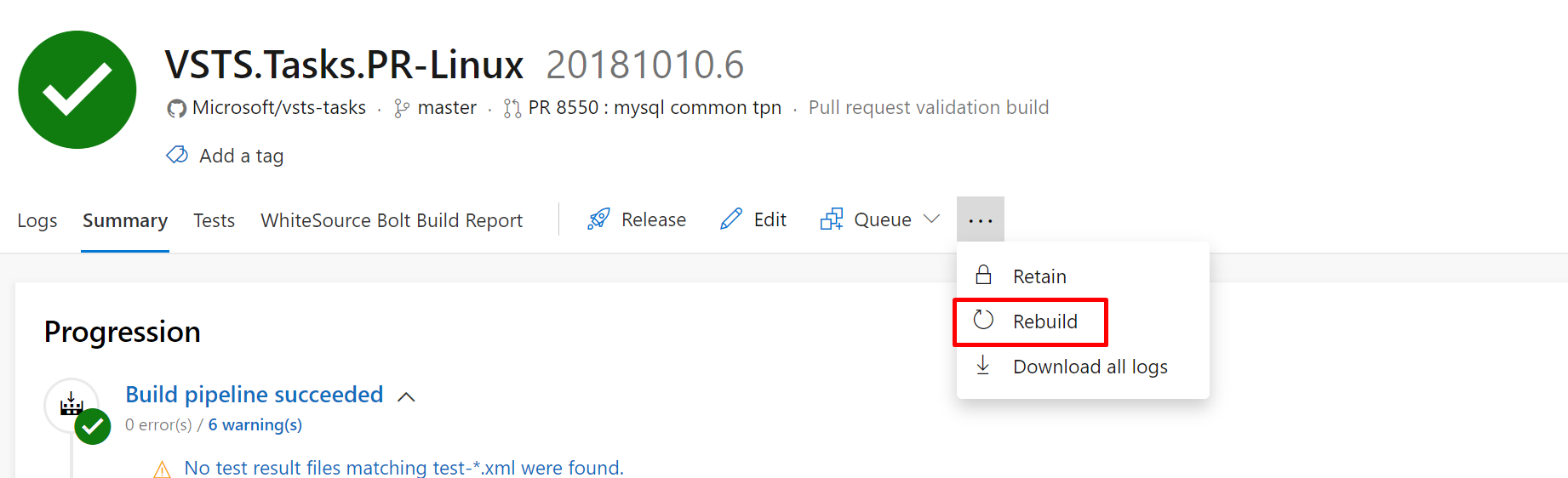
In the case of your scenarios, Azure Pipelines won't attempt to rebuild unless the PR is updated or you tell it to manually (using the steps above). So scenarios 1 and 3 are fixed with a re-build.
I'm not sure on the process for scenario 2, I'll let @DavidStaheli answer that.
 joshmgross
on 10 Oct 2018
joshmgross
on 10 Oct 2018
@joshmgross, this is helpful. If possible please document these?
two more related sub-issues:
1) Would it be possible to have one button to trigger a rebuild of all open PR builds? I don't know whether your system can tell open vs. closed PRs. If it does that would be very time saving.
This is to take care of the situation where say I committed something w/o realizing I broke CI build and went to sleep, meanwhile PRs are accumulating overnight all reporting red. In the morning realizing my mistake now I need to go through all PRs one by one and initiate rebuild. That could amount in a lot of clicking. This is of course not a bug and feature request.
2) Also I'm not sure whether this is correct
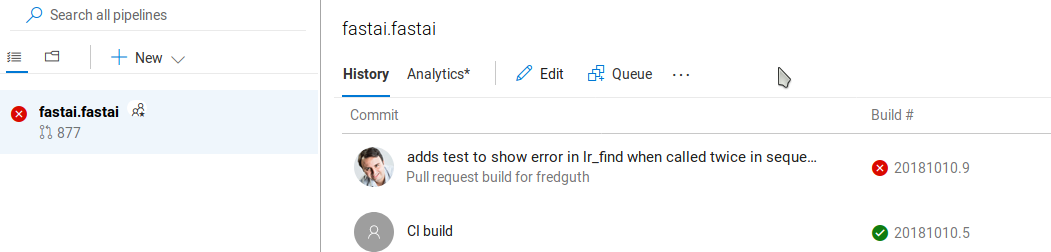
The last master build is green, followed by a red PR, the status of the project should be green, not red.
stas00
on 10 Oct 2018
Hi @stas00. You can also re-run the build from within the PR (on the Checks tab) if you have installed the Azure Pipelines GitHub App for your org/repo and use it to integrate with GitHub.
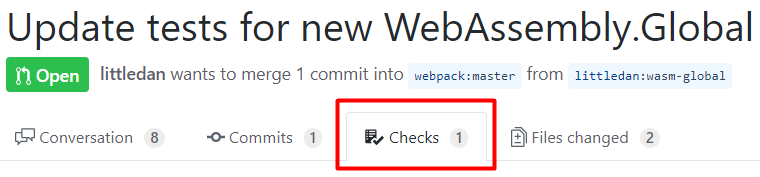
For scenario 2, I think the PR in GitHub's UI is accurate to appear green even if the master branch is red. The green PR is based on its own commits, but master became red based on its separate set of commits. If any of master's redness is shared by the PR because the same files are modified between the 2 branches, then the PR will show a merge conflict and can't be merged.
 davidstaheli
on 10 Oct 2018
davidstaheli
on 10 Oct 2018
Thank you for the tip on the app, @DavidStaheli.
wrt to your comment on scenario 2, it's clear about the merge conflicts. But I'm not sure I follow your logic in the main comment:
To the PR reviewer a green status would indicate that the it's "safe" to merge it. But if this same PR were to be submitted now, rather than then, it would have been red. So its real status is red and not green. So most of the time green would be only valid if there were no commits to master made since the PR submission, and otherwise it's real status is: 'last we checked it was green but it's no longer certain' really.
And surely the next CI build would expose the problem post PR-merge, so it's not a huge problem. So re-reading my own logic - nice in theory, difficult in practice. So I realize that nothing really can/should be done.
I'm sure in this discussion we are tapping into the difficult zone of wasting resources doing pointless re-runs most of the time, correct? So I am totally with you on trying to minimize computing resources (even though we are getting them for free), I'm pro energy-conservation.
stas00
on 10 Oct 2018
Sounds like issue is resolved. Marking this as closed.
joshmgross
on 10 Oct 2018
Several issues were discussed, some were addressed, these 2 were not:
https://github.com/Microsoft/vsts-tasks/issues/8551#issuecomment-428678608
Thanks
stas00
on 10 Oct 2018
Hi @stas00. You can also re-run the build from within the PR (on the Checks tab) if you have installed the Azure Pipelines GitHub App for your org/repo and use it to integrate with GitHub.
@DavidStaheli, I double checked that I already had Azure Pipelines GitHub App installed and configured for this repository. We had to do that from the very beginning, I don't think you can even use your service on github w/o it.
But I'm not seeing the same part of screen as you marked in red. In all PRs the Checks tab always shows 0.
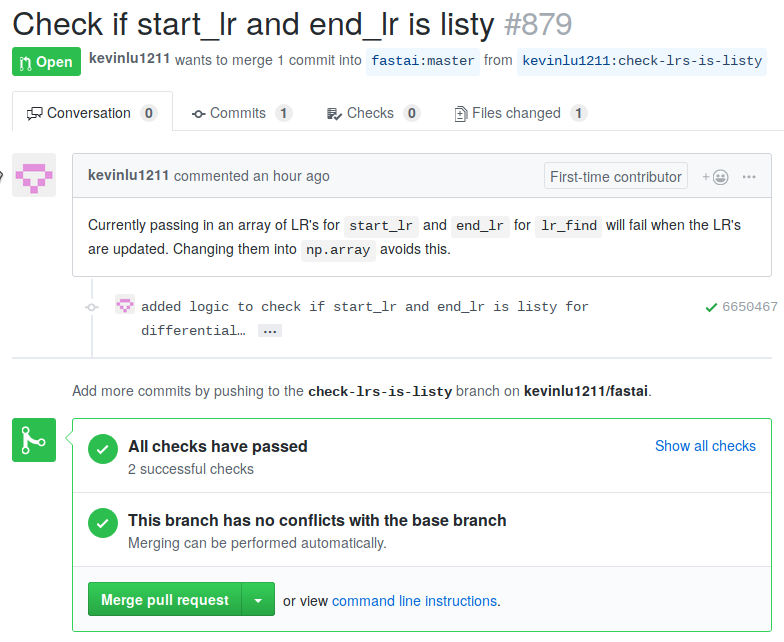
I'm not even sure what those checks mean and why do I want them. Do you have a link to that PR you made the snapshot from?
stas00
on 11 Oct 2018
Oops, sorry for closing the issue on you.
To answer your questions:
Would it be possible to have one button to trigger a rebuild of all open PR builds?
We currently don't have that ability, but I'll pass that feature request on. Currently I think the limiting factor would be on GitHub's side with regards to us knowing when we would have to re-queue all open PR builds (there is no UI or anything for that on GitHub).
Also I'm not sure whether this is correct. The last master build is green, followed by a red PR, the status of the project should be green, not red.
That is the intentional behavior. Right now the status of the project is the status of the most recently completed build. If you wanted the project status to reflect the status of your CI builds, then you could create two definitions, one for PRs and one for CI builds.
joshmgross
on 11 Oct 2018
Would it be possible to have one button to trigger a rebuild of all open PR builds?
We currently don't have that ability, but I'll pass that feature request on. Currently I think the limiting factor would be on GitHub's side with regards to us knowing when we would have to re-queue all open PR builds (there is no UI or anything for that on GitHub).
Oh, I was thinking having that button on your side - in the Builds section.
The system could even algorithmically suggest to run a rebuild of all open PRs if it sees that a whole bunch of them coincided with CI build failure - i.e. chances are that it wasn't PRs' fault and even automatically issue a re-run of PRs once the master branch is in the green. But that's an advanced DWIM (do what I mean). Just an idea...
Also I'm not sure whether this is correct. The last master build is green, followed by a red PR, the status of the project should be green, not red.
That is the intentional behavior. Right now the status of the project is the status of the most recently completed build. If you wanted the project status to reflect the status of your CI builds, then you could create two definitions, one for PRs and one for CI builds.
Thank you for explaining that nuance, Josh, and how to change that behavior.
So I only have one remaining thing wrt @DavidStaheli's suggestion, but otherwise I have everything else answered.
BTW, I also wanted to thank you all - it has been a pretty easy figuring out and everything works great, and I'm really enjoying the support I have been receiving - very welcoming and technically solid. Thank you.
stas00
on 11 Oct 2018
@DavidStaheli, I double checked that I already had Azure Pipelines GitHub App installed and configured for this repository. We had to do that from the very beginning, I don't think you can even use your service on github w/o it.
There are 3 ways you can connect with GitHub: the marketplace app, OAuth (logging in to GitHub from our service), and a Personal Access Token (PAT).
But I'm not seeing the same part of screen as you marked in red. In all PRs the Checks tab always shows 0.
It looks like you set up your build definition to use a connection other than the app (I'm guessing OAuth). (Since the checks tab shows the App but nothing else). You should be able to edit the definition and click "Sources" and switch to the app connection. Opening one of the connections in a new tab should take you to the service connections page which will show you how a connection is authorized. See here for more info on that: https://docs.microsoft.com/en-us/azure/devops/pipelines/library/service-endpoints?view=vsts
I'm not even sure what those checks mean and why do I want them. Do you have a link to that PR you made the snapshot from?
GitHub has two ways for a CI provider (like Azure DevOps) to send back information about a build: Statuses and Checks. Statuses are the basic 'X' and checkmarks you see next to a commit linking to a build success or failure.
Checks offer a whole lot more information and allow us to give details about builds (such as error logs and test reports). Checks are only available from connections through a GitHub Marketplace app.
I think its best to just see an example: This PR: https://github.com/electron/electron/pull/14920 under the "checks" tab here: https://github.com/electron/electron/pull/14920/checks?check_run_id=20874405
For more info on checks, here is the documentation from GitHub: https://help.github.com/articles/about-status-checks/#checks
So to answer shortly, checks just offer a better way to see build results on GitHub without having to go click on the build and view it on your Azure DevOps build.
Please let me know if you have any further questions.
joshmgross
on 11 Oct 2018
Oh, I was thinking having that button on your side - in the Builds section.
The system could even algorithmically suggest to run a rebuild of all open PRs if it sees that a whole bunch of them coincided with CI build failure - i.e. chances are that it wasn't PRs' fault and even automatically issue a re-run of PRs once the master branch is in the green. But that's an advanced DWIM (do what I mean). Just an idea...
That would definitely be a nice feature, I'll bring it up to my team. May end up being somewhat advanced (especially the whole detection of a CI failure relating to open PRs) but its a good direction to go towards.
joshmgross
on 11 Oct 2018
@joshmgross, the example is perfect, yes, we would like that.
You should be able to edit the definition and click "Sources" and switch to the app connection. Opening one of the connections in a new tab should take you to the service connections page which will show you how a connection is authorized
But I'm having a hard time figuring out what I need to change, I can't find none of what you suggested in the quoted text above.
On github side we have:
Installed GitHub Apps: Azure Pipelines
on your side
Type: Github
Created by Jeremy Howard
Connecting to service using OAuth
If I try to update it via "Update service connection", it authorizes me successfully but nothing happens - the pop-up just gets closed. Is the creator of the connection (not me) - the only one who can modify it, even though I have admin rights?
I created a new github connection with my own name, but I still get no Sources you speak of to modify. Or tabs to open... I read this and don't see any relation to your suggestion.
I think I may need you to look at our setup if possible. Thank you.
stas00
on 11 Oct 2018
@stas00 So on the page you linked, you should see multiple service connections for GitHub. You want to find the one that says "Connecting to service using token"
Like this:
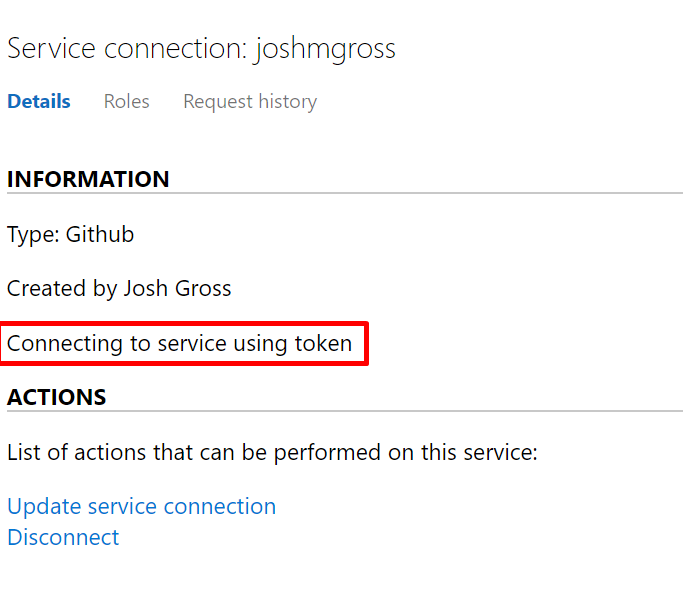
You don't have to update it or anything, we just need the name for the next step. It should be named after the GitHub org it was setup for (or possibly the user who installed the app).
That service connection is the one for the Azure DevOps marketplace app and the one we want for checks.
If you can't find it, then the App may have been set up for another project.
Once you find it, go to your build definition that you have set up for CI and once there click Edit. (You can also go to one of your PR builds and find the edit button there by clicking on the name of the definition).

From there click the "Get sources" on the left and then "Change" under the "Authorized using connection" tab. On that drop down you should see the App service connection you found earlier.
Let me know if you're seeing something different. I don't have access to your Azure Devops Organization so I can't click any of your links.
joshmgross
on 11 Oct 2018
1) I'm not sure it makes any difference how the auth was done, no? Ours is setup via "Connecting to service using OAuth" yours is with "Connecting to service using token". Unless you're saying that it must be done with token and not via OAuth, otherwise it won't work.
On that drop down you should see the App service connection you found earlier.
2) I got to the last screen you showed in your reply, I see the same options are yours. Where do I get that app connection - I am able to create a new connection from that area, but it's the same as the other one. Is the culprit in item 1 and I must have the token setup instead of OAuth?
If yes, what token do you I need? There are some 20 settings here https://github.com/settings/tokens/new
but somehow I have a feeling that it has nothing to do with the type of auth. And I'm missing something else.
stas00
on 11 Oct 2018
I'm not sure it makes any difference how the auth was done, no? Ours is setup via "Connecting to service using OAuth" yours is with "Connecting to service using token". Unless you're saying that it must be done with token and not via OAuth, otherwise it won't work.
The newer checks are only available through GitHub marketplace apps, so you need a GitHub App connection (note this is different from the "OAuth App").
If yes, what token do you I need? There are some 20 settings here https://github.com/settings/tokens/new
but somehow I have a feeling that it has nothing to do with the type of auth. And I'm missing something else.
So those are all PAT tokens, a third kind of auth, but not the one we want right now.
The description "Connecting to service using token" is misleading, and we're working on changing that. But that description indicates a GitHub Marketplace App connection (which is what we want). But if you don't see any service connections with that description, it means you don't have a GitHub marketplace app connected to your Azure DevOps project (or its connected to a different project).
To fix this, we need to make sure your GitHub organization (fastai) has installed the app. If you go to your organization settings (probably something like https://github.com/organizations/fastai/settings/installations) you can see if you have "Azure Pipelines" under "Installed GitHub Apps".

If you see it, then it may be connected to another Azure DevOps organization and you may want to reinstall it. You can go install it here: https://github.com/marketplace/azure-pipelines
and make sure you select your fastai org. (Note: you must be an admin or owner of the GitHub organization to set this up).
It will take you through an authorization flow and should let you select your existing Azure DevOps org that you already have set up for CI builds. Once you have it all set up, you should have a new service connection that you can switch your pre-existing build definition to (using the instructions I sent above).
joshmgross
on 12 Oct 2018
Thank you for the copious notes, @joshmgross. We figured it out!
Comments:
there is no such thing as https://github.com/organizations/fastai/settings/installations - gives 404, so I couldn't see that screen you shared.
we added a new connection using the org name instead of the username, under which it was initially configured, and now we get that [token] thing.
I switched the CI build to that connection and voila the checks tab is now populated after I did a rebuild for an existing PR.
In general this was a very difficult to follow resolution. Hopefully it will get easier over time. If I may give a suggestion: giving snapshots w/o urls that the users can click on to get to the same screen is problematic, since a lot of the time it took me some time to find out how to get to the same page, and often I wasn't getting a view similar to what the snapshot was showing. There needs to be a redirect url that you can use in your instructions/support threads like this that will automatically send the user to the page in the snapshot (redirecting to their username they are logged in with).
Lastly, I have initiated a rebuild of a PR to see this new configuration working and now I have:
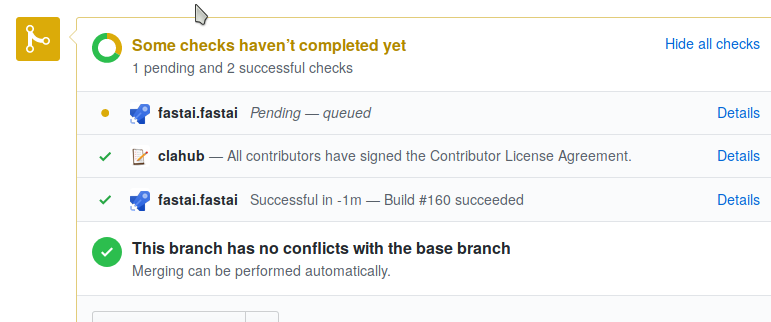
That Pending entry is strange, if I click on details it goes to the same page as the successful one before and its status is complete. Perhaps it's a small bug in your system that didn't clear the status of the PR build for the previous connection configuration. I imagine that it'll not show up there once a new PR will be submitted. I will let you know if it does, but my hunch is that it'll just work.
Otherwise this ticket can be closed now.
Thank you for your support, @joshmgross!
stas00
on 12 Oct 2018
Hey @stas00, glad I could help. I'll pass on the feedback to my team, thanks.
As far as the pending check, I believe that was from the first app connection that was set up, but shouldn't show up for any future PRs.
Let me know if you need any more help or have any further questions. Closing this issue now.
joshmgross
on 14 Oct 2018
Related issues
 MichaelWhiteCodingForFun
·
3Comments
MichaelWhiteCodingForFun
·
3Comments
 MikahB
·
3Comments
MikahB
·
3Comments
 timfish
·
3Comments
timfish
·
3Comments
 syltaxue
·
3Comments
syltaxue
·
3Comments
 NatMarchand
·
3Comments
NatMarchand
·
3Comments