Azure-pipelines-tasks: Azure App Service Deploy v3.* won't deploy to internal ASE
After troubleshooting forever, I have finally determined that the v3.* doesn't deploy to an internal ASE from VSTS. It fails trying to connect to the scm site trying to read or write values. When deploying to an app service with a virtual application to a directory that isn't the root, it fails with the error (below) when attempting to validate the directory exist. I am using a private agent on a VM in the same vnet. The ASE is using a self signed cert as this in just for our dev environment, but I don't think this is the issue. The deployment issues were fixed by simply switching version 2.*!
Please do not remove version 2.* til this is fixed!!!
Environment
Server - VSTS or TFS on-premises?
- If using VSTS, provide the account name, team project name, build definition name/build number: VSTS, acuvsts, compass project, Compass.Nomad.dev.Web.dev
Agent - Hosted or Private:
- If using private agent, provide the OS of the machine running the agent and the agent version: private agent, downloaded latest version, running on windows server 2016
Issue Description
[Include task name(s), screenshots and any other relevant details]
Error logs
2018-03-09T14:22:20.3721181Z ##[debug][PUT]https://$CompassIntDev:**@CompassIntDev.scm.acumen-nonprod.com/api/deployments/1721520605340355
2018-03-09T14:22:20.3832109Z ##[warning]Can\'t find loc string for key: FailedToUpdateDeploymentHistory
2018-03-09T14:22:20.3832917Z ##[debug]Processed: ##vso[task.issue type=warning;]Can\'t find loc string for key: FailedToUpdateDeploymentHistory
2018-03-09T14:22:20.3836203Z ##[warning]Error: FailedToUpdateDeploymentHistory unable to verify the first certificate
2018-03-07T02:38:48.2853210Z ##[debug][GET]https://$CompassIntDev:**@CompassIntDev.scm.acumen-nonprod.com/api/vfs/site/services/
2018-03-07T02:38:48.2949390Z ##[debug]task result: Failed
2018-03-07T02:38:48.3019558Z ##[error]Error: Failed to list path 'site/services' from Kudu. Error: unable to verify the first certificate
2018-03-07T02:38:48.3019994Z ##[debug]Processed: ##vso[task.issue type=error;]Error: Failed to list path 'site/services' from Kudu. Error: unable to verify the first certificate
2018-03-07T02:38:48.3020867Z ##[debug]Processed: ##vso[task.complete result=Failed;]Error: Failed to list path 'site/services' from Kudu. Error: unable to verify the first certificate
2018-03-07T02:38:48.3021519Z ##[debug][POST]https://management.azure.com/subscriptions/284fc750-a740-413b-9e27-5dc7c6b11edc/resourceGroups/CompassNP-RG/providers/Microsoft.Web/sites/CompassIntDev/config/appsettings/list?api-version=2016-08-01
2018-03-07T02:38:48.6473146Z ##[debug][GET]https://management.azure.com/subscriptions/284fc750-a740-413b-9e27-5dc7c6b11edc/providers/microsoft.insights/components?$filter=InstrumentationKey eq 'c7f1a83f-10d1-4901-83a6-95b411c5ab5b'&api-version=2015-05-01
2018-03-07T02:38:49.1700696Z ##[debug]Release.ReleaseUri=vstfs:///ReleaseManagement/Release/151
Troubleshooting
Checkout how to troubleshoot failures and collect debug logs: https://docs.microsoft.com/en-us/vsts/build-release/actions/troubleshooting
 toddwalstad
All 17 comments
@toddwalstad , can you add variable VSTS_ARM_REST_IGNORE_SSL_ERRORS with value true in Release definition and queue a new release?
 vincent1173
on 14 Mar 2018
vincent1173
on 14 Mar 2018
Looks like that worked!
Is the connection from VSTS failing? Can I put my self signed cert somewhere in VSTS to avoid this?
I looked for any post or logs with this error and couldn't find this setting documented anywhere.
toddwalstad
on 14 Mar 2018
I added VSTS_ARM_REST_IGNORE_SSL_ERRORS, having had the same issue, and it cleared up the failures.
 mbcooper
on 19 Mar 2018
mbcooper
on 19 Mar 2018
In our case, setting the environment variable NODE_TLS_REJECT_UNAUTHORIZED=0 on the agent machine in the same vNet with the ASE fixed the problem.
 altinoren
on 23 Mar 2018
altinoren
on 23 Mar 2018
@altinoren thank you for that information.
After adding that system environment variable to the release agent it allowed us to start seeing the functions when looking through the portal. That gave us hope, so we moved forward with deployment testing. Right away we started getting an ERROR_CERTIFICATE_VALIDATION_FAILED failure, so we added the VSTS Release Variable mentioned above and added the -allowUntrusted Web Deploy Argument.
This resulted in us getting a ERROR_COULD_NOT_CONNECT_TO_REMOTESVC error when attempting to deploy the function. While trying to get this to work we attempting to use the v2 of the 'Deploy Azure App Service' VSTS task which produced the same error.
Something to note is that we are using a self-signed cert at this time and did add it to the trusted root CA on the release agent.
Any thoughts or ideas would be greatly appreciated.
 glloyd2010f
on 30 Mar 2018
glloyd2010f
on 30 Mar 2018
What is the official status of this item? I don't see adding this flag as a long term solution. If there are differences in internal vs external, we should have a check box in this item that changes setting for an internal ASE without setting flags.
toddwalstad
on 3 Apr 2018
@toddwalstad something that I ended up doing was modifying the msdeploy task to add the -allowUntrusted flag within it's utility.js file on the release agent. This allowed us to do deploy with a self signed certificate on the ILB ASE. Hopefully this helps.
glloyd2010f
on 3 Apr 2018
It is not about difference between internal and external load balancer but use of self signed certificates, basically untrusted connections.
We will improve the logs to indicate option of setting the flag so that untrusted connections (self signed certificates) are allowed.
Long term solution is to use CA signed certificates.
 RoopeshNair
on 4 Apr 2018
RoopeshNair
on 4 Apr 2018
@glloyd2010f I found I had to modify a different file as couldn't find place to add -allowuntrusted:true in utility.js. The solution that worked for us was,
Edit file...
<DRIVE_LETTER>:\<PATH_TO_VSTS_AGENT>\_tasks\AzureRmWebAppDeployment_497d490f-eea7-4f2b-ab94-48d9c1acdcb1\3.3.46node_modules\webdeployment-common\msdeployutility.js
Find line...
msDeployCmdArgs += " -source:package=\"'" + webAppPackage + "'\"";
Replace with...
msDeployCmdArgs += " -allowUntrusted:true -source:package=\"'" + webAppPackage + "'\"";
We will defo use trusted certificates in future but for now in a POC we have a few contraints so this has helped move us forward, hope by posting it helps someone else as well 👍
 mattduguid
on 3 May 2018
mattduguid
on 3 May 2018
@mattduguid , You can pass -allowUntrusted:true in additional argument of Web Deploy option.
Please enable publish using Web deploy option and paste the flag in additional arguments.
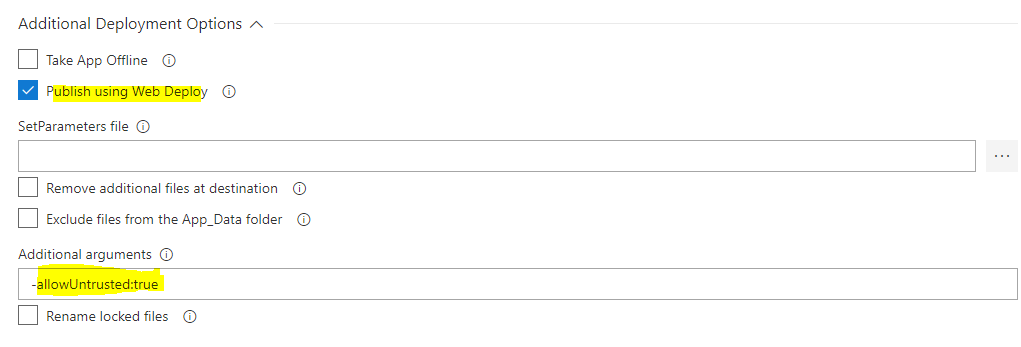
vincent1173
on 3 May 2018
Hi, I have the same issue. Our certificate covers *.domain and *.scm.domain as well as publish and ftp.
Deploying with version 2 and allowUntrusted works as expected, no warning. But switching to version 3 results in warnings.
I don't think, that this is solved, nor closed. Can you please investigate this.
2018-05-07T08:15:15.6709179Z Task         : Azure App Service Deploy
2018-05-07T08:15:15.6709700Z Description  : Update Azure WebApp Services On Windows, Web App On Linux with built-in images or docker containers, ASP.NET, .NET Core, PHP, Python or Node based Web applications, Function Apps, Mobile Apps, Api applications, Web Jobs using Web Deploy / Kudu REST APIs
2018-05-07T08:15:15.6710031Z Version      : 3.3.46
2018-05-07T08:15:15.6710219Z Author       : Microsoft Corporation
2018-05-07T08:15:15.6710449Z Help         : [More Information](https://aka.ms/azurermwebdeployreadme)
2018-05-07T08:15:15.6710885Z ==============================================================================
2018-05-07T08:15:16.5027771Z Got connection details for Azure App Service:'service'
2018-05-07T08:15:21.1472771Z [command]"C:\Program Files\IIS\Microsoft Web Deploy V3\msdeploy.exe" -verb:sync -source:package='d:\agentdir\work\r1\a\SVC-yaml\drop\SVC-6047.zip' -dest:contentPath='service',ComputerName='https://service.scm.domain:443/msdeploy.axd?site=service',UserName='$service',Password='********',AuthType='Basic' -enableRule:AppOffline -allowUntrusted -enableRule:DoNotDeleteRule -userAgent:VSTS_someid_release_4_56_56_2
2018-05-07T08:15:21.4303471Z Info: Using ID '17e88314-6174-48f1-8214-3a96563fcafe' for connections to the remote server.
2018-05-07T08:15:22.1453822Z Total changes: 0 (0 added, 0 deleted, 0 updated, 0 parameters changed, 0 bytes copied)
2018-05-07T08:15:22.1557070Z Successfully deployed web package to App Service.
2018-05-07T08:15:25.3712515Z ##[warning]Can\'t find loc string for key: FailedToUpdateDeploymentHistory
2018-05-07T08:15:25.3713691Z ##[warning]Error: FailedToUpdateDeploymentHistory unable to get local issuer certificate
2018-05-07T08:15:25.7613559Z ##[section]Finishing: Azure App Service Deploy: service
2018-05-07T08:15:25.7907426Z ##[section]Finishing: Release


2018-05-07T08:19:47.3128918Z ==============================================================================
2018-05-07T08:19:47.3129548Z Task         : Azure App Service Deploy
2018-05-07T08:19:47.3130206Z Description  : Update Azure App Service using Web Deploy / Kudu REST APIs
2018-05-07T08:19:47.3130692Z Version      : 2.1.14
2018-05-07T08:19:47.3130974Z Author       : Microsoft Corporation
2018-05-07T08:19:47.3131760Z Help         : [More Information](https://aka.ms/azurermwebdeployreadme)
2018-05-07T08:19:47.3132056Z ==============================================================================
2018-05-07T08:19:47.8457011Z 6150f9c6-a9aa-4a2b-9d67-8d5e25337c02 exists true
2018-05-07T08:19:51.2971106Z Got connection details for Azure App Service:'service'
2018-05-07T08:19:51.5627745Z [command]"C:\Program Files\IIS\Microsoft Web Deploy V3\msdeploy.exe" -verb:getParameters -source:package='d:\agentdir\work\r1\a\SVC-yaml\drop\SVC-6047.zip'
2018-05-07T08:19:51.8502843Z <output>
2018-05-07T08:19:51.8503482Z   <parameters />
2018-05-07T08:19:51.8572269Z [command]"C:\Program Files\IIS\Microsoft Web Deploy V3\msdeploy.exe" -verb:sync -source:package='d:\agentdir\work\r1\a\SVC-yaml\drop\SVC-6047.zip' -dest:contentPath='service',ComputerName='https://service.scm.domain:443/msdeploy.axd?site=service',UserName='********',Password='********',AuthType='Basic' -enableRule:AppOffline -allowUntrusted -userAgent:VSTS_someid_release_4_57_57_1
2018-05-07T08:19:52.1453982Z Info: Using ID '78bf3c43-8ddf-4f94-9301-571ba83e5acd' for connections to the remote server.
2018-05-07T08:19:52.8302370Z Info: Deleting file (service\hostingstart.html).
2018-05-07T08:19:52.8415277Z Total changes: 1 (0 added, 1 deleted, 0 updated, 0 parameters changed, 0 bytes copied)
2018-05-07T08:19:52.8511150Z App Service successfully deployed at url http://service.domain
2018-05-07T08:19:53.8356619Z Successfully updated deployment History at https://service.scm.domain/deployments/571525681192853
2018-05-07T08:19:53.8467436Z ##[section]Finishing: Azure App Service Deploy: service
 jzi96
on 7 May 2018
jzi96
on 7 May 2018
@vincentdass thanks for reply, we had looked at webdeploy method but preference is to use kudu method and we couldnt located a GUI location in VSTS to add extra parameters to msbuild for that? are we missing something as that would be better than hacking the file with a regex which is current workaround.
mattduguid
on 9 May 2018
@jzi96 We did receive the following warning "msdeploy.exe failed with return code: 2148734720" and to work around it we had to follow advice in this article https://www.benday.com/2018/01/09/how-to-fix-msdeploy-exe-failed-with-return-code-2148734720/ and we still got a few warnings as per below but the code did release.
2018-05-09T00:38:29.2196009Z ##[warning]Can\'t find loc string for key: FailedToUpdateDeploymentHistory
2018-05-09T00:38:29.2206865Z ##[warning]Error: FailedToUpdateDeploymentHistory Hostname/IP doesn't match certificate's altnames: "Host: _myappservice_.scm._mydomain_. is not in the cert's altnames: DNS:.scm._myappserviceenvironment_.p.azurewebsites.net, DNS:._myappserviceenvironment_.p.azure-mobile.net, DNS:.scm._myappserviceenvironment_.p.azure-mobile.net, DNS:.azure-apim.net, DNS:.consent.azure-apim.net, DNS:.admin.azure-apim.net, DNS:*._myappserviceenvironment_.p.azurewebsites.net"
mattduguid
on 9 May 2018
I haven't been following this thread for a while, but I did want to comment on what was said about the usage of self-signed certs.
While I would agree that the idea situation is to use signed certs and not self signed certs...there is not a way to do this in azure that I am aware of. You can't create an internal only site and create the cert in Azure and have it be able to validate it. I tried this multiple times and tried all the tricks I could to validate site ownership, but I couldn't do it on an internal only site. If this is possible, and the docs are updated to reflect this (current docs for an internal ASE explain and show only using self signed cert) I would agree that a easier way of working with Self Signed Certs isn't needed. But since by default we are led down this path, there needs to be a clean way to get the deployment working with Self Signed Certs.
toddwalstad
on 9 May 2018
@mattduguid the issues you are seeing is from the SCM site. I think your issue is related to my comment above. It looks like you created the internal site with a self signed cert first. Then you went and added a "real" cert with a different domain name. The issue with this is that the SCM site is only valid on the original site (as far as I can tell). The only way around this add the parameter (VSTS_ARM_REST_IGNORE_SSL_ERRORS) as stated above so the deployment can talk to the SCM site which only has a self signed cert.
Please let me know if this is what happened as it will validate my comment about the creation process leading most people to use self signed certs.
toddwalstad
on 9 May 2018
@toddwalstad thanks for your reply, we created the internal site first with self signed certificates as we dont yet have the required real certificates and may not for a little while but needed to get this working. I would have thought either way would have been a valid enough path but obviously real certificates being the preference for production or longer term systems?
mattduguid
on 9 May 2018
Added message to guide user to set variable to bypass SSL error and also recommended to use valid certificates.
vincent1173
on 30 May 2018
Related issues
 gregpakes
·
3Comments
gregpakes
·
3Comments
 yaananth
·
3Comments
yaananth
·
3Comments
 richard-ob
·
3Comments
richard-ob
·
3Comments
 timfish
·
3Comments
timfish
·
3Comments
 MarkIannucci
·
3Comments
MarkIannucci
·
3Comments
Most helpful comment
I added VSTS_ARM_REST_IGNORE_SSL_ERRORS, having had the same issue, and it cleared up the failures.