Azure-pipelines-tasks: Enable to select multiple feeds in NuGet restore task Feed(s) I select here
For now, we can only select only one feed from Feed(s) I select here option (NuGet restore task).
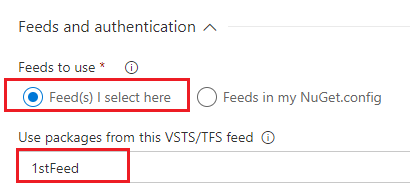
It should be more reasonable that we can select multiple feeds instead of only one feed. Just like we can select multiple feeds from outside:

 lvsezhufu
All 6 comments
Thanks for the feedback @lvsezhufu. We originally designed the task this way because we wanted to encourage people using multiple feeds to check in a NuGet.config with all the feeds needed. This enables each engineer who checks out the codebase to be immediately successful, rather than needing to add multiple feeds to the NuGet Package Manager configuration first.
In your scenario, how would you expect engineers on their dev machines to configure both 1stFeed and 2ndFeed?
 infin8x
on 1 Mar 2018
infin8x
on 1 Mar 2018
@alexmullans The scenario to select multiple feeds is that the dependencies are located in different feeds. In order to download all the referred packages, we need to select multiple feeds.
lvsezhufu
on 16 Mar 2018
Will the task at least consider each solution's individual nuget.config if we leave the "Path to NuGet.config" blank?
 Vossekop
on 19 Mar 2018
Vossekop
on 19 Mar 2018
@lvsezhufu and @Vossekop ,
I am closing this issue. There is a new feature coming out soon that will allow you to upstream Feeds to each other. Upstreaming is a much better way to solve this problem than the solution that is being proposed here.
 keithrob
on 25 Mar 2018
keithrob
on 25 Mar 2018
@keithrob actually, I find the solution you provided before to be the better one (use Nuget.config files at the solution level). And maybe it was a bit unclear in my previous message, but it was a genuine question: Does the task consider each solution's individual nuget.config if the path is left blank?
Don't get me wrong, I do very much like the upstream feeds to become more flexible than they are now.
Vossekop
on 26 Mar 2018
It does not consider the individual nuget.config if there is one adjacent to a .sln. Assuming you've wildcarded .sln files, the task will find them all and run restore on each one at a time.
We could probably fix this behavior by CDing to the directory containing the .sln and running nuget.exe from there, but that isn't on the near term plan.
keithrob
on 27 Mar 2018
Related issues
 divyesh-parikh
·
3Comments
divyesh-parikh
·
3Comments
 montebhoover
·
3Comments
montebhoover
·
3Comments
 syltaxue
·
3Comments
syltaxue
·
3Comments
 timfish
·
3Comments
timfish
·
3Comments
 MikahB
·
3Comments
MikahB
·
3Comments