Azure-pipelines-tasks: Azure Function deploy fails with The user name or password is incorrect
Environment
I'm using VSTS
- Account name: stamp-dev
- Release name: Stamp BigBro
- Release number: BigBro-Dev-30
- Agent: Hosted Agent (2.129.1)
Issue Description
I use Azure Service App Deploy to deploy an Azure Function to my Azure environment, and I keep on getting an error saying that username & password are incorrect.
If I delete the Azure Function and I create it again, the deployment works the first one/two times, than I get the same error.
Error logs
2018-02-26T00:23:18.1593970Z ##[error]Failed to deploy web package to App Service.
2018-02-26T00:23:18.1611382Z ##[debug]Processed: ##vso[task.issue type=error;]Failed to deploy web package to App Service.
2018-02-26T00:23:18.1612518Z ##[debug]{}
2018-02-26T00:23:18.1613194Z ##[debug]System.DefaultWorkingDirectory=D:\a\r1\a
2018-02-26T00:23:18.1618200Z ##[error]Error: (2/26/2018 12:23:18 AM) An error occurred when the request was processed on the remote computer.
Error: The user name or password is incorrect.
at Microsoft.Web.Deployment.NativeMethods.RaiseIOExceptionFromErrorCode(Win32ErrorCode errorCode, String maybeFullPath)
at Microsoft.Web.Deployment.DirectoryEx.CreateDirectory(String path)
at Microsoft.Web.Deployment.DirectoryEx.CreateDirectoriesFromRoot(String path)
at Microsoft.Web.Deployment.AppOfflineRuleHandler.AddAppOfflineFilesToEachApp(DeploymentBaseContext baseContext, Boolean whatIf)
at Microsoft.Web.Deployment.AppOfflineRuleHandler.Add(DeploymentSyncContext syncContext, DeploymentObject destinationObject, DeploymentObject& sourceObject, Boolean& proceed)
at Microsoft.Web.Deployment.DeploymentSyncContext.HandleAdd(DeploymentObject destObject, DeploymentObject sourceObject)
at Microsoft.Web.Deployment.DeploymentSyncContext.SyncChildren(DeploymentObject dest, DeploymentObject source)
at Microsoft.Web.Deployment.DeploymentSyncContext.SyncChildrenNoOrder(DeploymentObject dest, DeploymentObject source)
at Microsoft.Web.Deployment.DeploymentSyncContext.SyncChildren(DeploymentObject dest, DeploymentObject source)
at Microsoft.Web.Deployment.DeploymentSyncContext.SyncChildrenOrder(DeploymentObject dest, DeploymentObject source)
at Microsoft.Web.Deployment.DeploymentSyncContext.SyncChildren(DeploymentObject dest, DeploymentObject source)
at Microsoft.Web.Deployment.DeploymentSyncContext.ProcessSync(DeploymentObject destinationObject, DeploymentObject sourceObject)
at Microsoft.Web.Deployment.DeploymentObject.SyncToInternal(DeploymentObject destObject, DeploymentSyncOptions syncOptions, PayloadTable payloadTable, ContentRootTable contentRootTable, Nullable1 syncPassId, String syncSessionId)
at Microsoft.Web.Deployment.DeploymentAgent.HandleSync(DeploymentAgentAsyncData asyncData, Nullable1 passId, String user, String siteName)
Error count: 1.
2018-02-26T00:23:18.1622543Z ##[debug]Processed: ##vso[task.issue type=error;]Error: (2/26/2018 12:23:18 AM) An error occurred when the request was processed on the remote computer.%0D%0AError: The user name or password is incorrect.%0D%0A%0D%0A at Microsoft.Web.Deployment.NativeMethods.RaiseIOExceptionFromErrorCode(Win32ErrorCode errorCode, String maybeFullPath)%0D%0A at Microsoft.Web.Deployment.DirectoryEx.CreateDirectory(String path)%0D%0A at Microsoft.Web.Deployment.DirectoryEx.CreateDirectoriesFromRoot(String path)%0D%0A at Microsoft.Web.Deployment.AppOfflineRuleHandler.AddAppOfflineFilesToEachApp(DeploymentBaseContext baseContext, Boolean whatIf)%0D%0A at Microsoft.Web.Deployment.AppOfflineRuleHandler.Add(DeploymentSyncContext syncContext, DeploymentObject destinationObject, DeploymentObject& sourceObject, Boolean& proceed)%0D%0A at Microsoft.Web.Deployment.DeploymentSyncContext.HandleAdd(DeploymentObject destObject, DeploymentObject sourceObject)%0D%0A at Microsoft.Web.Deployment.DeploymentSyncContext.SyncChildren(DeploymentObject dest, DeploymentObject source)%0D%0A at Microsoft.Web.Deployment.DeploymentSyncContext.SyncChildrenNoOrder(DeploymentObject dest, DeploymentObject source)%0D%0A at Microsoft.Web.Deployment.DeploymentSyncContext.SyncChildren(DeploymentObject dest, DeploymentObject source)%0D%0A at Microsoft.Web.Deployment.DeploymentSyncContext.SyncChildrenOrder(DeploymentObject dest, DeploymentObject source)%0D%0A at Microsoft.Web.Deployment.DeploymentSyncContext.SyncChildren(DeploymentObject dest, DeploymentObject source)%0D%0A at Microsoft.Web.Deployment.DeploymentSyncContext.ProcessSync(DeploymentObject destinationObject, DeploymentObject sourceObject)%0D%0A at Microsoft.Web.Deployment.DeploymentObject.SyncToInternal(DeploymentObject destObject, DeploymentSyncOptions syncOptions, PayloadTable payloadTable, ContentRootTable contentRootTable, Nullable1 syncPassId, String syncSessionId)%0D%0A at Microsoft.Web.Deployment.DeploymentAgent.HandleSync(DeploymentAgentAsyncData asyncData, Nullable1 passId, String user, String siteName)%0D%0AError count: 1.%0D%0A
2018-02-26T00:23:18.1625647Z ##[debug]rm -rf D:\a\r1\a\error.txt
2018-02-26T00:23:18.1626072Z ##[debug]removing file
2018-02-26T00:23:18.1626432Z ##[debug]task result: Failed
2018-02-26T00:23:18.1627049Z ##[error]Error: C:\Program Files\IIS\Microsoft Web Deploy V3\msdeploy.exe failed with return code: 4294967295
 federicoD
All 15 comments
I'm having the exact same problem. Tried Reset publish credentials, but that didn't help either.
I downloaded the publishing profile and used the credentials in there to ftp to the resource location, without any luck. So I'm guessing there is indeed something wrong with the credentials.
 markbeij
on 27 Feb 2018
markbeij
on 27 Feb 2018
Download app content doesn't work either:
The user name or password is incorrect.
Description: An unhandled exception occurred during the execution of the current web request. Please review the stack trace for more information about the error and where it originated in the code.
Exception Details: System.IO.IOException: The user name or password is incorrect.
markbeij
on 27 Feb 2018
@federicoD , @markbeij , Can you please share the app names in private?
Also, share the MSDeploy command from the logs with log time. (mask only the app name)
 vincent1173
on 27 Feb 2018
vincent1173
on 27 Feb 2018
Same here, and what's more - I can't even access Kudu:
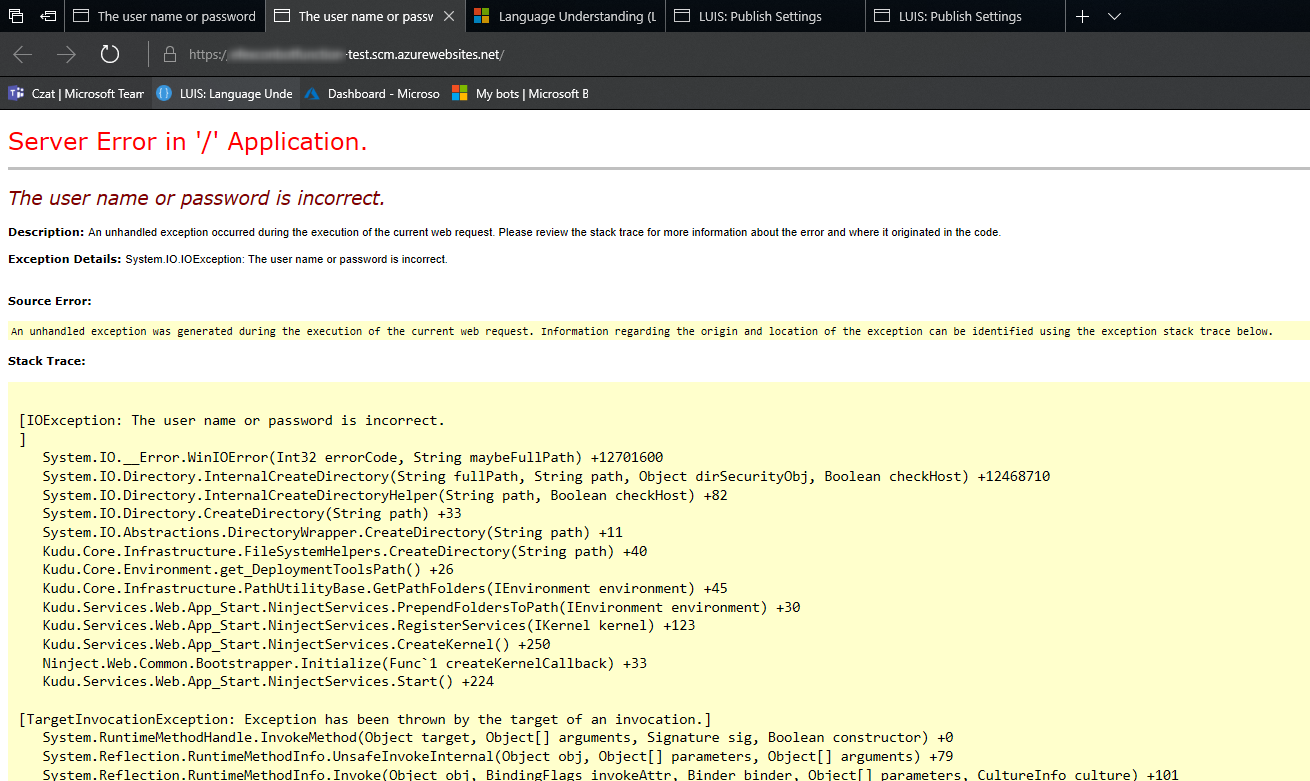
I think that problem is connected somehow with the "Slots", as before enabling that I didn't have any problems like that.
 pmatwiejuk
on 28 Feb 2018
pmatwiejuk
on 28 Feb 2018
@pmatwiejuk , Please share the app name in private.
vincent1173
on 28 Feb 2018
This error usually happens if you delete or regenerate the keys for the storage account associated with the function app. The one defined in the WEBSITE_CONTENTAZUREFILECONNECTIONSTRING App Settings for the functionapp.
If you deleted that storage account, you can try recreating it and updating the app settings that point to it. Check for WEBSITE_CONTENTAZUREFILECONNECTIONSTRING, AzureWebJobsDashboard, AzureWebJobsStorage
If you just regenerated the keys for that account, then update the connection strings in the App Settings for your app.
 ahmelsayed
on 28 Feb 2018
ahmelsayed
on 28 Feb 2018
@ahmelsayed I've a task to add variables to the AppSettings, but the task removes all the variables so I'm missing WEBSITE_CONTENTAZUREFILECONNECTIONSTRING. Do you think that could be the problem?
federicoD
on 6 Mar 2018
So my problem was due to the fact that the task for replacing the variables was deleting WEBSITE_CONTENTSHARE and WEBSITE_CONTENTAZUREFILECONNECTIONSTRING. So the first time VSTS was able to deploy because the variables where there, the task to set the variables was executed after...so the second time it was failing because of the missing variables.
federicoD
on 6 Mar 2018
@federicoD , You can also use Azure App Service Deploy task to update the App Settings / configuration settings. This might reduce the complexity of other task that removes the old value.

To resolve the current issue, you can refer to this thread.
Proposed answer from above thread:

vincent1173
on 6 Mar 2018
Same problem here, I'm using Apply variables to Azure webapp from Pascal Naber (Xpirit)
There is a checkbox 'Overwrite existing configuration' which you should carefully consider

markbeij
on 6 Mar 2018
@markbeij , is the issue resolved once you regenerated the keys?
vincent1173
on 6 Mar 2018
Yes
markbeij
on 7 Mar 2018
Closing the issue, as the issue is resolved.
You can update the App Settings / Config settings using App Service Deploy task.
vincent1173
on 8 Mar 2018
I just want to say that the CONTENT_SHARE and the other connectionstring setting is ONLY for CONSUMPTION plans!
As stated in this article:
https://docs.microsoft.com/en-us/azure/azure-functions/functions-app-settings#azurewebjobsstorage
If you apply this settings on a diff plan, your App will stop working.
 zorkind
on 26 Aug 2018
zorkind
on 26 Aug 2018
I have been having the same issues here today. After reading the above and the troubleshooting issues document I know what I have done wrong, but it would be nice if the error handling on publish provided a meaningful error and also the Azure Portal could do some validation to stop you from removing required configuration settings. I normally created Azure Functions using my Web App resources, but today ran out of available resources so made one under the consumption plan. I copied my configuration from an existing Azure Function, which caused the issue.
 euangordon
on 23 Oct 2019
euangordon
on 23 Oct 2019
Related issues
 alexszilagyi
·
3Comments
alexszilagyi
·
3Comments
 syltaxue
·
3Comments
syltaxue
·
3Comments
 HenrikStanley
·
3Comments
HenrikStanley
·
3Comments
 jared-hexagon
·
3Comments
jared-hexagon
·
3Comments
 Mardoxx
·
3Comments
Mardoxx
·
3Comments
Most helpful comment
This error usually happens if you delete or regenerate the keys for the storage account associated with the function app. The one defined in the
WEBSITE_CONTENTAZUREFILECONNECTIONSTRINGApp Settings for the functionapp.If you deleted that storage account, you can try recreating it and updating the app settings that point to it. Check for
WEBSITE_CONTENTAZUREFILECONNECTIONSTRING,AzureWebJobsDashboard,AzureWebJobsStorageIf you just regenerated the keys for that account, then update the connection strings in the App Settings for your app.