Azure-pipelines-tasks: NPM delays latest LTS with update notifier
We're using TFS 2017 Update 2 on premises, and we have builds that use NPM tasks. We've noticed two 3 minute+ delays in each NPM task in our builds. The builds do work, but of course take unnecessarily long.
_What is causing these delays? Is it a bug in the node vsts-task, the vsts-agent, or in Node that is causing node to not terminate correctly?_
More info:
- We've tried updating the vsts-agent on the build server to 2.124 (from 2.117.2) but it makes no difference.
- Running on Windows 10 x64.
- Running npm on a command prompt has no delays.
This questions is very much like the following one, but as you will be able to see below, it is not _installing_ that cases the delays, but instead the delays occur for every npm command. https://stackoverflow.com/questions/46900297/tfs-npm-install-build-task-hanging/46901603#46901603.
We're using Node 8.9.0 which is the new LTS (Long Time Support) compared to the above answer which mentions 6.x LTS which is still available.
The following log file clearly shows the two delays. The build just calls "npm version". The log shows that the tasks calls npm.cmd twice (marked in bold) Each of those commands runs quickly but after it is done, it waits for 3 minutes and 8 seconds before continuing (also marked bold).
When I look at the processes on the build computer, I see the node-processes in task manager, and towards the end when the last 3 minutes have passed, they disappear and the build completes.
_I'd like to be able to use the latest Node LTS and not have these delays...._ Anybody got any ideas?
2017-12-11T12:18:56.8791238Z ##[section]Starting: Build
2017-12-11T12:18:56.8811239Z Current agent version: '2.124.0'
....
2017-12-11T12:18:59.4928761Z [command]C:\Program Files\nodejs\npm.cmd config list -l
2017-12-11T12:18:59.8608148Z npm info it worked if it ends with ok
2017-12-11T12:18:59.8608148Z npm verb cli [ 'C:\Program Files\nodejs\node.exe',
2017-12-11T12:18:59.8608148Z npm verb cli 'C:\Program Files\nodejs\node_modules\npm\bin\npm-cli.js',
2017-12-11T12:18:59.8608148Z npm verb cli 'prefix',
2017-12-11T12:18:59.8608148Z npm verb cli '-g' ]
2017-12-11T12:18:59.8608148Z npm info using [email protected]
2017-12-11T12:18:59.8608148Z npm info using [email protected]
2017-12-11T12:18:59.8638322Z npm verb exit [ 0, true ]
2017-12-11T12:18:59.8648327Z npm info ok
2017-12-11T12:19:00.2308372Z npm info it worked if it ends with ok....
2017-12-11T12:19:00.2438380Z version = false
2017-12-11T12:19:00.2438380Z versions = false
2017-12-11T12:19:00.2438380Z viewer = "browser"
2017-12-11T12:19:00.2438380Z
2017-12-11T12:19:00.2438380Z
2017-12-11T12:19:00.2438380Z npm verb exit [ 0, true ]
2017-12-11T12:19:00.2438380Z npm info ok
2017-12-11T12:22:08.4599528Z ##[debug]rc:0
2017-12-11T12:22:08.4599528Z ##[debug]success:true
2017-12-11T12:22:08.4639831Z ##[debug]exec tool: C:\Program Files\nodejs\npm.cmd
2017-12-11T12:22:08.4639831Z ##[debug]Arguments:
2017-12-11T12:22:08.4639831Z ##[debug] version
2017-12-11T12:22:08.4639831Z [command]C:\Program Files\nodejs\npm.cmd version
2017-12-11T12:22:08.9200693Z npm info it worked if it ends with ok
2017-12-11T12:22:08.9210539Z npm verb cli [ 'C:\Program Files\nodejs\node.exe',
2017-12-11T12:22:08.9210539Z npm verb cli 'C:\Program Files\nodejs\node_modules\npm\bin\npm-cli.js',
2017-12-11T12:22:08.9210539Z npm verb cli 'prefix',
2017-12-11T12:22:08.9220697Z npm verb cli '-g' ]
2017-12-11T12:22:08.9220697Z npm info using [email protected]
2017-12-11T12:22:08.9220697Z npm info using [email protected]
2017-12-11T12:22:08.9260537Z npm verb exit [ 0, true ]
2017-12-11T12:22:08.9260537Z npm info ok
2017-12-11T12:22:09.2800875Z npm info it worked if it ends with ok
2017-12-11T12:22:09.2800875Z npm verb cli [ 'C:\Program Files\nodejs\node.exe',
2017-12-11T12:22:09.2810914Z npm verb cli 'C:\Program Files\nodejs\node_modules\npm\bin\npm-cli.js',
2017-12-11T12:22:09.2810914Z npm verb cli 'version' ]
2017-12-11T12:22:09.2810914Z npm info using [email protected]
2017-12-11T12:22:09.2810914Z npm info using [email protected]
2017-12-11T12:22:09.3470911Z { npm: '5.5.1',
2017-12-11T12:22:09.3470911Z ares: '1.10.1-DEV',
2017-12-11T12:22:09.3470911Z cldr: '31.0.1',
2017-12-11T12:22:09.3470911Z http_parser: '2.7.0',
2017-12-11T12:22:09.3470911Z icu: '59.1',
2017-12-11T12:22:09.3470911Z modules: '57',
2017-12-11T12:22:09.3470911Z nghttp2: '1.25.0',
2017-12-11T12:22:09.3470911Z node: '8.9.0',
2017-12-11T12:22:09.3470911Z openssl: '1.0.2l',
2017-12-11T12:22:09.3470911Z tz: '2017b',
2017-12-11T12:22:09.3470911Z unicode: '9.0',
2017-12-11T12:22:09.3470911Z uv: '1.15.0',
2017-12-11T12:22:09.3470911Z v8: '6.1.534.46',
2017-12-11T12:22:09.3470911Z zlib: '1.2.11' }
2017-12-11T12:22:09.3490815Z npm verb exit [ 0, true ]
2017-12-11T12:22:09.3490815Z npm info ok
2017-12-11T12:25:17.5877149Z ##[debug]rc:0
2017-12-11T12:25:17.5877149Z ##[debug]success:true
2017-12-11T12:25:17.5887154Z ##[debug]Npm command succeeded with code: 0
2017-12-11T12:25:17.5887154Z ##[debug]cleaning up...
2017-12-11T12:25:17.5947468Z ##[debug]task result: Succeeded
2017-12-11T12:25:17.5997217Z ##[debug]Processed: ##vso[task.complete result=Succeeded;]npm exited with return code: 0
2017-12-11T12:25:17.6027223Z ##[section]Finishing: npm version
 erikrenberg
All 45 comments
That's npm which has the delays (not the task). You should try and repro with the command line task invoking the exact cli to rule out the task
 bryanmacfarlane
on 15 Dec 2017
bryanmacfarlane
on 15 Dec 2017
Thanks, yes, it looks like NPM is delaying for some reason _when using the NPM task_ (I forgot to include above that the NPM task I use is version 0.2.22).
As you suggested, I just tried a command line task to call NPM directly, and then the whole tasks takes 9 seconds (no delay). Here's that log file:
...
2017-12-15T13:19:46.0942764Z ##[section]Starting: Run npm on command line
2017-12-15T13:19:46.1093018Z ==============================================================================
2017-12-15T13:19:46.1093018Z Task : Command Line
2017-12-15T13:19:46.1093018Z Description : Run a command line with arguments
2017-12-15T13:19:46.1093018Z Version : 1.1.3
2017-12-15T13:19:46.1093018Z Author : Microsoft Corporation
2017-12-15T13:19:46.1093018Z Help : More Information
2017-12-15T13:19:46.1093018Z ==============================================================================
2017-12-15T13:19:46.1373040Z ##[debug]Working directory: 'D:agent2_work\12\s'
2017-12-15T13:19:46.1373040Z ##[debug]Fail on standard error: 'False'
2017-12-15T13:19:46.1373040Z ##[debug]Modify environment: 'False'
2017-12-15T13:19:46.1373040Z ##[debug]C:\Windows\system32\cmd.exe /c "npm version"
2017-12-15T13:19:46.1373040Z ##[command]npm version
2017-12-15T13:19:46.9354150Z { npm: '5.5.1',
2017-12-15T13:19:46.9354150Z ares: '1.10.1-DEV',
2017-12-15T13:19:46.9354150Z cldr: '31.0.1',
2017-12-15T13:19:46.9354150Z http_parser: '2.7.0',
2017-12-15T13:19:46.9354150Z icu: '59.1',
2017-12-15T13:19:46.9354150Z modules: '57',
2017-12-15T13:19:46.9354150Z nghttp2: '1.25.0',
2017-12-15T13:19:46.9354150Z node: '8.9.0',
2017-12-15T13:19:46.9354150Z openssl: '1.0.2l',
2017-12-15T13:19:46.9354150Z tz: '2017b',
2017-12-15T13:19:46.9354150Z unicode: '9.0',
2017-12-15T13:19:46.9354150Z uv: '1.15.0',
2017-12-15T13:19:46.9354150Z v8: '6.1.534.46',
2017-12-15T13:19:46.9354150Z zlib: '1.2.11' }
2017-12-15T13:19:52.1155869Z ##[section]Finishing: Run npm on command line
2017-12-15T13:19:52.1175870Z ##[debug]Evaluating condition for step: 'Post Job Cleanup'
2017-12-15T13:19:52.1175870Z ##[debug]Always run post-job step: 'Post Job Cleanup'
2017-12-15T13:19:52.1175870Z ##[section]Starting: Post Job Cleanup
2017-12-15T13:19:52.1255880Z ##[section]Finishing: Post Job Cleanup
2017-12-15T13:19:52.1305884Z ##[section]Finishing: Build
erikrenberg
on 15 Dec 2017
Downgrading to npm/3.10.10 node/v6.12.2 results in no delay.
 dalle
on 19 Dec 2017
dalle
on 19 Dec 2017
For what it's worth, I'm seeing the same thing here. My 3 NPM tasks (install, test, build) suddenly took 4+ minutes each - the 3+ minute delay and then execution. My build went from 6 minutes to about 18.
I switched to a command task so I didn't have to downgrade anything. Now we're back to a reasonable time.
 markjsc
on 19 Jan 2018
markjsc
on 19 Jan 2018
@markjsc & @erikrenberg,
We have observed this before with specific versions of NPM. From the task's perspective, there is literally nothing going on. The task spawns npm and waits for the return code. Some versions of NPM seem to hang for a certain amount of time before giving the exit code back to the calling process.
Notice this[1] line in the original post's debug. Prior to running any command we always run 'config list -l' so that we can see which registries are being used (this helps with triage). This command is straightforward and should complete nearly instantaneously. Notice that the task waits 2m to get the return code from npm. Strange?!
To help narrow this down, you could add the "Node Tool Installer" at the _top_ of your build definition. This will add node & NPM to the tip of $PATH and it will be picked up by the V1 NPM build steps. Try a few combinations of Node+NPM to find the versions that work and the ones that don't.
[1] 2017-12-11T12:18:59.4928761Z [command]C:\Program Files\nodejs\npm.cmd config list -l
 keithrob
on 20 Jan 2018
keithrob
on 20 Jan 2018
(I upgraded to Node 8.9.4 with NPM 5.6.0 last week for other reasons, but that didn't improve the delays.).
I only have that version of Node installed on the build machine. Are you saying that adding a "Node Tool Installer" task with the spec 8.9.4 somehow could improve it? (sounds unlikely because the original logs already show a late Node-version being used).
I don't want to cherry-pick an old Node version to get the builds to run without delays, rather I want the build-system's "NPM task" to work as it should with the latest Node LTS (which we need because our builds require it).
As @markjsc writes; switching from the NPM task to command line task has no such delays....
Is there something else I can do to help you, or somebody, fixing this issue?
erikrenberg
on 22 Jan 2018
re: "Are you saying that adding a "Node Tool Installer" task with the spec 8.9.4 somehow could improve it?"
No. I would really like to see this task executed with a version that the task fetches and which it puts on the path. I am also asking you to try a few different versions from here so that we can narrow it down because we cannot reproduce.
keithrob
on 19 Feb 2018
@keithrob - thanks for following up.
I attempted this, but I'm having a separate issue with the Node Tools Installer related to our internal build server and the proxy we're using. It communicates correctly with other tasks but fails for the Node Tools Installer.
Not trying to muddy the issue here, I just wanted to let you know that I tried unsuccessfully.
Hopefully @erikrenberg will be able to help.
markjsc
on 19 Feb 2018
@markjsc - I think the tool installer needs to update to the latest task lib. We did work for proxy settings to just flow into the tasks but it needs a new task lib.
If you want to create a separate issue, I can take the work or @keithrob can. Should be trivial.
On a side note, this delay is likely an external node issue but I'll defer to @keithrob on finishing this.
bryanmacfarlane
on 20 Feb 2018
I've been noticing the same kind of issue without our yarn task which would hang with specific versions of node and only on windows. I've never been able to put the finger on what's the real cause. on of the case reported was with node 8.1.4
 sandorfr
on 20 Feb 2018
sandorfr
on 20 Feb 2018
I have since the last time moved to a different build server, but that didn't change anything; the delay is still there.
So, I've tried the Node Tools Installer task. Initially with the same version, version 8.9.4, and it (perhaps not surprisingly) has the same 3+ minutes delays (log below). I'll try some additional Node-versions now, and see if it works with other versions.
Meanwhile; I have started to suspect that perhaps the IT-managed antivirus run on the build server is doing something. I will see if it can be disabled to test if it matters.
2018-02-20T13:12:01.2225127Z ##[debug]Evaluating condition for step: 'npm version'
2018-02-20T13:12:01.2225127Z ##[debug]Evaluating: succeeded()
2018-02-20T13:12:01.2225127Z ##[debug]Evaluating succeeded:
2018-02-20T13:12:01.2225127Z ##[debug]=> (Boolean) True
2018-02-20T13:12:01.2225127Z ##[debug]Expanded: True
2018-02-20T13:12:01.2225127Z ##[debug]Result: True
2018-02-20T13:12:01.2225127Z ##[section]Starting: npm version
2018-02-20T13:12:01.2225127Z ==============================================================================
2018-02-20T13:12:01.2225127Z Task         : npm
2018-02-20T13:12:01.2225127Z Description  : Run an npm command
2018-02-20T13:12:01.2225127Z Version      : 0.2.22
2018-02-20T13:12:01.2225127Z Author       : Microsoft Corporation
2018-02-20T13:12:01.2225127Z Help         : [More Information](https://go.microsoft.com/fwlink/?LinkID=613746)
2018-02-20T13:12:01.2225127Z ==============================================================================
2018-02-20T13:12:01.4881402Z ##[debug]agent.workFolder=D:\agent\_work
2018-02-20T13:12:01.4881402Z ##[debug]loading inputs and endpoints
2018-02-20T13:12:01.4881402Z ##[debug]loading ENDPOINT_AUTH_PARAMETER_SYSTEMVSSCONNECTION_ACCESSTOKEN
2018-02-20T13:12:01.4881402Z ##[debug]loading ENDPOINT_AUTH_SCHEME_SYSTEMVSSCONNECTION
2018-02-20T13:12:01.4881402Z ##[debug]loading ENDPOINT_AUTH_SYSTEMVSSCONNECTION
2018-02-20T13:12:01.4881402Z ##[debug]loading INPUT_COMMAND
2018-02-20T13:12:01.4881402Z ##[debug]loading INPUT_CWD
2018-02-20T13:12:01.4881402Z ##[debug]loaded 5
2018-02-20T13:12:01.4881402Z ##[debug]check path : D:\agent\_work\_tasks\Npm_fe47e961-9fa8-4106-8639-368c022d43ad\0.2.22\task.json
2018-02-20T13:12:01.4881402Z ##[debug]set resource file to: D:\agent\_work\_tasks\Npm_fe47e961-9fa8-4106-8639-368c022d43ad\0.2.22\task.json
2018-02-20T13:12:01.4881402Z ##[debug]system.culture=en-US
2018-02-20T13:12:01.5037680Z ##[debug]cwd=D:\agent\_work\9\s
2018-02-20T13:12:01.5037680Z ##[debug]testing directory 'D:\agent\_work\9\s'
2018-02-20T13:12:01.5037680Z ##[debug]command=version
2018-02-20T13:12:01.5037680Z ##[debug]Absolute path for pathSegments: D:\agent\_work\_tool\node\8.9.4\x64/npm = D:\agent\_work\_tool\node\8.9.4\x64\npm
2018-02-20T13:12:01.5037680Z ##[debug]check path : D:\agent\_work\_tool\node\8.9.4\x64\npm.cmd
2018-02-20T13:12:01.5037680Z ##[debug]npm=D:\agent\_work\_tool\node\8.9.4\x64\npm.cmd
2018-02-20T13:12:01.5037680Z ##[debug]D:\agent\_work\_tool\node\8.9.4\x64\npm.cmd arg: version
2018-02-20T13:12:01.5037680Z ##[debug]arguments=null
2018-02-20T13:12:01.5037680Z ##[debug]USE_DEPRECATED_TASK_VERSION=undefined
2018-02-20T13:12:01.5037680Z ##[debug]Agent.BuildDirectory=D:\agent\_work\9
2018-02-20T13:12:01.5037680Z ##[debug]testing directory 'D:\agent\_work\9\npm'
2018-02-20T13:12:01.5037680Z ##[debug]build.buildId=5300
2018-02-20T13:12:01.5037680Z ##[debug]system.debug=true
2018-02-20T13:12:01.5037680Z ##[debug]system.debug=true
2018-02-20T13:12:01.5037680Z ##[debug]Absolute path for pathSegments: D:\agent\_work\_tool\node\8.9.4\x64/npm = D:\agent\_work\_tool\node\8.9.4\x64\npm
2018-02-20T13:12:01.5037680Z ##[debug]check path : D:\agent\_work\_tool\node\8.9.4\x64\npm.cmd
2018-02-20T13:12:01.5037680Z ##[debug]npm=D:\agent\_work\_tool\node\8.9.4\x64\npm.cmd
2018-02-20T13:12:01.5037680Z ##[debug]D:\agent\_work\_tool\node\8.9.4\x64\npm.cmd arg: config list
2018-02-20T13:12:01.5037680Z ##[debug]D:\agent\_work\_tool\node\8.9.4\x64\npm.cmd arg: -l
2018-02-20T13:12:01.5037680Z ##[debug]exec tool: D:\agent\_work\_tool\node\8.9.4\x64\npm.cmd
2018-02-20T13:12:01.5037680Z ##[debug]Arguments:
2018-02-20T13:12:01.5037680Z ##[debug]   config
2018-02-20T13:12:01.5037680Z ##[debug]   list
2018-02-20T13:12:01.5037680Z ##[debug]   -l
2018-02-20T13:12:01.5037680Z [command]D:\agent\_work\_tool\node\8.9.4\x64\npm.cmd config list -l
2018-02-20T13:12:02.1600217Z npm info it worked if it ends with ok
2018-02-20T13:12:02.1600217Z npm verb cli [ 'D:\\agent\\_work\\_tool\\node\\8.9.4\\x64\\node.exe',
2018-02-20T13:12:02.1600217Z npm verb cli   'D:\\agent\\_work\\_tool\\node\\8.9.4\\x64\\node_modules\\npm\\bin\\npm-cli.js',
2018-02-20T13:12:02.1600217Z npm verb cli   'prefix',
2018-02-20T13:12:02.1600217Z npm verb cli   '-g' ]
2018-02-20T13:12:02.1600217Z npm info using [email protected]
2018-02-20T13:12:02.1600217Z npm info using [email protected]
2018-02-20T13:12:02.1600217Z npm verb exit [ 0, true ]
2018-02-20T13:12:02.1600217Z npm info ok
2018-02-20T13:12:02.7225291Z npm info it worked if it ends with ok
2018-02-20T13:12:02.7381502Z npm verb cli [ 'D:\\agent\\_work\\_tool\\node\\8.9.4\\x64\\node.exe',
2018-02-20T13:12:02.7381502Z npm verb cli   'D:\\agent\\_work\\_tool\\node\\8.9.4\\x64\\node_modules\\npm\\bin\\npm-cli.js',
2018-02-20T13:12:02.7381502Z npm verb cli   'config',
2018-02-20T13:12:02.7381502Z npm verb cli   'list',
2018-02-20T13:12:02.7381502Z npm verb cli   '-l' ]
2018-02-20T13:12:02.7381502Z npm info using [email protected]
2018-02-20T13:12:02.7381502Z npm info using [email protected]
2018-02-20T13:12:02.7537780Z ; cli configs
2018-02-20T13:12:02.7537780Z long = true
2018-02-20T13:12:02.7537780Z metrics-registry = "https://registry.npmjs.org/"
2018-02-20T13:12:02.7537780Z scope = ""
2018-02-20T13:12:02.7537780Z user-agent = "npm/5.6.0 node/v8.9.4 win32 x64"
2018-02-20T13:12:02.7537780Z
2018-02-20T13:12:02.7537780Z ; environment configs
2018-02-20T13:12:02.7537780Z loglevel = "verbose"
2018-02-20T13:12:02.7537780Z
2018-02-20T13:12:02.7537780Z ; default values
2018-02-20T13:12:02.7537780Z access = null
2018-02-20T13:12:02.7537780Z allow-same-version = false
2018-02-20T13:12:02.7537780Z also = null
2018-02-20T13:12:02.7537780Z always-auth = false
2018-02-20T13:12:02.7537780Z auth-type = "legacy"
2018-02-20T13:12:02.7537780Z bin-links = true
2018-02-20T13:12:02.7537780Z browser = null
2018-02-20T13:12:02.7537780Z ca = null
2018-02-20T13:12:02.7537780Z cache = "C:\\Users\\svcTFSUmeaBuild\\AppData\\Roaming\\npm-cache"
2018-02-20T13:12:02.7537780Z cache-lock-retries = 10
2018-02-20T13:12:02.7537780Z cache-lock-stale = 60000
2018-02-20T13:12:02.7537780Z cache-lock-wait = 10000
2018-02-20T13:12:02.7537780Z cache-max = null
2018-02-20T13:12:02.7537780Z cache-min = 10
2018-02-20T13:12:02.7537780Z cafile = undefined
2018-02-20T13:12:02.7537780Z cert = null
2018-02-20T13:12:02.7537780Z cidr = null
2018-02-20T13:12:02.7537780Z color = true
2018-02-20T13:12:02.7537780Z commit-hooks = true
2018-02-20T13:12:02.7537780Z depth = null
2018-02-20T13:12:02.7537780Z description = true
2018-02-20T13:12:02.7537780Z dev = false
2018-02-20T13:12:02.7537780Z dry-run = false
2018-02-20T13:12:02.7537780Z editor = "notepad.exe"
2018-02-20T13:12:02.7537780Z engine-strict = false
2018-02-20T13:12:02.7537780Z fetch-retries = 2
2018-02-20T13:12:02.7537780Z fetch-retry-factor = 10
2018-02-20T13:12:02.7537780Z fetch-retry-maxtimeout = 60000
2018-02-20T13:12:02.7537780Z fetch-retry-mintimeout = 10000
2018-02-20T13:12:02.7537780Z force = false
2018-02-20T13:12:02.7537780Z git = "git"
2018-02-20T13:12:02.7537780Z git-tag-version = true
2018-02-20T13:12:02.7537780Z global = false
2018-02-20T13:12:02.7537780Z global-style = false
2018-02-20T13:12:02.7537780Z globalconfig = "D:\\agent\\_work\\_tool\\node\\8.9.4\\x64\\etc\\npmrc"
2018-02-20T13:12:02.7537780Z globalignorefile = "D:\\agent\\_work\\_tool\\node\\8.9.4\\x64\\etc\\npmignore"
2018-02-20T13:12:02.7537780Z group = 0
2018-02-20T13:12:02.7537780Z ham-it-up = false
2018-02-20T13:12:02.7537780Z heading = "npm"
2018-02-20T13:12:02.7537780Z https-proxy = null
2018-02-20T13:12:02.7537780Z if-present = false
2018-02-20T13:12:02.7537780Z ignore-prepublish = false
2018-02-20T13:12:02.7537780Z ignore-scripts = false
2018-02-20T13:12:02.7537780Z init-author-email = ""
2018-02-20T13:12:02.7537780Z init-author-name = ""
2018-02-20T13:12:02.7537780Z init-author-url = ""
2018-02-20T13:12:02.7537780Z init-license = "ISC"
2018-02-20T13:12:02.7537780Z init-module = "C:\\Users\\svcTFSUmeaBuild\\.npm-init.js"
2018-02-20T13:12:02.7537780Z init-version = "1.0.0"
2018-02-20T13:12:02.7537780Z json = false
2018-02-20T13:12:02.7537780Z key = null
2018-02-20T13:12:02.7537780Z legacy-bundling = false
2018-02-20T13:12:02.7537780Z link = false
2018-02-20T13:12:02.7537780Z local-address = undefined
2018-02-20T13:12:02.7537780Z ; loglevel = "notice" (overridden)
2018-02-20T13:12:02.7537780Z logs-max = 10
2018-02-20T13:12:02.7537780Z ; long = false (overridden)
2018-02-20T13:12:02.7537780Z maxsockets = 50
2018-02-20T13:12:02.7537780Z message = "%s"
2018-02-20T13:12:02.7537780Z ; metrics-registry = null (overridden)
2018-02-20T13:12:02.7537780Z node-options = null
2018-02-20T13:12:02.7537780Z node-version = "8.9.4"
2018-02-20T13:12:02.7537780Z offline = false
2018-02-20T13:12:02.7537780Z onload-script = null
2018-02-20T13:12:02.7537780Z only = null
2018-02-20T13:12:02.7537780Z optional = true
2018-02-20T13:12:02.7537780Z otp = 0
2018-02-20T13:12:02.7537780Z package-lock = true
2018-02-20T13:12:02.7537780Z package-lock-only = false
2018-02-20T13:12:02.7537780Z parseable = false
2018-02-20T13:12:02.7537780Z prefer-offline = false
2018-02-20T13:12:02.7537780Z prefer-online = false
2018-02-20T13:12:02.7537780Z prefix = "D:\\agent\\_work\\_tool\\node\\8.9.4\\x64"
2018-02-20T13:12:02.7537780Z production = false
2018-02-20T13:12:02.7537780Z progress = true
2018-02-20T13:12:02.7537780Z proxy = null
2018-02-20T13:12:02.7537780Z read-only = false
2018-02-20T13:12:02.7537780Z rebuild-bundle = true
2018-02-20T13:12:02.7537780Z registry = "https://registry.npmjs.org/"
2018-02-20T13:12:02.7537780Z rollback = true
2018-02-20T13:12:02.7537780Z save = true
2018-02-20T13:12:02.7537780Z save-bundle = false
2018-02-20T13:12:02.7537780Z save-dev = false
2018-02-20T13:12:02.7537780Z save-exact = false
2018-02-20T13:12:02.7537780Z save-optional = false
2018-02-20T13:12:02.7537780Z save-prefix = "^"
2018-02-20T13:12:02.7537780Z save-prod = false
2018-02-20T13:12:02.7537780Z scope = ""
2018-02-20T13:12:02.7537780Z script-shell = null
2018-02-20T13:12:02.7537780Z scripts-prepend-node-path = "warn-only"
2018-02-20T13:12:02.7537780Z searchexclude = null
2018-02-20T13:12:02.7537780Z searchlimit = 20
2018-02-20T13:12:02.7537780Z searchopts = ""
2018-02-20T13:12:02.7537780Z searchstaleness = 900
2018-02-20T13:12:02.7537780Z send-metrics = false
2018-02-20T13:12:02.7537780Z shell = "C:\\Windows\\system32\\cmd.exe"
2018-02-20T13:12:02.7537780Z shrinkwrap = true
2018-02-20T13:12:02.7537780Z sign-git-tag = false
2018-02-20T13:12:02.7537780Z sso-poll-frequency = 500
2018-02-20T13:12:02.7537780Z sso-type = "oauth"
2018-02-20T13:12:02.7537780Z strict-ssl = true
2018-02-20T13:12:02.7537780Z tag = "latest"
2018-02-20T13:12:02.7537780Z tag-version-prefix = "v"
2018-02-20T13:12:02.7537780Z timing = false
2018-02-20T13:12:02.7537780Z tmp = "D:\\agent\\_work\\_temp"
2018-02-20T13:12:02.7537780Z umask = 0
2018-02-20T13:12:02.7537780Z unicode = false
2018-02-20T13:12:02.7537780Z unsafe-perm = true
2018-02-20T13:12:02.7537780Z usage = false
2018-02-20T13:12:02.7537780Z user = 0
2018-02-20T13:12:02.7537780Z ; user-agent = "npm/{npm-version} node/{node-version} {platform} {arch}" (overridden)
2018-02-20T13:12:02.7537780Z userconfig = "C:\\Users\\svcTFSUmeaBuild\\.npmrc"
2018-02-20T13:12:02.7537780Z version = false
2018-02-20T13:12:02.7537780Z versions = false
2018-02-20T13:12:02.7537780Z viewer = "browser"
2018-02-20T13:12:02.7537780Z
2018-02-20T13:12:02.7537780Z
2018-02-20T13:12:02.7537780Z npm verb exit [ 0, true ]
2018-02-20T13:12:02.7537780Z npm info ok
2018-02-20T13:15:10.8610463Z ##[debug]rc:0
2018-02-20T13:15:10.8610463Z ##[debug]success:true
2018-02-20T13:15:10.8610463Z ##[debug]exec tool: D:\agent\_work\_tool\node\8.9.4\x64\npm.cmd
2018-02-20T13:15:10.8610463Z ##[debug]Arguments:
2018-02-20T13:15:10.8610463Z ##[debug]   version
2018-02-20T13:15:10.8610463Z [command]D:\agent\_work\_tool\node\8.9.4\x64\npm.cmd version
2018-02-20T13:15:11.5641755Z npm info it worked if it ends with ok
2018-02-20T13:15:11.5641755Z npm verb cli [ 'D:\\agent\\_work\\_tool\\node\\8.9.4\\x64\\node.exe',
2018-02-20T13:15:11.5641755Z npm verb cli   'D:\\agent\\_work\\_tool\\node\\8.9.4\\x64\\node_modules\\npm\\bin\\npm-cli.js',
2018-02-20T13:15:11.5641755Z npm verb cli   'prefix',
2018-02-20T13:15:11.5641755Z npm verb cli   '-g' ]
2018-02-20T13:15:11.5641755Z npm info using [email protected]
2018-02-20T13:15:11.5641755Z npm info using [email protected]
2018-02-20T13:15:11.5798001Z npm verb exit [ 0, true ]
2018-02-20T13:15:11.5798001Z npm info ok
2018-02-20T13:15:12.1423052Z npm info it worked if it ends with ok
2018-02-20T13:15:12.1423052Z npm verb cli [ 'D:\\agent\\_work\\_tool\\node\\8.9.4\\x64\\node.exe',
2018-02-20T13:15:12.1423052Z npm verb cli   'D:\\agent\\_work\\_tool\\node\\8.9.4\\x64\\node_modules\\npm\\bin\\npm-cli.js',
2018-02-20T13:15:12.1423052Z npm verb cli   'version' ]
2018-02-20T13:15:12.1423052Z npm info using [email protected]
2018-02-20T13:15:12.1423052Z npm info using [email protected]
2018-02-20T13:15:12.1891858Z { npm: '5.6.0',
2018-02-20T13:15:12.1891858Z   ares: '1.10.1-DEV',
2018-02-20T13:15:12.1891858Z   cldr: '31.0.1',
2018-02-20T13:15:12.1891858Z   http_parser: '2.7.0',
2018-02-20T13:15:12.1891858Z   icu: '59.1',
2018-02-20T13:15:12.1891858Z   modules: '57',
2018-02-20T13:15:12.1891858Z   nghttp2: '1.25.0',
2018-02-20T13:15:12.1891858Z   node: '8.9.4',
2018-02-20T13:15:12.1891858Z   openssl: '1.0.2n',
2018-02-20T13:15:12.1891858Z   tz: '2017b',
2018-02-20T13:15:12.1891858Z   unicode: '9.0',
2018-02-20T13:15:12.1891858Z   uv: '1.15.0',
2018-02-20T13:15:12.1891858Z   v8: '6.1.534.50',
2018-02-20T13:15:12.1891858Z   zlib: '1.2.11' }
2018-02-20T13:15:12.1891858Z npm verb exit [ 0, true ]
2018-02-20T13:15:12.1891858Z npm info ok
2018-02-20T13:18:20.4811067Z ##[debug]rc:0
2018-02-20T13:18:20.4811067Z ##[debug]success:true
2018-02-20T13:18:20.4811067Z ##[debug]Npm command succeeded with code: 0
2018-02-20T13:18:20.4811067Z ##[debug]cleaning up...
2018-02-20T13:18:20.4811067Z ##[debug]task result: Succeeded
2018-02-20T13:18:20.4967349Z ##[debug]Processed: ##vso[task.complete result=Succeeded;]npm exited with return code: 0
2018-02-20T13:18:20.4967349Z ##[section]Finishing: npm version
You can also add an exclusion path to the anti virus. In some environments it's tough to completely disable. If VS is on the box, it also has auto updates - we've seen it impact perf on our hosted build with unexplained pauses and perf hits. You can also try on linux to see if you see the same pauses.
bryanmacfarlane
on 20 Feb 2018
@bryanmacfarlane - Thanks for following up.
On the Node Tools Installer task failing (presumably a proxy issue), I haven't really been worried about it since we have a workaround (not using the Node Tools Installer task and then using the Command tasks rather than the NPM-specific tasks for install/lint/test/build).
I realize this isn't ideal for long-term use, but our plan is to eventually shift to the hosted build pipeline. I expect things will work differently (better) in that environment.
For what it's worth, the proxy issue is here: #5729 (It looks like @keithrob just added it as a feature request yesterday.)
markjsc
on 20 Feb 2018
Disabling antivirius did NOT make a difference. :(
I'm running the Node Tools Installer task now - many times :) - to try to find the first version of Node that has the delays.
(I added a https_proxy build variable to get the Node Tools Installer task to run - just like a commenter towards the end in the proxy issue above says).
erikrenberg
on 20 Feb 2018
OK. So I have tested Node versions now with the rather handy Note Tools Installer task:
- The latest version that works (has no delay) is 7.10.1. This is the last 7.x version.
- The first version with the delay is version, 8.0.0. The very latest at the time of writing, 9.5.0 also has the delays.
Not sure that it helps anyone, but I took a look with Process Explorer what the build agent is doing during the 3 minute delay. Basically it looks like this:
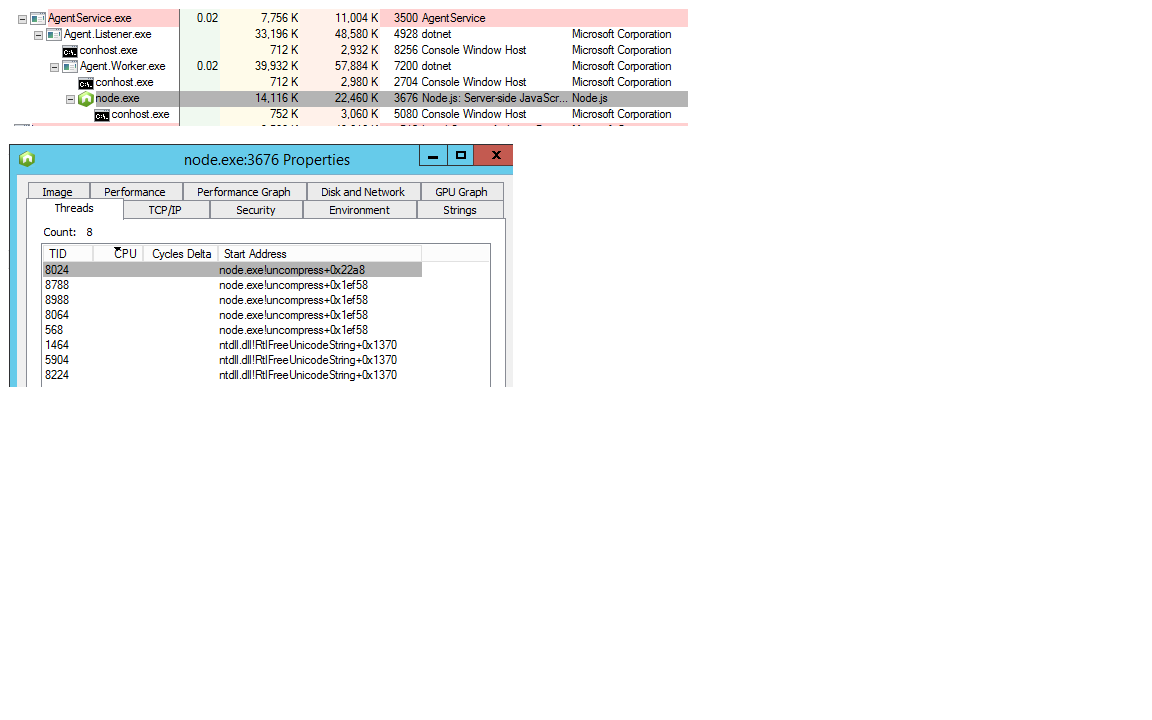
Is there anything else I can do to help finding the cause?
erikrenberg
on 20 Feb 2018
Couple ideas
- Assume this is your project sources on your agent. Have tried a very trivial npm example (no dependencies or one small one) on the same agent? Trying to differentiate environmental / machine vs repro specific to data (npm once had an issue that only reproduced with deep dependency trees with duplicates for example).
- I think npm has a verbose mode. When I logged a bug against them once (case above), their issue template (or something I found) instructed to run with verbose logging and send that with the issue.
If you can narrow to a repro with your data (enough to send us your package.json dependencies?) then we can capture the verbose log with a canned repro to npm. Without those, they won't entertain it based on what I've seen
bryanmacfarlane
on 20 Feb 2018
The above example in this thread is as trivial it can be: All it does is call npm version. No repo involved, no package.json at all. It still has the 3 minutes delays as can be seen in the latest log I added above.
And as I wrote in my initial post, running the same npm version in a Command Line task has got NO delay.
erikrenberg
on 20 Feb 2018
@bryanmacfarlane,
Re: "I think the tool installer needs to update to the latest task lib."
- Actually, in this scenario I think that setting the task specific http(s)_proxy env var is the proper solution for folks who have a proxy for egress to the Internet but not within their own network. The NuGet Tool Downloader uses the typed-rest-client to find the available versions and get a URI. typed-rest-client respects the http(s)_proxy env var. Once the URI is composed, this is passed to vsts-task-tool-lib which again uses typed-rest-client in a round about way to fetch the .tgz. So, in short, setting http(s)_proxy will work and we should probably document it. There is an edge scenario that I need to fix and we can discuss.
@erikrenberg,
It is interesting that 7.x works with no delay and that 8.x and forward exhibits the problem. I will look around the NPM github repo to see if there is an active issue because this task isn't doing anything materially different in the way that it spawns NPM.
keithrob
on 20 Feb 2018
@keithrob - agent config has inclusion / exclusion rules just like browser proxy config.
bryanmacfarlane
on 20 Feb 2018
We are seeing the same npm task delay on tfs 2017 as well. Running the commands just in a command task results in no delay.. running the npm task gives a delay of several minutes very consistently... Just running npm version results in a 6min completion time.
There are a couple of big 3 minute delays that show in the log:
2018-02-26T22:16:31.8729199Z ##[section]Starting: npm ver
...
...
..
2018-02-26T22:16:32.4194083Z [command]C:\Program Files\nodejs\npm.cmd config list
2018-02-26T22:16:35.6396212Z ; cli configs
..
..
..
2018-02-26T22:16:35.6406202Z ; "npm config ls -l" to show all defaults.
2018-02-26T22:16:35.6406730Z
2018-02-26T22:19:43.7832587Z [command]C:\Program Files\nodejs\npm.cmd version
2018-02-26T22:19:45.3155254Z { npm: '5.5.1',
 jeffpriz
on 26 Feb 2018
jeffpriz
on 26 Feb 2018
I'm seeing a similar 3min plus delay on one of my machines, using purely msbuild to execute a npm version command.
Create an msbuild project file that looks like this:
<Project DefaultTargets="Build">
  <Target Name="Build">
    <Exec Command="npm -v" />
  </Target>
</Project>
Save it as something such as runnpm.proj, and then execute it with msbuild. The msbuild initially logs the npm version quite quickly, but then sits apparently doing nothing for over 3 minutes before exiting. The msbuild log looks like the following:
Microsoft (R) Build Engine version 15.5.180.51428 for .NET Framework
Copyright (C) Microsoft Corporation. All rights reserved.

Build started 28/02/2018 15:35:00.
Project "D:\Temp\npmissue2\runnpm.proj" on node 1 (default targets).
Build:
  npm -v
  5.6.0
Done Building Project "D:\Temp\npmissue2\runnpm.proj" (default targets).


Build succeeded.
    0 Warning(s)
    0 Error(s)

Time Elapsed 00:03:12.28
Note the elapsed time, contrasted to running npm -v in the command line which completes very quickly.
This is with node v9.6.1 and npm v5.6.0 and msbuild 15.5.180.51428.
It is not happening on another machine with the same node, npm and msbuild versions however!
Did anyone find an existing issue on the npm repository for this?
 cjwainwright
on 28 Feb 2018
cjwainwright
on 28 Feb 2018
@cjwainwright,
This is good information. You have demonstrated that you can produce the delay from a completely different vector (i.e . forking npm from msbuild). As noted above, the NPM build task also executes a few commands that you would expect to be lightning fast (e.g. npm config ls) but for some reason on some systems there is a delay.
A couple of questions for you:
1) Are the build agent versions the same?
2) Do you have antivirus on both boxes and is that the same?
3) Are either of these systems VMs or containers?
4) Is there anything else that is materially different between the two systems that you can think of?
Finally, I was not able to find anything in NPMs issue tracker that is related to this.
keithrob
on 28 Feb 2018
@keithrob I've just found an issue on the npm repo that seems to be related: https://github.com/npm/npm/issues/19756. And commented there. It seems the node processes are not shutting down for some reason, and when you kill the process in my case the msbuild task completes fine.
The differences between my two machines are:
The affected machine is Windows 7, unaffected machine is Windows 10.
Neither are VMs.
Both running McAffee antivirus. I tried disabling it on the affected machine to no effect.
The affected machine was on a proxy, unaffected not. But I put the unaffected machine on the proxy and it still worked without the 3 minute delay.
Can't think of anything else!
cjwainwright
on 28 Feb 2018
Sounds like the npm process isn't exiting due to some unknown external factor combined with an npm bug.
For the folks that have a solid repro, you can create an issue at npm. In their issue template they have instructions on how to gather and submit an npm debug log.
https://github.com/EmmaRamirez/how-to-submit-your-npm-debug-log
This isn't related to the agent since as noted in msbuild case, once the process is killed, msbuild resumes and completes. In addition, the agent doesn't run npm. It uses node to run npm. This is also not related to TFS version.
This probably comes down to something environmental (OS, Proxies, etc...) raising a bug in npm.
bryanmacfarlane
on 28 Feb 2018
@keithrob @bryanmacfarlane
In the meantime, you may wish to try this workaround of setting the NO_UPDATE_NOTIFIER environment variable
https://github.com/npm/npm/issues/19756#issuecomment-369311403
cjwainwright
on 28 Feb 2018
@cjwainwright,
Ah. I've seen issues with update notifier in the past. Did setting 'NO_UPDATE_NOTIFIER' on your Win7 box stop the delay?
keithrob
on 28 Feb 2018
@keithrob Yes, it stopped the delay for me.
cjwainwright
on 28 Feb 2018
@cjwainwright, thanks.
Closing this issue. To other users who experience this, please set 'NO_UPDATE_NOTIFIER=1' as a build env var whilst the issue is resolved by the npm team.
keithrob
on 28 Feb 2018
And the delay is gone for me too, with NO_UPDATE_NOTIFIER=1.
erikrenberg
on 28 Feb 2018
@keithrob @bryanmacfarlane well I still have this issue even after setting NO_UPDATE_NOTIFIER = 1 as an environment variable and/or passing the --no-update-notifier flag to the npm task as an argument.. so not sure that's all...
jeffpriz
on 28 Feb 2018
yes I'd agree with you @jeffpriz , We have similar issues with yarn which does not use Update Notifier. it only happens with VSTS. It seems that neither VSTS team or Yarn team is interested in investigating the issue...
sandorfr
on 1 Mar 2018
@sandorfr - we can't have one issue that tracks delays in various tools in the build. If you're having an issue with a yarn task or the yarn tool, then log an issue in that appropriate repo. These issues are happening on private agents with external tools (npm, node). We're keeping this open to help everyone communicate and track it down.
@jeffpriz - this specific issue is related to update notifier. Once again, not one issue for any delay issue in various tools. I'm going to update the title of this one to help search hits.
bryanmacfarlane
on 1 Mar 2018
@bryanmacfarlane this is actually why I liked this issue. It was a single point where people where complaining about that class of issues which I could monitor to see if anything would apply to the yarn case.
But I do understand your point ;)
sandorfr
on 2 Mar 2018
Hello,
I got exactly the same problem with the Built-in npm task of TFS 2018 On premise.
But this 3mins delay is repeated 4 times!
Then each build using npm install is taking at least 12mins instead 30 seconds...
Unfortunatly the workaround with the system variable NO_UPDATE_NOTIFIER=1 is not working on my agent...
If someone could help me to find a way to solve that, I would be very glad... :)
Here is my log file where I have added '---' between each two log lines when the 3mins delay happen:
2018-05-30T12:59:24.8197049Z ##[debug]Evaluating condition for step: 'npm install'`
2018-05-30T12:59:24.8198796Z ##[debug]Evaluating: succeeded()
2018-05-30T12:59:24.8199034Z ##[debug]Evaluating succeeded:
2018-05-30T12:59:24.8199668Z ##[debug]=> (Boolean) True
2018-05-30T12:59:24.8200067Z ##[debug]Expanded: True
2018-05-30T12:59:24.8200389Z ##[debug]Result: True
2018-05-30T12:59:24.8200761Z ##[section]Starting: npm install
2018-05-30T12:59:24.8429938Z ==============================================================================
2018-05-30T12:59:24.8430145Z Task         : npm
2018-05-30T12:59:24.8430315Z Description  : Install and publish npm packages, or run an npm command. Supports npmjs.com and authenticated registries like Package Management.
2018-05-30T12:59:24.8430502Z Version      : 1.0.5
2018-05-30T12:59:24.8430633Z Author       : Microsoft Corporation
2018-05-30T12:59:24.8430783Z Help         : [More Information](https://go.microsoft.com/fwlink/?LinkID=613746)
2018-05-30T12:59:24.8430995Z ==============================================================================
2018-05-30T12:59:27.2794707Z ##[debug]agent.TempDirectory=D:\vsts-agent-win-x64-2.129.0_EI_certificats\_work\_temp
2018-05-30T12:59:27.2796581Z ##[debug]loading inputs and endpoints
2018-05-30T12:59:27.2797028Z ##[debug]loading ENDPOINT_AUTH_PARAMETER_SYSTEMVSSCONNECTION_ACCESSTOKEN
2018-05-30T12:59:27.2797427Z ##[debug]loading ENDPOINT_AUTH_SCHEME_SYSTEMVSSCONNECTION
2018-05-30T12:59:27.2797803Z ##[debug]loading ENDPOINT_AUTH_SYSTEMVSSCONNECTION
2018-05-30T12:59:27.2798166Z ##[debug]loading INPUT_COMMAND
2018-05-30T12:59:27.2798511Z ##[debug]loading INPUT_CUSTOMREGISTRY
2018-05-30T12:59:27.2798946Z ##[debug]loading INPUT_PUBLISHREGISTRY
2018-05-30T12:59:27.2799499Z ##[debug]loading INPUT_VERBOSE
2018-05-30T12:59:27.2800318Z ##[debug]loading INPUT_WORKINGDIR
2018-05-30T12:59:27.2803933Z ##[debug]loaded 8
2018-05-30T12:59:27.2820163Z ##[debug]Agent.ProxyUrl=undefined
2018-05-30T12:59:27.2821758Z ##[debug]Agent.CAInfo=undefined
2018-05-30T12:59:27.2822269Z ##[debug]Agent.ClientCert=undefined
2018-05-30T12:59:28.0567711Z ##[debug]check path : D:\vsts-agent-win-x64-2.129.0_EI_certificats\_work\_tasks\Npm_fe47e961-9fa8-4106-8639-368c022d43ad\1.0.5\task.json
2018-05-30T12:59:28.0569766Z ##[debug]set resource file to: D:\vsts-agent-win-x64-2.129.0_EI_certificats\_work\_tasks\Npm_fe47e961-9fa8-4106-8639-368c022d43ad\1.0.5\task.json
2018-05-30T12:59:28.0570319Z ##[debug]system.culture=en-US
2018-05-30T12:59:28.0713216Z ##[debug]command=install
2018-05-30T12:59:28.0764723Z ##[debug]workingDir=D:\vsts-agent-win-x64-2.129.0_EI_certificats\_work\4\s
2018-05-30T12:59:28.0777612Z ##[debug]Build.BuildId=15911
2018-05-30T12:59:28.0778076Z ##[debug]Agent.BuildDirectory=D:\vsts-agent-win-x64-2.129.0_EI_certificats\_work\4
2018-05-30T12:59:28.0778548Z ##[debug]testing directory 'D:\vsts-agent-win-x64-2.129.0_EI_certificats\_work\4\npm'
2018-05-30T12:59:28.0780980Z ##[debug]testing directory 'D:\vsts-agent-win-x64-2.129.0_EI_certificats\_work\4'
2018-05-30T12:59:28.0782925Z ##[debug]mkdir 'D:\vsts-agent-win-x64-2.129.0_EI_certificats\_work\4\npm'
2018-05-30T12:59:28.0819928Z ##[debug]customRegistry=useNpmrc
2018-05-30T12:59:28.0932099Z ##[debug]Using registries in .npmrc
2018-05-30T12:59:28.0933138Z ##[debug]customEndpoint=null
2018-05-30T12:59:28.0944312Z ##[debug]which 'npm'
2018-05-30T12:59:28.1200361Z ##[debug]found: 'C:\Program Files\nodejs\npm.cmd'
2018-05-30T12:59:28.1201092Z ##[debug]which 'npm'
2018-05-30T12:59:28.1329865Z ##[debug]found: 'C:\Program Files\nodejs\npm.cmd'
2018-05-30T12:59:28.1332063Z ##[debug]System.Debug=true
2018-05-30T12:59:28.1337595Z ##[debug]agent.proxyurl=undefined
2018-05-30T12:59:28.1340362Z ##[debug]which 'npm'
2018-05-30T12:59:28.1481622Z ##[debug]found: 'C:\Program Files\nodejs\npm.cmd'
2018-05-30T12:59:28.1483244Z ##[debug]which 'npm'
2018-05-30T12:59:28.1600945Z ##[debug]found: 'C:\Program Files\nodejs\npm.cmd'
2018-05-30T12:59:28.1607026Z ##[debug]C:\Program Files\nodejs\npm.cmd arg: config list -l
2018-05-30T12:59:28.1608664Z ##[debug]C:\Program Files\nodejs\npm.cmd arg: config list -l
2018-05-30T12:59:28.1619549Z ##[debug]exec tool: C:\Program Files\nodejs\npm.cmd
2018-05-30T12:59:28.1620092Z ##[debug]exec tool: C:\Program Files\nodejs\npm.cmd
2018-05-30T12:59:28.1621421Z ##[debug]arguments:
2018-05-30T12:59:28.1622723Z ##[debug]arguments:
2018-05-30T12:59:28.1624095Z ##[debug]   config
2018-05-30T12:59:28.1625420Z ##[debug]   config
2018-05-30T12:59:28.1626847Z ##[debug]   list
2018-05-30T12:59:28.1628336Z ##[debug]   list
2018-05-30T12:59:28.1629604Z ##[debug]   -l
---
2018-05-30T12:59:28.1631104Z ##[debug]   -l
2018-05-30T13:02:40.7416631Z ##[debug]which 'npm'
---
2018-05-30T13:02:40.7533266Z ##[debug]found: 'C:\Program Files\nodejs\npm.cmd'
2018-05-30T13:02:40.7534428Z ##[debug]which 'npm'
2018-05-30T13:02:40.7662380Z ##[debug]found: 'C:\Program Files\nodejs\npm.cmd'
2018-05-30T13:02:40.7663992Z ##[debug]C:\Program Files\nodejs\npm.cmd arg: config get cache
2018-05-30T13:02:40.7664527Z ##[debug]C:\Program Files\nodejs\npm.cmd arg: config get cache
2018-05-30T13:02:40.7667488Z ##[debug]exec tool: C:\Program Files\nodejs\npm.cmd
2018-05-30T13:02:40.7668552Z ##[debug]exec tool: C:\Program Files\nodejs\npm.cmd
2018-05-30T13:02:40.7668987Z ##[debug]arguments:
2018-05-30T13:02:40.7669381Z ##[debug]arguments:
2018-05-30T13:02:40.7669744Z ##[debug]   config
2018-05-30T13:02:40.7670141Z ##[debug]   config
2018-05-30T13:02:40.7670498Z ##[debug]   get
2018-05-30T13:02:40.7671748Z ##[debug]   get
2018-05-30T13:02:40.7672164Z ##[debug]   cache
---
2018-05-30T13:02:40.7672554Z ##[debug]   cache
2018-05-30T13:05:49.8298187Z ##[debug]C:\Program Files\nodejs\npm.cmd arg: install
---
2018-05-30T13:05:49.8299205Z ##[debug]agent.proxyurl=undefined
2018-05-30T13:05:49.8299608Z ##[debug]which 'npm'
2018-05-30T13:05:49.8400159Z ##[debug]found: 'C:\Program Files\nodejs\npm.cmd'
2018-05-30T13:05:49.8400744Z ##[debug]which 'npm'
2018-05-30T13:05:49.8551034Z ##[debug]found: 'C:\Program Files\nodejs\npm.cmd'
2018-05-30T13:05:49.8551934Z ##[debug]C:\Program Files\nodejs\npm.cmd arg: config list -l
2018-05-30T13:05:49.8552364Z ##[debug]C:\Program Files\nodejs\npm.cmd arg: config list -l
2018-05-30T13:05:49.8553012Z ##[debug]exec tool: C:\Program Files\nodejs\npm.cmd
2018-05-30T13:05:49.8553393Z ##[debug]exec tool: C:\Program Files\nodejs\npm.cmd
2018-05-30T13:05:49.8553843Z ##[debug]arguments:
2018-05-30T13:05:49.8554200Z ##[debug]arguments:
2018-05-30T13:05:49.8554576Z ##[debug]   config
2018-05-30T13:05:49.8554912Z ##[debug]   config
2018-05-30T13:05:49.8555345Z ##[debug]   list
2018-05-30T13:05:49.8555692Z ##[debug]   list
2018-05-30T13:05:49.8556051Z ##[debug]   -l
2018-05-30T13:05:49.8556386Z ##[debug]   -l
---
2018-05-30T13:05:49.8561265Z [command]C:\windows\system32\cmd.exe /D /S /C ""C:\Program Files\nodejs\npm.cmd" config list -l"
2018-05-30T13:08:58.9864635Z npm info it worked if it ends with ok
---
2018-05-30T13:08:58.9864897Z ; cli configs
2018-05-30T13:08:58.9870231Z npm verb cli [ 'C:\\Program Files\\nodejs\\node.exe',
2018-05-30T13:08:58.9870633Z npm verb cli   'C:\\Program Files\\nodejs\\node_modules\\npm\\bin\\npm-cli.js',
2018-05-30T13:08:58.9870946Z npm verb cli   'prefix',
2018-05-30T13:08:58.9871236Z npm verb cli   '-g' ]
2018-05-30T13:08:58.9871485Z npm info using [email protected]
2018-05-30T13:08:58.9871737Z npm info using [email protected]
2018-05-30T13:08:58.9872018Z npm verb exit [ 0, true ]
2018-05-30T13:08:58.9872259Z npm info ok
2018-05-30T13:08:58.9872509Z npm info it worked if it ends with ok
2018-05-30T13:08:58.9872797Z npm verb cli [ 'C:\\Program Files\\nodejs\\node.exe',
2018-05-30T13:08:58.9873082Z npm verb cli   'C:\\Program Files\\nodejs\\node_modules\\npm\\bin\\npm-cli.js',
2018-05-30T13:08:58.9873346Z npm verb cli   'config',
2018-05-30T13:08:58.9873628Z npm verb cli   'list',
2018-05-30T13:08:58.9873871Z npm verb cli   '-l' ]
2018-05-30T13:08:58.9874113Z npm info using [email protected]
2018-05-30T13:08:58.9874389Z npm info using [email protected]
2018-05-30T13:08:58.9874739Z npm verb exit [ 0, true ]
2018-05-30T13:08:58.9875999Z npm info ok
2018-05-30T13:08:58.9876787Z long = true
2018-05-30T13:08:58.9877143Z metrics-registry = "http://xcmci52i.formation.cm-cic.fr:8081/artifactory/api/npm/POC_Y130_Angular"
2018-05-30T13:08:58.9877488Z scope = ""
2018-05-30T13:08:58.9877754Z user-agent = "npm/5.5.1 node/v8.9.1 win32 x64"
2018-05-30T13:08:58.9877957Z
2018-05-30T13:08:58.9878231Z ; environment configs
2018-05-30T13:08:58.9878487Z loglevel = "verbose"
2018-05-30T13:08:58.9878763Z userconfig = "D:\\vsts-agent-win-x64-2.129.0_EI_certificats\\_work\\4\\npm\\15911.npmrc"
2018-05-30T13:08:58.9878976Z
2018-05-30T13:08:58.9879249Z ; builtin config undefined
2018-05-30T13:08:58.9879513Z prefix = "C:\\Users\\AgentTFSY130_DB\\AppData\\Roaming\\npm"
2018-05-30T13:08:58.9879803Z registry = "http://xcmci52i.formation.cm-cic.fr:8081/artifactory/api/npm/POC_Y130_Angular"
2018-05-30T13:08:58.9880043Z
2018-05-30T13:08:58.9881206Z ; default values
2018-05-30T13:08:58.9881470Z access = null
2018-05-30T13:08:58.9881768Z allow-same-version = false
2018-05-30T13:08:58.9882012Z also = null
2018-05-30T13:08:58.9882252Z always-auth = false
2018-05-30T13:08:58.9882901Z auth-type = "legacy"
2018-05-30T13:08:58.9883152Z bin-links = true
2018-05-30T13:08:58.9883396Z browser = null
2018-05-30T13:08:58.9883666Z ca = null
2018-05-30T13:08:58.9883932Z cache = "C:\\Users\\AgentTFSY130_DB\\AppData\\Roaming\\npm-cache"
2018-05-30T13:08:58.9884194Z cache-lock-retries = 10
2018-05-30T13:08:58.9884469Z cache-lock-stale = 60000
2018-05-30T13:08:58.9884718Z cache-lock-wait = 10000
2018-05-30T13:08:58.9884961Z cache-max = null
2018-05-30T13:08:58.9888662Z cache-min = 10
2018-05-30T13:08:58.9888993Z cafile = undefined
2018-05-30T13:08:58.9889238Z cert = null
2018-05-30T13:08:58.9889498Z cidr = null
2018-05-30T13:08:58.9889741Z color = true
2018-05-30T13:08:58.9889981Z commit-hooks = true
2018-05-30T13:08:58.9890221Z depth = null
2018-05-30T13:08:58.9890513Z description = true
2018-05-30T13:08:58.9890755Z dev = false
2018-05-30T13:08:58.9891018Z dry-run = false
2018-05-30T13:08:58.9891290Z editor = "notepad.exe"
2018-05-30T13:08:58.9891553Z engine-strict = false
2018-05-30T13:08:58.9891793Z fetch-retries = 2
2018-05-30T13:08:58.9892059Z fetch-retry-factor = 10
2018-05-30T13:08:58.9892307Z fetch-retry-maxtimeout = 60000
2018-05-30T13:08:58.9892560Z fetch-retry-mintimeout = 10000
2018-05-30T13:08:58.9892823Z force = false
2018-05-30T13:08:58.9893062Z git = "git"
2018-05-30T13:08:58.9893301Z git-tag-version = true
2018-05-30T13:08:58.9893558Z global = false
2018-05-30T13:08:58.9893800Z global-style = false
2018-05-30T13:08:58.9894074Z globalconfig = "C:\\Users\\AgentTFSY130_DB\\AppData\\Roaming\\npm\\etc\\npmrc"
2018-05-30T13:08:58.9894387Z globalignorefile = "C:\\Users\\AgentTFSY130_DB\\AppData\\Roaming\\npm\\etc\\npmignore"
2018-05-30T13:08:58.9894656Z group = 0
2018-05-30T13:08:58.9894894Z ham-it-up = false
2018-05-30T13:08:58.9895221Z heading = "npm"
2018-05-30T13:08:58.9895495Z https-proxy = null
2018-05-30T13:08:58.9895767Z if-present = false
2018-05-30T13:08:58.9896007Z ignore-prepublish = false
2018-05-30T13:08:58.9896287Z ignore-scripts = false
2018-05-30T13:08:58.9896944Z init-author-email = ""
2018-05-30T13:08:58.9897251Z init-author-name = ""
2018-05-30T13:08:58.9897504Z init-author-url = ""
2018-05-30T13:08:58.9897791Z init-license = "ISC"
2018-05-30T13:08:58.9898056Z init-module = "C:\\Users\\AgentTFSY130_DB\\.npm-init.js"
2018-05-30T13:08:58.9898319Z init-version = "1.0.0"
2018-05-30T13:08:58.9898591Z json = false
2018-05-30T13:08:58.9898829Z key = null
2018-05-30T13:08:58.9899071Z legacy-bundling = false
2018-05-30T13:08:58.9899342Z link = false
2018-05-30T13:08:58.9899587Z local-address = undefined
2018-05-30T13:08:58.9899841Z ; loglevel = "notice" (overridden)
2018-05-30T13:08:58.9900118Z logs-max = 10
2018-05-30T13:08:58.9900363Z ; long = false (overridden)
2018-05-30T13:08:58.9900803Z maxsockets = 50
2018-05-30T13:08:58.9901219Z message = "%s"
2018-05-30T13:08:58.9902245Z ; metrics-registry = null (overridden)
2018-05-30T13:08:58.9902625Z node-version = "8.9.1"
2018-05-30T13:08:58.9902926Z offline = false
2018-05-30T13:08:58.9903181Z onload-script = null
2018-05-30T13:08:58.9903641Z only = null
2018-05-30T13:08:58.9903927Z optional = true
2018-05-30T13:08:58.9904165Z otp = 0
2018-05-30T13:08:58.9904405Z package-lock = true
2018-05-30T13:08:58.9904726Z parseable = false
2018-05-30T13:08:58.9904974Z prefer-offline = false
2018-05-30T13:08:58.9905222Z prefer-online = false
2018-05-30T13:08:58.9905534Z ; prefix = "C:\\Program Files\\nodejs" (overridden)
2018-05-30T13:08:58.9905801Z production = false
2018-05-30T13:08:58.9906041Z progress = true
2018-05-30T13:08:58.9906323Z proxy = null
2018-05-30T13:08:58.9906577Z read-only = false
2018-05-30T13:08:58.9906822Z rebuild-bundle = true
2018-05-30T13:08:58.9907173Z ; registry = "https://registry.npmjs.org/" (overridden)
2018-05-30T13:08:58.9907443Z rollback = true
2018-05-30T13:08:58.9907679Z save = true
2018-05-30T13:08:58.9907940Z save-bundle = false
2018-05-30T13:08:58.9908392Z save-dev = false
2018-05-30T13:08:58.9909675Z save-exact = false
2018-05-30T13:08:58.9909959Z save-optional = false
2018-05-30T13:08:58.9910256Z save-prefix = "^"
2018-05-30T13:08:58.9910493Z save-prod = false
2018-05-30T13:08:58.9910827Z scope = ""
2018-05-30T13:08:58.9911082Z script-shell = null
2018-05-30T13:08:58.9911326Z scripts-prepend-node-path = "warn-only"
2018-05-30T13:08:58.9911609Z searchexclude = null
2018-05-30T13:08:58.9911921Z searchlimit = 20
2018-05-30T13:08:58.9912157Z searchopts = ""
2018-05-30T13:08:58.9912405Z searchstaleness = 900
2018-05-30T13:08:58.9912641Z send-metrics = false
2018-05-30T13:08:58.9912951Z shell = "C:\\windows\\system32\\cmd.exe"
2018-05-30T13:08:58.9913208Z shrinkwrap = true
2018-05-30T13:08:58.9913442Z sign-git-tag = false
2018-05-30T13:08:58.9913734Z sso-poll-frequency = 500
2018-05-30T13:08:58.9913987Z sso-type = "oauth"
2018-05-30T13:08:58.9914222Z strict-ssl = true
2018-05-30T13:08:58.9914526Z tag = "latest"
2018-05-30T13:08:58.9914781Z tag-version-prefix = "v"
2018-05-30T13:08:58.9915039Z timing = false
2018-05-30T13:08:58.9915296Z tmp = "D:\\vsts-agent-win-x64-2.129.0_EI_certificats\\_work\\_temp"
2018-05-30T13:08:58.9915601Z umask = 0
2018-05-30T13:08:58.9915831Z unicode = false
2018-05-30T13:08:58.9916061Z unsafe-perm = true
2018-05-30T13:08:58.9916347Z usage = false
2018-05-30T13:08:58.9916575Z user = 0
2018-05-30T13:08:58.9916836Z ; user-agent = "npm/{npm-version} node/{node-version} {platform} {arch}" (overridden)
2018-05-30T13:08:58.9917172Z ; userconfig = "C:\\Users\\AgentTFSY130_DB\\.npmrc" (overridden)
2018-05-30T13:08:58.9917425Z version = false
2018-05-30T13:08:58.9917658Z versions = false
2018-05-30T13:08:58.9917985Z viewer = "browser"
2018-05-30T13:08:58.9918171Z
2018-05-30T13:08:58.9918353Z
2018-05-30T13:08:58.9919123Z ##[debug]exec tool: C:\Program Files\nodejs\npm.cmd
2018-05-30T13:08:58.9919518Z ##[debug]arguments:
2018-05-30T13:08:58.9919926Z ##[debug]   install
2018-05-30T13:08:58.9920227Z [command]C:\windows\system32\cmd.exe /D /S /C ""C:\Program Files\nodejs\npm.cmd" install"
2018-05-30T13:08:59.4881780Z npm info it worked if it ends with ok
2018-05-30T13:08:59.4892426Z npm verb cli [ 'C:\\Program Files\\nodejs\\node.exe',
2018-05-30T13:08:59.4893691Z npm verb cli   'C:\\Program Files\\nodejs\\node_modules\\npm\\bin\\npm-cli.js',
2018-05-30T13:08:59.4894375Z npm verb cli   'prefix',
2018-05-30T13:08:59.4895743Z npm verb cli   '-g' ]
2018-05-30T13:08:59.4896093Z npm info using [email protected]
2018-05-30T13:08:59.4896358Z npm info using [email protected]
2018-05-30T13:08:59.4896681Z npm verb exit [ 0, true ]
2018-05-30T13:08:59.4896938Z npm info ok
2018-05-30T13:09:00.0092734Z npm info it worked if it ends with ok
2018-05-30T13:09:00.0093515Z npm verb cli [ 'C:\\Program Files\\nodejs\\node.exe',
2018-05-30T13:09:00.0093905Z npm verb cli   'C:\\Program Files\\nodejs\\node_modules\\npm\\bin\\npm-cli.js',
2018-05-30T13:09:00.0094582Z npm verb cli   'install' ]
2018-05-30T13:09:00.0094930Z npm info using [email protected]
2018-05-30T13:09:00.0095209Z npm info using [email protected]
2018-05-30T13:09:00.3886298Z npm verb npm-session 4636bbca1d01a2a9
2018-05-30T13:09:00.4824674Z npm info lifecycle [email protected]~preinstall: [email protected]
2018-05-30T13:09:01.6425134Z npm http fetch GET 304 http://xcmci52i.formation.cm-cic.fr:8081/artifactory/api/npm/POC_Y130_Angular/@types%2frequirejs 188ms
2018-05-30T13:09:01.7307849Z npm verb correctMkdir C:\Users\AgentTFSY130_DB\AppData\Roaming\npm-cache\_locks correctMkdir not in flight; initializing
2018-05-30T13:09:01.7369135Z npm verb lock using C:\Users\AgentTFSY130_DB\AppData\Roaming\npm-cache\_locks\staging-acba892bb1664499.lock for D:\vsts-agent-win-x64-2.129.0_EI_certificats\_work\4\s\node_modules\.staging
2018-05-30T13:09:01.7388053Z npm verb unlock done using C:\Users\AgentTFSY130_DB\AppData\Roaming\npm-cache\_locks\staging-acba892bb1664499.lock for D:\vsts-agent-win-x64-2.129.0_EI_certificats\_work\4\s\node_modules\.staging
2018-05-30T13:09:01.7412940Z npm info linkStuff [email protected]
2018-05-30T13:09:01.7414246Z npm verb linkBins [email protected]
2018-05-30T13:09:01.7419079Z npm verb linkMans [email protected]
2018-05-30T13:09:01.7429258Z npm info lifecycle [email protected]~install: [email protected]
2018-05-30T13:09:01.7437082Z npm info lifecycle [email protected]~postinstall: [email protected]
2018-05-30T13:09:01.7451704Z npm info lifecycle [email protected]~prepublish: [email protected]
2018-05-30T13:09:01.7451893Z npm info lifecycle [email protected]~prepare: [email protected]
2018-05-30T13:09:01.7642070Z npm verb saving []
2018-05-30T13:09:01.7775717Z npm info lifecycle undefined~preshrinkwrap: undefined
2018-05-30T13:09:01.7815774Z npm info lifecycle undefined~shrinkwrap: undefined
2018-05-30T13:09:01.7930023Z npm info lifecycle undefined~postshrinkwrap: undefined
2018-05-30T13:09:01.7964307Z npm WARN [email protected] No repository field.
2018-05-30T13:09:01.7965038Z npm WARN [email protected] No license field.
2018-05-30T13:09:01.7965293Z
2018-05-30T13:09:01.7965548Z up to date in 1.36s
2018-05-30T13:09:01.8025111Z npm verb exit [ 0, true ]
---
2018-05-30T13:09:01.8032692Z npm info ok
2018-05-30T13:12:08.1614316Z ##[debug]rc:0
---
2018-05-30T13:12:08.1616070Z ##[debug]success:true
2018-05-30T13:12:08.1617038Z ##[debug]rm -rf D:\vsts-agent-win-x64-2.129.0_EI_certificats\_work\4\npm\15911.npmrc
2018-05-30T13:12:08.1617522Z ##[debug]Agent.BuildDirectory=D:\vsts-agent-win-x64-2.129.0_EI_certificats\_work\4
2018-05-30T13:12:08.1617976Z ##[debug]rm -rf D:\vsts-agent-win-x64-2.129.0_EI_certificats\_work\4\npm
2018-05-30T13:12:08.1618346Z ##[debug]removing directory
2018-05-30T13:12:08.2086238Z ##[section]Finishing: npm install`
 henkin67
on 31 May 2018
henkin67
on 31 May 2018
@henkin67 - how did you set the envvar. Add a step right before npm to dump envvars (cmd line task run 'env')
@keithrob - I wonder if the npm task should set this envvar until it's resolved. 8.x is the latest LTS ...
bryanmacfarlane
on 31 May 2018
@bryanmacfarlane : You are rigth, the NO_UPDATE_NOTIFIER is not set at all (I run a ps script with Get-ChildItem Env: to check).
I set the variable into the System variables of the VM (logged with my account not the one used by the agent).
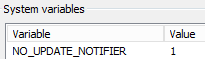
henkin67
on 31 May 2018
@keithrob - the other reason I think it's good to set the envvar in the task is the update notifier really isn't helpful in the ci case - as we can see here it can only cause issues. often in ci, user specifically specifies version to use by either installing it on their build server of using an installer task.
You can also set in option specifically on the invocation of npm process.
leaving open for consideration.
bryanmacfarlane
on 31 May 2018
@henkin67 : Maybe you just need to restart the server? (if you haven't tried already)
I put NO_UPDATE_NOTIFIER as a build variable with the value 1 on the Variables tab of the build definition, and that worked fine.
@bryanmacfarlane : the npm task setting NO_UPDATE_NOTIFIER to 1 (if that envvar isn't already set to something) sounds like a good and pragmatic idea!
erikrenberg
on 31 May 2018
I just tried to set NO_UPDATE_NOTIFIER to 1 through the variable of the build and it work perfectly.
My task took 18 secondes now.
I'm quite new with TFS and I'm still not very familiar with the scope of the variables.
henkin67
on 31 May 2018
@erikrenberg : You are right, both solutions work:
- set the System variables and restarting the service
- set the variable in the build defiition
Thanks for your help @erikrenberg and @bryanmacfarlane !
henkin67
on 31 May 2018
Seems like everyone with a proxy is hitting this. Not a huge fan of embedding this logic in the task but I agree update+CI doesn't make sense.
keithrob
on 30 Jul 2018
Either the task does it or you push the consumer of the task to do it (and discover they need to do it). In the task you 100% reliably whether the agent is configured to use a proxy. Since the task packages up how to run tools given the appropriate environment, I think it's where it should be done.
bryanmacfarlane
on 30 Jul 2018
@keithrob seems like it would make sense to have the task do this. Can you elaborate more on your concerns? In general, I think we should rely on the Tool Installer infra to handle the version of Node/npm used in builds, and override any (seemingly problematic) npm version management/updater that's intended for interactive use.
 infin8x
on 30 Jul 2018
infin8x
on 30 Jul 2018
@henkin67 we're doing a clean-up pass of old GitHub issues. Have you got everything working here/can this issue be closed? Thanks in advance.
infin8x
on 2 Apr 2019
Hello! I'm a PM over on the Azure Artifacts team. We haven't heard from this issue in a while, I wanted to drop in here and address some of these issues with the news that we're currently reevaluating the types of tasks we offer in Azure Pipelines, and looking to focus more on lighter-weight tasks that cover authentication and setup. In lieu of the task redesign, we're going to forego making changes to the current tasks (with a few exceptions). We hope the new tasks we spin up in the next quarter or so are easier and more helpful, be on the lookout!
 elbatk
on 28 May 2019
elbatk
on 28 May 2019
Related issues
 yaananth
·
3Comments
yaananth
·
3Comments
 pharring
·
3Comments
pharring
·
3Comments
 richard-ob
·
3Comments
richard-ob
·
3Comments
 gregpakes
·
3Comments
gregpakes
·
3Comments
 HenrikStanley
·
3Comments
HenrikStanley
·
3Comments
Most helpful comment
(I upgraded to Node 8.9.4 with NPM 5.6.0 last week for other reasons, but that didn't improve the delays.).
I only have that version of Node installed on the build machine. Are you saying that adding a "Node Tool Installer" task with the spec 8.9.4 somehow could improve it? (sounds unlikely because the original logs already show a late Node-version being used).
I don't want to cherry-pick an old Node version to get the builds to run without delays, rather I want the build-system's "NPM task" to work as it should with the latest Node LTS (which we need because our builds require it).
As @markjsc writes; switching from the NPM task to command line task has no such delays....
Is there something else I can do to help you, or somebody, fixing this issue?