Azure-pipelines-tasks: Wrong content-type for SVG extension
AzCopy /SetContentType puts automatic content-type based on file extension
But it does it wrong for .svg extension.
It should be
image/svg+xml
instead current/wrong:
application/octet-stream
This needs to be fixed
 hkusulja
All 42 comments
I have the same issue with the azcopy within VSTS.
Where does the azcopy tool get a list of content types from?
 Philo
on 13 Oct 2017
Philo
on 13 Oct 2017
This is a huge blocker to our adoption of VSTS for releases as we were expecting to be able to build a release pipeline that would support uploading web assets to a CDN (blob storage)
Philo
on 13 Oct 2017
@hkusulja and @Philo
Acknowledging.
We are looking into this issue will update you on cause and fix for this issue soon
 Ajay-MS
on 15 Oct 2017
Ajay-MS
on 15 Oct 2017
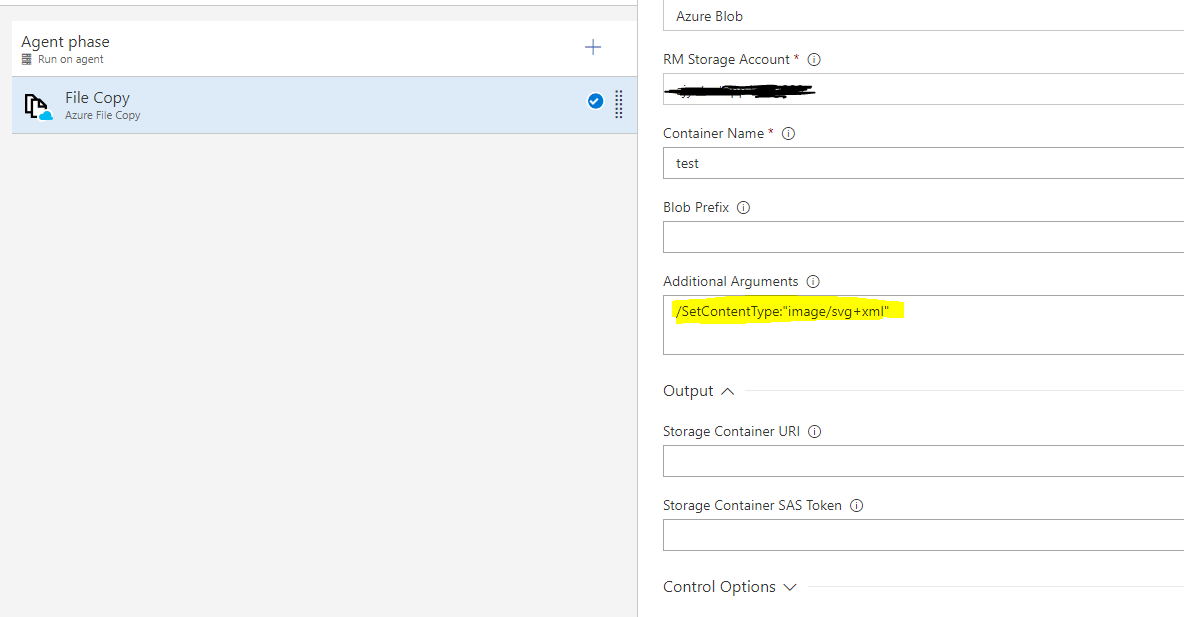
Provide following arguments as additional argument to task for SVG file.
_/SetContentType:"image/svg+xml"_
Screenshot of storage explorer after copying SVG file to blob with above-mentioned arguments.

Let me know if the issue still persists even after providing this argument.
Ajay-MS
on 15 Oct 2017
Thanks for the reply, setting individual content types does work, but if u are uploading multiple files of different types you have to rely on the /SetContentType argument without any options, the issue to wider reaching than that.
In my scenario I have a set of build artifacts produced from a build task (gulp), these artifacts are then deployed via the task during release. The expectation is that I can specify a source and destination and that the /SetContentType argument has a greater understanding of modern mime types and file extensions for the web world (svg, woff, etc). If this isn't possible then the task itself should perhaps support a method to manually present a key/value list of extension -> type mappings that can be used. Ideally this would be part of the underlying azcopy tool.
Azcopy /contenttype:[svg,image/svg+xml] /contenttype:[woff,application/woff]
These would be appended to the existing known content types that are read from somewhere?
Philo
on 16 Oct 2017
@Philo
This is an issue with azCopy itself as it's not aware of mime type for svg, woff file type. I have raised an internal issue with AzCopy team and will update you on this issue.
currently, you can unblock yourself with a workaround of using multiple Azure File Copy task with specifying /Pattern:*.svg
E.g.
You RD will have task in the following pattern
- Azure File Copy to copy all contents of folder
- Azure File Copy to copy on svg file ( /Pattern:*.svg /SetContentType:"image/svg+xml")
Ajay-MS
on 17 Oct 2017
@Ajay-MS thank you for internal escalation. The /Pattern:*.svg does not work for me
hkusulja
on 17 Oct 2017
@hkusulja and @Philo
For automatically set content, AzCopy first tries to get content type by file’s extension with a .Net framework interface, if it cannot a content type with this interface, AzCopy tries to get content type from registry: HKEY_CLASSES_ROOT/
Could you try to set content type for each file extension in the registry and try AzCopy again? For example, if you want to set content type "image/svg+xml" to all blob with extension “.svg”, you can set value of registry key HKEY_CLASSES_ROOT/.svg/Content Type to “image/svg+xml”.
Ajay-MS
on 18 Oct 2017
Registry is already like that, so no effect
[HKEY_CLASSES_ROOT\.svg]
@="svgfile"
"Content Type"="image/svg+xml"

[HKEY_CLASSES_ROOT\.svg\OpenWithProgIds]
"svgfile"=""
I also do not understand why /Pattern:*.svg does not work :/ as temporary workaround. Because who knows when AzCopy will be fixed.
hkusulja
on 18 Oct 2017
Above response was from AzCopy team itself.
Can you please share your email Id so that I can schedule a call to look into this issue why /Pattern:*.svg is not working for you.
Ajay-MS
on 18 Oct 2017
hkusulja AT 3pro.eu is my email and skype for msg / calls.
hkusulja
on 18 Oct 2017
I also do not understand why /Pattern:*.svg does not work :/ as temporary workaround. Because who knows when AzCopy will be fixed.
I believe the /pattern:*.svg argument won't work if your files/blobs are within nested directories, since the pattern argument is more of a file/blob prefix match? (according to the docs)
For my specific use-case, and assuming that the registry update does work (but perhaps requires a reboot/logout to reload the hive), is it possible for the hosted build agents within VSTS can be updated with a greater set of modern content types?
Philo
on 18 Oct 2017
It was my mistake, i missed column sign after parameter name.
So permanent resolution is to AzCopy team to fix .svg to look for the HKEY_CLASSES_ROOT in registry.
And temporary resolution as per @Ajay-MS suggestion is just to create a copy of the same VS TS task and put in Task parameters:
/Pattern:*.svg /SetContentType:"image/svg+xml"
So I am closing this as resolved, however internal AzCopy team needs to fix their part.
hkusulja
on 18 Oct 2017
There is also, another/better solution, and that is just to have newer AzCopy inside VS TS.
Download and install AzCopy latest version, and overwrite the AzCopy binaries at your task on build server D:\_work\_tasks\AzureFileCopy_eb72cb01-a7e5-427b-a8a1-1b31ccac8a43\1.0.104\AzCopy
Then all content types are working correctly (according to Windows registry, which is by default correct) with SetContentType.
So what is ETA for Microsoft to update VS TS task to use latest AzCopy version?
hkusulja
on 2 Nov 2017
When using azure blob storage to back website assets either directly or via a cdn, with support for common file types missing has led us to opt toinbestigate using AWS instead.
Philo
on 2 Nov 2017
@Philo I have information that this VS TS task will be updated with latest AzCopy (which I can confirm it works normally) in next sprint / release, which has ETA on 25 November 2017
hkusulja
on 2 Nov 2017
Thanks for the update, i will endeavour to delay our decision until this time.
Can I confirm how this functions for a privately hosted work pipeline? Would I need to install the latest azcopy onto the build agent or are the executables for azcopy transferred to the build agent during the build and executed?
Philo
on 2 Nov 2017
@Philo VS TS - Task - "Azure File copy" , delivery binaries from VS TS / cloud to your build machine.
Temporary you can manually overwrite AzCopy binary files in your \_work\_tasks\ ...
hkusulja
on 2 Nov 2017
I have tried with the latest version of the task on a Hosted Agent today, and the problem still persists. Is there a manual step I must perform before I get the latest version of AzCopy in my releases? I noticed the task is still version 1.0.104 (just like a couple of weeks ago since I last checked).
 Vossekop
on 29 Nov 2017
Vossekop
on 29 Nov 2017
@Philo , We are working on updating the AzCopy tool to latest version in VSTS. We will update here once that is done.
My understanding of your scenario is you are using Azure File Copy task to copy your build artifact to some Azure VM and using PowerShellOnTargetMachine task to do some deployment on the target VM.
You can try out Deployment Group feature in your scenario which dont has any AzCopy dependency. This is pull based deployment model. You can configure agent on the target Machine and the artifact will be downloaded directly to the target VM, so we dont need to use AzureFileCopy task to copy the bit. You have to use PowerShell task to do your deployment as the scripts are present on the agent machine itself. Please refer to the below docs for more details.
https://docs.microsoft.com/en-us/vsts/build-release/concepts/definitions/release/deployment-groups/
https://docs.microsoft.com/en-us/vsts/build-release/concepts/definitions/release/deployment-groups/howto-provision-deployment-group-agents
https://blogs.msdn.microsoft.com/devops/2017/05/11/announcing-public-preview-of-the-new-deployment-groups-in-release-management/
https://www.youtube.com/watch?v=535HmFjzrmg
Let us know if this helps.
 niadak
on 30 Nov 2017
niadak
on 30 Nov 2017
Any indication on when this will happen? My scenario is somewhat different. I want to automatically deploy Azure B2C custom templates. These need to be on a storage account and our templates need to contain SVG files. Auto deployment works, but the templates are not displayed correctly because the mime type of the SVG files are incorrect. (which means I change them manually now after each deployment).
Vossekop
on 30 Nov 2017
Still not working. AzCopy is now on version 7.1, agents are still on v 3.1.
Any update?
 ghost
on 13 Feb 2018
ghost
on 13 Feb 2018
Just wanted to raise this again, since it's been a while since the last update. I'm still facing issues with svg having the wrong content-type. Any updates?
 tomverhoeff
on 7 Mar 2018
tomverhoeff
on 7 Mar 2018
We appreciate you taking the time to report this problem. We are currently prioritizing problems that are impacting a broad set of our customers, so we may not be able to investigate this one immediately.
We know this problem is important to you, so we will continue to monitor it.
 RoopeshNair
on 9 Mar 2018
RoopeshNair
on 9 Mar 2018
Another upvote on this one. The mime type support and functionality on blob storage is really sub par. A lot of time is wasted debugging issues that are related to Azure Storage nuking or not setting MIME types correctly for pretty web standard file formats.
 ndonnell
on 13 Mar 2018
ndonnell
on 13 Mar 2018
This is still not resolved from Microsoft side.
VS TS agent uses its own old version of AzCopy tool in folder:
C:_work_tasks\AzureFileCopy_eb72cb01-a7e5-427b-a8a1-1b31ccac8a43\1.0.109\AzCopy
where AzCopy.exe is 3.1.0.93
You can manually overwrite files from latest AzCopy - http://aka.ms/downloadazcopy
where AzCopy.exe is 7.1.0.25
I hope Microsoft will update VS TS Agent to use newer version of AzCopy.exe in its _tasks folder
@RoopeshNair and @Ajay-MS , can you please escalate this to be resolved ASAP ?
Thank you,
Kind regards
hkusulja
on 22 Mar 2018
Appreciate you inputs, we will plan for this to be take up soon after //build. (~3-4 months). Tracking this internally.
RoopeshNair
on 23 Mar 2018
While this is still not fixed, I use the following powershell script to set the correct content type after the files have been uploaded (it is an inline script in a VSTS Release Azure Powershell task, hence the variable references):
$sa= Get-AzureRmStorageAccount -ResourceGroupName $(ResourceGroupName) -Name $(StorageAccountName)
$ctx = $sa.Context
$blobs = Get-AzureStorageBlob -Container $(ContainerName) -Context $ctx | Where-Object {$_.Name.EndsWith("$(SearchExtension)")}
foreach($blob in $blobs)
{
$cbb = $blob.ICloudBlob
$cbb.Properties.ContentType = "$(ContentType)"
$cbb.SetProperties()
}
Vossekop
on 23 Mar 2018
@Vossekop - thanks for sharing a great tip!
RoopeshNair
on 23 Mar 2018
So the current estimate is that this issue will require approximately 8 months from being raised (Oct 2017 to June 2018) to being fixed. Where the fix primarily involves updating to a newer version of an existing MS tool (azcopy). I appreciate there are a lot of issues and features you have on your backlog, but from the outside this doesnt feel like one that requires significant effort to correct?
Being on top of bugs and issues has to have similar priority to the implementation of features to show off at the next build event?
Philo
on 23 Mar 2018
FYI - I managed to fix our issue with non-supported json mime in the Linux version of Azcopy by going into the bin folder and adding the mime types I wanted to the AzCopyConfig.json file.
From: Phil Oyston [mailto:[email protected]]
Sent: 23 March 2018 12:06
To: Microsoft/vsts-tasks vsts-tasks@noreply.github.com
Cc: Neil Donnell neil.donnell@inseinc.com; Manual manual@noreply.github.com
Subject: Re: [Microsoft/vsts-tasks] Wrong content-type for SVG extension (#5590)
So the current estimate is that this issue will require approximately 8 months from being raised (Oct 2017 to June 2018) to being fixed. Where the fix primarily involves updating to a newer version of an existing MS tool (azcopy). I appreciate there are a lot of issues and features you have on your backlog, but from the outside this doesnt feel like one that requires significant effort to correct?
Being on top of bugs and issues has to have similar priority to the implementation of features to show off at the next build event?
—
You are receiving this because you are subscribed to this thread.
Reply to this email directly, view it on GitHubhttps://github.com/Microsoft/vsts-tasks/issues/5590#issuecomment-375644952, or mute the threadhttps://github.com/notifications/unsubscribe-auth/AM-llQSUlctWl529X5kGe_sCZlndBv29ks5thOUogaJpZM4PyfRJ.
ndonnell
on 23 Mar 2018
@Philo,
Appreciate your feedback. Being on top of bugs is definitely a higher priority than rolling out new features. Adding to that, we are prioritizing problems that are impacting a broad set of our customers, We are actively monitoring this thread. Rest assured that we will address this issue at the earliest possible opportunity.
RoopeshNair
on 26 Mar 2018
If I was in a position to submit a PR to update the AzCopy utility version I would, however this is downloaded from a storage account (https://vstsagenttools.blob.core.windows.net/tools/azcopy/3.1/AzCopy.zip):
https://github.com/Microsoft/vsts-tasks/blob/master/Tasks/AzureFileCopy/make.json#L23
Updating this to the latest version v7.1 improves support significantly (as suggested previously) and I am struggling to see how this is impossible to include in an upcoming sprint. The number of affected users will be be reflected purely in this thread and I hazrd to guess that low usage of this task is as likely related to it this problem more so than the general need for a robust, functional task to upload to Azure storage.
I am now left to feedback internally on our evaluation of migrating some 200+ projects into VSTS, many of which require exactly this functionality.
Philo
on 5 Apr 2018
@Philo - we plan to take this up in the upcoming sprint. Will keep this thread posted
RoopeshNair
on 6 Apr 2018
@RoopeshNair - thank you for the positive news :)
Philo
on 6 Apr 2018
Any update on this? Our build agent was pushed an update approx 4/18 w/ 1.0.112 and this was overwritten with the old version again.
 NizZ8
on 25 Apr 2018
NizZ8
on 25 Apr 2018
This work is in progress and is planned to be available through next sprintly deployment. So you can expect it by this month's end.
 rajatagrawal-dev
on 2 May 2018
rajatagrawal-dev
on 2 May 2018
I'm using version 7.2.0 on Ubuntu and the issue still exists. From the azcopy docs i can see that a list of mime types is provided on Ubuntu at /usr/lib/azcopy/AzCopyConfig.json. A quick cat of the json file shows that svg isn't listed as a Mime type so im guessing it defaults to application/octet-stream
Just checked this and updating the config file with a mime type for svg resolves issue on Linux.
 bitdepth
on 2 Aug 2018
bitdepth
on 2 Aug 2018
@bitdepth Since your issue is related to AzCopy itself, I recommend you raise an issue here: https://github.com/Azure/azure-storage-net-data-movement, to get the right traction.
rajatagrawal-dev
on 3 Aug 2018
Any update on this issue? We are currently facing it and trying various workarounds that were already suggested, unluckily so far.
The issue's solution has already been postponed several times. I can't know what you are doing internally to make it work and don't want to question your efforts. However, it would only be fair to open this issue as it has not been resolved.
@RoopeshNair, you have closed the issue half a year ago. Can you reopen it now?
 aleksandersmierciak
on 20 Aug 2018
aleksandersmierciak
on 20 Aug 2018
@aleksandersmierciak What version of Azure File Copy task are you using? Please check in the logs and let us know.
rajatagrawal-dev
on 20 Aug 2018
@rajatagrawal-dev, apologies, it was my mistake. Upon setting the correct Azure File Copy 2.* (2.0.7) Optional arguments we made it work; the content-type for an SVG file is image/svg+xml.
aleksandersmierciak
on 20 Aug 2018
Related issues
 TheRealEdwardCullen
·
3Comments
TheRealEdwardCullen
·
3Comments
 divyesh-parikh
·
3Comments
divyesh-parikh
·
3Comments
 MikahB
·
3Comments
MikahB
·
3Comments
 ThomasBarnekow
·
3Comments
ThomasBarnekow
·
3Comments
 Mardoxx
·
3Comments
Mardoxx
·
3Comments
Most helpful comment
@Philo
This is an issue with azCopy itself as it's not aware of mime type for svg, woff file type. I have raised an internal issue with AzCopy team and will update you on this issue.
currently, you can unblock yourself with a workaround of using multiple Azure File Copy task with specifying /Pattern:*.svg
E.g.
You RD will have task in the following pattern