Azure-pipelines-tasks: Copy Files using Clean Target Folder sometimes fails with EPERM: operation not permitted
I have release definitions having the "Copy Files" task and "Clean target folder" option checked.
Most of the deployments are successfull, so security seems rights.
Service account is in server local admin group which have full control of folder within NTFS security.
Sometimes the tasks end up giving the EPERM: operation not permitted error message. After getting the error, we can see that the folder deletion occured correctly because the folder exists no more. We just have to press "Deploy" again and the deployment ends up good. The issue seems to be "on and off" because we had 5 straight good release before hitting the problem. Then pressing re-deploy did the job. The next release got again the issue and we needed to re-deploy twice before ending up the release.
When the issue occured, we are sure no Windows Explorer were open by dev team into the folder that got cleanup.
Do you have an idea what can cause this issue?
 perreaultd
All 33 comments
Any hint on this? Got the error twice in a row again this moring.
perreaultd
on 6 Oct 2017
@perreaultd A workaround is to do the delete yourself. If you have antivirus on, I suspect that adding an exclusion for folder would workaround the issue as well.
I suspect the issue is occurring because node unlink() decrements the ref count on the file, and the OS deletes the file after all ref counts are removed. If contents in the folder are still pretty fresh, then anti-virus may not be done scanning the files yet. Then you are hitting a race condition attempting to recreate the folder/files.
 ericsciple
on 8 Oct 2017
ericsciple
on 8 Oct 2017
@bryanmacfarlane we need either a new or updated lib function to do the delete. Either sleep in a loop and wait for the delete to finish, or shell out to do the delete. There are aspects about both options that I am not enthusiastic about (poll and sleep in js, or spawn a process on Windows and handle escaping problems correctly either across an env var or in a batch script).
ericsciple
on 8 Oct 2017
@ericsciple thanks for the tips. We'll try to antivirus workaround and will keep you inform. The task is used into a continous deployment release definition so deleting content myself is not an option. We use this step and clean target folder to make sure deployment content does not "inherit" from previous deployments and do a full clean before copying files. We used to do this using robocopy command in previous release management tools.
perreaultd
on 10 Oct 2017
Sorry, by do-the-delete-yourself I mean to add a step immediately prior that does something like rmdir /s /q on the folder. Or robocopy (mirror copy against an empty folder) with multithreaded option might be quicker if you have a lot of files to delete, or across network IO.
ericsciple
on 10 Oct 2017
@ericsciple the antivirus exclusion workaround seems to do the job. No more copy files failed since. I am willing to "patch" all existing deployments servers using an exclusion, but you mentionned earlier in this conversation to @bryanmacfarlane a new version of the function. When can we expect this? I'd prefer having sucessfull releases because i am using a better task than a "sometime-failing" task mixed up with AV exclusion.
perreaultd
on 16 Oct 2017
This is still an issue, has anyone considered the option of removing the clean folder option? Microsoft already provides a 'Delete Files from' Task.
 Calidus
on 27 Jul 2018
Calidus
on 27 Jul 2018
I have the same error with Delete Files from' Task.
:-(
 sergienko4
on 28 Aug 2018
sergienko4
on 28 Aug 2018
@sergienko4 same here. Were you able to resolve your issue with Delete Files? I get the following error:
Failed rmRF: EPERM: operation not permitted, unlink 'D:\Web Apps\FileName.dll
 ryanbuening
on 15 Jan 2019
ryanbuening
on 15 Jan 2019
@damccorm @stephenmichaelf i think the best path forward is to change the rmrf function in the task lib to shell out to rm on nix and robocopy or rmdir on windows.
Consider bumping major version, otherwise add an overload. And the command line escaping needs to be 100% accurate.
ericsciple
on 6 Feb 2019
... @damccorm for self-verifying accuracy, you could run a script that CD's to the desired folder, pwd to verify it's in the correct location, and then rmdir . /s /q. However, that approach wouldn't work for network shares.
But something along those lines... Maybe IF EXIST. On windows I think escaping % is the major thing you would need to worry about. And do assertions beforehand in node that the file/dir exists and doesn't contain unexpected characters (like double quote or newline or carriage return). We can go over the escaping details...
ericsciple
on 6 Feb 2019
i still have this issue
 codehunter13
on 20 Mar 2019
codehunter13
on 20 Mar 2019
I am also still seeing this issue when trying to clean a directory after the contents are supposed to have been copied over.
 JGCreator
on 8 Apr 2019
JGCreator
on 8 Apr 2019
This should be fixed in the task-lib by this PR: https://github.com/Microsoft/azure-pipelines-task-lib/pull/518
Once that's in we can consume the new version here. We might want to wait until the task-lib is entirely out of preview though.
 damccorm
on 8 Apr 2019
damccorm
on 8 Apr 2019
Hello, i'm facing the same issue with copy task but i see that happening only when i'm attempting to copy files from artifact to target server (windows machine) and redeploy isn't helping too. May i please know when would the update "Fix rmrf and drop version to 2.9.0 #531" be merged so i hope that can fix my issue too. Thanks!
 chaitu89a
on 28 May 2019
chaitu89a
on 28 May 2019
I'm also waiting for the release of the pull request; any update on its status or a timeline to get the fix out? Thanks!
 turbodrubin
on 17 Jun 2019
turbodrubin
on 17 Jun 2019
Giving enough permissions to "NETWORK SERVICE" solved the problem on my side.

 avestura
on 7 Nov 2019
avestura
on 7 Nov 2019
@0xaryan would please elaborate on how to provide privileges to Network service account, it would help for me, thank you.
 ogarciacapetillo
on 12 Feb 2020
ogarciacapetillo
on 12 Feb 2020
This should now be fixed - let me know if you're still running into the issue
damccorm
on 6 Mar 2020
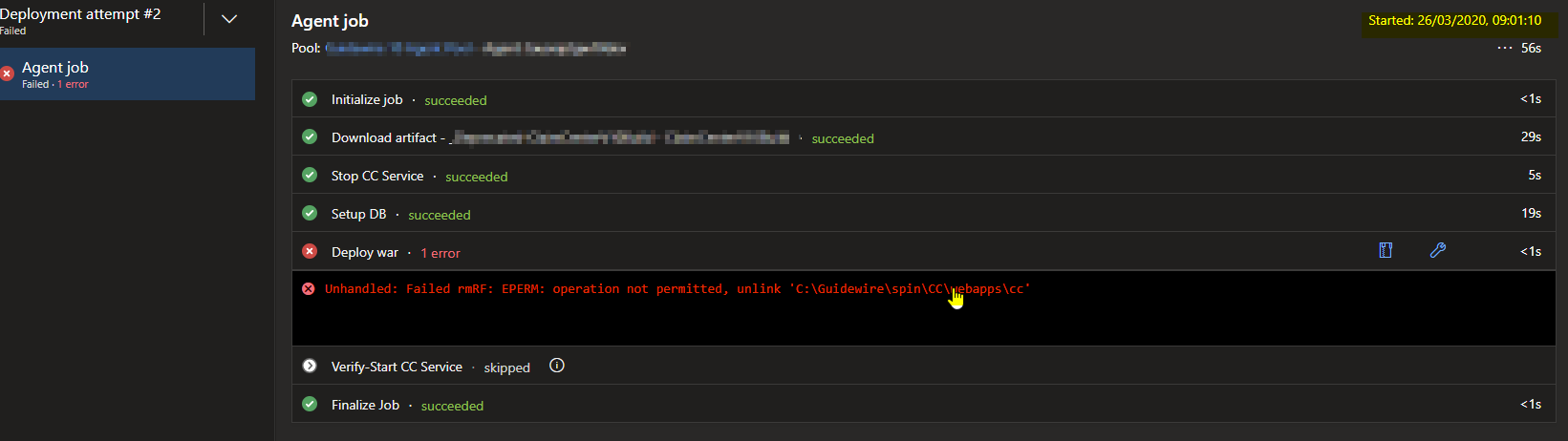
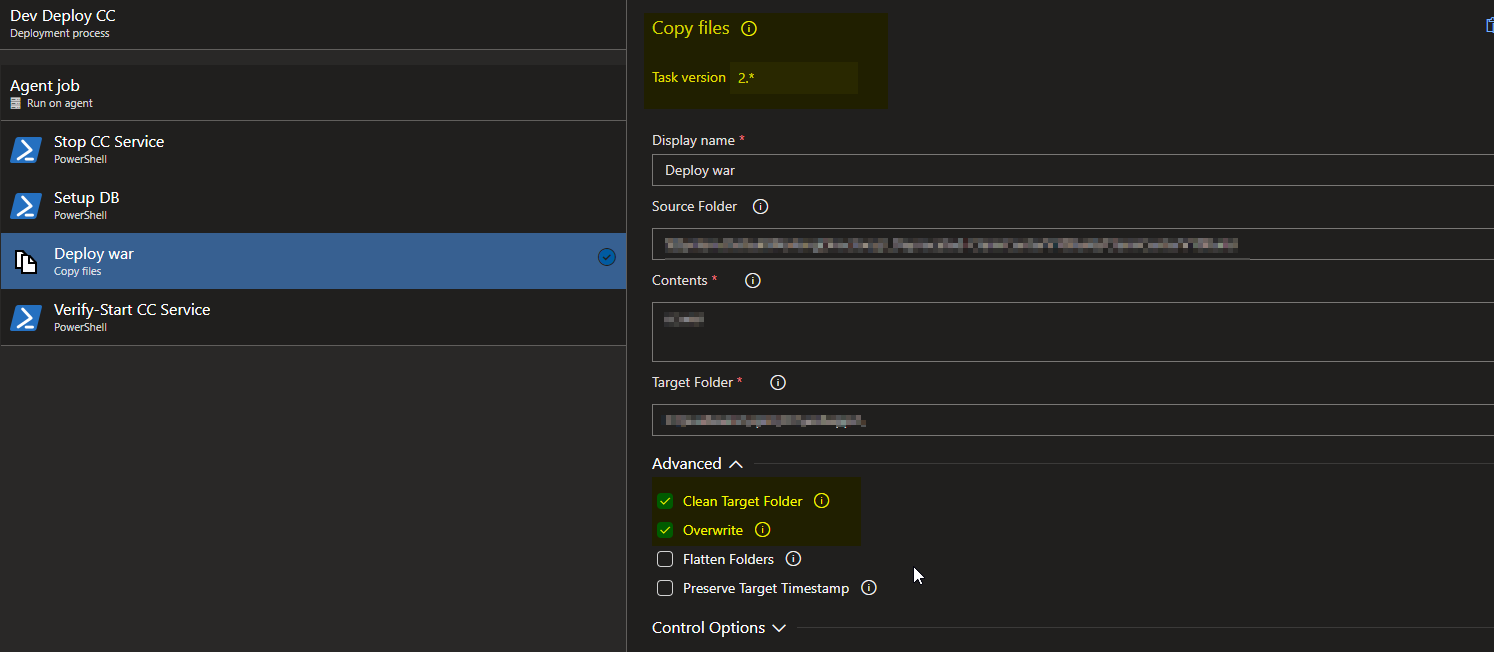
Still getting the issue.
 kaushikgayal
on 25 Mar 2020
kaushikgayal
on 25 Mar 2020
Also still hitting this.
 optiks
on 27 Mar 2020
optiks
on 27 Mar 2020
still a problem here.
Unhandled: Failed rmRF: EPERM: operation not permitted, unlink '\test-vm-01\ProjectName\some.dll'
 MiroKov
on 27 Mar 2020
MiroKov
on 27 Mar 2020
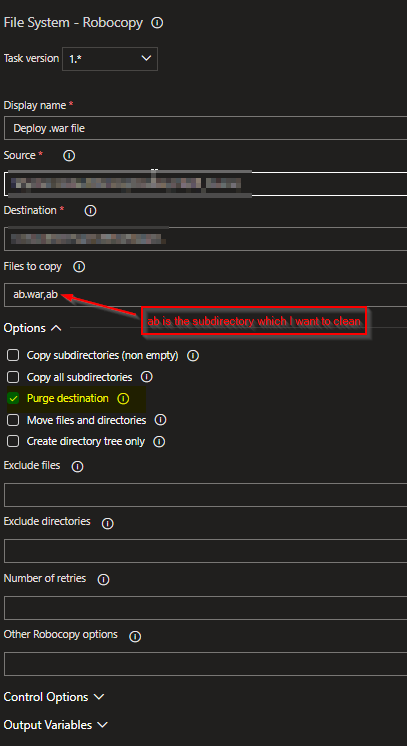
Hope this helps.
In my case, Copy files was not able to unlink the root folder coz there were files in subdirectories having path length greater than 256, which the utility was not able to find.
The workaround that worked was to use robocopy with purge.
kaushikgayal
on 2 Apr 2020
@0xaryan Thanks. It also worked for me.
 MehdiSaeedifar
on 28 Jun 2020
MehdiSaeedifar
on 28 Jun 2020
This is still an issue for me
 braydie
on 10 Jul 2020
braydie
on 10 Jul 2020
Still an issue here as well.
 xantari
on 22 Jul 2020
xantari
on 22 Jul 2020
Still an issue here as well. Using .net core app and some Azure client things.
Got : Failed rmRF: EPERM: operation not permitted, unlink '$LocalPath$\Azure.Core.dll'
In my case, i've got everytime the same file, "Azure.Core.dll" and i deploy multiple services in multiple repositories.
 Rayzbam
on 30 Jul 2020
Rayzbam
on 30 Jul 2020
Still an issue here using MSbuild for a .NET Framework 4.7.1 application.
It occours sometimes after the Publish Quality Gate Result task with SonarCloud plugin in a task to copy the artifacts originated in build step:
##[error]Unhandled: Failed rmRF: EPERM: operation not permitted, unlink 'D:\a\1\a\.sqAnalysis'
 jpmoura
on 16 Aug 2020
jpmoura
on 16 Aug 2020
I still have the same issue here for a .Net 4.7.1 web application.
 JoeyCor
on 18 Aug 2020
JoeyCor
on 18 Aug 2020
Still an issue for us today.
Using Copy files Task version 2.*
Clean Target Folder ticked.
2020-08-26T08:46:44.1940259Z Cleaning target folder: C:\aaa\aaa.sites\aaa-web\build
2020-08-26T08:46:44.2092589Z C:\aaa\aaa.sites\aaa-web\build\css\semantic - The directory is not empty.
2020-08-26T08:46:44.2184445Z ##[error]Unhandled: Failed rmRF: EPERM: operation not permitted, unlink 'C:\aaa\aaa.sites\aaa-web\build\css'
 righardtmarais
on 26 Aug 2020
righardtmarais
on 26 Aug 2020
I have the same issue as well.
 iginzburg
on 15 Sep 2020
iginzburg
on 15 Sep 2020
Im also getting the same issue:
Command failed: rd /s /q - Access is denied.
 phil-veloso
on 17 Nov 2020
phil-veloso
on 17 Nov 2020
Dont think this is a pipeline-task issue. In my case, I was deploying a windows service but previous installation (.exe) was sitting in a suspended state and it was holding on to one of the dlls hence I wasn't able to clean the folder. I couldn't manually kill the process either.. ended up rebooting the server
 johnybaryah
on 17 Dec 2020
johnybaryah
on 17 Dec 2020
Related issues
 HenrikStanley
·
3Comments
HenrikStanley
·
3Comments
 Mardoxx
·
3Comments
Mardoxx
·
3Comments
 ThomasBarnekow
·
3Comments
ThomasBarnekow
·
3Comments
 timfish
·
3Comments
timfish
·
3Comments
 alexszilagyi
·
3Comments
alexszilagyi
·
3Comments
Most helpful comment
I have the same error with Delete Files from' Task.
:-(