Azure-pipelines-tasks: Nuget push to external nuget server using apikey no longer working
The Nuget V2 task to push packages to an external Nuget server endpoint using apikey connection is no longer working and returning the following errors:
2017-09-20T16:24:22.7643802Z ##[warning]Can\'t find loc string for key: Error_ApiKeyNotSupported
2017-09-20T16:24:22.7643802Z ##[error]Error: Error_ApiKeyNotSupported
 cory-nmdp
All 35 comments
Is there any way to use version 2.0.6? It was working in that. Same issue here.
 Zuul86
on 20 Sep 2017
Zuul86
on 20 Sep 2017
Seems to have been caused by #5208
Possibly: https://github.com/Microsoft/vsts-tasks/pull/5208/files#diff-a71b45ee54093d79865072cd1f147790 ?
 chrish619
on 20 Sep 2017
chrish619
on 20 Sep 2017
To get around this issue I just used Custom and used push as the command and arguments. That way it bypasses that issue.
Zuul86
on 21 Sep 2017
Nuget.exe cannot use wild cards. Instead of using custom I used this inline powershell script:
Write-Host "Looking in path $Env:BUILD_SOURCESDIRECTORY"
$files = Get-ChildItem -Path "$Env:BUILD_SOURCESDIRECTORY" -Recurse -Include *.nupkg -Name
$apikey = <apikey>
$nugetsource = <nugetsource>
foreach ($f in $files)
{
    Write-Host $f
    &nuget.exe push $f $apikey -Source $nugetsource
    exit 0
}
exit 1
Obviously this only pushes the first package it encounters. Please modify to your own needs.
 PalleDue
on 22 Sep 2017
PalleDue
on 22 Sep 2017
Same issue here. I switched to use Custom with the following argument as a workaround for now.
push $(System.DefaultWorkingDirectory)/$(Release.DefinitionName)/drop/Release/** -ApiKey $(NuGet.ApiKey) -Source $(NuGet.Source)
 kyleherzog
on 22 Sep 2017
kyleherzog
on 22 Sep 2017
Same issue here. Any fix plan? Thanks
 tkcrown
on 22 Sep 2017
tkcrown
on 22 Sep 2017
+1 here.
 tuyen-vuduc
on 23 Sep 2017
tuyen-vuduc
on 23 Sep 2017
+1
 SergeBerwert
on 23 Sep 2017
SergeBerwert
on 23 Sep 2017
+1
 jonkeda
on 23 Sep 2017
jonkeda
on 23 Sep 2017
+1
 Iapmes
on 23 Sep 2017
Iapmes
on 23 Sep 2017
+1
 daanl
on 25 Sep 2017
daanl
on 25 Sep 2017
+1
 antonio-neto-basecone
on 25 Sep 2017
antonio-neto-basecone
on 25 Sep 2017
+1
 cucamacuca
on 25 Sep 2017
cucamacuca
on 25 Sep 2017
+1
 demetrioalvesnl
on 25 Sep 2017
demetrioalvesnl
on 25 Sep 2017
Easiest work-around for me: Revert back temporarily to using the deprecated NuGet publisher with a generic endpoint. (May require changes to minimatch patterns.)
Iapmes
on 25 Sep 2017
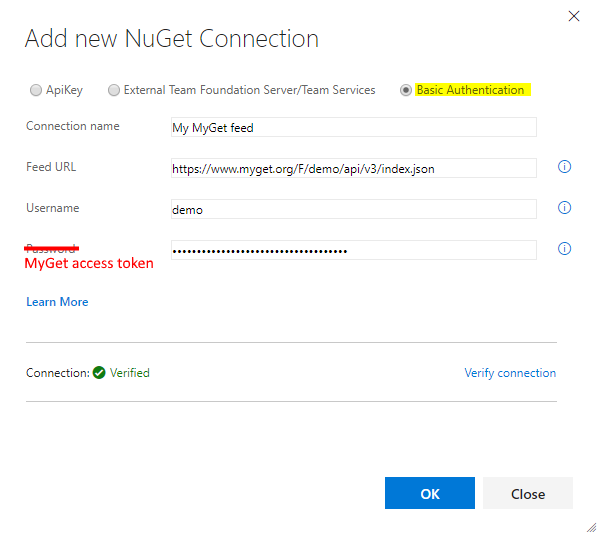
For any MyGet users affected by this VSTS change: your MyGet username and MyGet scoped access token (API key) can also be used for Basic Authentication.
Note: don't use the _Primary API Key_, but create a _scoped_ key instead. Primary API key won't work for Basic Auth.
You can update the NuGet Service Connection in your Team Project to use Basic Authentication, and leverage your MyGet scoped API key and MyGet username as basic auth credentials.
We updated the MyGet docs to reflect this:
https://docs.myget.org/docs/reference/vsts-integration#Add_a_NuGet_Service_Connection_to_your_MyGet_feeds
 xavierdecoster
on 25 Sep 2017
xavierdecoster
on 25 Sep 2017
+1
 pedro-resende-1981
on 25 Sep 2017
pedro-resende-1981
on 25 Sep 2017
+1
 jiraf
on 25 Sep 2017
jiraf
on 25 Sep 2017
+1
 advdberg
on 25 Sep 2017
advdberg
on 25 Sep 2017
+1
 fvelasco1
on 25 Sep 2017
fvelasco1
on 25 Sep 2017
+1
 jochenvangasse
on 25 Sep 2017
jochenvangasse
on 25 Sep 2017
+2
 SanderSiep
on 25 Sep 2017
SanderSiep
on 25 Sep 2017
+1
 alesebi91
on 25 Sep 2017
alesebi91
on 25 Sep 2017
+1
 cvvvlad
on 25 Sep 2017
cvvvlad
on 25 Sep 2017
Auto updates without rollback.....going to be the death of the platform real quick.
 mikehowey1
on 25 Sep 2017
mikehowey1
on 25 Sep 2017
Thanks for reporting. We're determining the root cause of this issue now and will share more details here soon.
 infin8x
on 25 Sep 2017
infin8x
on 25 Sep 2017
We also used the deprecated push command also with a generic service endpoint.
maybe allowing the task version selector to be explicit not just major version would help in these instances.
 wyrdfish
on 25 Sep 2017
wyrdfish
on 25 Sep 2017
This is now being tracked as an incident: https://blogs.msdn.microsoft.com/vsoservice/?p=15005
infin8x
on 25 Sep 2017
+1
 scottkoland
on 25 Sep 2017
scottkoland
on 25 Sep 2017
👍
 baskint
on 25 Sep 2017
baskint
on 25 Sep 2017
+1
 felipeOliveira
on 25 Sep 2017
felipeOliveira
on 25 Sep 2017
+1
 Schenz
on 25 Sep 2017
Schenz
on 25 Sep 2017
The fix is now out to all but one of the remaining deployment rings. The majority of users should be unblocked now; the failure rate is down to ~6%. The current ETA for completing this on the final deployment ring is 22:00 UTC. We will provide another update in 2 hours or less at https://blogs.msdn.microsoft.com/vsoservice/?p=15005
infin8x
on 25 Sep 2017
@chrish619 ,
The PR you linked to wasn't the root cause. The root cause is this.
Keith
 keithrob
on 26 Sep 2017
keithrob
on 26 Sep 2017
@keithrob: Fair enough, I did mention it was a _possible_ cause;
Also, a null coalescing truthy, in this method, e.g.
function test(param?:boolean){
  param = param || true; // ?
  return param;
}
Will always evaluate to true..
chrish619
on 26 Sep 2017
Related issues
 jared-hexagon
·
3Comments
jared-hexagon
·
3Comments
 fedemkr
·
3Comments
fedemkr
·
3Comments
 MikahB
·
3Comments
MikahB
·
3Comments
 pharring
·
3Comments
pharring
·
3Comments
 timfish
·
3Comments
timfish
·
3Comments
Most helpful comment
For any MyGet users affected by this VSTS change: your MyGet username and MyGet scoped access token (API key) can also be used for Basic Authentication.
Note: don't use the _Primary API Key_, but create a _scoped_ key instead. Primary API key won't work for Basic Auth.
You can update the NuGet Service Connection in your Team Project to use Basic Authentication, and leverage your MyGet scoped API key and MyGet username as basic auth credentials.
We updated the MyGet docs to reflect this:
https://docs.myget.org/docs/reference/vsts-integration#Add_a_NuGet_Service_Connection_to_your_MyGet_feeds