Azure-pipelines-tasks: Azure CLI task - Upgrade to Modern Shell?
It appears Azure CLI task uses batch/CMD.exe as the shell interpreter.

Can we get this to use something more modern? Powershell? Bash?
Is there some reason cmd.exe/batch was chosen here that makes something like Powershell or Bash not feasible options? I want to add some logic within Azure CLI tasks and having to implement that logic in batch is right up there of putting it in a vbscript.
Alternatively, Is there a (sane) way to get the azure cli and particularly the service principal identity login step into another step? In other words, run the Azure CLI task and then follow it up with a Bash or Powershell task that contains more logic, that ones run through, executes some az cli command.
_
_
EDIT [May 2019]:
On _Windows_ agents, I would suggest using Azure Powershell (>=4.* version) task instead of Azure CLI task. It uses the newer Az powershell module (not the legacy AzureRM module, and also not Azure CLI python executable).
You WILL still have to rewrite/re-research your Azure CLI commands into Az Powershell specific language. This change doesn't buy you much, but Az Powershell supposedly multi-platform, allowing in theory same code on both Windows and Linux agents.
I still very much prefer Azure CLI syntax over the Az Powershell syntax (Az Powershell appears to rely on very long naming of cmdlets):
az webapp deployment list-publishing-profiles -n $WEBAPPNAME-g $RSGROUP
Get-AzWebAppContainerContinuousDeploymentUrl -ResourceGroupName $RSGROUP -Name $WEBAPPNAME
Ultimately, this doesn't change what issue wants: Azure CLI within Powershell (not AzureRM, not Az Powershell module)
END Edit
 iyerusad
All 18 comments
Workaround: Use Linux Agent
Linux hosted agent doesn't (currently) ship with AZ CLI installed, but if you can install it you will find the AZ CLI task on the linux agent uses the bash shell interpreter:

AZ CLI/python needs to be installed on Linux hosted agent (thanks, @davidobrien1985):
1. Add Shell task, use inline option, with following code:
apt-get update -y && apt-get install -y python libssl-dev libffi-dev python-dev build-essential jq
curl -L https://azurecliprod.blob.core.windows.net/install.py -o install.py
printf "/usr/azure-cli\n/usr/bin" | python install.py
After that, AZ CLI task will find az and be able to run on the Linux Hosted agent.
iyerusad
on 8 Sep 2017
A other workaround is to change the azure cli task to a inline script and write:
powershell -File $(System.DefaultWorkingDirectory)/path/to/your.ps1
 StefanSchoof
on 21 Nov 2017
StefanSchoof
on 21 Nov 2017
I'm having the same issue. Please support Azure CLI task with Powershell on hosted Windows agent or allow easy way to az login in the Powershell task. I think that the combination of Powershell and Azure CLI is the best.
 gjmoyer
on 25 Jul 2018
gjmoyer
on 25 Jul 2018
We have on our backlog to support PS/bash shell for Az CLI. Currently we are working through the designs to support the new version of Az CLI with AzureRM modules here as per the announcement. It will be few months(tentatively), before we can have something that we can share as preview
 RoopeshNair
on 23 Oct 2018
RoopeshNair
on 23 Oct 2018
Can we get an update on this? Doesn't the fact Powershell 6 is out and cross-platform solve this problem?
Having to use batch whilst Microsoft heavily promotes both PS and the new az console is just painful to have to explain to people. For devs finding this my solution is currently this:
powershell "$keyVaultID = (az keyvault secret show --vault-name $(keyVaultName) --name $(settingName) | ConvertFrom-Json).id; az webapp config appsettings set --resource-group $(rgName) --name $(waName) --settings $(settingName)=$keyVaultID --output none"
 moritonal
on 24 Jan 2019
moritonal
on 24 Jan 2019
Thanks @moritonal for reaching out. Really appreciate your time and the feedback.
We have been tracking this item on our backlog but haven't been able to prioritize it yet. But we are adding your comments as well to the item, will help us build a better solution. Will try to work on this as early as possible.
Thanks again!
Regards,
Pulkit
 pulkitaggarwl
on 25 Jan 2019
pulkitaggarwl
on 25 Jan 2019
I agree with @pulkitaggarwl . Being forced to use cmd/batch is a severe step in the wrong direction. Ie. building up a blob store sastoken, and using it to download a linked template proves to be very hard (especially if you compare it with how easy it is done in az cli). Please prioritize this feature req ;)
 markusfoss
on 6 Feb 2019
markusfoss
on 6 Feb 2019
this may come as a shock to everyone - but the fact that we have SHELL forced on us when everything else has moved to powershell ages ago is insanity.
 benjamin-goldman
on 9 May 2019
benjamin-goldman
on 9 May 2019
this may come as a shock to everyone - but the fact that we have SHELL forced on us when everything else has moved to power shell ages ago is insanity.
It makes no sense that this feature was released like this.
benjamin-goldman
on 9 May 2019
On _Windows_ agents, I would suggest using Azure Powershell (>=4.* version) task instead of Azure CLI task. It uses the newer Az powershell module (not the legacy AzureRM module, and also not Azure CLI python executable).
You WILL still have to rewrite/re-research your Azure CLI commands into Az Powershell specific language. This change doesn't buy you much, but Az Powershell supposedly multi-platform, allowing in theory same code on both Windows and Linux agents.
I still very much prefer Azure CLI syntax over the Az Powershell syntax (Az Powershell appears to rely on very long naming of cmdlets):
az webapp deployment list-publishing-profiles -n $WEBAPPNAME-g $RSGROUP
Get-AzWebAppContainerContinuousDeploymentUrl -ResourceGroupName $RSGROUP -Name $WEBAPPNAME
Ultimately, this doesn't change what issue wants: Azure CLI within Powershell (not AzureRM, not Az Powershell module)
iyerusad
on 22 May 2019
As others have mentioned, the only real workaround right now is to write your script containing powershell and Azure CLI commands and have the Azure CLI task run the script on the agent by way of an inline script that executes your script using the powershell exe:
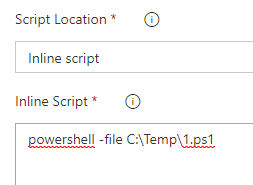
This way when your script is running the az commands, it's already logged in thanks to the AZ CLI task. I wrote a script to create virtual directories for an existing web app getting the app's existing config, converting to JSON, making n copies of the virtual directory object in the json, updating them with the correct values, and then reapplying them to the web app via the generic-configurations option of the az webapp config set command. All of the connective tissue between the config show and the config set is using powershell, so it seems obvious to me that anyone using az commands also wants to using powershell commands, especially for extensibility (since the current az commands don't let you easily add new virtual directories).
@iyerusad To your point, you could use AZ powershell, but like you said, it's a lot of work, as the commands are much more verbose, and for me the biggest difference (and one of the things I like so much about AZ CLI) is that the commands are idempotent, which saves a lot of scripting headache of having to do checks in AZ powershell.
I do look forward to native support for powershell in this task, and as someone who just started using the AZ CLI I'm very surprised it doesn't support it out of the box, but at least we have the workaround I mentioned above.
 ahmedchater
on 4 Jun 2019
ahmedchater
on 4 Jun 2019
one of the things I like so much about AZ CLI) is that the commands are idempotent
Some commands are idempotent, but I still run into the need for having to do checks - pretty sure a number of commands are not idempotent. At the very least there were edge case scenarios in every idempotent capable environment I've worked in that necessitated checks (until bugfix).
Presumably https://github.com/microsoft/azure-pipelines-tasks/blob/master/Tasks/AzureCLIV1/azureclitask.ts#L17-L20 could be changed to something like:
            if (os.type() != "Windows_NT") {
                tool = tl.tool(tl.which("bash", true));
            }
            elif (os.type() = "Windows_NT") {
              let powershell = tl.tool(tl.which('pwsh') || tl.which('powershell') || tl.which('pwsh', true))
                .arg('-NoLogo')
                .arg('-NoProfile')
                .arg('-NonInteractive')
                .arg('-ExecutionPolicy')
                .arg('Unrestricted')
                .arg('-Command')
                .arg(`. '${filePath.replace("'", "''")}'`);
                tool = powershell;
            }
On Windows agents, I would suggest using Azure Powershell
Azure CLI has extensions that Az PowerShell does not. For example enabling static web sites on Storage accounts. So suggested approach will force us to us to fallback to REST API.
 Damag3d
on 14 Jul 2019
Damag3d
on 14 Jul 2019
Azure CLI has extensions that Az PowerShell does not.
If you mean the az CLI, then you can use that from powershell like any other dos style cmd.
 StingyJack
on 15 Jul 2019
StingyJack
on 15 Jul 2019
Azure CLI has extensions that Az PowerShell does not.
If you mean the
azCLI, then you can use that from powershell like any other dos style cmd.
Sure, I know. My point is such suggestion "_On Windows agents, I would suggest using Azure Powershell_" is not suitable. Why? Because Az CLI involves deployment... of cli together with python, pip to update cli to latest version if cli is already installed and other actions, like configuring path variables, in automated scenarios. So it is always PowerShell + CLI
In my case I was trying to enable static web sites, configure app manifest etc and all this only works with CLI to full extent. So as of now Az PowerShell is not a replacement for Az CLI and I expect it should be, because of all processing power of powershell. Hopefully, some day. I personally (as a dev) hate CLI, but have no choice to use it from posh. even then there are some quirks.
Damag3d
on 23 Jul 2019
A other workaround is to change the azure cli task to a inline script and write:
powershell -File $(System.DefaultWorkingDirectory)/path/to/your.ps1
Please note that as its a batch file you'll actually need
call powershell $(System.DefaultWorkingDirectory)/path/to/your.ps1 parameter1 parameter2
 sebastianrogers
on 23 Aug 2019
sebastianrogers
on 23 Aug 2019
Happy to inform that we have released a new major version of Azure CLI task which supports shells like PS (windows only) and PS Core (both windows and linux)
 bishal-pdMSFT
on 12 Nov 2019
bishal-pdMSFT
on 12 Nov 2019
Happy to inform that we have released a new major version of Azure CLI task which supports shells like PS (windows only) and PS Core (both windows and linux)
Good job! We'll test it.
Damag3d
on 15 Nov 2019
Related issues
 richard-ob
·
3Comments
richard-ob
·
3Comments
 ThomasBarnekow
·
3Comments
ThomasBarnekow
·
3Comments
 NatMarchand
·
3Comments
NatMarchand
·
3Comments
 syltaxue
·
3Comments
syltaxue
·
3Comments
 timfish
·
3Comments
timfish
·
3Comments
Most helpful comment
I agree with @pulkitaggarwl . Being forced to use cmd/batch is a severe step in the wrong direction. Ie. building up a blob store sastoken, and using it to download a linked template proves to be very hard (especially if you compare it with how easy it is done in az cli). Please prioritize this feature req ;)