Azure-pipelines-tasks: "Deploy Azure App Service" task not actually deploying a migrated ASP.NET MVC Core 2.0 web app
Hi, I've documented this issue extensively on StackOverflow:
In brief, after 100 successful releases to Azure Web Apps Web Sites using VSTS CD, I migrated my ASP.NET MVC Core 1.1.2 web app to ASP.NET MVC Core 2.0. Now, the "Deploy Azure App Service" says it is performing a deployment, however nothing is actually getting unzipped and deployed to the staging slot.
I provide access to log files and log excerpts, screenshots, etc. on the StackOverflow question.
At first, I was 100% convinced this was specific to my scenario. However, after reading carefully through logs I'm less convinced this is me and growing in my concern that this task is not ready for ASP.NET MVC Core 2.0 apps. In fact, your readme.md at this URL:
https://github.com/Microsoft/vsts-tasks/blob/master/Tasks/AzureRmWebAppDeployment/README.md
... says ...
" The task works for ASP.NET, ASP.NET Core 1 and Node.js based web applications."
If taken literally, there's no mention of support for ASP.NET Core 2.0.
 DeveloperUniversity
All 6 comments
@kmkumaran @vincentdass
Quick question - Does the Deploy Azure App Service task support ASP.NET Core 2.0?
 KrishnaAdityaB
on 24 Aug 2017
KrishnaAdityaB
on 24 Aug 2017
One new pertinent detail as I continue to debug this.
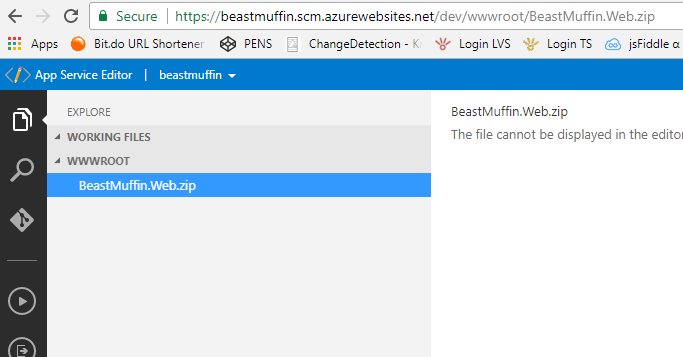
The new (preview) App Service Editor shows that the .zip file has been moved to the /wwwroot folder, however it does not unzip it.
DeveloperUniversity
on 24 Aug 2017
@DeveloperUniversity, Can you please share the debug logs for both Build and Release?
To enable debug logs, set 'system.debug' variable to 'true' in both Build and Release Definition.
Once you trigger the Build, on successful completion, Release will also be triggered.
Please share both the logs. If you want to share them in private, send the same to [email protected]
 vincent1173
on 26 Aug 2017
vincent1173
on 26 Aug 2017
@vincentdass Here's a screencast that displays the build and release steps and the steps I'm taking to reproduce this, etc. AND the logs w/ the debugging flag added:
Build Logs w/ debug flag
https://1drv.ms/u/s!AvZL4t4dMuo5lq0fYpt0toHyW_vifA
Release Logs w/ debug flag
https://1drv.ms/u/s!AvZL4t4dMuo5lq0eQt7XwgAClI3Y6w
DeveloperUniversity
on 29 Aug 2017
@DeveloperUniversity , thanks for the logs and video, really appreciated. 👍
It looks like you are already archiving the published folder in .NetCore Publish Task.
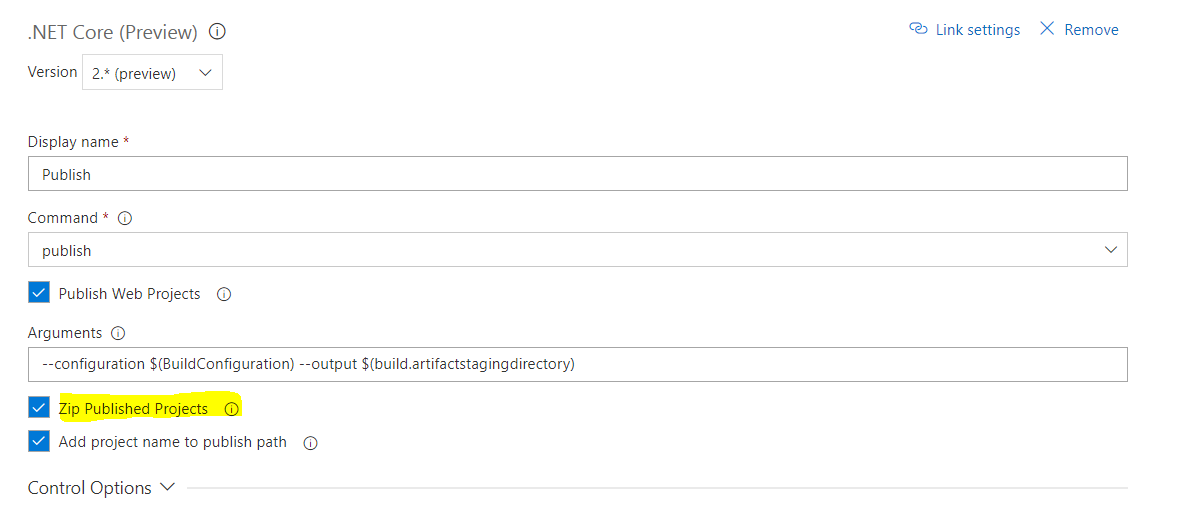
Since, Add Project Name to publish path is enabled, the zip is named as <WebProjectName>.zip

Archive Task (next to Publish task) again archives the published zip resulting in Nested Zip Structure.
On Release Side, Azure App Service Deploy Task takes a single zip as input and extracts only the given package. So the inner package (Actual content to be deployed) is not extracted to App Service.
There are multiple ways to resolve this issue:
One way is to remove Archive Task from Build definition and modify Publish Artifact task to publish BeastMuffin.web.zip as artifact. Since your release definition, Package Input is BeastMuffin-CI\drop\*.zip, the package from artifact will be matched with given regex and will be deployed to App Service.
Please feel free to ping, if any assistance required.
vincent1173
on 29 Aug 2017
That was it. THANK YOU for taking the time to understand and resolve the problem.
Off to the next hurdle ...
DeveloperUniversity
on 29 Aug 2017
Related issues
 Mardoxx
·
3Comments
Mardoxx
·
3Comments
 richard-ob
·
3Comments
richard-ob
·
3Comments
 jared-hexagon
·
3Comments
jared-hexagon
·
3Comments
 syltaxue
·
3Comments
syltaxue
·
3Comments
 MikahB
·
3Comments
MikahB
·
3Comments